Posts in Featured

Friends, Social Contact Manager for iPhone - Review & iPod Nano Giveaway

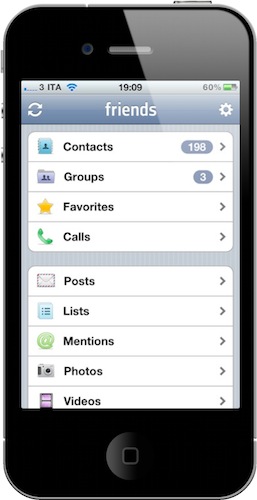
How do you keep contacts from your local iPhone address book, Facebook, Twitter, LinkedIn and other social networks in one single, unified place? That’s the question Taptivate aims at answering with its latest app for the iPhone – the much anticipated Friends.

In the era of social networking, social graphs and Twitter trends, it’s not easy to keep up with the stream of information. We all know that. But at a wider level, it’s not simple to keep up with the people behind those information, either. Sometimes, we struggle to find a person’s contact details because we don’t know where to look. The iPhone’s address book is a thing of its own, even if Apple managed to deploy sync for contacts in MobileMe. Sync alone, however, doesn’t come to the rescue when it’s about integration with all the social services we’re subscribed to. Nor do giants like Facebook and Google help, continuously fighting with each other over contact exports and proper email access.

If most of our social connections happen online nowadays, what’s the best way to make the pieces come together in a single package? According to Taptivate, that would be an iPhone app. Friends is a beautiful contact manager and aggregator for iPhone, an app that picks contacts from your local address book and integrates them with the online services you use on a daily basis. Read more

Access Extra Content and Perks

Founded in 2015, Club MacStories has delivered exclusive content every week for nearly a decade.

What started with weekly and monthly email newsletters has blossomed into a family of memberships designed for every MacStories fan.

Learn more here and from our Club FAQs.

Club MacStories: Weekly and monthly newsletters via email and the web that are brimming with apps, tips, automation workflows, longform writing, early access to the MacStories Unwind podcast, periodic giveaways, and more;

Club MacStories+: Everything that Club MacStories offers, plus an active Discord community, advanced search and custom RSS features for exploring the Club’s entire back catalog, bonus columns, and dozens of app discounts;

Club Premier: All of the above and AppStories+, an extended version of our flagship podcast that’s delivered early, ad-free, and in high-bitrate audio.

Learn more here and from our Club FAQs.


Lots Of Great iOS Games Coming Out Tonight

Today’s a great day for iOS games, just like last week when Infinity Blade and a bunch of other big names came out in the App Store. And it’s no surprise that right ahead of Christmas iOS users get to download the best gems of the year – who doesn’t want to spend the holiday season relaxing and playing games on a possibly new, shiny iPad?

Most of all, tomorrow will be the last Thursday before the iTunes Connect holiday shut down, when developers (from Dec. 23 to Dec. 28) won’t be able to submit apps and updates or change the price of their existing apps in the Store. Basically, everyone is rushing to get games approved and available before the 23rd.

Already available in the New Zealand store (time zone differences, you know) and coming out in about 14 hours in the U.S. App Store, the following games will be ready to be installed on your devices tomorrow morning. The links you’ll find in this post point to the New Zealand, but you’ll be able to find these games in the U.S. store later today. Read more

Access Extra Content and Perks

Founded in 2015, Club MacStories has delivered exclusive content every week for nearly a decade.

What started with weekly and monthly email newsletters has blossomed into a family of memberships designed for every MacStories fan.

Learn more here and from our Club FAQs.

Club MacStories: Weekly and monthly newsletters via email and the web that are brimming with apps, tips, automation workflows, longform writing, early access to the MacStories Unwind podcast, periodic giveaways, and more;

Club MacStories+: Everything that Club MacStories offers, plus an active Discord community, advanced search and custom RSS features for exploring the Club’s entire back catalog, bonus columns, and dozens of app discounts;

Club Premier: All of the above and AppStories+, an extended version of our flagship podcast that’s delivered early, ad-free, and in high-bitrate audio.

Learn more here and from our Club FAQs.


iPad Portraits: The Woz

David Newman is one of the most talented artists that use the iPad as a canvas for their creations. We covered David’s impressive portraits before, but his latest is just too great and geeky to not deserve another spot here. I mean, it’s the Woz!

That’s right, a portrait of Steve Wozniak while using a MacBook with his custom white iPhone 4 sitting on a Glif. The portrait was entirely realized on an iPad and Steve set it as his new profile picture on Facebook. It can’t get any geekier than this.

Check out the animation video of the portrait below. As usual, Newman doesn’t disappoint.[via RazorianFly] Read more

Access Extra Content and Perks

Founded in 2015, Club MacStories has delivered exclusive content every week for nearly a decade.

What started with weekly and monthly email newsletters has blossomed into a family of memberships designed for every MacStories fan.

Learn more here and from our Club FAQs.

Club MacStories: Weekly and monthly newsletters via email and the web that are brimming with apps, tips, automation workflows, longform writing, early access to the MacStories Unwind podcast, periodic giveaways, and more;

Club MacStories+: Everything that Club MacStories offers, plus an active Discord community, advanced search and custom RSS features for exploring the Club’s entire back catalog, bonus columns, and dozens of app discounts;

Club Premier: All of the above and AppStories+, an extended version of our flagship podcast that’s delivered early, ad-free, and in high-bitrate audio.

Learn more here and from our Club FAQs.


CNN Releases Official iPad App

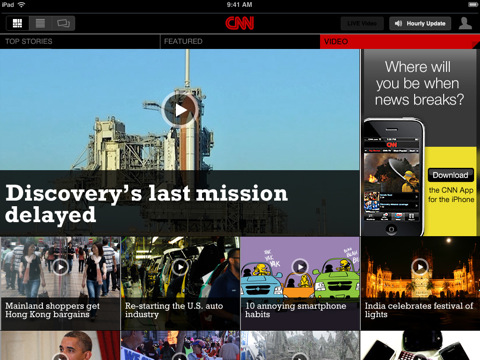
CNN released its first official app for the iPad earlier today, and it’s a solid first iteration on the tablet. It’s available now for free in the App Store.

The CNN app is meant to let you enjoy the full CNN experience with stories, insights and videos directly on your iPad. Being the iPad both a personal and communal device, the developers over at CNN thought it would be appropriate to build sharing features and a commenting system right into the app. You can share stories on Facebook and Twitter, send them via email, save a story for offline viewing (as you can guess, very useful on iPad WiFi devices). Read more

Access Extra Content and Perks

Founded in 2015, Club MacStories has delivered exclusive content every week for nearly a decade.

What started with weekly and monthly email newsletters has blossomed into a family of memberships designed for every MacStories fan.

Learn more here and from our Club FAQs.

Club MacStories: Weekly and monthly newsletters via email and the web that are brimming with apps, tips, automation workflows, longform writing, early access to the MacStories Unwind podcast, periodic giveaways, and more;

Club MacStories+: Everything that Club MacStories offers, plus an active Discord community, advanced search and custom RSS features for exploring the Club’s entire back catalog, bonus columns, and dozens of app discounts;

Club Premier: All of the above and AppStories+, an extended version of our flagship podcast that’s delivered early, ad-free, and in high-bitrate audio.

Learn more here and from our Club FAQs.


Trickle: The “Passive” Twitter App That’s Perfect On Your Desk

Twitter clients for iPhone and iPad, in spite of their substantial UI differences, are basically all geared towards the Twitter power user who wants to be able to do a lot of stuff with his Twitter timeline: check on users’ profiles, retweet, save to Instapaper, search, access lists, and so forth. Most Twitter clients for iOS are aimed at enabling you to enjoy the full Twitter experience.

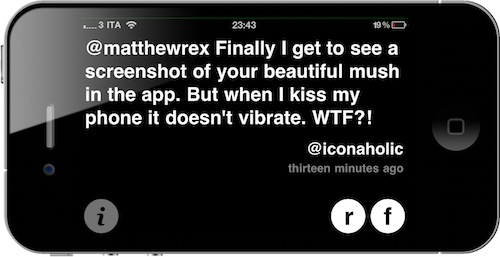
Trickle, released a few days ago, is different. It runs on the iPhone and iPad as a universal app, but instead of bringing many of Twitter’s features to mobile devices, it focuses on turning your Apple device into a minimal, Helvetica-based, constantly up-to-date Twitter widget. Perfect for your desk, possibly with your iPhone or iPad in a dock. Read more

Access Extra Content and Perks

Founded in 2015, Club MacStories has delivered exclusive content every week for nearly a decade.

What started with weekly and monthly email newsletters has blossomed into a family of memberships designed for every MacStories fan.

Learn more here and from our Club FAQs.

Club MacStories: Weekly and monthly newsletters via email and the web that are brimming with apps, tips, automation workflows, longform writing, early access to the MacStories Unwind podcast, periodic giveaways, and more;

Club MacStories+: Everything that Club MacStories offers, plus an active Discord community, advanced search and custom RSS features for exploring the Club’s entire back catalog, bonus columns, and dozens of app discounts;

Club Premier: All of the above and AppStories+, an extended version of our flagship podcast that’s delivered early, ad-free, and in high-bitrate audio.

Learn more here and from our Club FAQs.


MacStories Giveaway: Win A Copy of Screens for iPhone & iPad

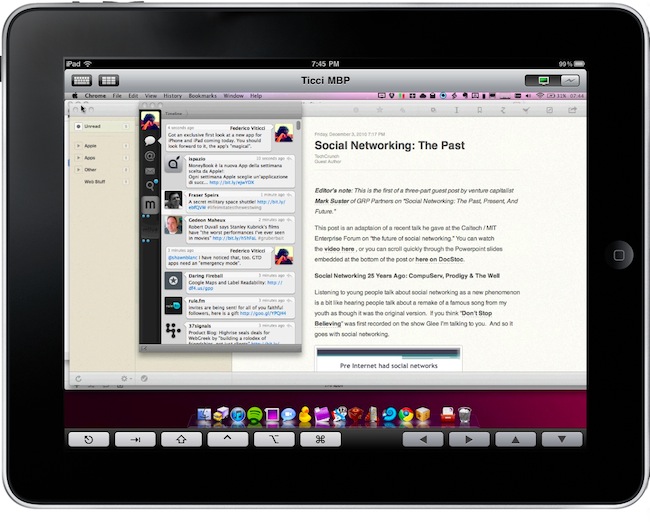
Screens is an excellent new VNC client by Edovia which, unlike other similar apps in the App Store, it’s not aimed at letting you move a cursor on your computer through the iPhone and iPad. It’s an app specifically meant to take advantage of the platform it runs on – iOS – so that you can actually touch your computer remotely.

From my review:

The “simple approach” doesn’t stop at touch controls, however. Once you’re controlling OS X on your device and you’d like to do some actual stuff with it, Screens offer two separate keyboards to execute most of the commands you know and love on the Mac. The first keyboard is a standard iOS keyboard with an additional bar on top which allows you to navigate using the arrow keys, or press Mac-only keys like Command and Control. Those buttons stay pressed until you tap on them again — useful. The second keyboard, though, is much more functional: it contains the same Mac-only and arrow keys on top, but there are no letters at the bottom. Instead, you get these “action buttons” that let you perform tasks that would require a series of taps and dialogue boxes instead. For instance, you can cut, copy, minimize, log out and activate Spolight with a single tap. Huge time saver.

We have 5 copies of Screens to give away to lucky MacStories readers. Check out the giveaway rules below (it ends tomorrow!), and if you can’t wait the app is available here. Read more

Access Extra Content and Perks

Founded in 2015, Club MacStories has delivered exclusive content every week for nearly a decade.

What started with weekly and monthly email newsletters has blossomed into a family of memberships designed for every MacStories fan.

Learn more here and from our Club FAQs.

Club MacStories: Weekly and monthly newsletters via email and the web that are brimming with apps, tips, automation workflows, longform writing, early access to the MacStories Unwind podcast, periodic giveaways, and more;

Club MacStories+: Everything that Club MacStories offers, plus an active Discord community, advanced search and custom RSS features for exploring the Club’s entire back catalog, bonus columns, and dozens of app discounts;

Club Premier: All of the above and AppStories+, an extended version of our flagship podcast that’s delivered early, ad-free, and in high-bitrate audio.

Learn more here and from our Club FAQs.


DailyBooth Launches Brand New iPhone App

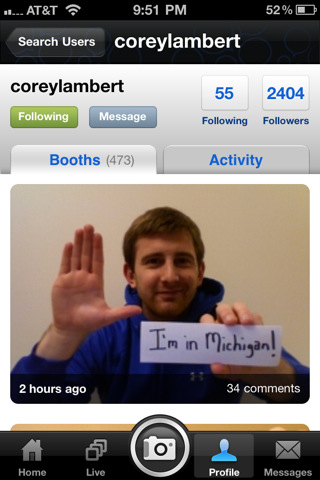
DailyBooth, the popular service that allows you to communicate with your friends by sharing pictures of yourself, launched a completely new version of their official iPhone app. The app reaches version 2.0 and it’s been redesigned from the group up to accomodate new features, an improved UI and Facebook / Twitter sharing.

It’s available now as a free download here. Read more

Access Extra Content and Perks

Founded in 2015, Club MacStories has delivered exclusive content every week for nearly a decade.

What started with weekly and monthly email newsletters has blossomed into a family of memberships designed for every MacStories fan.

Learn more here and from our Club FAQs.

Club MacStories: Weekly and monthly newsletters via email and the web that are brimming with apps, tips, automation workflows, longform writing, early access to the MacStories Unwind podcast, periodic giveaways, and more;

Club MacStories+: Everything that Club MacStories offers, plus an active Discord community, advanced search and custom RSS features for exploring the Club’s entire back catalog, bonus columns, and dozens of app discounts;

Club Premier: All of the above and AppStories+, an extended version of our flagship podcast that’s delivered early, ad-free, and in high-bitrate audio.

Learn more here and from our Club FAQs.


Grappler for Mac Grabs Music and Videos From The Web

I know a lot of people who don’t listen to music through their iTunes library, or a Music folder saved somewhere on their computers. Every time they want to listen to their favorite band, they fire up Youtube. This behavior is particularly common among my friends, who find it “easier” to search for a video rather than organizing a media library. Maybe they just don’t want to buy songs and don’t feel like downloading pirated copies, either. I don’t really know why they keep doing this.

There’s also another reason why people listen to music through Youtube: rare footage and live performances. iTunes offers a large selection of official live performances from thousands of artists, yet Youtube manages to keep an impressive archive of unofficial, yet high quality, footage from millions of bands. That 1994 Oasis concert at New York?  Go find it on iTunes if you can. Sometimes the quality isn’t exactly record-like, but the average user (and fan) doesn’t care.

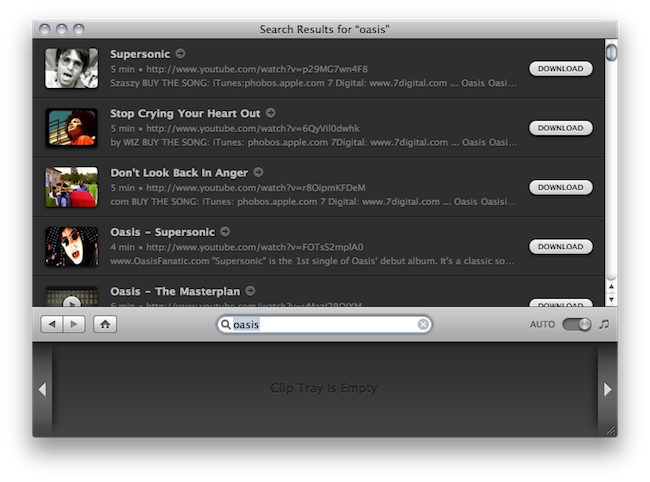
That’s where an app like Grappler for Mac by The Little App Factory comes in handy: it’s a beautiful and simple utility that helps you save music and videos from the web, especially Youtube.com. It’s deeply integrated with iTunes, so you can have the best of both worlds with an organized library that relies upon a huge web archive. Read more

Access Extra Content and Perks

Founded in 2015, Club MacStories has delivered exclusive content every week for nearly a decade.

What started with weekly and monthly email newsletters has blossomed into a family of memberships designed for every MacStories fan.

Learn more here and from our Club FAQs.

Club MacStories: Weekly and monthly newsletters via email and the web that are brimming with apps, tips, automation workflows, longform writing, early access to the MacStories Unwind podcast, periodic giveaways, and more;

Club MacStories+: Everything that Club MacStories offers, plus an active Discord community, advanced search and custom RSS features for exploring the Club’s entire back catalog, bonus columns, and dozens of app discounts;

Club Premier: All of the above and AppStories+, an extended version of our flagship podcast that’s delivered early, ad-free, and in high-bitrate audio.

Learn more here and from our Club FAQs.


Angry Birds iPhone Cases Now At Apple Stores

First came the games, then the movie rumors, plush toys, more games…and now Angry Birds are sold at Apple Stores. As iPhone and iPod touch cases. As reported by TechCrunch last week, Gear4 announced a series of Angry Birds-themed cases for the iPhone and iPod touch – available on the official website at $24.99 – which feature red and yellow Angry Birds and the green Pig King. They’re made out of hard plastic.

I went to the Apple Store (Roma Est) yesterday, and it looks like the official Angry Birds cases are sold there, too. Actually, tons of them were available on the shelves and Apple even managed to put them in a very visible position. As you can guess, many people were checking them out and laughing at them. Not in a bad way – they’re awesome.

Another photo after the break. Read more

Access Extra Content and Perks

Founded in 2015, Club MacStories has delivered exclusive content every week for nearly a decade.

What started with weekly and monthly email newsletters has blossomed into a family of memberships designed for every MacStories fan.

Learn more here and from our Club FAQs.

Club MacStories: Weekly and monthly newsletters via email and the web that are brimming with apps, tips, automation workflows, longform writing, early access to the MacStories Unwind podcast, periodic giveaways, and more;

Club MacStories+: Everything that Club MacStories offers, plus an active Discord community, advanced search and custom RSS features for exploring the Club’s entire back catalog, bonus columns, and dozens of app discounts;

Club Premier: All of the above and AppStories+, an extended version of our flagship podcast that’s delivered early, ad-free, and in high-bitrate audio.

Learn more here and from our Club FAQs.