Posts in Featured

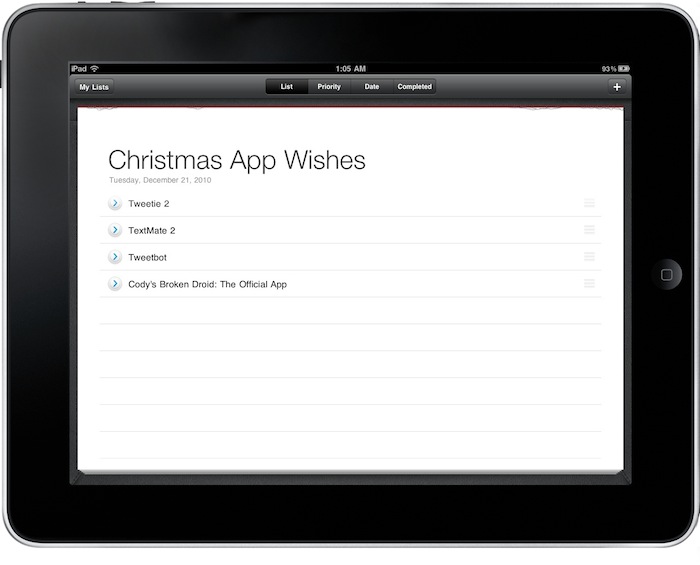
Sorted, Simple To-Do App for iPad, Gets A Lot Better With Version 2.0

Sorted is a very simple (and beautiful) to-do / list app for the iPad we first reviewed in May. The iPad was “the new hot thing” back then, not so many productivity apps were available and Things was my GTD app of choice. Sorted managed to stand out because it was elegant and provided a new way to simple list creation and task management on the tablet. It wasn’t meant for the average GTD power user still it captured the hearts of many hardcore users by being the “alternative” to more popular software like the aforementioned Things or, months later, OmniFocus for iPad.

I liked Sorted because it was the app I used to create lists out of my daily GTD environment. In fact, I still have the app on my iPad. But it’s a lot better now, as version 2.0 was released in the App Store a couple of days ago and it’s really good. Read more

Access Extra Content and Perks

Founded in 2015, Club MacStories has delivered exclusive content every week for nearly a decade.

What started with weekly and monthly email newsletters has blossomed into a family of memberships designed for every MacStories fan.

Learn more here and from our Club FAQs.

Club MacStories: Weekly and monthly newsletters via email and the web that are brimming with apps, tips, automation workflows, longform writing, early access to the MacStories Unwind podcast, periodic giveaways, and more;

Club MacStories+: Everything that Club MacStories offers, plus an active Discord community, advanced search and custom RSS features for exploring the Club’s entire back catalog, bonus columns, and dozens of app discounts;

Club Premier: All of the above and AppStories+, an extended version of our flagship podcast that’s delivered early, ad-free, and in high-bitrate audio.

Learn more here and from our Club FAQs.


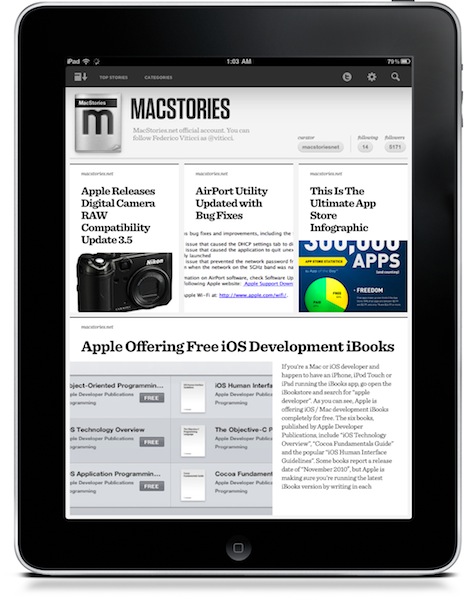
Twitter Just Got Its Most Beautiful iPad App. It’s Called TweetMag.

TweetMag is, without a doubt, the most beautiful Twitter app that ever landed on the iPad. Yes, TweetMag is  more attractive than Flipboard. But they are two different apps. And there’s no way I’m going to focus this review on a comparison between them.

Let me get this out quickly before I dive deeper into this piece of software that appeared on the App Store tonight: Flipboard and Tweetmag are two different products. Both in the intentions, and realization. Yes, they both aim at letting you build a”digital magazine” out of links shared on Twitter. Yes, they share some aspects of a same concept. And yes, they can live together. This is not about which app is going to kill Flipboard, the iPad app of the year. This is not a piece about the functionalities that you’ll find in both the apps, either. This is about TweetMag, a product of its own that aims at providing a new Twitter experience.

You notice how the most used words until now have been “difference”, “experience”, “product”. TweetMag and Flipboard have a lot in common, yet some aspects underlying the overall concept manage to put them on two separate roads. That’s why I’m running both of them on my iPad. Read more

Access Extra Content and Perks

Founded in 2015, Club MacStories has delivered exclusive content every week for nearly a decade.

What started with weekly and monthly email newsletters has blossomed into a family of memberships designed for every MacStories fan.

Learn more here and from our Club FAQs.

Club MacStories: Weekly and monthly newsletters via email and the web that are brimming with apps, tips, automation workflows, longform writing, early access to the MacStories Unwind podcast, periodic giveaways, and more;

Club MacStories+: Everything that Club MacStories offers, plus an active Discord community, advanced search and custom RSS features for exploring the Club’s entire back catalog, bonus columns, and dozens of app discounts;

Club Premier: All of the above and AppStories+, an extended version of our flagship podcast that’s delivered early, ad-free, and in high-bitrate audio.

Learn more here and from our Club FAQs.


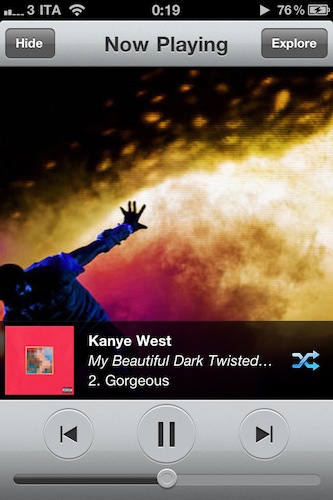
My Artists 1.1 - Still My Favorite iPod Alternative

In my review of My Artists for iPhone months ago, I wrote that the app was the ultimate iPod.app replacement for me. It still is, months after its release and with lots of alternative music players available in the App Store. I never deleted My Artists from my device, and I don’t see it going away from that Music folder on my homescreen anytime soon.

My Artists fetches artists and songs already synced to your device and sitting in the iPod app but provides a completely new layout that offers more information thanks to the magic of the Internet. Not only does the app provide better artist profile pics and cover albums, it also lets you check on detailed bios and related artists.

The latest 1.1 update brings several interface improvements, especially in the main list view where the app feels more solid and crisp than ever. You can also shuffle entire albums or artists now – heck, you can even shuffle your entire library from the main view. That’s quite handy. Last, the app’s engine has been update to be faster, and more stable.

My Artists 1.1 is a nice update to an app that is still one of my favorites on the iPhone. Highly recommended. Go download it here.

Access Extra Content and Perks

Founded in 2015, Club MacStories has delivered exclusive content every week for nearly a decade.

What started with weekly and monthly email newsletters has blossomed into a family of memberships designed for every MacStories fan.

Learn more here and from our Club FAQs.

Club MacStories: Weekly and monthly newsletters via email and the web that are brimming with apps, tips, automation workflows, longform writing, early access to the MacStories Unwind podcast, periodic giveaways, and more;

Club MacStories+: Everything that Club MacStories offers, plus an active Discord community, advanced search and custom RSS features for exploring the Club’s entire back catalog, bonus columns, and dozens of app discounts;

Club Premier: All of the above and AppStories+, an extended version of our flagship podcast that’s delivered early, ad-free, and in high-bitrate audio.

Learn more here and from our Club FAQs.


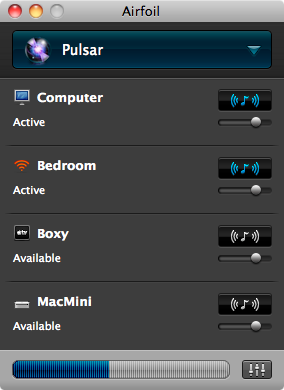
Airfoil 4 Streamlines Audio, Video Experience

Apple may have introduced AirPlay, but that doesn’t mean Rogue Amoeba is out of the game. In fact, AirPlay is rather limited unless you enjoy hacking your way out of a paper bag, and by no means can it expand its territory outside of iTunes. If you ever wanted to sit back on the couch and watch CNET TV on your 27” Cinema Display through your iPod’s headphones, you’re out of luck. But with Airfoil, streaming audio anywhere allows one to achieve a state of wireless bliss.

Read more

Access Extra Content and Perks

Founded in 2015, Club MacStories has delivered exclusive content every week for nearly a decade.

What started with weekly and monthly email newsletters has blossomed into a family of memberships designed for every MacStories fan.

Learn more here and from our Club FAQs.

Club MacStories: Weekly and monthly newsletters via email and the web that are brimming with apps, tips, automation workflows, longform writing, early access to the MacStories Unwind podcast, periodic giveaways, and more;

Club MacStories+: Everything that Club MacStories offers, plus an active Discord community, advanced search and custom RSS features for exploring the Club’s entire back catalog, bonus columns, and dozens of app discounts;

Club Premier: All of the above and AppStories+, an extended version of our flagship podcast that’s delivered early, ad-free, and in high-bitrate audio.

Learn more here and from our Club FAQs.


Microsoft Launches Revamped Bing App for iPhone

A few hours ago the official Bing app for iPhone received a major update, which brings it to version 2.0 and introduces a lot of new (and nice) features I’m sure will make several iOS users reconsider Microsoft’s search engine app.

Bing 2.0 comes with new sharing possibilities and deeper integration with Facebook, Foursquare and Windows Live Messenger. You can check in without leaving Bing and even check on Facebook Likes in search results. While I’m not sure about the usefulness of “liking” a search results, it’s nice to see Microsoft committed to making the search engine more “social”. Perhaps it’s not the right path to follow, but at least something’s moving. Overall, the app’s layout has been slightly tweaked and improved to make room for a cleaner design and more intuitive navigation. Yes, it feels even more Metro than before – not sure if this is the right approach on iOS but again, Microsoft’s trying to keep its brand identity consistent across platforms.

The new Bing app also makes it easy and quick to find restaurants and theaters. The new Plans feature (again, with Facebook integration) lets you plan a night out with just a few taps.

The biggest addition to the iPhone client is what Microsoft calls Bing Streetside. Similar to Google’s StreetView but really geared towards simplicity and multi-touch gestures, Streetside enables you to know more about a specific location before visiting it. You can pinch and zoom and get a better visual of the neighborhood, tap to focus on the details and see overlays of business listings and store fronts.

Bing 2.0 is available for free here. Check out the full changelog and video (courtesy of Engadget) below. Read more

Access Extra Content and Perks

Founded in 2015, Club MacStories has delivered exclusive content every week for nearly a decade.

What started with weekly and monthly email newsletters has blossomed into a family of memberships designed for every MacStories fan.

Learn more here and from our Club FAQs.

Club MacStories: Weekly and monthly newsletters via email and the web that are brimming with apps, tips, automation workflows, longform writing, early access to the MacStories Unwind podcast, periodic giveaways, and more;

Club MacStories+: Everything that Club MacStories offers, plus an active Discord community, advanced search and custom RSS features for exploring the Club’s entire back catalog, bonus columns, and dozens of app discounts;

Club Premier: All of the above and AppStories+, an extended version of our flagship podcast that’s delivered early, ad-free, and in high-bitrate audio.

Learn more here and from our Club FAQs.


Spotify iPhone App: Faster, Retina-ready

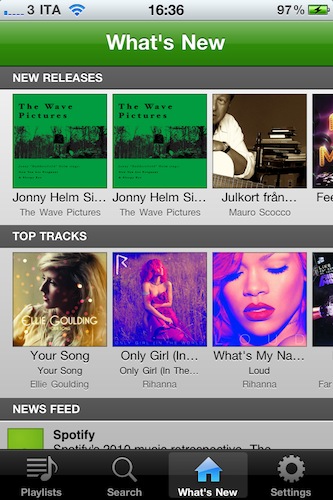
Spotify is still nowhere to be seen in the US – although they keep saying that the service will find its way to America, eventually – but it’s doing quite well in Europe. I, for instance, have been a subscriber for over a year now and I can say Spotify has changed the way I think of music availability and my personal library. I don’t care about downloads and purchases anymore.

The Spotify app for Mac has always been a sexy piece of software with neat functionalities, but the iPhone app is just better. It’s a mobile client that allows you to access your music anywhere, even on 3G, with high quality streams and the possibility to check on your favorite tracks and playlists.

With the latest updates released in iTunes last night, Spotify for iPhone got even better. The app now starts up to 6 times faster, and I can tell you this is a difference you will spot. The app sports a new loading indicator and it takes seconds to load up your account info, playlists and new releases. Bug fixes and updated graphics for the Retina Display aside, the developers changed the way the client handled saved state on each relaunch. Now you no longer have to wait for an internet connection to kick in before using the app. It feels immediate.

Spotify for iPhone requires a premium subscription and it’s only available in the UK App Store. Full changelog below. Read more

Access Extra Content and Perks

Founded in 2015, Club MacStories has delivered exclusive content every week for nearly a decade.

What started with weekly and monthly email newsletters has blossomed into a family of memberships designed for every MacStories fan.

Learn more here and from our Club FAQs.

Club MacStories: Weekly and monthly newsletters via email and the web that are brimming with apps, tips, automation workflows, longform writing, early access to the MacStories Unwind podcast, periodic giveaways, and more;

Club MacStories+: Everything that Club MacStories offers, plus an active Discord community, advanced search and custom RSS features for exploring the Club’s entire back catalog, bonus columns, and dozens of app discounts;

Club Premier: All of the above and AppStories+, an extended version of our flagship podcast that’s delivered early, ad-free, and in high-bitrate audio.

Learn more here and from our Club FAQs.


Disk Drill Is An Amazingly Simple Recovery App For HDDs

When we lose deleted files on our hard drives we tend to think of this information as unrecoverable. On a Wednesday afternoon it’s easy to forget that those nightly cleanup scripts aren’t going to do you any favors when you’re looking to reuse some stock images for an updated web template. And those deleted music files? It turns out that you liked that dirty ol’ garage band after all. In times of panic we resort to Google and often extreme utilities to scrounge our Macs for every last bit of recoverable data possible before sifting through the garbage of unreadable file names and Quick Look previews. We not only advise that you read John Gruber’s advice on the matter and keep consistent backups, but we’ve reviewed a brand new Mac utility that’s not only free during beta, it’s really (really) slick.

Read more

Access Extra Content and Perks

Founded in 2015, Club MacStories has delivered exclusive content every week for nearly a decade.

What started with weekly and monthly email newsletters has blossomed into a family of memberships designed for every MacStories fan.

Learn more here and from our Club FAQs.

Club MacStories: Weekly and monthly newsletters via email and the web that are brimming with apps, tips, automation workflows, longform writing, early access to the MacStories Unwind podcast, periodic giveaways, and more;

Club MacStories+: Everything that Club MacStories offers, plus an active Discord community, advanced search and custom RSS features for exploring the Club’s entire back catalog, bonus columns, and dozens of app discounts;

Club Premier: All of the above and AppStories+, an extended version of our flagship podcast that’s delivered early, ad-free, and in high-bitrate audio.

Learn more here and from our Club FAQs.


Prizmo for iPhone Now Lets You Scan To Evernote and MobileMe

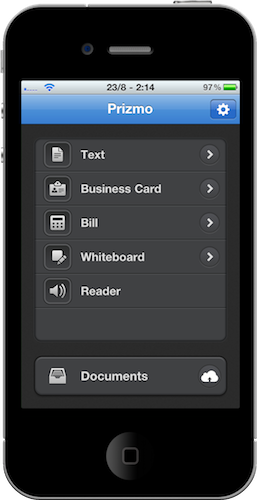
Prizmo for iPhone is an excellent port of the popular Mac app by Creaceed  which lets you scan just about any kind of document and apply smart OCR to it. The iPhone app – we reviewed it here – also lets you upload your scans to Dropbox and CloudApp. At least it used to.

The latest 1.1 update, released today, adds support for two much requested online services: Evernote and MobileMe. Evernote just happens to have a brand new 2.0 version available for Mac users today. Together with bug fixes, better in-app documentation and additional languages, Prizmo now lets you easily upload any document to these two new services.

Prizmo for iPhone is available at $9.99 in the App Store.

Access Extra Content and Perks

Founded in 2015, Club MacStories has delivered exclusive content every week for nearly a decade.

What started with weekly and monthly email newsletters has blossomed into a family of memberships designed for every MacStories fan.

Learn more here and from our Club FAQs.

Club MacStories: Weekly and monthly newsletters via email and the web that are brimming with apps, tips, automation workflows, longform writing, early access to the MacStories Unwind podcast, periodic giveaways, and more;

Club MacStories+: Everything that Club MacStories offers, plus an active Discord community, advanced search and custom RSS features for exploring the Club’s entire back catalog, bonus columns, and dozens of app discounts;

Club Premier: All of the above and AppStories+, an extended version of our flagship podcast that’s delivered early, ad-free, and in high-bitrate audio.

Learn more here and from our Club FAQs.


Genius Mixes Are Back With iTunes 10.1.1

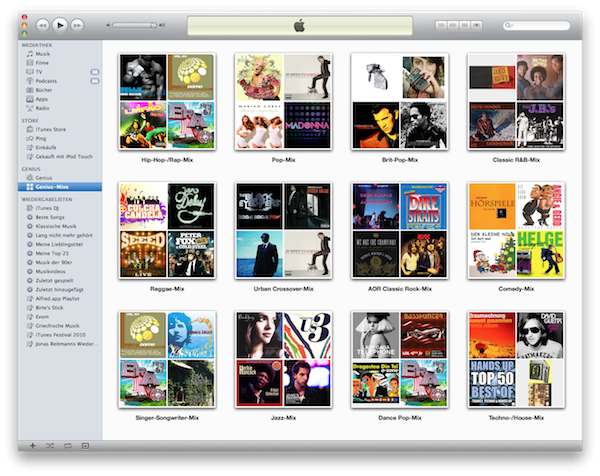
Just a quick update to let you know that together with the release of iTunes 10.1.1 earlier today, Apple seems to have fixed the “missing Genius Mixes” reported by many users last week.

Either built in 10.1.1 or a server-side fix on Apple’s end that has been deployed today, go update your iTunes now, activate and / or update Genius (Store -> Turn On Genius, Store -> Update Genius) and enjoy your Genius Mixes again.

[Thanks, Jonas]

Access Extra Content and Perks

Founded in 2015, Club MacStories has delivered exclusive content every week for nearly a decade.

What started with weekly and monthly email newsletters has blossomed into a family of memberships designed for every MacStories fan.

Learn more here and from our Club FAQs.

Club MacStories: Weekly and monthly newsletters via email and the web that are brimming with apps, tips, automation workflows, longform writing, early access to the MacStories Unwind podcast, periodic giveaways, and more;

Club MacStories+: Everything that Club MacStories offers, plus an active Discord community, advanced search and custom RSS features for exploring the Club’s entire back catalog, bonus columns, and dozens of app discounts;

Club Premier: All of the above and AppStories+, an extended version of our flagship podcast that’s delivered early, ad-free, and in high-bitrate audio.

Learn more here and from our Club FAQs.