Posts in Featured

Is Skype The Biggest Threat To Apple’s FaceTime?

Last night, Skype released a major new version of their iPhone and iPod touch client. Version 3.0 of the Skype app, released just in time for New Year’s Eve, adds video calling to all iOS devices with the possibility to run the app in compatibility mode on the iPad and receive video calls on screen. The iPhone app allows you to receive and initiate video calls both on WiFi and 3G, it’s compatible with iPhone 4 / iPhone 3GS and iPod touch 4th gen and, when on 3G, consumes around 3.4 MB of data per minute. Previous tests showed that Apple’s FaceTime technology also consume 3 MB per minute. Skype 3.0 also lets you call desktop users on Mac and PC and check on their computer screens (sounds useful for remote troubleshooting or networking), requires iOS 4 and supports both portrait and landscape modes.

The latest Skype update is, put simply, a huge win for the millions of Skype users out there who have an iOS device always connected to the internet. We could argue on the 24/7 internet availability on devices like the iPod touch and the iPad WiFi, but there’s no doubt the new Skype for iOS is the closest thing Apple ever had to a FaceTime competitor. Forget the 3rd party apps in the App Store that allow video calls: this is Skype. Which leads me to consider Apple’s position in regards to this update: Skype lets you see your friends wherever you are, no matter what kind of connection you’re on. Apple, due to technology limitations or AT&T’s pressure, only lets you FaceTime on WiFi. But looking at the big picture, that’s not really what Apple should fear. Read more
Access Extra Content and Perks

Founded in 2015, Club MacStories has delivered exclusive content every week for nearly a decade.

What started with weekly and monthly email newsletters has blossomed into a family of memberships designed for every MacStories fan.

Learn more here and from our Club FAQs.

Club MacStories: Weekly and monthly newsletters via email and the web that are brimming with apps, tips, automation workflows, longform writing, early access to the MacStories Unwind podcast, periodic giveaways, and more;

Club MacStories+: Everything that Club MacStories offers, plus an active Discord community, advanced search and custom RSS features for exploring the Club’s entire back catalog, bonus columns, and dozens of app discounts;

Club Premier: All of the above and AppStories+, an extended version of our flagship podcast that’s delivered early, ad-free, and in high-bitrate audio.

Learn more here and from our Club FAQs.


Update: A Minimal App For Simple Sharing

On our iPhones and iPads, we run Twitter clients. Be it Twitter, Twitterrific, Osfoora or some beta app no one knows about, many of us rely on these standalone apps to share links, thoughts and comments on Twitter. We do the same for Facebook (even if there’s no official app for iPad, third party clients are well known in the App Store), LinkedIn and other social networks. The problem: some would like to have the possibility to forward some status updates to other social networks they’re subscribed to (and likely have some friends on) without having to copy the message every single time in a new app. A few people I know use hashtags on Twitter to beam a tweet to Facebook or Google Buzz, but I don’t like the option. Next time I want to share the same message on Twitter and Facebook, what should I use?

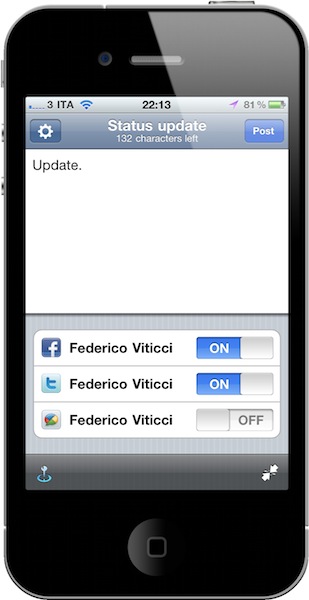
Update is a neat $0.99 utility for iPhone which lets you do one thing: write down a status update and choose the social networks you want to send it to. Everything happens in one screen. That’s it. Once you’ve authorized the supported services (Twitter, Facebook, Google Buzz, LinkedIn and Hyves) in the settings, you’ll get a simple on/off menu in the compose window to choose the active services. Type, and share. You can tell the app to grab your location data or shrink URLs contained in the message. You can’t attach pictures, but I guess this is one of the non-features that make Update a great app: it’s simple and focused on text messages. If you need more, go download a dedicated client.

I like the developers’ approach with Update. It’s available at $0.99 in the App Store, and even if it’s not the app for everyone I surely appreciate its simplicity. Recommended.

Access Extra Content and Perks

Founded in 2015, Club MacStories has delivered exclusive content every week for nearly a decade.

What started with weekly and monthly email newsletters has blossomed into a family of memberships designed for every MacStories fan.

Learn more here and from our Club FAQs.

Club MacStories: Weekly and monthly newsletters via email and the web that are brimming with apps, tips, automation workflows, longform writing, early access to the MacStories Unwind podcast, periodic giveaways, and more;

Club MacStories+: Everything that Club MacStories offers, plus an active Discord community, advanced search and custom RSS features for exploring the Club’s entire back catalog, bonus columns, and dozens of app discounts;

Club Premier: All of the above and AppStories+, an extended version of our flagship podcast that’s delivered early, ad-free, and in high-bitrate audio.

Learn more here and from our Club FAQs.


Going Back To Windows Has Taught Me I Could Live Off A Chrome Notebook

This is a bit of an off beat story for MacStories, but I’d like to talk about my experiences from moving to the Mac onto a PC desktop I’ve tossed together in the past week. It irks me that even going into 2011, you still see the age old arguments of software availability, familiarity, and often other non-issues when people partake in with the Mac vs. PC debate. I’d like to discuss software availability, because this is where I think PC advocates are highly mistaken in their perception of what we have available on OS X.

Read more

Access Extra Content and Perks

Founded in 2015, Club MacStories has delivered exclusive content every week for nearly a decade.

What started with weekly and monthly email newsletters has blossomed into a family of memberships designed for every MacStories fan.

Learn more here and from our Club FAQs.

Club MacStories: Weekly and monthly newsletters via email and the web that are brimming with apps, tips, automation workflows, longform writing, early access to the MacStories Unwind podcast, periodic giveaways, and more;

Club MacStories+: Everything that Club MacStories offers, plus an active Discord community, advanced search and custom RSS features for exploring the Club’s entire back catalog, bonus columns, and dozens of app discounts;

Club Premier: All of the above and AppStories+, an extended version of our flagship podcast that’s delivered early, ad-free, and in high-bitrate audio.

Learn more here and from our Club FAQs.


Short URLS Suck, OS X & iOS Malware To Become More “Sophisticated” According To McAfee

McAfee Logo

McAfee Logo

When short URLs first arrived on the scene, I was rather excited at the prospect of simply using a good looking “designer” URL to vainly share links on Twitter. Short URLs provide brand reassurance: MacStories, Engadget, Gizmodo, TechCrunch, and other sites now sport custom short URLs that verify the links we share lead back to our site. However, links from Bit.ly, CloudApp cl.ly links, and Twitter’s t.co links have become nothing more than a nuisance. If I use a service like TinyGrab, I know their short URLs will most likely lead to a snapshot someone has taken of their material. With more anonymous (everything) URL shorteners, there’s no way to verify its trust without using software that allows you to preview the long URL before you click through. We’ve seen their validity ruined plenty of times on Twitter through various attacks such as the cross-site request forgery attack that amused us for a few hours earlier this year, but I’ve simply lost trust in these “brands.”

While I didn’t need McAfee to be skeptical of weird Twitter users asking me if I want a free iPad, they predict short URLs will continue to annoy the tech savvy as the computer-illiterate continue to click through short URLs to whatever tomfoolery exists on the other side. McAfee’s other big claim: OS X could be the next target for malware kiddies.

Read more

Access Extra Content and Perks

Founded in 2015, Club MacStories has delivered exclusive content every week for nearly a decade.

What started with weekly and monthly email newsletters has blossomed into a family of memberships designed for every MacStories fan.

Learn more here and from our Club FAQs.

Club MacStories: Weekly and monthly newsletters via email and the web that are brimming with apps, tips, automation workflows, longform writing, early access to the MacStories Unwind podcast, periodic giveaways, and more;

Club MacStories+: Everything that Club MacStories offers, plus an active Discord community, advanced search and custom RSS features for exploring the Club’s entire back catalog, bonus columns, and dozens of app discounts;

Club Premier: All of the above and AppStories+, an extended version of our flagship podcast that’s delivered early, ad-free, and in high-bitrate audio.

Learn more here and from our Club FAQs.


QuickCursor Brings Text Editors To Other Apps - Coming To The Mac App Store

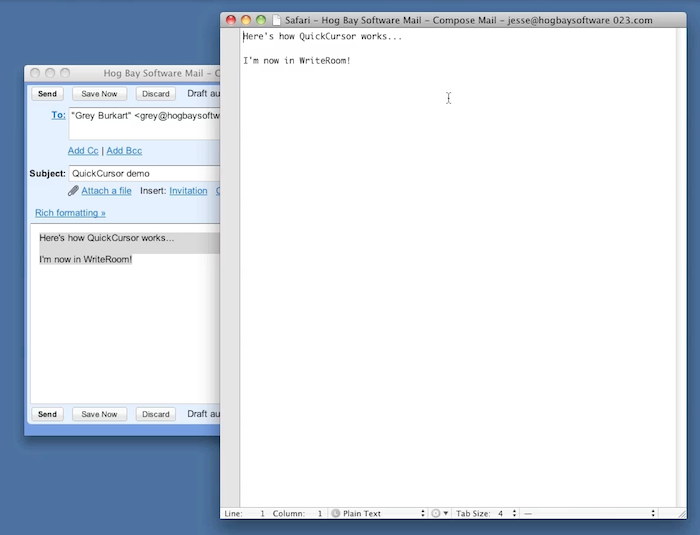
Coming soon to the Mac App Store (which opens for business on January 6), QuickCursor is a new utility by HogBay Software (WriteRoom, PlainText) which will help you write text in any Mac app using your favorite text editor.

Say you’re composing a new message in Gmail through Safari, or writing down a long note attached to a task in OmniFocus; wouldn’t it be great to use your favorite text editor instead of an app’s standard text field? QuickCursor will do just that: as you can see in the demo video on HogBay’s website, with a keyboard shortcut you’ll be able to fire up your text editor of choice, write, close it and have the changes saved in the app you were using in the first place, like Gmail.

QuickCursor will work with a variety of text editors including the popular Espresso, WriteRoom and TextMate. We don’t know if the app will be available on January 6th for the Mac App Store grand opening, but we’re surely looking forward to it.

Access Extra Content and Perks

Founded in 2015, Club MacStories has delivered exclusive content every week for nearly a decade.

What started with weekly and monthly email newsletters has blossomed into a family of memberships designed for every MacStories fan.

Learn more here and from our Club FAQs.

Club MacStories: Weekly and monthly newsletters via email and the web that are brimming with apps, tips, automation workflows, longform writing, early access to the MacStories Unwind podcast, periodic giveaways, and more;

Club MacStories+: Everything that Club MacStories offers, plus an active Discord community, advanced search and custom RSS features for exploring the Club’s entire back catalog, bonus columns, and dozens of app discounts;

Club Premier: All of the above and AppStories+, an extended version of our flagship podcast that’s delivered early, ad-free, and in high-bitrate audio.

Learn more here and from our Club FAQs.


App Store Updates Are Back, Camera+ Sells Over 78,000 Copies On Christmas Day

In case you missed it, iTunes Connect is back online. The web interface that allows developers to submit apps, updates and price changes went down on December 23 for the so-called “holiday shutdown” which didn’t freeze the App Store charts as many believed, but still made it impossible for developers to submit apps and users to find updates in iTunes. iTunes Connect went back online a few hours ago, and app updates are now showing up in iTunes and propagating through the App Store. Read more

Access Extra Content and Perks

Founded in 2015, Club MacStories has delivered exclusive content every week for nearly a decade.

What started with weekly and monthly email newsletters has blossomed into a family of memberships designed for every MacStories fan.

Learn more here and from our Club FAQs.

Club MacStories: Weekly and monthly newsletters via email and the web that are brimming with apps, tips, automation workflows, longform writing, early access to the MacStories Unwind podcast, periodic giveaways, and more;

Club MacStories+: Everything that Club MacStories offers, plus an active Discord community, advanced search and custom RSS features for exploring the Club’s entire back catalog, bonus columns, and dozens of app discounts;

Club Premier: All of the above and AppStories+, an extended version of our flagship podcast that’s delivered early, ad-free, and in high-bitrate audio.

Learn more here and from our Club FAQs.


8mm For iPhone Applies Vintage Effects to Videos In Real-Time

Hipstamatic is one of the most popular iPhone apps in the App Store: not only it’s a great app with a cool camera-like interface and tons of filters, films and flashes to choose from, it has also been named “iPhone App of the Year” by Apple and journalists at the New York Times use it. Hipstamatic is the closest thing to having an old analog camera on your iPhone. Some say it’s overly designed and too complicated for the average users, I think the results and popularity of the software speak by themselves.

Then again, Hipstamatic (and other apps that apply cool effects to photos like Instagram or Camera+) is for photos.  8mm Vintage Camera by Nexvio is a new app that can apply vintage film effects to videos, all in real-time through the iPhone’s rear and front-facing cameras. Read more

Access Extra Content and Perks

Founded in 2015, Club MacStories has delivered exclusive content every week for nearly a decade.

What started with weekly and monthly email newsletters has blossomed into a family of memberships designed for every MacStories fan.

Learn more here and from our Club FAQs.

Club MacStories: Weekly and monthly newsletters via email and the web that are brimming with apps, tips, automation workflows, longform writing, early access to the MacStories Unwind podcast, periodic giveaways, and more;

Club MacStories+: Everything that Club MacStories offers, plus an active Discord community, advanced search and custom RSS features for exploring the Club’s entire back catalog, bonus columns, and dozens of app discounts;

Club Premier: All of the above and AppStories+, an extended version of our flagship podcast that’s delivered early, ad-free, and in high-bitrate audio.

Learn more here and from our Club FAQs.


Dock Spaces Brings Multiple Docks to OS X - Review & Giveaway

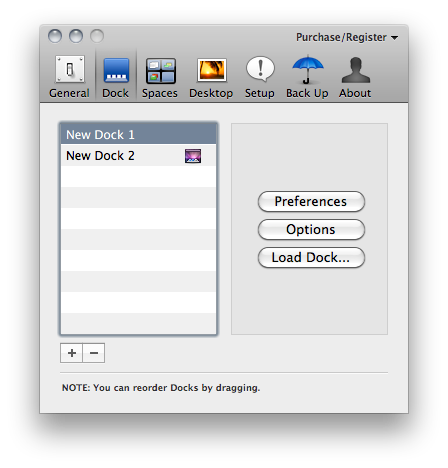
By default, OS X allows you to set up one and only one dock on your machine. Many users keep their dock at the bottom, with all the apps installed on their computer, some prefer to keep it hidden with only the most used apps – others keep it on the left. The dock is one of the most recognizable features of the Mac, the tool that lets you access your application with just a click. But the default dock doesn’t come with all the customization features offered by Patrick Chamelo’s Dock Spaces.

Dock Spaces, recently updated to version 4.0, enables you to set up multiple and customized docks depending on what kind of dock you need at any given time. Just like other apps like Hyperspaces let you create multiple spaces with different preferences, Dock Spaces is a tweak that comes as a preference panel which you can use to switch between different, contextual docks. Say you’re working on Photoshop and together with that you need easy access to other apps for graphic design: you can create a dock with all those apps, other than your “default” OS X dock. Basing on this same concept, you can set up as many docks as you want for all the different contexts and situations you’re going to use your computer. Read more

Access Extra Content and Perks

Founded in 2015, Club MacStories has delivered exclusive content every week for nearly a decade.

What started with weekly and monthly email newsletters has blossomed into a family of memberships designed for every MacStories fan.

Learn more here and from our Club FAQs.

Club MacStories: Weekly and monthly newsletters via email and the web that are brimming with apps, tips, automation workflows, longform writing, early access to the MacStories Unwind podcast, periodic giveaways, and more;

Club MacStories+: Everything that Club MacStories offers, plus an active Discord community, advanced search and custom RSS features for exploring the Club’s entire back catalog, bonus columns, and dozens of app discounts;

Club Premier: All of the above and AppStories+, an extended version of our flagship podcast that’s delivered early, ad-free, and in high-bitrate audio.

Learn more here and from our Club FAQs.


iPad 2 To Look Like an iPod touch?

When the iPad was announced, many quickly dismissed it as a “giant iPod touch”. According to the information posted by Japanese blog Macotakara, it looks like the next generation iPad will indeed look more similar to an iPod touch than it does in its current version. Basically, Macotakara analyzed the iPad 2 cases that have been floating around these weeks and concluded that they are designed for a device with a flat back and “tapered sides”, as reported by MacRumors. The new sides and back will presumably force Apple to relocate the speaker and adjust the position of the volume buttons as well.

The volume buttons on the side of the next-generation iPad appear to be of the split style with an oblong form factor as seen on the current iPod touch, as opposed to the rocker buttons used on the current iPad and the round split buttons used on the iPhone 4.

The current iPad 1st gen comes with a curved back and flat sides. The next gen one might be the exact opposite, although I don’t know much a flat back design would make it comfortable for users to pick up the device from a table or desk.

Macotakara also seems to think the iPad 2 will offer a rear camera as big as the iPhone 4’s one, capable of snapping high-resolution pictures. It is still unknown, however, whether these cases that have been posted on the internet are produced by people actually in the know of the next gen iPad 2 or just to generate traffic towards the promo websites.

Video below. Read more

Access Extra Content and Perks

Founded in 2015, Club MacStories has delivered exclusive content every week for nearly a decade.

What started with weekly and monthly email newsletters has blossomed into a family of memberships designed for every MacStories fan.

Learn more here and from our Club FAQs.

Club MacStories: Weekly and monthly newsletters via email and the web that are brimming with apps, tips, automation workflows, longform writing, early access to the MacStories Unwind podcast, periodic giveaways, and more;

Club MacStories+: Everything that Club MacStories offers, plus an active Discord community, advanced search and custom RSS features for exploring the Club’s entire back catalog, bonus columns, and dozens of app discounts;

Club Premier: All of the above and AppStories+, an extended version of our flagship podcast that’s delivered early, ad-free, and in high-bitrate audio.

Learn more here and from our Club FAQs.