Posts in Featured

White iPhone 4 Shows Up On AT&T’s Online System

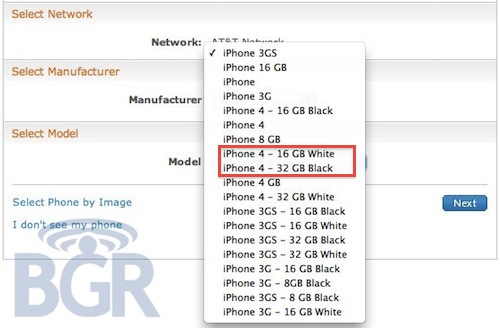
Here we go again. After a brief appearance on Verizon’s website right after the official announcement of the new CDMA iPhone 4, the mythical white iPhone 4 has been spotted on AT&T’s online management system, BGR reports.

It looks like Best Buy isn’t the only retailer with white iPhones popping up in its system. AT&T is now showing two versions of Apple’s unicorn-colored iPhone. The entries appear in AT&T’s Online Account Management system (OLAM), and read as “iPhone 4 – 16GB White” and “iPhone 4 – 32GB White.

Of course, this may just be a mistake or a prank from an AT&T employee – we don’t know what to think about the white iPhone at this point. Still, it keeps showing up. Read more

Access Extra Content and Perks

Founded in 2015, Club MacStories has delivered exclusive content every week for nearly a decade.

What started with weekly and monthly email newsletters has blossomed into a family of memberships designed for every MacStories fan.

Learn more here and from our Club FAQs.

Club MacStories: Weekly and monthly newsletters via email and the web that are brimming with apps, tips, automation workflows, longform writing, early access to the MacStories Unwind podcast, periodic giveaways, and more;

Club MacStories+: Everything that Club MacStories offers, plus an active Discord community, advanced search and custom RSS features for exploring the Club’s entire back catalog, bonus columns, and dozens of app discounts;

Club Premier: All of the above and AppStories+, an extended version of our flagship podcast that’s delivered early, ad-free, and in high-bitrate audio.

Learn more here and from our Club FAQs.


Woman Tries To Commit Suicide Because She Lost Her iPhone

You can file this in the “just wrong” category we have seen appear from time to time here on MacStories. Mrs. Wong, iPhone 4 owner from Hong Kong, was really happy about her purchase; she was so glad she got an iPhone, in fact, that when she accidentally lost it she went asking her husband to immediately get a new one. Her husband is a bus driver, and the couple has two daughters to think about, too. For an average family, getting two iPhones in the same week might be a little too much.

So her husband said no, and Mrs. Wong went crazy about it. She left home at 6 in the morning, only to try to jump from the 14th floor of the building. All of this because she was upset about the lost iPhone. Luckily, her husband noticed her weird behavior, called the police and went up to the 14th floor to stop her.

Now, I’m not here to judge people, but this is just wrong. Wrong. Committing suicide for an iPhone? For as much as I love Apple device, I would never put my life at risk because I lost one. Also: the free Find My iPhone works great. [iPhoneShine via OrientalDaily]

Access Extra Content and Perks

Founded in 2015, Club MacStories has delivered exclusive content every week for nearly a decade.

What started with weekly and monthly email newsletters has blossomed into a family of memberships designed for every MacStories fan.

Learn more here and from our Club FAQs.

Club MacStories: Weekly and monthly newsletters via email and the web that are brimming with apps, tips, automation workflows, longform writing, early access to the MacStories Unwind podcast, periodic giveaways, and more;

Club MacStories+: Everything that Club MacStories offers, plus an active Discord community, advanced search and custom RSS features for exploring the Club’s entire back catalog, bonus columns, and dozens of app discounts;

Club Premier: All of the above and AppStories+, an extended version of our flagship podcast that’s delivered early, ad-free, and in high-bitrate audio.

Learn more here and from our Club FAQs.


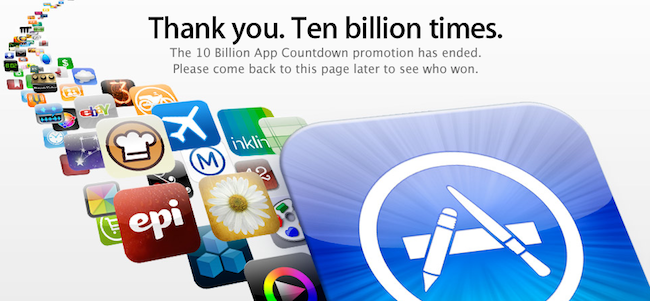
App Store: 10 Billion Apps Downloaded

It’s official: 10 billion apps have been downloaded from the App Store for iPhone, iPad and iPod touch. The competition Apple launched to celebrate the new milestone has ended, and Apple is now projected towards the next milestones, 15 billion apps and 20 billion apps.

The App Store was launched in 2008, when the only iPhones available were the original iPhone and the 3G. In January 2010 App Store downloads topped 3 billion; the downloads became 5 billion during summer 2010. Thanks to the enoermous success of the iPad and iPhone, Apple added another 5 billion downloads in 6 months.

Will we see 20 billion apps by the end of 2011?

Access Extra Content and Perks

Founded in 2015, Club MacStories has delivered exclusive content every week for nearly a decade.

What started with weekly and monthly email newsletters has blossomed into a family of memberships designed for every MacStories fan.

Learn more here and from our Club FAQs.

Club MacStories: Weekly and monthly newsletters via email and the web that are brimming with apps, tips, automation workflows, longform writing, early access to the MacStories Unwind podcast, periodic giveaways, and more;

Club MacStories+: Everything that Club MacStories offers, plus an active Discord community, advanced search and custom RSS features for exploring the Club’s entire back catalog, bonus columns, and dozens of app discounts;

Club Premier: All of the above and AppStories+, an extended version of our flagship podcast that’s delivered early, ad-free, and in high-bitrate audio.

Learn more here and from our Club FAQs.


View Instagram’s Most Popular Photos on Instagreat!

Instagram has been a massive success but it is largely an experience that has been exclusive to its iPhone app. Not anymore though, web developers Elliott Kember and Hector Simpson have created Insta-great, a site that showcases all the most popular photo’s from Instagram.

The brilliantly designed site allows you to also drill down to photos by a specific person, in a specific place, on a specific date or photos using one of Instagram’s filters. Plus Elliot (who has a game of Snake running on top of his site!) and Hector added keyboard navigation which is another great touch to a really finessed site.

If you’re a fan of Instagram like I am, definitely check the site out, you’ll find yourself just scrolling through the photos for ages.

[Via Cult of Mac]

Access Extra Content and Perks

Founded in 2015, Club MacStories has delivered exclusive content every week for nearly a decade.

What started with weekly and monthly email newsletters has blossomed into a family of memberships designed for every MacStories fan.

Learn more here and from our Club FAQs.

Club MacStories: Weekly and monthly newsletters via email and the web that are brimming with apps, tips, automation workflows, longform writing, early access to the MacStories Unwind podcast, periodic giveaways, and more;

Club MacStories+: Everything that Club MacStories offers, plus an active Discord community, advanced search and custom RSS features for exploring the Club’s entire back catalog, bonus columns, and dozens of app discounts;

Club Premier: All of the above and AppStories+, an extended version of our flagship podcast that’s delivered early, ad-free, and in high-bitrate audio.

Learn more here and from our Club FAQs.


Sending Emails From @mac.com Accounts Will Soon Be Impossible

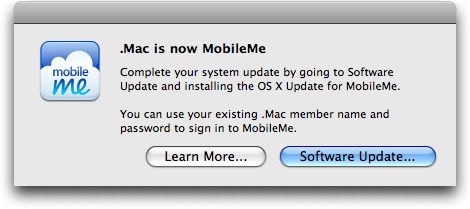
According to a recent thread on Apple’s Discussion boards and a support document on Apple’s website, users of @mac.com email addresses who upgraded to iOS 4.2 are no longer able to send email messages through a @mac.com account unless it was setup prior to updating to iOS 4.2. Alternatively, the @mac.com account details can be synced through iTunes on the desktop, but this won’t enable push for emails.

A user on Apple Discussions explains:

Because of this unannounced development, I had a sneaking suspicion that Apple may be planning to do the same in the future for sending email from @mac.com addresses via www.me.com and a desktop email client.

It appears my suspicion was true. Here are the relevant sections from a Chat Session I’ve just finished with a very nice MobileMe Support agent.

Read more

Access Extra Content and Perks

Founded in 2015, Club MacStories has delivered exclusive content every week for nearly a decade.

What started with weekly and monthly email newsletters has blossomed into a family of memberships designed for every MacStories fan.

Learn more here and from our Club FAQs.

Club MacStories: Weekly and monthly newsletters via email and the web that are brimming with apps, tips, automation workflows, longform writing, early access to the MacStories Unwind podcast, periodic giveaways, and more;

Club MacStories+: Everything that Club MacStories offers, plus an active Discord community, advanced search and custom RSS features for exploring the Club’s entire back catalog, bonus columns, and dozens of app discounts;

Club Premier: All of the above and AppStories+, an extended version of our flagship podcast that’s delivered early, ad-free, and in high-bitrate audio.

Learn more here and from our Club FAQs.


SyncPad: The Collaborative Online Whiteboard For iPad. Review & Giveaway!

Inspiration hits us often at MacStories, and we’ll usually collaborate by sharing sketches thanks to Skitch and iChat. Imagine, however, if we didn’t rely on static images and browser refreshes to share content collaboratively over the Internet: SyncPad is an answer to our clunky workflow, thanks to immediately accessible online sketch rooms available via the Internet or SyncPad’s reader component for the iPad. In realtime, you can watch as the creators create instant wireframes, sketch over photos, markup PDFs (yes!), or draw the “OctoTicci” as I’ve done screwing around when I first tried the app with Federico. Below you’ll find many a 4th grader’s sketch (read: my terrible finger painting), an overview, and a little something for our readers who’d like to win one of ten copies. We can’t keep all of this collaborative-ness to ourselves after all.

Read more

Access Extra Content and Perks

Founded in 2015, Club MacStories has delivered exclusive content every week for nearly a decade.

What started with weekly and monthly email newsletters has blossomed into a family of memberships designed for every MacStories fan.

Learn more here and from our Club FAQs.

Club MacStories: Weekly and monthly newsletters via email and the web that are brimming with apps, tips, automation workflows, longform writing, early access to the MacStories Unwind podcast, periodic giveaways, and more;

Club MacStories+: Everything that Club MacStories offers, plus an active Discord community, advanced search and custom RSS features for exploring the Club’s entire back catalog, bonus columns, and dozens of app discounts;

Club Premier: All of the above and AppStories+, an extended version of our flagship podcast that’s delivered early, ad-free, and in high-bitrate audio.

Learn more here and from our Club FAQs.


FileSorter for OS X Applies Rules To Files, Folders

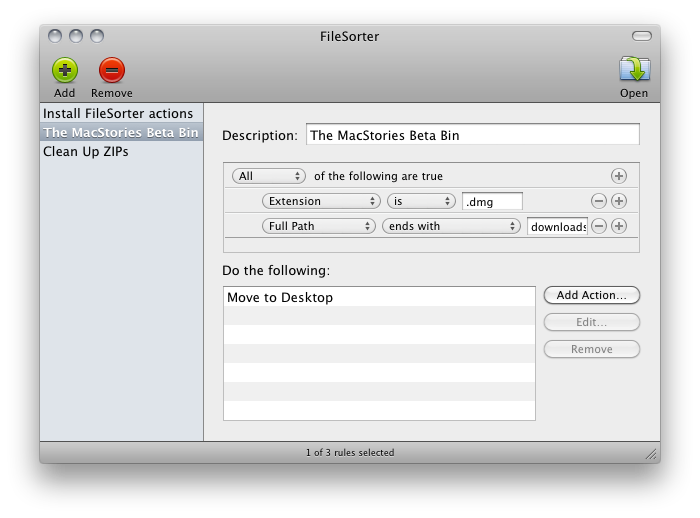
If you’re constantly struggling to manage or automate simple tasks like moving files out of your downloads folder, keeping files in your documents folder organized, or simply need an extra hand to batch automate certain tasks, FileSorter may be of some help. While it’s not as powerful as Hazel, it provides a decent middle ground for users who don’t need Hazel’s background automation. FileSorter applies rules to files much like how you’d apply rules to e-mail: simply specific what kinds of files (by name or extension for example) you’d like to manage, then apply rules to move, copy, or even delete files. After your rules are created, you can simply open the folder you’d like to manage to apply the rules you’ve created – I open my home folder and use rules to specify where FileSorter should look instead of opening everything individually. DMGs get moved to the desktop, folders SpeedDownload creates get removed, and instantly processes are tidied up thanks to the custom rules I’ve created. It’s $7.99 in the App Store, and its manual functionality will be the deciding factor of whether this app is right for you.

Access Extra Content and Perks

Founded in 2015, Club MacStories has delivered exclusive content every week for nearly a decade.

What started with weekly and monthly email newsletters has blossomed into a family of memberships designed for every MacStories fan.

Learn more here and from our Club FAQs.

Club MacStories: Weekly and monthly newsletters via email and the web that are brimming with apps, tips, automation workflows, longform writing, early access to the MacStories Unwind podcast, periodic giveaways, and more;

Club MacStories+: Everything that Club MacStories offers, plus an active Discord community, advanced search and custom RSS features for exploring the Club’s entire back catalog, bonus columns, and dozens of app discounts;

Club Premier: All of the above and AppStories+, an extended version of our flagship podcast that’s delivered early, ad-free, and in high-bitrate audio.

Learn more here and from our Club FAQs.


1 Megapixel Rear Camera On The iPad 2?

Several rumors are pointing to the next generation iPad as a slight redesign of the original iPad, with tapered edges, flat back, bigger speaker and front / rear facing cameras. According to 9to5mac, which has done further digging into the latest iOS 4.3 SDK, the iPad 2 will have a 1 MP rear camera capable of shooting photos and videos, and a VGA front-facing one for FaceTime and other camera functionalities.

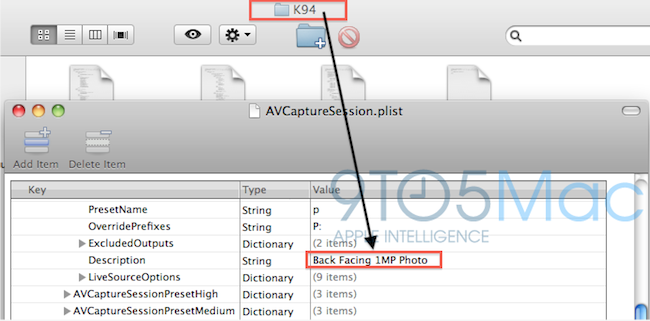
We’ve done some digging in the latest SDK it looks like Apple’s much rumored second-generation iPad will not feature some fancy 5 megapixel camera, but will instead shoot your flicks and take your pics with something close to a 1 megapixel camera. That’s awfully close to the fourth-generation iPod touch’s 0.7 megapixel back camera so we speculate they could be the same thing. That means you’ll be able to take some unwieldy 720P video with your iPad (whether you’ll be able to view that 720P video natively is another question).

The aforementioned SDK files reference to this device carrying a 1 MP camera as K94 and K95; the site speculates these codenames might refer to the next generation iPad. The current one, for instance, has codename K48. Multiple codenames for the iPad 2 might suggest that different versions are in the works, like iPad WiFi, CDMA and GSM. Other references found in iOS 4.3 beta seem to suggest the same thing.

A 1-megapixel camera on the iPad 2 would be significantly lower than the one found on the iPhone 4; we also have some doubts on the actual photo quality that would result from such a camera lens, which will have to display pictures on a 10-inch screen. Previous rumors indicated Largan Precision as the supplier of camera lenses for the next iPad, and a report in November also confirmed Largan was set to ship “5-megapixel lens modules for tablet PCs”.

Access Extra Content and Perks

Founded in 2015, Club MacStories has delivered exclusive content every week for nearly a decade.

What started with weekly and monthly email newsletters has blossomed into a family of memberships designed for every MacStories fan.

Learn more here and from our Club FAQs.

Club MacStories: Weekly and monthly newsletters via email and the web that are brimming with apps, tips, automation workflows, longform writing, early access to the MacStories Unwind podcast, periodic giveaways, and more;

Club MacStories+: Everything that Club MacStories offers, plus an active Discord community, advanced search and custom RSS features for exploring the Club’s entire back catalog, bonus columns, and dozens of app discounts;

Club Premier: All of the above and AppStories+, an extended version of our flagship podcast that’s delivered early, ad-free, and in high-bitrate audio.

Learn more here and from our Club FAQs.


These Are Real-Life Fruit Ninjas

Fruit Ninja is an insanely successful game for iPhone, iPad and Android I think you might have heard of. In the game, you have to slice fruit to get the highest score or simply slice more fruit as possible in a certain amount of time. It’s got several multiplayer options and it’s also quite addictive.

Now, the problem is Fruit Ninja is a game. A game that, if you think about it, doesn’t really make any sense at all: why would you be a ninja to slice fruit with a knife? I don’t know. Still, some shirtless dudes tried to replicate Fruit Ninja in real life, and there is video proof of the hilarious experiments. The videos embedded below might be slightly NSFW – but if your boss is a Fruit Ninja fan you might just go ahead and let him watch them.

Also: please don’t try this at home. Just keep playing the iPhone game. [via Kotaku] Read more

Access Extra Content and Perks

Founded in 2015, Club MacStories has delivered exclusive content every week for nearly a decade.

What started with weekly and monthly email newsletters has blossomed into a family of memberships designed for every MacStories fan.

Learn more here and from our Club FAQs.

Club MacStories: Weekly and monthly newsletters via email and the web that are brimming with apps, tips, automation workflows, longform writing, early access to the MacStories Unwind podcast, periodic giveaways, and more;

Club MacStories+: Everything that Club MacStories offers, plus an active Discord community, advanced search and custom RSS features for exploring the Club’s entire back catalog, bonus columns, and dozens of app discounts;

Club Premier: All of the above and AppStories+, an extended version of our flagship podcast that’s delivered early, ad-free, and in high-bitrate audio.

Learn more here and from our Club FAQs.