Posts in Featured

FaceMan Is Like Photo Booth For Your iPhone

I should have seen this coming. With iOS 4.3 rumored to introduce Photo Booth-like features for FaceTime or the Camera app, a developer created a full-featured alternative to Photo Booth that’s called FaceMan and it’s available now in the App Store at $0.99.

Put simply: FaceMan is great. It comes with 20 effects from the most popular Squeeze and Bent to a geek’s dream like Broken TV and LED; it’s got a slider to adjust the strength of effects; it can do both photos and videos WITH effects applied. Videos don’t have audio right now, but it’s coming with the next update, almost ready to be submitted to Apple. The interface is clean and polished, supports the Retina Display and you just need to flick through pages of effects to pick one and snap a picture. I did, and the terrible result can be viewed in the screenshot above. Full effect list includes: Swirl, X-Ray, Stretch, Heat, Sketch, Sepia, Dent, Led, Emboss, LightTunnel, Bulge, Squeeze, BrokenTv, Mirror, Toon, BlackAndWhite, AsciiArt, ModernArt, 100Me and NightVision.

Last, you can share photos on Twitter, Facebook, email and Tumblr. The app has a dedicated album to view all the photos and videos without having to open the iOS camera roll. I don’t know what else will Apple add in their own Photo Booth app, but FaceMan is an excellent alternative, available now. And it does videos. Go get it.
Access Extra Content and Perks

Founded in 2015, Club MacStories has delivered exclusive content every week for nearly a decade.

What started with weekly and monthly email newsletters has blossomed into a family of memberships designed for every MacStories fan.

Learn more here and from our Club FAQs.

Club MacStories: Weekly and monthly newsletters via email and the web that are brimming with apps, tips, automation workflows, longform writing, early access to the MacStories Unwind podcast, periodic giveaways, and more;

Club MacStories+: Everything that Club MacStories offers, plus an active Discord community, advanced search and custom RSS features for exploring the Club’s entire back catalog, bonus columns, and dozens of app discounts;

Club Premier: All of the above and AppStories+, an extended version of our flagship podcast that’s delivered early, ad-free, and in high-bitrate audio.

Learn more here and from our Club FAQs.


CleanMyMac’s New Feature: Mac App Store Uninstaller for Apps

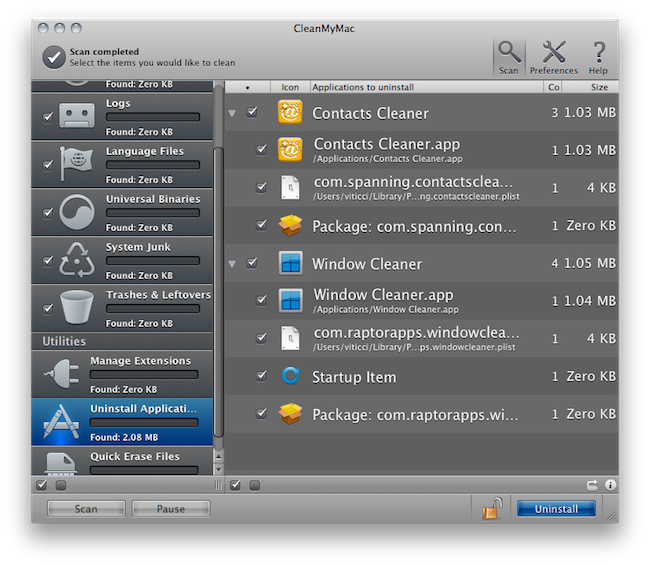
An update to MacPaw’s popular cleaning and maintenance software CleanMyMac (our review here) was released a few hours ago to include an interesting new feature: an uninstaller for applications installed through the Mac App Store. The new update also includes iOS firmware cleanup and a new “Ignore list”.

The uninstaller feature works as expected: you drag an app into CleanMyMac’s window and MacPaw’s app finds all the associated files and preferences to put them into the trash. It is unclear what exactly did MacPaw implement into CleanMyMac to introduce official Mac App Store support, but it works. As you may have noticed, the current version of the Mac App Store doesn’t provide an option to uninstall apps, only a neat feature to easily re-install apps on all your machines. If you want to delete apps on your Mac the old way is still good: just manually drag one from /Applications to the Trash. With this easy method, though, is very likely that additional files like preferences and databases will be left behind. MacPaw’s app now takes care of everything.

In the future, I’m pretty confident Apple will implement easy and complete uninstallation into the Mac App Store. For now, you should give CleanMyMac a try.

Access Extra Content and Perks

Founded in 2015, Club MacStories has delivered exclusive content every week for nearly a decade.

What started with weekly and monthly email newsletters has blossomed into a family of memberships designed for every MacStories fan.

Learn more here and from our Club FAQs.

Club MacStories: Weekly and monthly newsletters via email and the web that are brimming with apps, tips, automation workflows, longform writing, early access to the MacStories Unwind podcast, periodic giveaways, and more;

Club MacStories+: Everything that Club MacStories offers, plus an active Discord community, advanced search and custom RSS features for exploring the Club’s entire back catalog, bonus columns, and dozens of app discounts;

Club Premier: All of the above and AppStories+, an extended version of our flagship podcast that’s delivered early, ad-free, and in high-bitrate audio.

Learn more here and from our Club FAQs.


Pixelmator and Mac App Store: $1 Million in 20 Days

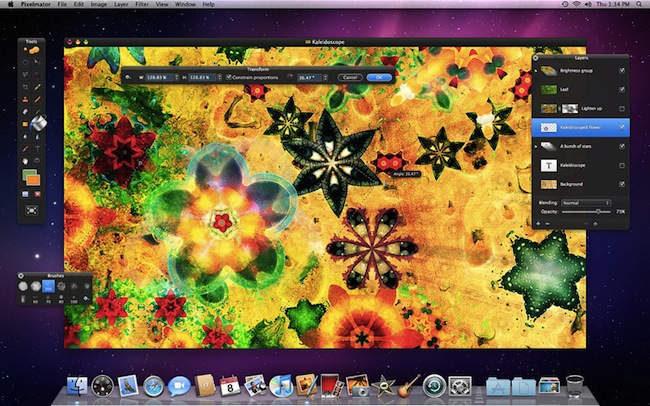
The first stories of success in the Mac App Store are starting to come in. First came Evernote, with its impressive Mac adoption rate thanks to the new Store; then Compartments, from a developer who went from 7 sales a day to 1500. Now the Pixelmator developers have posted a new entry on the company’s blog announcing that their graphic editing app has grossed $1 million in less than 20 days into the Mac App Store.

Taking Apple’s 30% away out of the equation, that leaves $700,000 to the Pixelmator team. Or maybe it’s $1 million after Apple’s cut? We don’t know. Either way, it’s an impressive result that we’re sure wasn’t possible back in the days when there was no Mac App Store.

This is a well-deserved milestone for the Pixelmator devs and we’re looking forward to what’s next for the app. The Pixelmator team, for instance, implemented a clever Mac App Store transition policy that forces existing customers to buy the app again, but will give them Pixelmator 2.0 for free once it’s released later this year.

Pixelmator is available at $29.99.

Access Extra Content and Perks

Founded in 2015, Club MacStories has delivered exclusive content every week for nearly a decade.

What started with weekly and monthly email newsletters has blossomed into a family of memberships designed for every MacStories fan.

Learn more here and from our Club FAQs.

Club MacStories: Weekly and monthly newsletters via email and the web that are brimming with apps, tips, automation workflows, longform writing, early access to the MacStories Unwind podcast, periodic giveaways, and more;

Club MacStories+: Everything that Club MacStories offers, plus an active Discord community, advanced search and custom RSS features for exploring the Club’s entire back catalog, bonus columns, and dozens of app discounts;

Club Premier: All of the above and AppStories+, an extended version of our flagship podcast that’s delivered early, ad-free, and in high-bitrate audio.

Learn more here and from our Club FAQs.


Woman Tries To Get Past Airport Security with 44 iPhones Around Her Body

Looks like we have another “this is just wrong” story here. If yesterday’s suicide attempt from a woman who lost her iPhone wasn’t enough, here’s what we have today on the menu: a woman who wanted to become an iPhone smuggler and tried to a) get past airport security with 44 iPhones around her body in b) typical Georgian outfit. Picture the scene. 44 iPhone 4’s below the outfit to get them into Israeli without paying taxes. Must have sounded like a good plan to the woman.

The Ben-Gurion International Airport security staff of course got suspicious over this woman who was walking slowly, asked if there were any problems and the woman replied “she was not feeling well”. Perhaps 44 iPhones are a bit too much for anyone? Anyway, security called a full body scan and surprise, they found a Cupertino treasure in there.

You know what’s missing from this curious story? A white iPhone. Just because. [Engadget via Haaretz]

Access Extra Content and Perks

Founded in 2015, Club MacStories has delivered exclusive content every week for nearly a decade.

What started with weekly and monthly email newsletters has blossomed into a family of memberships designed for every MacStories fan.

Learn more here and from our Club FAQs.

Club MacStories: Weekly and monthly newsletters via email and the web that are brimming with apps, tips, automation workflows, longform writing, early access to the MacStories Unwind podcast, periodic giveaways, and more;

Club MacStories+: Everything that Club MacStories offers, plus an active Discord community, advanced search and custom RSS features for exploring the Club’s entire back catalog, bonus columns, and dozens of app discounts;

Club Premier: All of the above and AppStories+, an extended version of our flagship podcast that’s delivered early, ad-free, and in high-bitrate audio.

Learn more here and from our Club FAQs.


Beat The Parking Meter With Honk For The iPhone

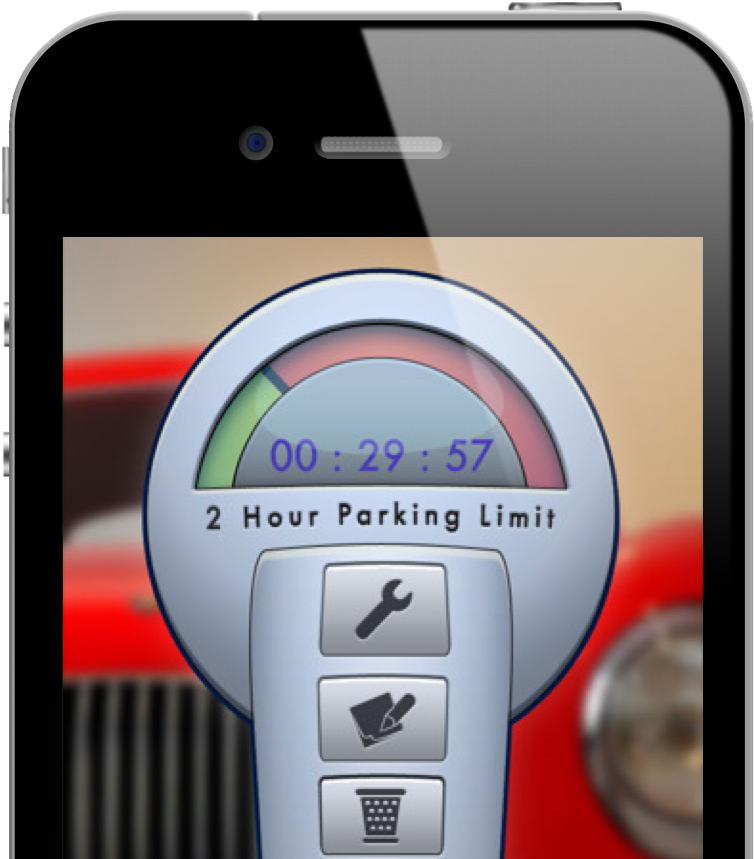
Have you ever gotten a ticket because you forgot to refill the parking meter? Sucks doesn’t it? Here’s the deal: you can pay a monkey to keep popping quarters in the slots, or you can pay for an iPhone app that’s honk worthy. Really: parking meters (and remembering your parking spot) shouldn’t be so hard.

Read more

Access Extra Content and Perks

Founded in 2015, Club MacStories has delivered exclusive content every week for nearly a decade.

What started with weekly and monthly email newsletters has blossomed into a family of memberships designed for every MacStories fan.

Learn more here and from our Club FAQs.

Club MacStories: Weekly and monthly newsletters via email and the web that are brimming with apps, tips, automation workflows, longform writing, early access to the MacStories Unwind podcast, periodic giveaways, and more;

Club MacStories+: Everything that Club MacStories offers, plus an active Discord community, advanced search and custom RSS features for exploring the Club’s entire back catalog, bonus columns, and dozens of app discounts;

Club Premier: All of the above and AppStories+, an extended version of our flagship podcast that’s delivered early, ad-free, and in high-bitrate audio.

Learn more here and from our Club FAQs.


Free “Plus” Widget Turns Dashboard Into A Launchpad

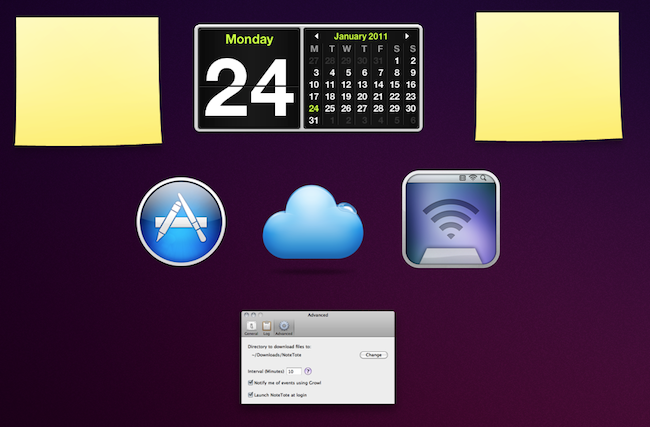
Launchpad is a feature of the upcoming Lion operating system that will allow users to have quick access to all their apps and folders through an iPad-like overlay interface. A few weeks ago, we saw developers already trying to imitate this functionality on Snow Leopard as I covered QuickPick, an app that brings a Launchpad-like UI to OS X 10.6. Plus, a new widget by Junecloud, takes a similar approach to QuickPick but it’s free and works with the system’s Dashboard.

Plus can turn anything into a Dashboard widget. That’s right: a widget to create other widgets; sort of meta, and it works. You can in fact drop multiple instances of Plus on to the Dashboard, and make each one a different shortcut to something else. Like an app, a screenshot, a document, a web address or a folder. Anything that you can drag out of the Finder can be dropped into Plus and become a widget of its own; Plus even lets you decide the size of the item’s preview. With a bit of organization and time, you can thus turn the Dashboard into a grid of most used apps and shortcuts, although you won’t be able to expand folders within the overlay the way we’ve seen in the Launchpad preview.

All things considered, Plus is a cool widget that’s being given away for free and definitely works as expected. Give it a try.

Access Extra Content and Perks

Founded in 2015, Club MacStories has delivered exclusive content every week for nearly a decade.

What started with weekly and monthly email newsletters has blossomed into a family of memberships designed for every MacStories fan.

Learn more here and from our Club FAQs.

Club MacStories: Weekly and monthly newsletters via email and the web that are brimming with apps, tips, automation workflows, longform writing, early access to the MacStories Unwind podcast, periodic giveaways, and more;

Club MacStories+: Everything that Club MacStories offers, plus an active Discord community, advanced search and custom RSS features for exploring the Club’s entire back catalog, bonus columns, and dozens of app discounts;

Club Premier: All of the above and AppStories+, an extended version of our flagship podcast that’s delivered early, ad-free, and in high-bitrate audio.

Learn more here and from our Club FAQs.


Extra Security For Your Mac with Hands Off

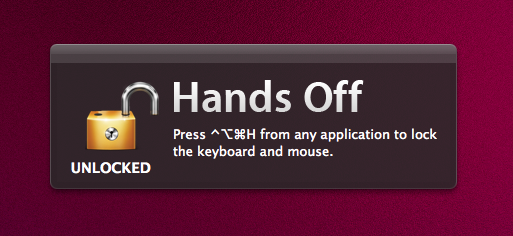
Available at $0.99 in the Mac App Store, Hands Off is a very simple, yet clever utility that will come in handy if you’ve always wanted an easy way to block access to your Mac when you’re not around – without having to turn the computer off or log out. How does that happen? Well, Hands Off can block the keyboard and the trackpad with a shortcut that can be activated at any time. Say you’re going away from your Mac for a few minutes and you don’t want your kids, or anyone, to press keyboard keys and create problems, Hands Off can help you by completely blocking keystrokes and trackpad recognition. When in “Locked” mode, the keyboard and trackpad won’t do anything.

For extra security or “keyboard cat” prevention, Hands Off is just great. You can use “readable hotkeys” (CMD instead of ⌘), change the global shortcut and even turn on Growl notifications. Combine this with Prowl, and you’ll get remote notifications if someone ever finds the right combination to unlock your Mac’s keyboard and mouse.

Hands Off works as advertised, although I noticed things can get pretty messy if a VNC client tries to remotely access your Mac when the computer is locked. I had to kill the app from the VNC client before actually being able to use my Mac, but it took a minute for the app to quit because it started beachballing in the dock. I guess an update is needed to fix this little inconvenience with VNC clients and local blocking. Anyway, Hands Off just works and it’s available at .99 cents.

Go get it.

Access Extra Content and Perks

Founded in 2015, Club MacStories has delivered exclusive content every week for nearly a decade.

What started with weekly and monthly email newsletters has blossomed into a family of memberships designed for every MacStories fan.

Learn more here and from our Club FAQs.

Club MacStories: Weekly and monthly newsletters via email and the web that are brimming with apps, tips, automation workflows, longform writing, early access to the MacStories Unwind podcast, periodic giveaways, and more;

Club MacStories+: Everything that Club MacStories offers, plus an active Discord community, advanced search and custom RSS features for exploring the Club’s entire back catalog, bonus columns, and dozens of app discounts;

Club Premier: All of the above and AppStories+, an extended version of our flagship podcast that’s delivered early, ad-free, and in high-bitrate audio.

Learn more here and from our Club FAQs.


The AppSumo “That’s Entertainment!” Bundle Giveaway

Just because we overslept Sunday and messed up some homemade DVDs doesn’t mean you should miss out on the latest AppSumo bundle. We’re into day two of yet another fantastic package, which includes everything you need to start enjoying your Mac as a writer, a movie enthusiast, or a casual gamer. There’s a little something for everyone this time around, so we advise you to click past the break to check out our latest giveaway where you can win one of five AppSumo bundles.

Read more

Access Extra Content and Perks

Founded in 2015, Club MacStories has delivered exclusive content every week for nearly a decade.

What started with weekly and monthly email newsletters has blossomed into a family of memberships designed for every MacStories fan.

Learn more here and from our Club FAQs.

Club MacStories: Weekly and monthly newsletters via email and the web that are brimming with apps, tips, automation workflows, longform writing, early access to the MacStories Unwind podcast, periodic giveaways, and more;

Club MacStories+: Everything that Club MacStories offers, plus an active Discord community, advanced search and custom RSS features for exploring the Club’s entire back catalog, bonus columns, and dozens of app discounts;

Club Premier: All of the above and AppStories+, an extended version of our flagship podcast that’s delivered early, ad-free, and in high-bitrate audio.

Learn more here and from our Club FAQs.


“Theme It” Store for Jailbroken Devices Released

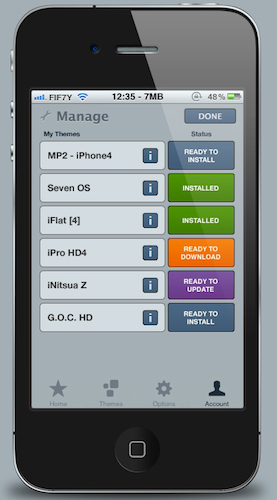
Right after a major improvement to the Themes section on Cydia, here comes Theme It, a new store for themes iOS users can install on their jailbroken devices. Theme It offers a curated collection of premium, paid themes from designers who have created full replacement for the standard graphic elements on iOS. If you’re familiar with Cydia and Winterboard – the tool to apply themes to the iPhone – starting to use Theme It shouldn’t be really difficult. The store now only has paid themes, and the developers promise free ones will be added soon. To use the store, an account is required, and the app must be downloaded either manually or installed through a dedicated Cydia repository.

A full list of currently available themes can be viewed here. Users can browse themes either on the app or the website, they can vote themes and read through the descriptions provided by the creator. The app’s design looks clean and elegant, although we don’t know the technical details of the app – namely, whether or not it uses the same Winterboard system to apply themes to iOS.

There’s also some controversy in the launch of Theme It. Apparently, Cydia’s owner and main developer Jay Freeman asked the Theme It folks to “back down” and not launch the app, claiming “competition is bad”. After the break, you’ll find the response from Theme It’s developers (courtesy of ReadWriteWeb) and a promotional video for the new Store. Read more

Access Extra Content and Perks

Founded in 2015, Club MacStories has delivered exclusive content every week for nearly a decade.

What started with weekly and monthly email newsletters has blossomed into a family of memberships designed for every MacStories fan.

Learn more here and from our Club FAQs.

Club MacStories: Weekly and monthly newsletters via email and the web that are brimming with apps, tips, automation workflows, longform writing, early access to the MacStories Unwind podcast, periodic giveaways, and more;

Club MacStories+: Everything that Club MacStories offers, plus an active Discord community, advanced search and custom RSS features for exploring the Club’s entire back catalog, bonus columns, and dozens of app discounts;

Club Premier: All of the above and AppStories+, an extended version of our flagship podcast that’s delivered early, ad-free, and in high-bitrate audio.

Learn more here and from our Club FAQs.