Posts in Featured

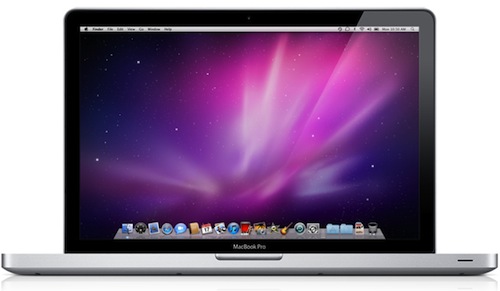
New MacBook Pros To Feature Hard Drive / SSD Combo for Faster OS?

The new MacBook Pros are approaching the rumored February 24th release date, with several retailers sold out  and various Apple online stores reporting shipments within 3-5 business days – a timeframe that plays very well with the Thursday, Feb. 24th rumors. BGR has posted some interesting details on the new models, which will come in five different SKUs as previously reported and will be lighter at around a half-pound less than the current generation. BGR also claims the new MBPs will have bigger glass trackpads.

The curious tidbit, however, is about a hard drive / SSD combo that would allow the new MacBook Pros to store the OS on the faster solid state disks and load everything else straight off the regular (and perhaps very large in capacity) drive:

The next bit of information doesn’t quite make sense to us, but we have been told the OS on the laptops will be loaded to a separate (internal) 8-16GB SSD while everything else will remain on the regular hard drive. There will be options for just SSD drives but the base models will feature regular hard disks with the SSD combo for the OS.

The rumor is interesting because it replicates what many users have been doing over the years to achieve a faster OS and still manage to store hundreds of GBs of media on their computers: install the OS on a small internal SSD, offload media and apps on a second internal (spinning) hard drive. It’s not a full SSD setup, but it has worked well for thousands of Mac users in the past years.

Does this make sense to you? Personally, I think I will go with the single (and more expensive) SSD option, but this could be a good move to introduce SSD in the MacBook Pros without increasing costs for the base models and yet provide a full-featured SSD option for those who want the speed and efficiency of solid state.

Access Extra Content and Perks

Founded in 2015, Club MacStories has delivered exclusive content every week for nearly a decade.

What started with weekly and monthly email newsletters has blossomed into a family of memberships designed for every MacStories fan.

Learn more here and from our Club FAQs.

Club MacStories: Weekly and monthly newsletters via email and the web that are brimming with apps, tips, automation workflows, longform writing, early access to the MacStories Unwind podcast, periodic giveaways, and more;

Club MacStories+: Everything that Club MacStories offers, plus an active Discord community, advanced search and custom RSS features for exploring the Club’s entire back catalog, bonus columns, and dozens of app discounts;

Club Premier: All of the above and AppStories+, an extended version of our flagship podcast that’s delivered early, ad-free, and in high-bitrate audio.

Learn more here and from our Club FAQs.


Affix Lets You Email Notes to Yourself With Prefixes, Gmail Filters Approve

Back in September I reviewed Captio, a simple iPhone app to send text or pictures to yourself via email. The concept behind Captio is simple and very appealing: when things to remember are too many and opening your GTD app of choice always feels like a thousand taps away, Captio offers you the 1-tap shortcut to dump anything into your mail inbox. Cool link to check out later? Email to myself in the inbox. Task to complete? Email. Youtube video? Same. Captio literally requires one tap to be ready to feed your inbox content to be consumed later, and for many it’s an insanely useful and time-saving little app.

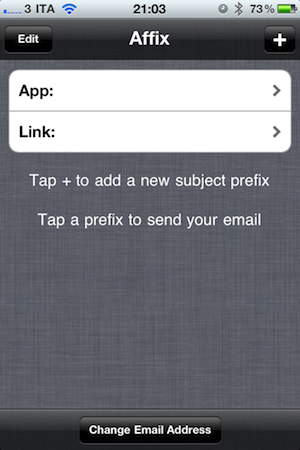
Starting from this idea, developer Raul Rea Menacho created Affix, which is a $0.99 iPhone app that like Captio lets you email things to yourself, but gives you more control over the ‘Subject’ and ‘From’ fields. Captio, in fact, focuses on speed but doesn’t let you specify a subject for the notes you’re going to email yourself. Furthermore, incoming messages are received from Captio’s own email address – something that might not be OK for some users. Affix aims at becoming your new default solution for dumping tasks and ideas onto your inbox by providing a way to set multiple templates for subjects, completely editable from the main screen at any time. You can change the default email address to send messages to with the tap of a button but, more importantly, Affix relies on iOS’ mail interface to let you change the ‘From’, ‘CC’ and ‘BCC’ fields when you want to. In fact, Affix uses the in-app email UI you know and love and that’s it.

The interesting feature is the possibility to create the prefixes to achieve God-knows what complicated workflows in your Gmail or Apple Mail inboxes. Think about it: if you can set up different subject templates with prefixes and if you have control over the sender information, it means you can easily create filters and rules to turn these emails into actions. In Gmail, for instance, you could create a filter to label messages coming from Affix with the “Work” prefix as “Important”, star them and leave them in the inbox. Or again, you could set up Apple Mail to receive emails from Affix with a certain Subject and pass them along as tasks to OmniFocus. The possibilities given by this kind of control over email fields are almost endless and totally up to your geek dreams and needs.

Affix could use some UI refinements, but overall it’s a very good app. Think of it as “Captio for nerds” who would love to deeply customize the way emails can be turned into actions, tasks and reminders within a desktop or web mail program. Affix is available at $0.99 in the App Store. Read more

Access Extra Content and Perks

Founded in 2015, Club MacStories has delivered exclusive content every week for nearly a decade.

What started with weekly and monthly email newsletters has blossomed into a family of memberships designed for every MacStories fan.

Learn more here and from our Club FAQs.

Club MacStories: Weekly and monthly newsletters via email and the web that are brimming with apps, tips, automation workflows, longform writing, early access to the MacStories Unwind podcast, periodic giveaways, and more;

Club MacStories+: Everything that Club MacStories offers, plus an active Discord community, advanced search and custom RSS features for exploring the Club’s entire back catalog, bonus columns, and dozens of app discounts;

Club Premier: All of the above and AppStories+, an extended version of our flagship podcast that’s delivered early, ad-free, and in high-bitrate audio.

Learn more here and from our Club FAQs.


Minecraft To Officially Come To iOS This Year

Minecraft

Minecraft

If you’re as addicted to Minecraft as I am, then you’ll be excited to learn that the hit block building title will be arriving to iOS later this year. Gamasutra reports that Markus Persson has revealed to the site that the game won’t be an exact port, but rather will be granted features that “make sense” for touch screen devices.

Minecraft is currently in the beta stages, with a full release planned sometime this year. So far over 1.3 million copies of the game have been purchased, with nearly five million registered accounts on the official site.

Minecraft has been a massive success in indie gaming, and there’s been a lot of interest from the community in an iOS version since the game’s inception. Aron Neiminen, a new recruit to the Mojang team working on Minecraft, will be developing the iOS version that’s to be released at an unannounced date.

[Gamasutra via IndieGames]

Access Extra Content and Perks

Founded in 2015, Club MacStories has delivered exclusive content every week for nearly a decade.

What started with weekly and monthly email newsletters has blossomed into a family of memberships designed for every MacStories fan.

Learn more here and from our Club FAQs.

Club MacStories: Weekly and monthly newsletters via email and the web that are brimming with apps, tips, automation workflows, longform writing, early access to the MacStories Unwind podcast, periodic giveaways, and more;

Club MacStories+: Everything that Club MacStories offers, plus an active Discord community, advanced search and custom RSS features for exploring the Club’s entire back catalog, bonus columns, and dozens of app discounts;

Club Premier: All of the above and AppStories+, an extended version of our flagship podcast that’s delivered early, ad-free, and in high-bitrate audio.

Learn more here and from our Club FAQs.


Readability Is The First Victim Of Apple’s New Subscriptions

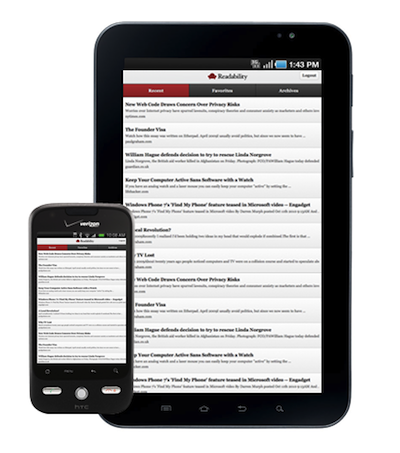
Three weeks ago, web service Readability launched a completely revamped version of its “read later” platform including support for Instapaper (Marco Arment is an advisor to Arc90, the company behind Readability) and a new subscription system that allows publishers of content consumed through Readability to get 70% of the fees paid by subscribers.

It works like this: you sign up to Readability as a reader paying a $5 monthly fee, but you can decide to pay even more if you’re willing to support the project. Once you’re ready to use the service, you install a bookmarklet in your browser that will save articles for later in an uncluttered view that’s perfect for late-night reading sessions and mobile devices. Yes, it really is similar to Marco Arment’s Instapaper. In fact, the developers announced that the first official Readability iOS app would be heavily based on Instapaper – which also happens to have introduced support for sending logs to Readability a few days ago. Instapaper and Readability thus have become two integrated platforms for reading content and sharing it with your friends – but Readability’s unique twist allows publishers (like MacStories, or any other weblog) to get a kickback for every article saved for later. It’s a genius approach no one ever tried before. Read more

Access Extra Content and Perks

Founded in 2015, Club MacStories has delivered exclusive content every week for nearly a decade.

What started with weekly and monthly email newsletters has blossomed into a family of memberships designed for every MacStories fan.

Learn more here and from our Club FAQs.

Club MacStories: Weekly and monthly newsletters via email and the web that are brimming with apps, tips, automation workflows, longform writing, early access to the MacStories Unwind podcast, periodic giveaways, and more;

Club MacStories+: Everything that Club MacStories offers, plus an active Discord community, advanced search and custom RSS features for exploring the Club’s entire back catalog, bonus columns, and dozens of app discounts;

Club Premier: All of the above and AppStories+, an extended version of our flagship podcast that’s delivered early, ad-free, and in high-bitrate audio.

Learn more here and from our Club FAQs.


You Don’t Eat This Angry Birds Cake - You Play With It First

We know people spend an incredible amount of time playing Angry Birds every day, and it shouldn’t come as a surprise that, once the iOS game is done, people keep on thinking about their beloved birds and pigs. Remember the LEGO set, arcade booth and cake? Angry Birds aficionados (dare we say fanboys) don’t just refine their skills on iPhones and iPads: they are truly immersed in the world imagined by Rovio.

So here comes the interactive Angry Birds cake, playable with a real slingshot and, of course, made of chocolate, icing and so forth. It’s a cake made for a boy named Ben. It took 10 hours to make, and only 2 minutes to destroy.

Ah, the kids playing with real-life Angry Birds. I didn’t have the chance to eat a Super Mario when I was a kid. Check out the video below. [Electricpig via Gizmodo] Read more

Access Extra Content and Perks

Founded in 2015, Club MacStories has delivered exclusive content every week for nearly a decade.

What started with weekly and monthly email newsletters has blossomed into a family of memberships designed for every MacStories fan.

Learn more here and from our Club FAQs.

Club MacStories: Weekly and monthly newsletters via email and the web that are brimming with apps, tips, automation workflows, longform writing, early access to the MacStories Unwind podcast, periodic giveaways, and more;

Club MacStories+: Everything that Club MacStories offers, plus an active Discord community, advanced search and custom RSS features for exploring the Club’s entire back catalog, bonus columns, and dozens of app discounts;

Club Premier: All of the above and AppStories+, an extended version of our flagship podcast that’s delivered early, ad-free, and in high-bitrate audio.

Learn more here and from our Club FAQs.


WiFi2HiFi Makes Streaming Music From Your Computer to a HiFi Easy

Just released today is WiFi2HiFi, a new iPhone and iPod Touch app that effectively allows you to use your device to stream audio from your computer to an iPod dock, stereo system or anything else that can connect to the 3.5mm jack or the 30-pin port. It virtually emulates the AirPort Express feature of streaming audio from a computer to connected sound system, but how well does it work? I was given a pre-release build to review and a review follows the break.

Read more

Access Extra Content and Perks

Founded in 2015, Club MacStories has delivered exclusive content every week for nearly a decade.

What started with weekly and monthly email newsletters has blossomed into a family of memberships designed for every MacStories fan.

Learn more here and from our Club FAQs.

Club MacStories: Weekly and monthly newsletters via email and the web that are brimming with apps, tips, automation workflows, longform writing, early access to the MacStories Unwind podcast, periodic giveaways, and more;

Club MacStories+: Everything that Club MacStories offers, plus an active Discord community, advanced search and custom RSS features for exploring the Club’s entire back catalog, bonus columns, and dozens of app discounts;

Club Premier: All of the above and AppStories+, an extended version of our flagship podcast that’s delivered early, ad-free, and in high-bitrate audio.

Learn more here and from our Club FAQs.


A Must-Have Mac Utility: App Tamer

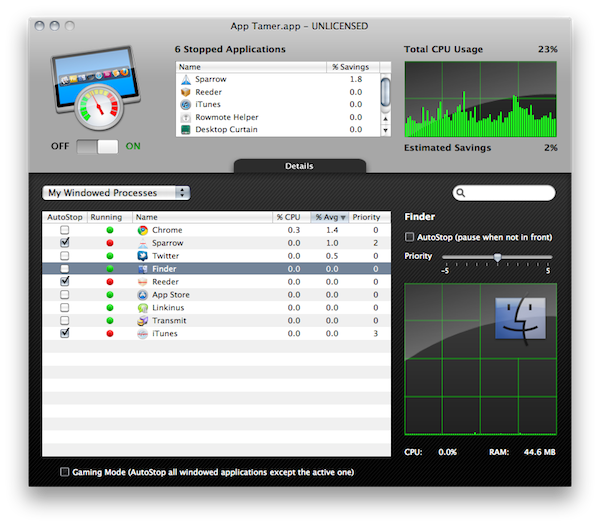
Over the past weeks, I’ve noticed my MacBook Pro (unibody late 2008) has started feeling the weight of the years of intensive usage. I replaced my internal hard drive with an SSD last year, and while overall performances have increased (especially when open and closing applications or large files) clearly the computer’s fans aren’t the same anymore. I might hold to buy a new computer until this one really dies, but in the meantime I’ve begun looking out for some utilities that could help me better manage the software running on my Mac all the time. Read more

Access Extra Content and Perks

Founded in 2015, Club MacStories has delivered exclusive content every week for nearly a decade.

What started with weekly and monthly email newsletters has blossomed into a family of memberships designed for every MacStories fan.

Learn more here and from our Club FAQs.

Club MacStories: Weekly and monthly newsletters via email and the web that are brimming with apps, tips, automation workflows, longform writing, early access to the MacStories Unwind podcast, periodic giveaways, and more;

Club MacStories+: Everything that Club MacStories offers, plus an active Discord community, advanced search and custom RSS features for exploring the Club’s entire back catalog, bonus columns, and dozens of app discounts;

Club Premier: All of the above and AppStories+, an extended version of our flagship podcast that’s delivered early, ad-free, and in high-bitrate audio.

Learn more here and from our Club FAQs.


Facebook Messenger Brings Free VoIP Calls to Facebook Chat

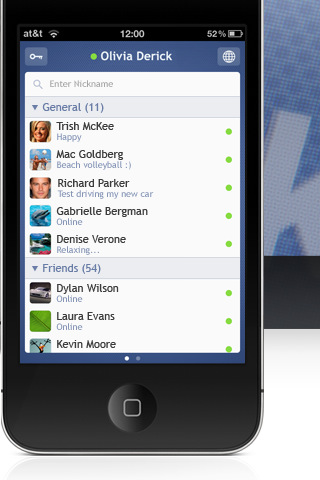
Facebook Messenger, a new iPhone application by the Crisp App developers, promises to bring the ultimate Facebook Chat experience to iOS. The app, unlike several alternatives that use Facebook Chat to let you communicate with your friends in a native iPhone interface, doesn’t only provide a clean design for chat, conversation views and photo attachments, it also lets you receive and place free VoIP calls through Facebook. That’s right: Facebook Messenger leverages the Facebook contact list to allow you to call your friends, for free, over the Internet. Read more

Access Extra Content and Perks

Founded in 2015, Club MacStories has delivered exclusive content every week for nearly a decade.

What started with weekly and monthly email newsletters has blossomed into a family of memberships designed for every MacStories fan.

Learn more here and from our Club FAQs.

Club MacStories: Weekly and monthly newsletters via email and the web that are brimming with apps, tips, automation workflows, longform writing, early access to the MacStories Unwind podcast, periodic giveaways, and more;

Club MacStories+: Everything that Club MacStories offers, plus an active Discord community, advanced search and custom RSS features for exploring the Club’s entire back catalog, bonus columns, and dozens of app discounts;

Club Premier: All of the above and AppStories+, an extended version of our flagship podcast that’s delivered early, ad-free, and in high-bitrate audio.

Learn more here and from our Club FAQs.


New MacBook Pro Model Numbers Revealed? Launch Next Week?

Two reports posted today by Italian blogs SlideToMac and iSpazio suggest the new MacBook Pros might be released as early as next week, in five different models. The MacBook Pro line is due an update and several rumors in the past weeks pointed to a late February / early March release.

First off, SlideToMac [Google Translation] claims to have received exclusive information that the new MacBook Pros will be available next week, by Thursday or Friday. Five models will be available according to SlideToMac: two 13-inch models, two 15-inch models and one 17-inch model. SlideToMac also reports they’re not completely sure about the 17-inch version and that, according to their source, this won’t be a “simple upgrade” to the existing MacBook Pro family.

Similar information comes from iSpazio [Google Translation], which also posted model numbers received via email from an Apple employee:

  • MC720
  • MC721
  • MC723
  • MC724
  • MC725

iSpazio, however, reports the “new MacBooks” (most likely MacBook Pros) will be available “around the end of this month” and that shipments from Apple to retail stores will begin in the next few days. Currently, Apple is selling two MacBook Pro 13-inch models, three 15-inch models and only one 17-inch MacBook Pro.

Access Extra Content and Perks

Founded in 2015, Club MacStories has delivered exclusive content every week for nearly a decade.

What started with weekly and monthly email newsletters has blossomed into a family of memberships designed for every MacStories fan.

Learn more here and from our Club FAQs.

Club MacStories: Weekly and monthly newsletters via email and the web that are brimming with apps, tips, automation workflows, longform writing, early access to the MacStories Unwind podcast, periodic giveaways, and more;

Club MacStories+: Everything that Club MacStories offers, plus an active Discord community, advanced search and custom RSS features for exploring the Club’s entire back catalog, bonus columns, and dozens of app discounts;

Club Premier: All of the above and AppStories+, an extended version of our flagship podcast that’s delivered early, ad-free, and in high-bitrate audio.

Learn more here and from our Club FAQs.