Posts in Featured

iOS Multitasking: It Doesn’t Need To Be PC-like

In a recent article on his personal blog, Lukas Mathis argues that the iPad’s multitasking doesn’t actually help people get things done and focus more as it forces you to constantly switch between apps. He writes:

a task (or an app) on a computer, and a task performed by a human don’t map to each other one-to-one. In fact, a single task performed by a human can easily make use of several applications running concurrently on a computer.

For example, right now, I’m typing this text in Notational Velocity, and I’m looking at the New York Times in a browser. The computer is showing me two windows at the same time. It is multitasking. I, however, am not. I’m absolutely focused on writing this essay. In fact, the computer’s multitasking is precisely what allows me to focus on writing my essay. I can type text into this window while looking at the Times article in another window without being forced to interrupt my task, and consciously switch between apps.

This is a common point being raised by people curious to try out iOS, but afraid it won’t help them be productive: “can I see multiple apps at once”? No, with iOS you can’t. And the way I see it, there’s good reason to enforce this implementation. First off, let’s consider the devices iOS runs on: iPhone, iPod touch, iPad, Apple TV. The Apple TV 2nd gen doesn’t exactly have apps and I don’t understand why would anyone want to see multiple photos and movies at once. The iPhone and iPod touch? The screen is so small (in spite of high resolution) I honestly can’t believe some people are exploring the possibility of seeing multiple apps on a single screen. It doesn’t make sense. Read more
Access Extra Content and Perks

Founded in 2015, Club MacStories has delivered exclusive content every week for nearly a decade.

What started with weekly and monthly email newsletters has blossomed into a family of memberships designed for every MacStories fan.

Learn more here and from our Club FAQs.

Club MacStories: Weekly and monthly newsletters via email and the web that are brimming with apps, tips, automation workflows, longform writing, early access to the MacStories Unwind podcast, periodic giveaways, and more;

Club MacStories+: Everything that Club MacStories offers, plus an active Discord community, advanced search and custom RSS features for exploring the Club’s entire back catalog, bonus columns, and dozens of app discounts;

Club Premier: All of the above and AppStories+, an extended version of our flagship podcast that’s delivered early, ad-free, and in high-bitrate audio.

Learn more here and from our Club FAQs.


Test Shows iPad 2 with iOS 4.3 Is Incredibly Faster Than iPad 1

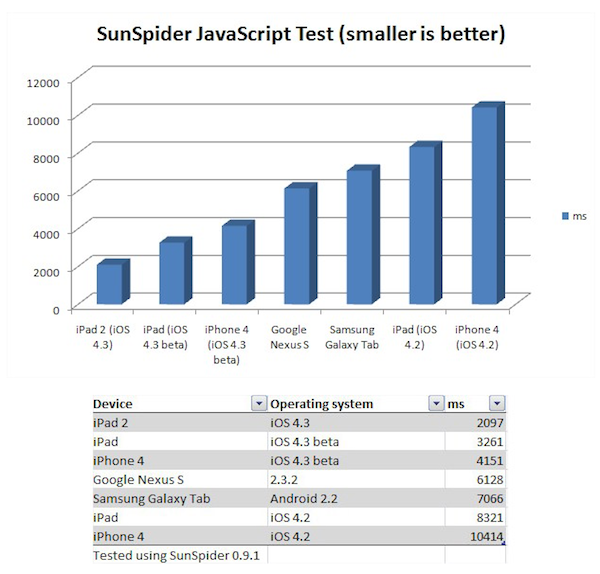
Surprise: the iPad 2 running iOS 4.3 is faster than the original iPad running iOS 4.2. According to CNET UK, which had the chance to run a JavaScript SunSpider benchmark test on the iPad 2 during a brief demo at San Francisco, the iPad 2 will outperform the competition and even other Apple’s devices when it comes to web browsing experience and overall snappiness of the browser application. The SunSpider test is usually a good test of how a browser will perform with “heavy” webpages with lots of content and functionalities such as Facebook.

Indeed, Apple itself promotes the new Nitro JavaScript engine that powers Safari on iOS 4.3 as “twice as fast” than its predecessor on iOS 4.2. The original iPad, however, also comes with a slower and non-dual core processor (Apple A4), whilst the iPad 2 will get a dual-core A5 and likely more RAM. These hardware features, together with the iOS 4.3, should make the device a lot faster than iPad 1, iPhone 4 and several Android tablets out in the market or coming soon.

Back to the SunSpider JavaScript test, CNET writes:

Incidentally, when you compare the iPad to the other devices we tested, Android phones and tablets don’t come out particularly well. The Galaxy Tab is more than 3x slower than the iPad 2 in this test, and about 2x slower than the original iPad with the new software. The Google Nexus S smart phone doesn’t fare too well either, at nearly 3x slower than the iPad 2. There’s really good news for iPhone 4 owners out there: when it arrives, iOS 4.3 will deliver a 2.5x speed increase in this test.

The one device we’d like to test, but can’t, is the Motorola Xoom. This tablet has a dual-core processor and runs the latest version of Android, 3.0 Honeycomb.

We will get our iPad 2’s next week and we’ll make sure to run some tests as well to see how the new tablet is really faster than other devices with iOS 4.3 and the iPad 1.

Access Extra Content and Perks

Founded in 2015, Club MacStories has delivered exclusive content every week for nearly a decade.

What started with weekly and monthly email newsletters has blossomed into a family of memberships designed for every MacStories fan.

Learn more here and from our Club FAQs.

Club MacStories: Weekly and monthly newsletters via email and the web that are brimming with apps, tips, automation workflows, longform writing, early access to the MacStories Unwind podcast, periodic giveaways, and more;

Club MacStories+: Everything that Club MacStories offers, plus an active Discord community, advanced search and custom RSS features for exploring the Club’s entire back catalog, bonus columns, and dozens of app discounts;

Club Premier: All of the above and AppStories+, an extended version of our flagship podcast that’s delivered early, ad-free, and in high-bitrate audio.

Learn more here and from our Club FAQs.


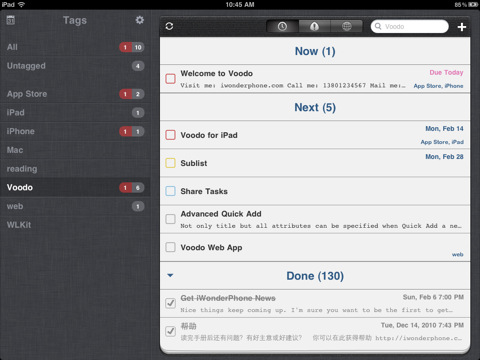
Top-Notch GTD App Voodo for iPad Gets Reviewed, Plus A Giveaway!

If you are looking for a GTD app that works on the iPhone and iPad you have many, many excellent options that include Things, Due, OmniFocus and a multitude of others. Well now you can add Voodo to that extensive list of compelling GTD apps. Voodo had previously been available as an iPhone app but earlier this week it made it to the iPad as well and I was able to give it a go whilst it was being approved last month.

Jump the break for a review of Voodo for iPad and win one of five copies of the iPhone companion app!

Read more

Access Extra Content and Perks

Founded in 2015, Club MacStories has delivered exclusive content every week for nearly a decade.

What started with weekly and monthly email newsletters has blossomed into a family of memberships designed for every MacStories fan.

Learn more here and from our Club FAQs.

Club MacStories: Weekly and monthly newsletters via email and the web that are brimming with apps, tips, automation workflows, longform writing, early access to the MacStories Unwind podcast, periodic giveaways, and more;

Club MacStories+: Everything that Club MacStories offers, plus an active Discord community, advanced search and custom RSS features for exploring the Club’s entire back catalog, bonus columns, and dozens of app discounts;

Club Premier: All of the above and AppStories+, an extended version of our flagship podcast that’s delivered early, ad-free, and in high-bitrate audio.

Learn more here and from our Club FAQs.


Apple Negotiating With Record Companies Over Cloud Service?

According to sources who talked to Bloomberg, Apple is negotiating with the key record companies of Universal, Sony, EMI and Warner for an improved iTunes service that would simplify access to music that users have purchased. The service would allegedly allow consumers to retrieve a backup of all their music perhaps if their originals were lost.

According to Bloomberg’s three sources, an agreement could be announced midyear which could have the potential of bringing consumers “closer to universal access to content centrally stored on the Internet.” The record companies are supposedly concerned of the gaining popularity of Internet services such as Pandora, which allow users to stream songs rather than purchase them and want to offer users who purchase music a similar convenience.

Read more

Access Extra Content and Perks

Founded in 2015, Club MacStories has delivered exclusive content every week for nearly a decade.

What started with weekly and monthly email newsletters has blossomed into a family of memberships designed for every MacStories fan.

Learn more here and from our Club FAQs.

Club MacStories: Weekly and monthly newsletters via email and the web that are brimming with apps, tips, automation workflows, longform writing, early access to the MacStories Unwind podcast, periodic giveaways, and more;

Club MacStories+: Everything that Club MacStories offers, plus an active Discord community, advanced search and custom RSS features for exploring the Club’s entire back catalog, bonus columns, and dozens of app discounts;

Club Premier: All of the above and AppStories+, an extended version of our flagship podcast that’s delivered early, ad-free, and in high-bitrate audio.

Learn more here and from our Club FAQs.


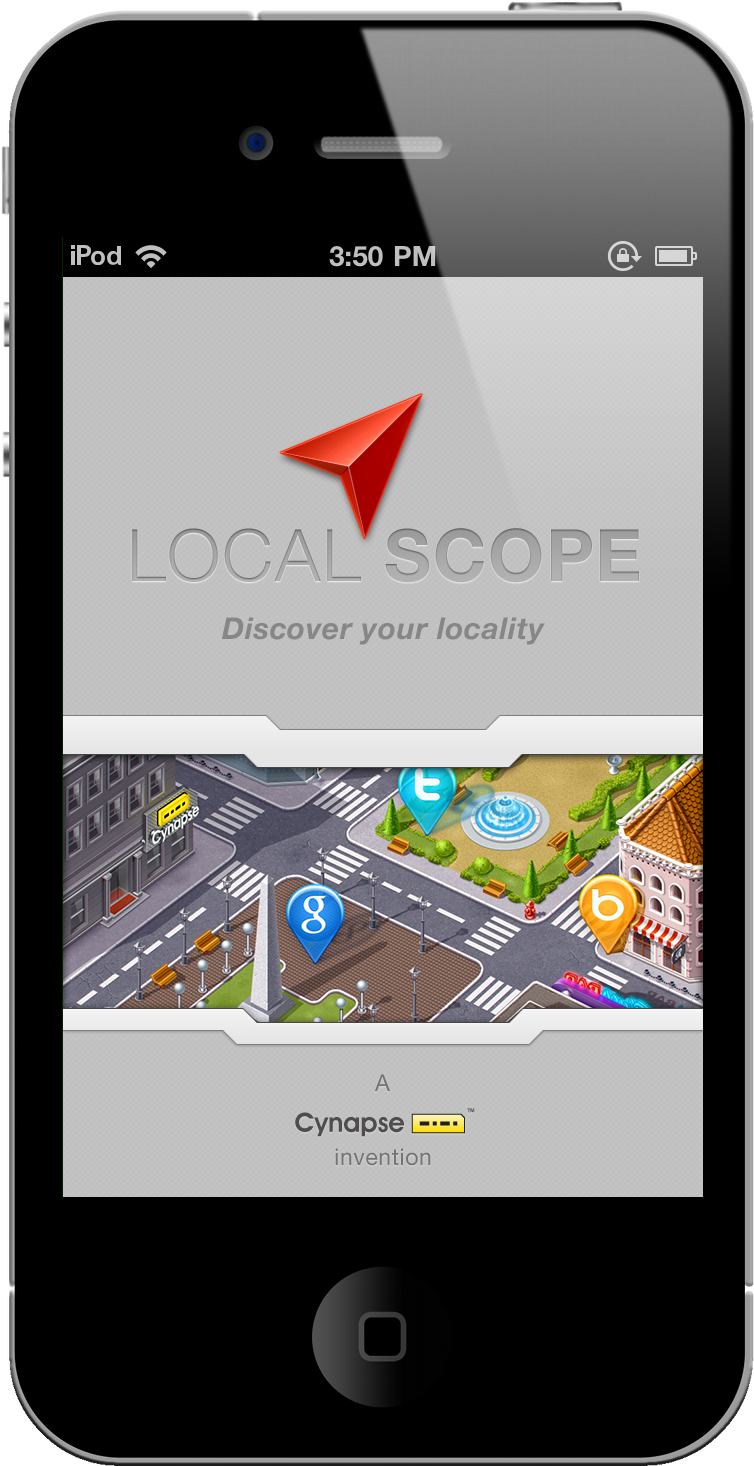
Localscope Is Perfect For iPod Or iPhone

It doesn’t matter whether a GPS signal is available to know what restaurants are nearby, or where the next gas station is. In fact, I’d easily trade Localscope for Google’s Places on Android (and who wants Hotpot when you have Facebook?). You’re never tethered to a single source of information with Google, Bing, Foursquare, Twitter, and Wikimapia for a combination of maps, current events, and augmented reality. Talk about holy wowza! And the thing is, Localscope is incredibly pretty. It’s the iPhone companion you’ll want on your homescreen if not in a nearby folder, and we’re going to run through some of the features that make this client worth its weight in bacon.

Read more

Access Extra Content and Perks

Founded in 2015, Club MacStories has delivered exclusive content every week for nearly a decade.

What started with weekly and monthly email newsletters has blossomed into a family of memberships designed for every MacStories fan.

Learn more here and from our Club FAQs.

Club MacStories: Weekly and monthly newsletters via email and the web that are brimming with apps, tips, automation workflows, longform writing, early access to the MacStories Unwind podcast, periodic giveaways, and more;

Club MacStories+: Everything that Club MacStories offers, plus an active Discord community, advanced search and custom RSS features for exploring the Club’s entire back catalog, bonus columns, and dozens of app discounts;

Club Premier: All of the above and AppStories+, an extended version of our flagship podcast that’s delivered early, ad-free, and in high-bitrate audio.

Learn more here and from our Club FAQs.


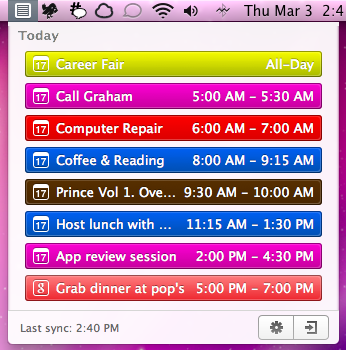
CalendarBar Tucks Event Reminders In Your Menubar

Clean Cut Code is known for making beautiful apps like Cloud Calendar, and it was only a matter of time before they brought some of their talent to the OS X desktop. CalendarBar takes on the inefficiencies of a traditional calendar client by providing a quick list of events in a beautiful timeline that can grab events from iCal, Google Calendar, and Facebook. Clicking on an event takes you to the event listing in its parent application – CalendarBar removes the distraction of busy calendar utilities, but provides shortcuts so you can add entries and gather additional information. The app features a some iOS overtones in its design, most obviously via the settings and exit button that adorn the bottom of the pop-up panel. Launching yesterday, the app is only $1.99 in the Mac App Store.

Access Extra Content and Perks

Founded in 2015, Club MacStories has delivered exclusive content every week for nearly a decade.

What started with weekly and monthly email newsletters has blossomed into a family of memberships designed for every MacStories fan.

Learn more here and from our Club FAQs.

Club MacStories: Weekly and monthly newsletters via email and the web that are brimming with apps, tips, automation workflows, longform writing, early access to the MacStories Unwind podcast, periodic giveaways, and more;

Club MacStories+: Everything that Club MacStories offers, plus an active Discord community, advanced search and custom RSS features for exploring the Club’s entire back catalog, bonus columns, and dozens of app discounts;

Club Premier: All of the above and AppStories+, an extended version of our flagship podcast that’s delivered early, ad-free, and in high-bitrate audio.

Learn more here and from our Club FAQs.


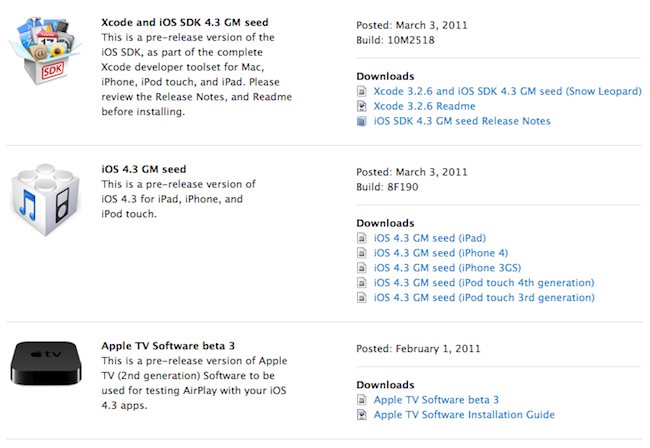
Apple Releases iOS 4.3 GM [Update: Gestures, Home Sharing]

A few minutes ago Apple seeded the GM seed of iOS 4.3 to developers. It’s available now in the iOS Dev Center. Build number is 8F190. Updated versions of the iOS SDK and Apple TV pre-release software have been released as well. iOS 4.3 beta 3 was released on February 1st.

iOS 4.3 is set to come out on March 11 together with the release of the iPad 2. This GM build should include the new iTunes Home Sharing feature announced by Apple yesterday.

Update: We have received word from several developers that the multitasking gestures for iPad can still be activated in the GM build with Xcode. At this point it sounds like Xcode will be able to activate gestures in the final release as well, but the general public won’t have this feature – it’s exclusive to developers for testing. Read more

Access Extra Content and Perks

Founded in 2015, Club MacStories has delivered exclusive content every week for nearly a decade.

What started with weekly and monthly email newsletters has blossomed into a family of memberships designed for every MacStories fan.

Learn more here and from our Club FAQs.

Club MacStories: Weekly and monthly newsletters via email and the web that are brimming with apps, tips, automation workflows, longform writing, early access to the MacStories Unwind podcast, periodic giveaways, and more;

Club MacStories+: Everything that Club MacStories offers, plus an active Discord community, advanced search and custom RSS features for exploring the Club’s entire back catalog, bonus columns, and dozens of app discounts;

Club Premier: All of the above and AppStories+, an extended version of our flagship podcast that’s delivered early, ad-free, and in high-bitrate audio.

Learn more here and from our Club FAQs.


Twitter Updates iOS App with Lots Of New Features

An interesting (and rather huge) update to the official Twitter app for iOS was released a few minutes ago, and it includes improvements both for the iPhone and iPad version of the client. New features has been added to this release as well, which unlike previous updates doesn’t only focus on bug fixes and stability improvements.

First off, the tweet compose screen has been greatly improved and redesigned to have a much cleaner UI and buttons to attach media for easier photo uploading; location info and usernames shortcuts are part of the redesigned screen, too. There’s even username auto-completion now, which is very nice on the iPhone considering one doesn’t always have time to type a long username on the virtual keyboard.

Trends have been improved, the app now shows trends for your specific location and there’s also a bar on top of the timeline called “Quick Bar” that allows you to cycle through trends. I wonder if there’s a way to disable it from the new Settings view. Twitter for iOS can also look in your local address book now to find friends that you might want to follow. This has been enabled both on the iPhone and iPad. Local trends, on the other hands, can be ignored thanks to an option in the Settings.

We are looking for new features and details right now and we’ll update this post as we find more interesting stuff. Check for more screenshots below, and go download the app here.

Update: The app seems a lot stable on the iOS 4.3 beta, and the bug that caused DMs and mentions to be marked as “unread” on each launch has been fixed. Finally, DM conversations behave like you would expect, too.

Update #2: Surprisingly enough, Twitter for iPad doesn’t seem to have the Quick Bar. Also, Quick Bar on the iPhone only stays at the top of the list and doesn’t follow you when scrolling the timeline.

Read more

Access Extra Content and Perks

Founded in 2015, Club MacStories has delivered exclusive content every week for nearly a decade.

What started with weekly and monthly email newsletters has blossomed into a family of memberships designed for every MacStories fan.

Learn more here and from our Club FAQs.

Club MacStories: Weekly and monthly newsletters via email and the web that are brimming with apps, tips, automation workflows, longform writing, early access to the MacStories Unwind podcast, periodic giveaways, and more;

Club MacStories+: Everything that Club MacStories offers, plus an active Discord community, advanced search and custom RSS features for exploring the Club’s entire back catalog, bonus columns, and dozens of app discounts;

Club Premier: All of the above and AppStories+, an extended version of our flagship podcast that’s delivered early, ad-free, and in high-bitrate audio.

Learn more here and from our Club FAQs.


The Genius of Apple’s Smart Cover

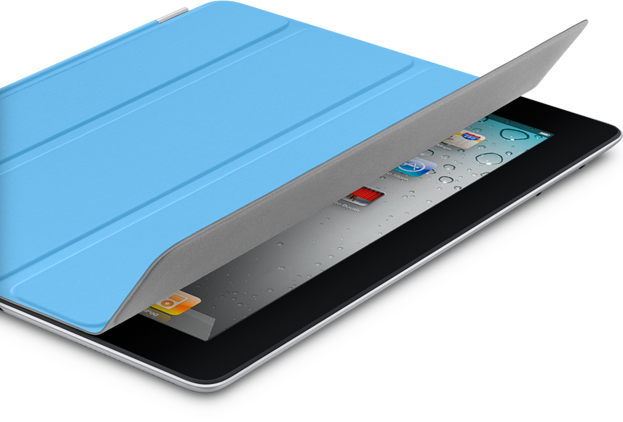
The most exciting part of the March 2nd keynote was not the introduction of the iPad 2, but the introduction of its surprise accessory that makes the iPad 2 twice as magical as its predecessor. Approximately twenty-five minutes into his speech, Steve Jobs broadcasts signals of pure excitement. Suddenly the mediocre announcement of the Digital AV Adapter was transitioned into what might have as been Job’s, “One last thing.” With the unveiling of the Smart Cover, Jobs hadn’t yet looked so happy in the keynote. Clearly, this was something to pay attention to.

Read more

Access Extra Content and Perks

Founded in 2015, Club MacStories has delivered exclusive content every week for nearly a decade.

What started with weekly and monthly email newsletters has blossomed into a family of memberships designed for every MacStories fan.

Learn more here and from our Club FAQs.

Club MacStories: Weekly and monthly newsletters via email and the web that are brimming with apps, tips, automation workflows, longform writing, early access to the MacStories Unwind podcast, periodic giveaways, and more;

Club MacStories+: Everything that Club MacStories offers, plus an active Discord community, advanced search and custom RSS features for exploring the Club’s entire back catalog, bonus columns, and dozens of app discounts;

Club Premier: All of the above and AppStories+, an extended version of our flagship podcast that’s delivered early, ad-free, and in high-bitrate audio.

Learn more here and from our Club FAQs.