Posts in Featured

Twitter Makes Quick Bar Less Intrusive With Update For iOS 4.3

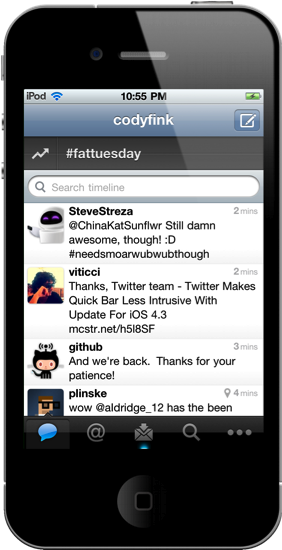
Along with bug fixes related to app startup and location services, Twitter has met users half-way by stopping the Quick Bar from intrusively popping over the timeline as you scroll in version 3.3.1. Intended to update users on what’s happening the Twitter sphere, users were outraged at the inability to disable the distracting pop-over. Twitter has permanently affixed the Quick Bar at the top of the timeline, which you can scrub your thumb over to scroll through recent trending topics. Twitter isn’t backing down on a feature they claim user’s want – I say let individuals decide how they want to browse Twitter.

You can get the latest update for Twitter in the App Store.

Access Extra Content and Perks

Founded in 2015, Club MacStories has delivered exclusive content every week for nearly a decade.

What started with weekly and monthly email newsletters has blossomed into a family of memberships designed for every MacStories fan.

Learn more here and from our Club FAQs.

Club MacStories: Weekly and monthly newsletters via email and the web that are brimming with apps, tips, automation workflows, longform writing, early access to the MacStories Unwind podcast, periodic giveaways, and more;

Club MacStories+: Everything that Club MacStories offers, plus an active Discord community, advanced search and custom RSS features for exploring the Club’s entire back catalog, bonus columns, and dozens of app discounts;

Club Premier: All of the above and AppStories+, an extended version of our flagship podcast that’s delivered early, ad-free, and in high-bitrate audio.

Learn more here and from our Club FAQs.


Explor: It’s Like Ping, For Apps

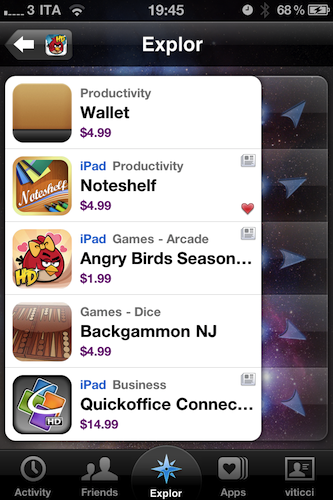
I’ve never been a loyal user of “app discovery” tools for iOS: I’m talking about those apps that help you find out about new apps and share the results with your friends. Sort of meta, I know, but apparently there’s a huge market for these things now that the iOS App Store has crossed the mark of 300,000 apps available for the iPhone. In the sea of applications that’s inundating our inboxes, it seems like there’s plenty of room for alternatives to the default App Store app.

Explor, a free app by Hello,Chair released today, is the latest (and possibly greatest) addition to iOS software discovery panorama that comes with interesting features I haven’t seen anywhere else. Read more

Access Extra Content and Perks

Founded in 2015, Club MacStories has delivered exclusive content every week for nearly a decade.

What started with weekly and monthly email newsletters has blossomed into a family of memberships designed for every MacStories fan.

Learn more here and from our Club FAQs.

Club MacStories: Weekly and monthly newsletters via email and the web that are brimming with apps, tips, automation workflows, longform writing, early access to the MacStories Unwind podcast, periodic giveaways, and more;

Club MacStories+: Everything that Club MacStories offers, plus an active Discord community, advanced search and custom RSS features for exploring the Club’s entire back catalog, bonus columns, and dozens of app discounts;

Club Premier: All of the above and AppStories+, an extended version of our flagship podcast that’s delivered early, ad-free, and in high-bitrate audio.

Learn more here and from our Club FAQs.


Google Launches Instant Previews, Available for iOS

A few minutes ago Google announced the availability of Instant Previews for mobile devices, a new way to quickly preview the contents of a webpage by simply tapping with your finger on a magnifying glass icon next to search results. Instant Previews, perfectly compatible with the iPhone and iPod touch, allow you to flick through a series of thumbnails for a specific webpage like in the iOS photo app, without actually following the link in Mobile Safari.

As soon as you tap on a link from the visual preview gallery, Mobile Safari will open the webpage. Hit the back button, and you’re brought to the gallery again. The animations are very neat and fluid from what we can see now, and there’s even some kind of rubber-banding elastic effect when you scroll thumbnails. Sadly, there’s no support for Instant Previews in mobile Youtube videos – just webpages.

For example, if you’re looking for a webpage that has both photos and descriptions, you can use Instant Previews to quickly identify these pages by navigating across the visual search results with a few swipes of your finger. Or perhaps you’re looking for an article, a step-by-step instructions list, or a product comparison chart—with Instant Previews, you can see easily spot pages with the right content without having to navigate back and forth between websites and search results.

iOS 4 or later is required for Instant Previews, and you can try them on your iPhone now. Promo video and another screenshot below. More information available here. Read more

Access Extra Content and Perks

Founded in 2015, Club MacStories has delivered exclusive content every week for nearly a decade.

What started with weekly and monthly email newsletters has blossomed into a family of memberships designed for every MacStories fan.

Learn more here and from our Club FAQs.

Club MacStories: Weekly and monthly newsletters via email and the web that are brimming with apps, tips, automation workflows, longform writing, early access to the MacStories Unwind podcast, periodic giveaways, and more;

Club MacStories+: Everything that Club MacStories offers, plus an active Discord community, advanced search and custom RSS features for exploring the Club’s entire back catalog, bonus columns, and dozens of app discounts;

Club Premier: All of the above and AppStories+, an extended version of our flagship podcast that’s delivered early, ad-free, and in high-bitrate audio.

Learn more here and from our Club FAQs.


Flash 10.3 Beta for Mac: Now In Your System Preferences, Too

If you’ve always been wondering why Adobe’s Flash Player don’t let you easily manage privacy and storage settings, then you must be pleased to know that’s about to change with the beta of Flash 10.3 for Windows, Mac and Linux. As noted by Lifehacker, version 10.3.180.42 (let’s just call it 10.3 beta) allows you to directly modify Flash Player’s cache, privacy and other settings (such as the microphone or camera) without having to visit a special web link to a webpage hosted on Adobe’s servers.

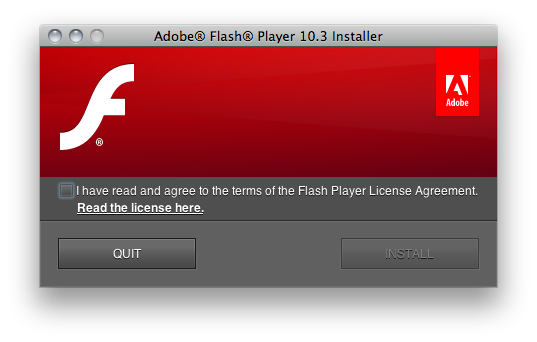
With Flash 10.3, it all (finally) happens with a settings window that appears to be accessible from the Control Panel in Windows, and a prefpane in your Mac’s System Preferences (see screenshots below). The panel has got a tabbed interface to switch between Storage, Camera and Mic, Playback and Advanced settings with lots of options to delete private data, de-authorize a computer from protected content, tweak the camera’s settings on a site-by-site basis.

Clearing out your Flash cache will be much easier in the new version, currently available for download and testing on Adobe’s website. These new user and OS-friendly settings will also be integrated into each browser’s own Preferences. Go download Flash 10.3 beta for Mac here. Read more

Access Extra Content and Perks

Founded in 2015, Club MacStories has delivered exclusive content every week for nearly a decade.

What started with weekly and monthly email newsletters has blossomed into a family of memberships designed for every MacStories fan.

Learn more here and from our Club FAQs.

Club MacStories: Weekly and monthly newsletters via email and the web that are brimming with apps, tips, automation workflows, longform writing, early access to the MacStories Unwind podcast, periodic giveaways, and more;

Club MacStories+: Everything that Club MacStories offers, plus an active Discord community, advanced search and custom RSS features for exploring the Club’s entire back catalog, bonus columns, and dozens of app discounts;

Club Premier: All of the above and AppStories+, an extended version of our flagship podcast that’s delivered early, ad-free, and in high-bitrate audio.

Learn more here and from our Club FAQs.


Adobe Releases Its Flash To HTML5 Conversion Tool

Adobe has released its Flash to HTML5 conversion tool to its Adobe Labs website for designers and developers to easily produce HTML5 (and thus iOS compatible) content from a Flash project. John Nack, the Principal Product Manager at Adobe said back in October last year (when the tool was announced) that Adobe’s goal was to “Cut the cost of targeting multiple runtimes & we’ll deliver real wins”.

The tool, codenamed “Wallaby” is limited and far from complete but it should work fine with most Flash banner ads, however projects utilizing ActionScript are currently not supported by the tool. The tool allows simple drag and drop conversion and Adobe says that it “allows you to reuse and extend the reach of your content to devices that do not support the Flash runtimes.”

Whilst Adobe is not at all backing off from backing Flash, it certainly seems that they have been forced into implementing HTML5 support in order to please its customers who see the wide usage of devices such as the iPad and iPhone which don’t support Flash. It is also evident that at least part of Steve Job’s ‘Thoughts on Flash’ article from last April is coming true;

New open standards created in the mobile era, such as HTML5, will win on mobile devices (and PCs too). Perhaps Adobe should focus more on creating great HTML5 tools for the future, and less on criticizing Apple for leaving the past behind.

[Via The Loop]

Access Extra Content and Perks

Founded in 2015, Club MacStories has delivered exclusive content every week for nearly a decade.

What started with weekly and monthly email newsletters has blossomed into a family of memberships designed for every MacStories fan.

Learn more here and from our Club FAQs.

Club MacStories: Weekly and monthly newsletters via email and the web that are brimming with apps, tips, automation workflows, longform writing, early access to the MacStories Unwind podcast, periodic giveaways, and more;

Club MacStories+: Everything that Club MacStories offers, plus an active Discord community, advanced search and custom RSS features for exploring the Club’s entire back catalog, bonus columns, and dozens of app discounts;

Club Premier: All of the above and AppStories+, an extended version of our flagship podcast that’s delivered early, ad-free, and in high-bitrate audio.

Learn more here and from our Club FAQs.


An Artist’s Tool: Learn Music & Train Your Ear With Capo

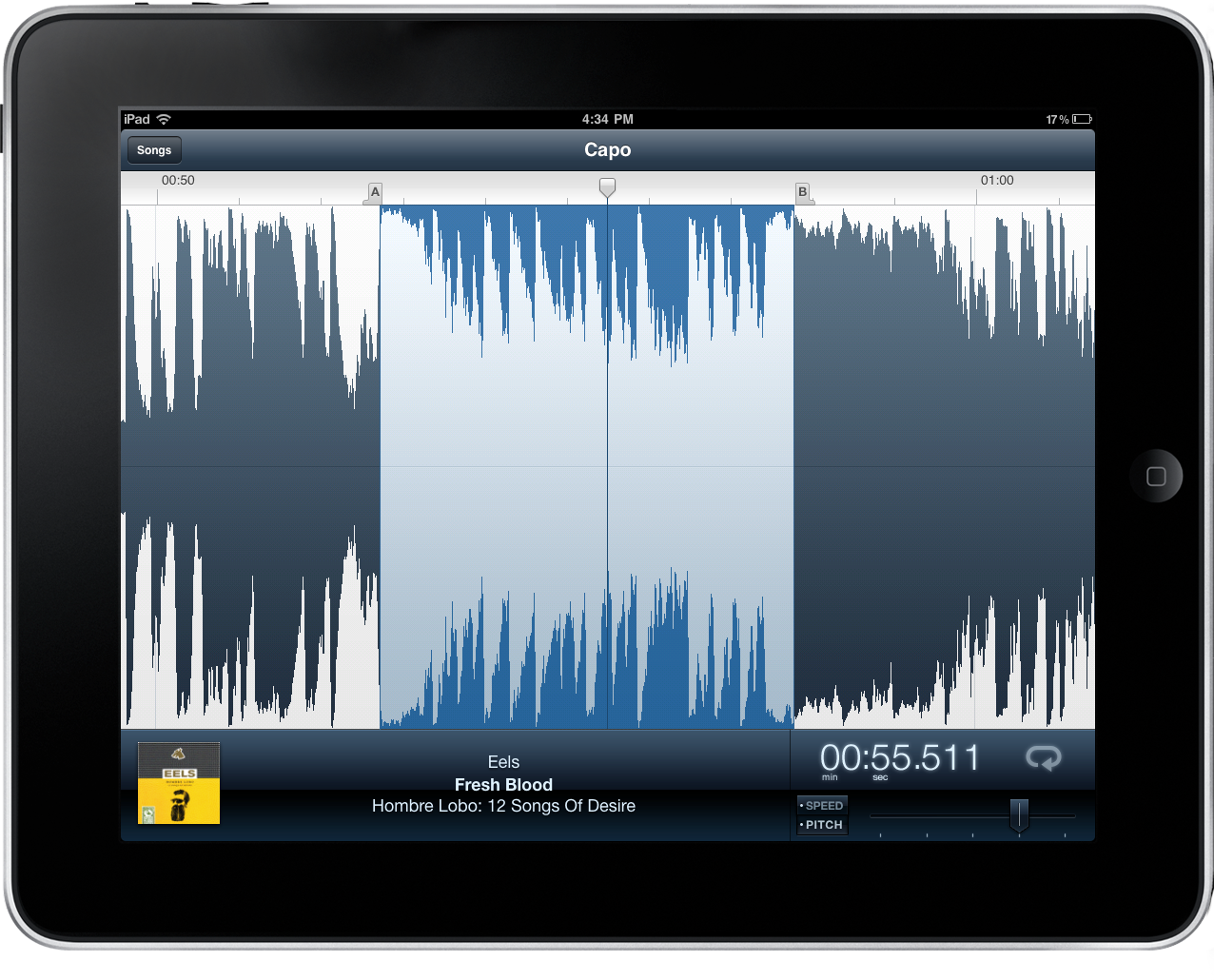
Capo is one of the brilliant Mac apps that often gets overlooked because of its niche value for musicians that have the will to not just follow tabs on a reading sheet, but to actually tear apart songs and learn them by ear. Capo intrinsically is an odd product in this respect – if you’re learning music by ear, why do you need an aid? I’ll tell ya: there’s nothing like being able to scribble all over a song, create your own tabs, and actually study what’s in front of you. You might want to fondle iTunes as you replay parts and study tracks, but you can ditch the pen and paper as you mark an important bridge, analyze the song’s chord progression, and figure out new riffs.

Read more

Access Extra Content and Perks

Founded in 2015, Club MacStories has delivered exclusive content every week for nearly a decade.

What started with weekly and monthly email newsletters has blossomed into a family of memberships designed for every MacStories fan.

Learn more here and from our Club FAQs.

Club MacStories: Weekly and monthly newsletters via email and the web that are brimming with apps, tips, automation workflows, longform writing, early access to the MacStories Unwind podcast, periodic giveaways, and more;

Club MacStories+: Everything that Club MacStories offers, plus an active Discord community, advanced search and custom RSS features for exploring the Club’s entire back catalog, bonus columns, and dozens of app discounts;

Club Premier: All of the above and AppStories+, an extended version of our flagship podcast that’s delivered early, ad-free, and in high-bitrate audio.

Learn more here and from our Club FAQs.


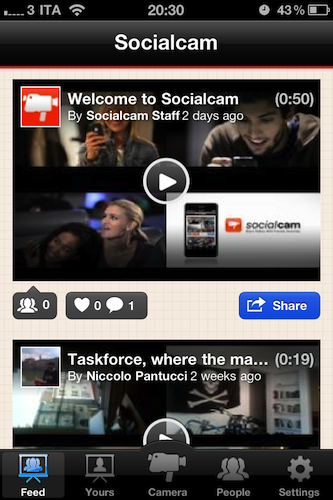
Socialcam, The “Instagram for Video”, Now Available. Our Review

A few weeks ago we talked about Socialcam, a new iOS and Android app from the creators of Justin.tv that’s aimed at revolutionizing the mobile video sharing space by offering a friendly user-experience heavily inspired by the current winner of mobile photo sharing apps, Instagram. Socialcam is finally available for free in the App Store and, after some quick tests, I can say this new app / service has a lot of potentialities to become the “Instagram for video”, but it needs a series of refinements in the settings to allow users to upload videos at the quality they want.

The strongest selling point of Instagram, in fact, is that it’s easy to use and, while images get compressed to enable faster uploading times on WiFi and 3G, users won’t notice the decrease in quality thanks to the filters provided by the app. Filters in Instagram are both a nice photographic addition and a way to “hide” the fact that photos are compressed at lower quality. Socialcam, however, doesn’t come with filters and videos are heavily compressed even when uploaded through WiFi. From what I’ve seen so far, this will make most videos look crappy on the iPhone 4 which, by the way, can actually do HD video recording. Socialcam should definitely offer some settings to allow users to upload and wait for the quality they want, as this could be great for videographers willing to share their creations on the go. Read more

Access Extra Content and Perks

Founded in 2015, Club MacStories has delivered exclusive content every week for nearly a decade.

What started with weekly and monthly email newsletters has blossomed into a family of memberships designed for every MacStories fan.

Learn more here and from our Club FAQs.

Club MacStories: Weekly and monthly newsletters via email and the web that are brimming with apps, tips, automation workflows, longform writing, early access to the MacStories Unwind podcast, periodic giveaways, and more;

Club MacStories+: Everything that Club MacStories offers, plus an active Discord community, advanced search and custom RSS features for exploring the Club’s entire back catalog, bonus columns, and dozens of app discounts;

Club Premier: All of the above and AppStories+, an extended version of our flagship podcast that’s delivered early, ad-free, and in high-bitrate audio.

Learn more here and from our Club FAQs.


iPad 2 Launch Details Roundup

There has been an avalanche of information regarding the iPad 2 launch since the Apple event last week so if you are confused, unsure or just want a refresher on the launch details just jump the break for a full roundup of all the important details!

Also be sure to check out our iPad 2 roundup to get all the details what exactly is new and awesome about the iPad 2.

Read more

Access Extra Content and Perks

Founded in 2015, Club MacStories has delivered exclusive content every week for nearly a decade.

What started with weekly and monthly email newsletters has blossomed into a family of memberships designed for every MacStories fan.

Learn more here and from our Club FAQs.

Club MacStories: Weekly and monthly newsletters via email and the web that are brimming with apps, tips, automation workflows, longform writing, early access to the MacStories Unwind podcast, periodic giveaways, and more;

Club MacStories+: Everything that Club MacStories offers, plus an active Discord community, advanced search and custom RSS features for exploring the Club’s entire back catalog, bonus columns, and dozens of app discounts;

Club Premier: All of the above and AppStories+, an extended version of our flagship podcast that’s delivered early, ad-free, and in high-bitrate audio.

Learn more here and from our Club FAQs.


Yes, The iPad 2 Is Carrier Unlocked

Over the weekend there were some reports that WiFi+3G iPad 2’s would be locked to a specific carrier after people read on the Canadian Apple site that “the iPad model you purchase is specially configured to work with either Bell, Rogers, or Telus.” It turns out that this wordage, whilst technically correct, is very confusing in that whilst the iPad is initially configured to work with a specific carrier, it can be reconfigured to work with other carriers at any stage.

This has been confirmed by a number of people from iPadinCanada to TUAW that have all confirmed from a variety of sources including Rogers Wireless, Apple Experts and Apple Support that you can swap SIMs and carriers with the iPad 2. The only issue (a very minor one) is that the iPad will need to connect to iTunes after the SIM has been swapped to download the new carrier settings, which is required for the 3G service to be usable.

So to be totally clear to all those interested, the iPad 2 is not carrier locked, rather Apple has just over-simplified the information it provided, because you can indeed reconfigure the iPad to work with another carrier with a simple SIM swap and iTunes sync. The one caveat to all this is of course the Verizon (CDMA) iPad 2 which will not be able to switch to any carrier using a GSM network because it does not contain a 3G chipset compatible with GSM networks.

[Via TUAW]

Access Extra Content and Perks

Founded in 2015, Club MacStories has delivered exclusive content every week for nearly a decade.

What started with weekly and monthly email newsletters has blossomed into a family of memberships designed for every MacStories fan.

Learn more here and from our Club FAQs.

Club MacStories: Weekly and monthly newsletters via email and the web that are brimming with apps, tips, automation workflows, longform writing, early access to the MacStories Unwind podcast, periodic giveaways, and more;

Club MacStories+: Everything that Club MacStories offers, plus an active Discord community, advanced search and custom RSS features for exploring the Club’s entire back catalog, bonus columns, and dozens of app discounts;

Club Premier: All of the above and AppStories+, an extended version of our flagship podcast that’s delivered early, ad-free, and in high-bitrate audio.

Learn more here and from our Club FAQs.