



A new Cydia tweak being developed by InfectionFX and TheZimm will add native turn-by-turn voice navigation to the Maps application for iPhone. A few alternatives like MapQuest offer turn-by-turn with voice today in the App Store; this tweak will plug directly into the native Google Maps software for iPhone. While not as full-featured as navigation system offered by Google on Android devices, this option will provide a relatively cheap and useful way to do turn-by-turn voice navigation on iOS without using multiple apps.
Could Nokia - Microsoft Partnership Lead To A Patent Settlement with Apple?→
Could Nokia - Microsoft Partnership Lead To A Patent Settlement with Apple?

Earlier today, Microsoft and Nokia announced a partnership to bring Windows Phone 7 to Nokia’s smartphones. Intellectual property activist Florian Mueller speculates this could facilitate the settlement of patent disputes between Apple and Nokia.
I can’t imagine that Apple would assert any of its patents against Windows Phone 7. Nokia is now covered by Microsoft as far as Windows Phone-based devices are concerned, and it’s been a long time since Apple and Microsoft had (and settled) a patent dispute. They need each other.
In the past months, the two companies fired back at each other with a series of lawsuits. I don’t know how much Apple “needs” Microsoft at the end of the day, but I do agree that resources would be better spent going after Android rather than Nokia’s alleged patent infringements.
Read the whole story here.
New MacBook Airs In June with Sandy Bridge CPU?
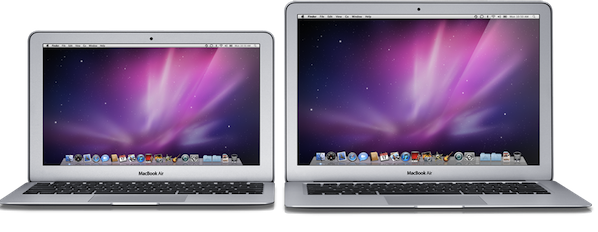
According to CNET, who cites “a source familiar with Apple’s plans”, the MacBook Air might receive an update in June with the new Intel Sandy Bridge processor:
Apple is targeting a MacBook Air update for this summer that will include a move to Intel’s Sandy Bridge processors, CNET has learned.
The MacBook Air refresh is expected in June, according to a source familiar with Apple’s plans.
Intel’s Sandy Bridge chips were initially delayed due to a hardware bug, but the company confirmed earlier this week that shipments will start on February 20th. As CNET notes, the MacBook Air family is still carrying Intel’s Core 2 Duo processors which are two generations behind Sandy Bridge; the MacBook Airs were last updated in October, announced by Steve Jobs at the “Back to the Mac” event.
Recent rumors suggested the MacBook Pros, due a refresh, will soon receive an update, possibly featuring Sandy Bridge. A MacBook Air announcement in June would play well with the WWDC 2011 timeframe, where Apple is expected to unveil the next-generation iPhone.
Pulse For iPad Is Now Faster, Always In Sync with Google Reader

Pulse, the social news reader for iPad, was updated last night to include a number of optimizations and new features. With the release of the new Flipboard a few months ago, Pulse had to play catch-up to face the iPad app of the year, which was updated with better Facebook integration, Google Reader support and huge improvements to the interface and navigation. Pulse, however, was never based on the same concept of Flipboard: where Flipboard is a social magazine that aggregates content from Twitter, Facebook and Google Reader, Pulse is a wall for your news. Moving out of RSS feeds to embrace Facebook links confirms the news wall theory.
The latest update to Pulse is aimed at enhancing speed and Google Reader sync. The app will now store changes offline and sync them back as soon as an internet connection becomes available. On the engine side, Alphonso Labs improved image loading times, refresh and scrolling, which feels much smoother now. The app was never really fluid for me, and I expect things to get even better once the iPad 2 with a faster processor ships.
Images can now be saved to the iPad’s photo library, and search has been refined to direct you to proper news sources. There is no doubt Pulse is getting better over time, however I would like to see a redesign of the interface, which I believe has fallen behind the elegance and minimalism of Flipboard.
Pulse News Reader is available for free here.
IconBox for Mac: 50% Off Today Only→
IconBox for Mac: 50% Off Today Only
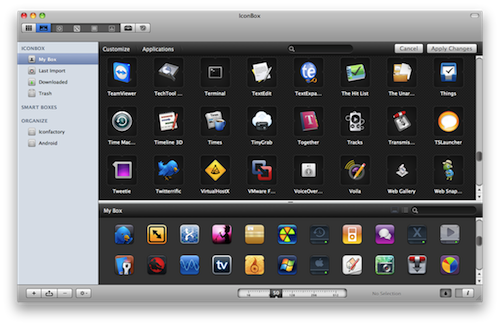
IconBox, icon organizer and customization tool for Mac, is available at $12.49 (50% off) at MacUpdate today only. From our review:
I really like IconBox. It’s akin to what LittleSnapper did for me for Flickr photos; IconBox is a library chock-full of considerate features that helps me organize interesting findings. While it may look intimidating at first glance due to its large feature set, there’s nothing to be afraid of. IconBox provides icon lovers new and old with a great toolset that’s persuaded me to use it over Panic’s own CandyBar 3.
If you’re that kind of user who customizes his Mac a lot, you should give IconBox a try.
Notebook Shipments To Slow Down in Q1, But Apple Is “Doubling Orders”
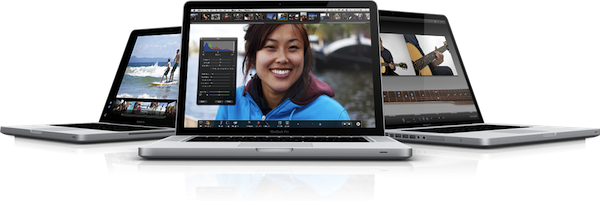
According to Digitimes, most notebook vendors will see lower shipments in Q1 2011, mainly due to defective Intel chipsets. Apple and Samsung, however, won’t experience this slowdown and Apple is even doubling the orders of some models.
With the exception of Samsung Electronics and Apple, first-quarter 2011 shipments of notebooks from brand-name vendors will be lower than expected, according to sources from Taiwan’s notebook upstream supply chain.
Samsung has been performing better than other brands by taking up deliveries from the suppliers, the sources noted, adding that Apple reportedly is revising upward its orders with the volume of some hot-selling models being doubled.
Do we see new MacBook Pros here, relatively soon? The line is due an update, and reports suggested Intel may be able to ship the Sandy Bridge by the end of February anyway. According to recent rumors, stock of some MacBook Pro models has been running low and a refresh is coming soon.
Fourth Beta Of 10.6.7 (10J855 ) Seeded To Developers
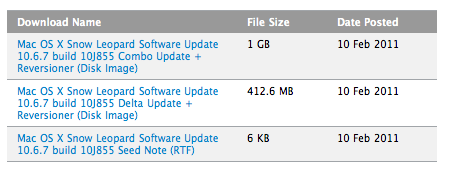
Earlier today Apple released a new developer beta of OS X 10.6.7. The build is the fourth since January, carrying number 10J855.
No known issues are reported in the seed notes, focus areas still include Mac App Store, AirPort, Bonjour, SMB and Graphics Drivers. At this point, it appears that the public release of OS X is getting closer, as Apple has been releasing new betas every week and the initial issues have been fixed and no new ones have been reported.
The third beta (10J850) was released on February 1st.
[Thanks, Bastian]
Yahoo Announces Livestand, Digital Newsstand For iPad and Android

In an attempt to revitalize its news and content delivery platform and target the new tablet market, today Yahoo announced Livestand, a digital newsstand for iPad and Android devices that will become available in the form of native apps in the first half of 2011. There is no release date and pricing information for now, but a few details about Livestand have been revealed.
Livestand, according to Yahoo, will deliver “a wealth of ever-changing content” from different publishers that will sign up to the project and it will be geared towards a user’s interest and contexts. It sounds like a personalized news platform à la Flipboard, although it isn’t clear at this point whether the information will be real-time, aggregated from social networks and websites, or published at regular intervals from external sources.
With Livestand, we’re using ad formats that evoke the emotion of TV advertising with a highly-visual magazine-like experience. And they’re combined with the effectiveness of an Internet ad that’s data-rich, actionable, even location aware. It’s all personalized and in context – just like our content.
In the first half of 2011, you’ll see Yahoo!’s vast digital content library come to life through Livestand from Yahoo! – from Sports, News, Finance, Flickr, omg!, and the Yahoo! Contributor Network – as iPad and Android tablet applications.
This is all Yahoo has announced for now. It sounds fairly interesting and promising – honestly though, I’m really looking forward to what comes next for Flipboard. Sorry, Yahoo.
Advertisers Not Happy About Apple’s iAds?
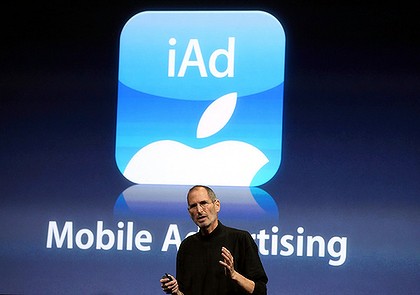
Months after the introduction of Apple’s iAd advertising platform, it looks like advertisers aren’t happy about the service at all. According to a report posted by TechCrunch, many developers have noticed a massive slowdown in iAd’s fill rates recently, especially after the New Year:
The fill rate—what percentage of the ad inventory is actually filled with an ad—for two separate developers plummeted from 18 percent to 6 percent. And in a few instances for some newer apps, none of the ad slots were getting filled, compared to nearly complete fill rates from other mobile ad networks.