
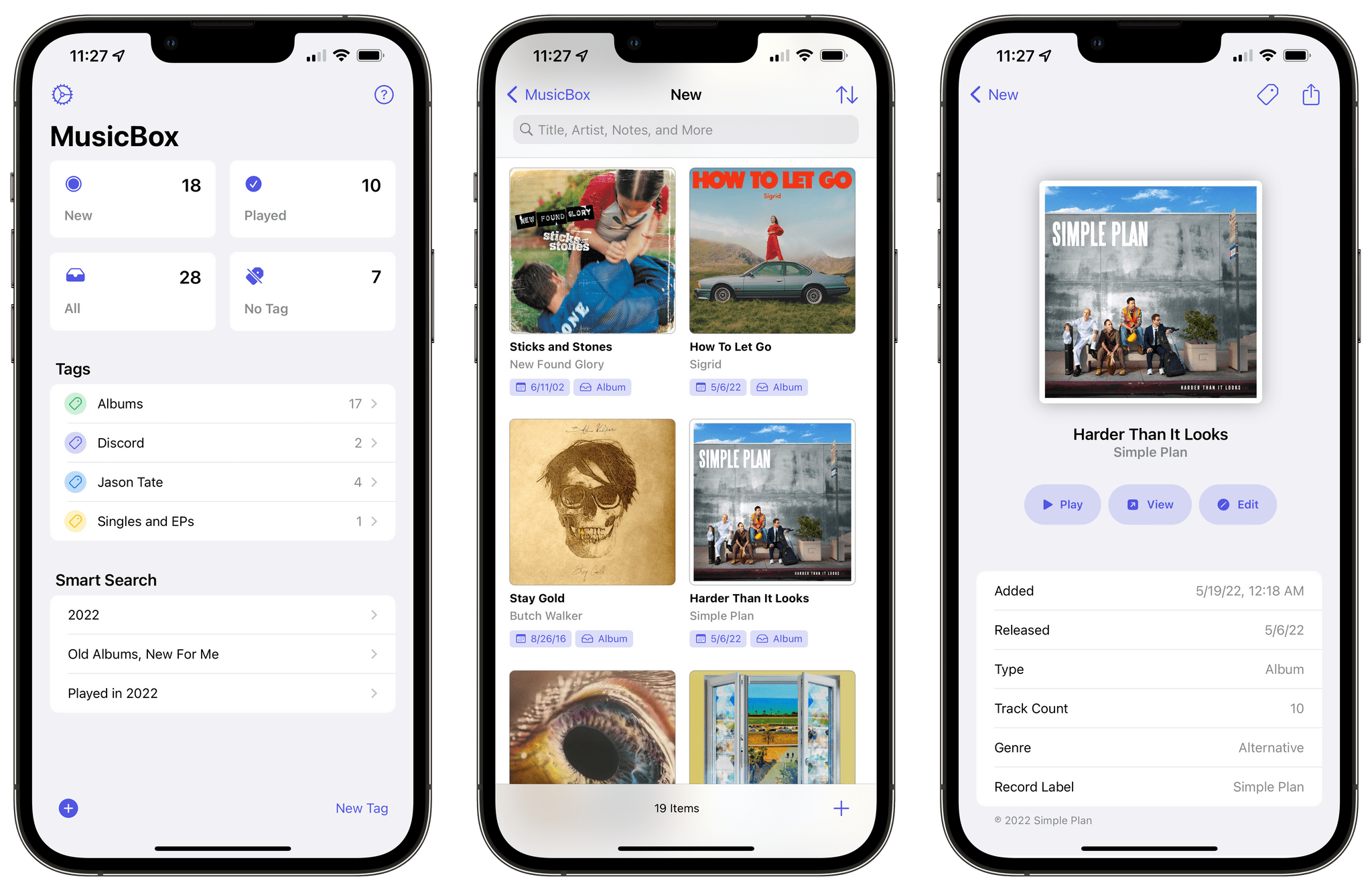
Earlier this week on MacStories, I reviewed MusicBox, Marcos Tanaka’s fantastic new app to save music for later. As I explained in the story, I’ve looked for a utility specifically optimized for Apple Music to save singles and albums for later for a long time, and MusicBox does exactly that. If you missed it, go...
 A DAC Review, a Marvis Tip, and Display Preferences Keyboard Shortcuts for Mac
Here are the highlights from the Club MacStories Discord this week: Nicolas posted a review of the Khadas Tea, a portable DAC for iPhone that attaches via MagSafe and lets you use wired headphones with iOS. I’ve been testing mine a lot this week and I agree with everything Nicolas wrote. Member OneMorningStar shared a...
MusicBox Review: The ‘Listen-Later’ Music App I’ve Been Waiting For
Longtime MacStories readers know how much music is important to me. I Made You a Mixtape, which I published six years ago, continues to be one of my favorite, most intimate things I’ve ever published for a simple reason: it tells the story of the importance music had in my life when I was growing up, the connections it helped me make, and the lifelong memories it created. I am not exaggerating when I say that I feel weird inside if I don’t listen to music every day. My love for music – all kinds of music – is also why I spent the past few years rebuilding a personal, offline music library and creating a setup that lets me enjoy music without distractions.
Now, I’ve covered plenty of music apps over the years on MacStories, starting from desktop utilities for music controls to Apple Music clients based on Apple’s official API, music widgets, and even Last.fm scrobblers. But there’s been one particular type of music app, which I’ve always wanted someone to build, that has eluded my coverage of apps on MacStories in over 13 years of reviews: a read-later utility, but for music you want you want to save and listen to later.
That is, until today. MusicBox, the latest app by indie developer Marcos Tanaka, is the “listen-later” music app of my dreams, the one I’ve wanted to use for years and that someone finally made as a Universal app for iPhone, iPad, and Mac. It’s rare for me these days to find new apps that elicit this kind of enthusiasm, but when I do, I know I’ve stumbled upon something special. MusicBox is one of those apps.
This review is going to be pretty straightforward. If you’re a music lover and use either Apple Music or Spotify, and if you feel like you discover more interesting music than you can possibly consume in a day, MusicBox is for you. Open the App Store, spend $2.99 (there are no subscriptions or In-App Purchases in the app), and you’ll get what is likely going to be one of your favorite apps of 2022. Then, if you want to learn more about what the app does, how it integrates with Apple Music, and how you can set it up on your device, come back to this story and let’s dive in.
 Our iPadOS 16 Wishes
 John
John
Three System Features That Should Become Standalone Apps in iOS 16
WWDC is three weeks away, which means soon enough we’ll see what Apple has been working on for iOS and iPadOS 16. Following last year’s quality-of-life updates, I expect Apple to build upon the foundation they laid two years ago with widgets on the Home Screen in iOS 14, making those widgets more interactive and...
A Special Shortcut Icon, Bike Meets Obsidian, Drafts’ URL Scheme and Dictation, and a Drafts/Todoist Action Group
Here are the highlights from the Club MacStories Discord this week: Nate, the winner of the Best Media Shortcut category for Automation April, shared a MacStories-themed red icon for iPod Shuffle, their winning shortcut. John shared an interesting idea on how to combine Obsidian and Bike, which he reviewed earlier this week. Member Marc looked...
Our watchOS and tvOS Wishes
Remembering the iPod, Downloading YouTube Videos on iPad, Shortcuts and AppleScript, and Recipe RSS Feeds
Here are the highlights from the Club MacStories Discord this week: The highlight of the week in the Apple community has certainly been Apple’s announcement that they are discontinuing the last remaining iPod, the iPod touch. That inspired Alex to ask our members to share their iPod photos and memories, and the resulting thread in...