
Here are the highlights from the Club MacStories Discord this week: Earlier this week on our Discord server, I asked our members who have installed the iOS 16 beta to share some examples of the custom Lock Screens they’ve set up so far. The resulting thread is a fascinating look at how early iOS 16...
 iOS 16, iPadOS 16, and macOS Ventura Public Beta Previews
 John
John
AppStories Episode 286 - iOS 16, iPadOS 16, and macOS Ventura Public Beta Previews
0:00
01:06:59
01:06:59
To kick off our Summer OS Preview Series, Federico and John cover the top new features of iOS and iPadOS 16 and macOS Ventura, that are now available as part of Apple’s public beta program.
A Month with iOS and iPadOS 16: A New iPad Era
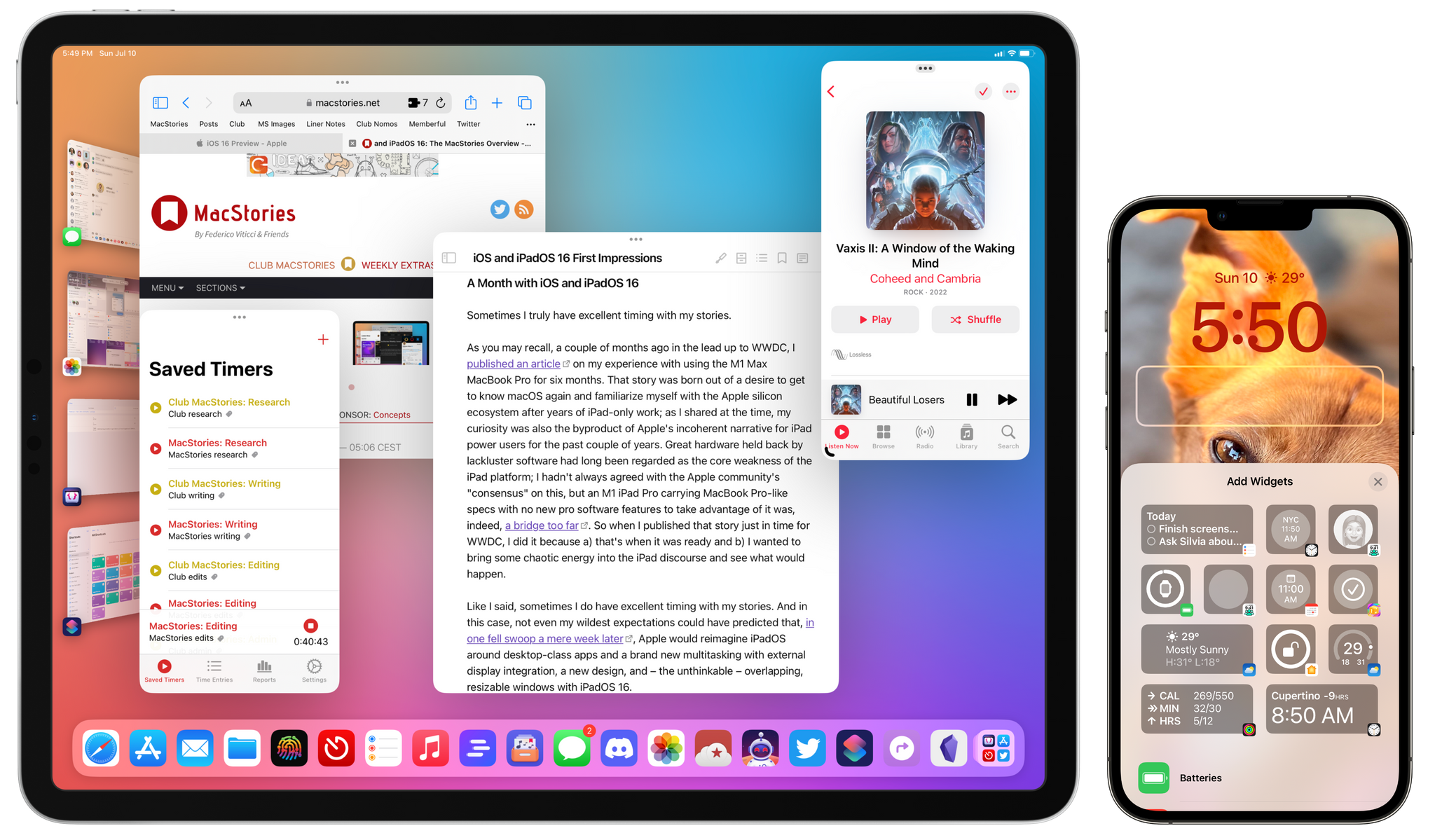
Sometimes I truly have excellent timing with my stories.
As you may recall, a couple of months ago in the lead-up to WWDC, I published an article on my experience with using the M1 Max MacBook Pro for six months. That story was born out of a desire to get to know macOS again after years of iPad-only work; as I shared at the time, my curiosity was also the byproduct of Apple’s incoherent narrative for iPad power users for the past couple of years. Great hardware held back by lackluster software had long been regarded as the core weakness of the iPad platform; I hadn’t always agreed with the Apple community’s “consensus” on this, but an M1 iPad Pro carrying MacBook Pro-like specs with no new pro software features to take advantage of it was, indeed, a bridge too far. So when I published that story just in time for WWDC, I did it because a) that’s when it was ready and b) I wanted to bring some chaotic energy into the iPad discourse and see what would happen.
Like I said, sometimes I do have excellent timing with my stories. And in this case, not even my wildest expectations could have predicted that, in one fell swoop a week later, Apple would reimagine iPadOS around desktop-class apps and a brand new multitasking with external display integration, a new design, and – the unthinkable – overlapping, resizable windows with iPadOS 16.
Today, Apple is releasing the first public betas of all the operating systems that will launch to the wider public later this year: iOS 16, iPadOS 16, macOS 13 Ventura, and watchOS 9. We’re going to have overviews of all these public betas today on MacStories.1 As you can imagine given my annual reviewer responsibilities, I installed both iOS and iPadOS 16 as soon as they became available after the WWDC keynote on my iPhone 13 Pro Max and 12.9” iPad Pro with M1, and I’ve been using them as my daily drivers for the past month.
Obviously, I have some early thoughts and first impressions to share on iPadOS 16: it is fundamentally changing my relationship with the iPad platform and my workflow, which has been untouched for years since the introduction of multiwindow in iPadOS 13. Stage Manager, while still in need of refinements in several areas, is a game-changer for people like me, and it signifies a major course correction on how Apple thinks about iPadOS for power users.
But I should also say that I’m equally intrigued by iOS 16, which marks Apple’s return – after two years – to user customization with a drastic revamp of the Lock Screen, which can now be personalized with widgets, multiple wallpaper sets, and deep integration with the Home Screen, Focus, and even Apple Watch. The new Lock Screen is the proper follow-up to iOS 14 widgets we’ve been waiting for, and it’s going to be the feature that will push millions of people to update their iPhones to iOS 16 right away later this year. Besides the Lock Screen, there are dozens of other quality-of-life improvements to built-in apps and system intelligence that have caught my attention in iOS 16 in the past month, from the welcome updates to Mail and Reminders to system-wide unit conversions based on Live Text, Safari tab groups, and more.
There’s a lot to uncover in iOS and iPadOS 16, and I can’t possibly get into all of it today with this story. All the details and final opinions will have to wait for my annual review in the fall. Instead, below you’ll find a collection of initial thoughts, impressions, and suggestions for aspects of iPadOS and iOS 16 I’d like Apple to improve this summer. As with last year’s preview story, I’m going to include two recap segments at the end of each section with a list of improvements I’d like to see in iPadOS and iOS 16 before the public release.
Let’s dive in.
Exploring Reading and Research Apps
 Kanban in Reminders and Daily Notes in Apple’s Notes App
Here are the highlights from the Club MacStories Discord this week: Sam had a great idea on how to use drag and drop inside list groups for the updated Reminders app in iOS 16 to simulate Kanban-like behavior in Apple’s app. I think I’m going to steal this approach. Joshua created a shortcut to bring...
Mac App Spotlight
Video Apps, Stage Manager Terminal Commands, and A More Intuitive Mail Toolbar
Here are the highlights from the Club MacStories Discord this week: In the always-busy Apps channel, Bryan asked for recommendations on apps to watch local videos. By poking around the Console on macOS Ventura, Eric found some Terminal commands to tweak the behavior of Stage Manager for Mac. Don’t miss the full list with Eric’s...
App Grab Bag
Five iOS 16 Features You May Have Not Seen Yet
As is always the case for major new versions of iOS and iPadOS, there are hundreds of smaller features that don’t make the cut for Apple’s presentations and have to be discovered by users over the course of the beta period. Longtime MacStories readers know that coming across these changes to the operating systems is...