Federico Viticci

10758 posts on MacStories since April 2009

Federico is the founder and Editor-in-Chief of MacStories, where he writes about Apple with a focus on apps, developers, iPad, and iOS productivity. He founded MacStories in April 2009 and has been writing about Apple since. Federico is also the co-host of AppStories, a weekly podcast exploring the world of apps, Unwind, a fun exploration of media and more, and NPC: Next Portable Console, a show about portable gaming and the handheld revolution.

Sponsor: MindNode

My thanks to IdeasOnCanvas for sponsoring MacStories this week with MindNode.

MindNode is an easy to use and elegant mind mapping app for iOS and OS X. With a clutter-free interface, MindNode lets you brainstorm and connect ideas on an infinitely expanding canvas that can hold as many ideas as you like. MindNode’s focus on simplicity allows you to easily move between “nodes” and mark the most important ones with bold text or bigger font sizes.

MindNode has been one of my favorite apps for a long time. I don’t use iCloud much, but I found MindNode’s implementation to be extremely reliable at keeping my maps in sync across my iPhone and iPad, allowing me to start jotting down thoughts on one device and finish on the other. Whenever someone asks me for a mind mapping app recommendation, I personally mention MindNode because it’s been a great tool for me.

Find out more about MindNode here.


Rdio 2.1.3

Rdio 2.1.3

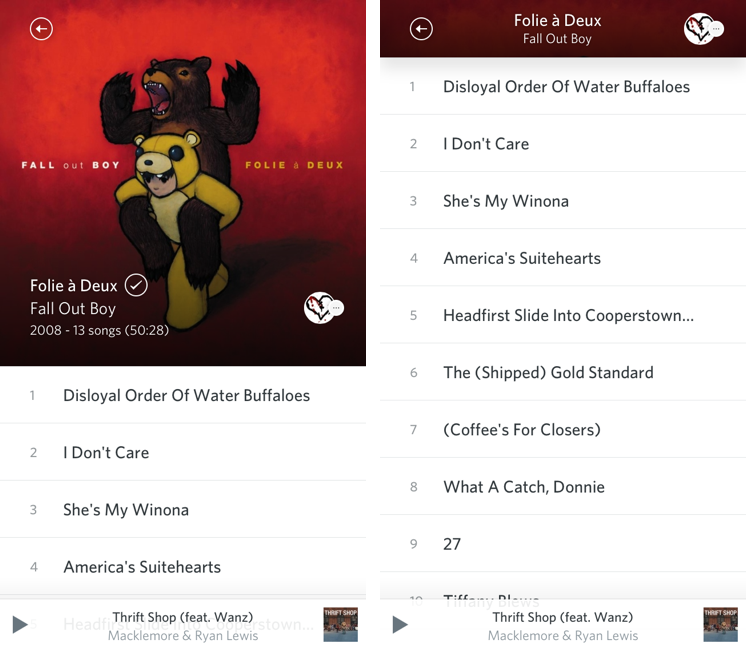
In a seemingly minor 2.1.3 update to their iOS app, Rdio today introduced a gorgeous new list view for albums and playlists on the iPhone. In the previous 2.1 update, Rdio added a new album art view:

Notably, Rdio now comes with a “long press” gesture to tap & hold any item to bring up a new menu to sync, play, share, subscribe, and more. The new menu will “slide up” an item’s album artwork from the bottom, revealing a color-coded background that seems to be inspired by iTunes 11′s way of using the primary colors of an album to generate a background. Personally, I like how this allows each album to have a very unique sharing menu; I’m also a fan of this addition because the developers put a “More by…” link in the menu.

With the new list view, a larger artwork is displayed at the top of the screen with text overlays for album/artist information and rounded avatars for your friends who are listening to the same album/playlist (another new feature of this update). As you scroll up the first song, the album art becomes smaller until it turns into a title bar with a back button, name of album, and social profile icons. At the bottom, you’ll find  stats about the album such as total plays and number of playlists for that album. It’s lovely visual refresh with a clever attention to detail and animations.

I am a big fan of Rdio’s latest updates on iOS. I still think the iPad app could use some personality (today’s UI refresh is iPhone-only), but, overall, I’m impressed with Rdio’s new direction.

Permalink

Pinbrowser for Pinboard

pin

pin

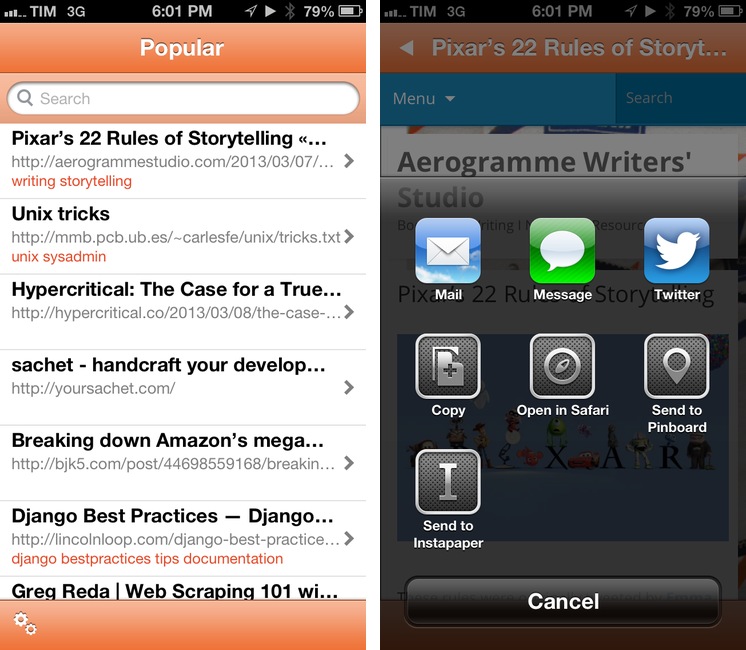
There’s been a rise in popularity for Pinboard clients lately, and I very much like this trend. I use Pinboard on a daily basis to save and discover links of interest, and I really appreciate the business model of the service. On iOS, I use Pinbook to save links (primarily thanks to a bookmarklet) and Pushpin to browse Popular and Network bookmarks on my iPhone. Pinbrowser is a new Pinboard app focused on letting you browse the Popular feed, users, and tags.

Read more


Philips Releases Hue API and iOS SDK

hue

hue

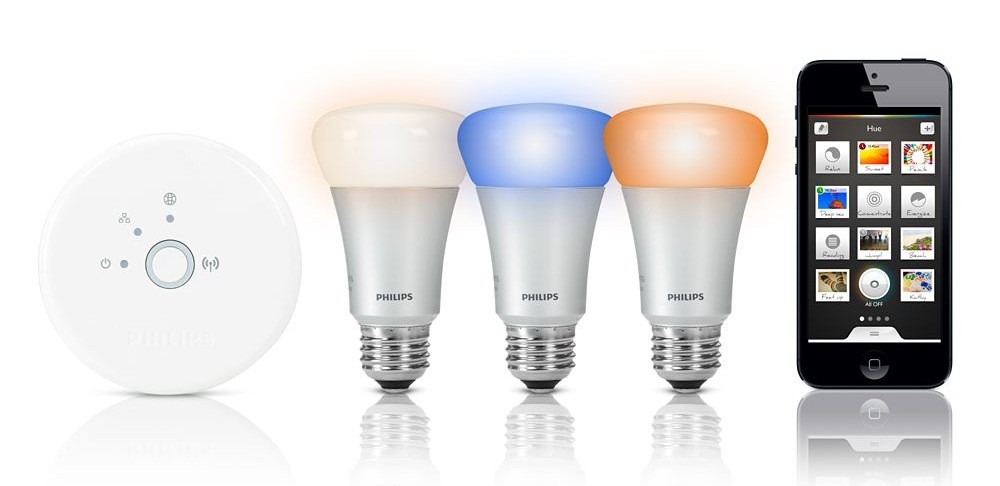
As reported by TechCrunch, Philips has released an API and iOS SDK for the hue, the company’s wireless lighting system that gives users control through an iOS app.

We’re now at a point where there are already about 10 applications that have been shared and built from the unofficial developer community for new applications around Hue,” explained George Yianni, Hue System Architect in an interview. “Now what we want to do as Philips is we actually want to help and grow and encourage this community, and give them tools and proper documentation. Also, we want to give them commitment that this is the API and we’re going to support it and it won’t change overnight.

Prior to the official release of an API and SDK, third-party developers had already reverse-engineered Philips’ apps to create their own solutions to control hue’s system (based on a “bridge” that communicates with the actual lightbulbs). An iOS app called Ambify lets users pair their music with hue lights; here at MacStories, I linked to a video back in November showing an unofficial hue Python library that could work with Pythonista to automate the process of switching lights on and off.

The API opens a lot of interesting possibilities for third-party software and hardware makers. The hue already shipped with its own options for remote control and “presets” (called “recipes”) for different lighting settings aimed at providing users with ways to easily replicate specific color combinations based on photos (available in the app’s photo library) or targeted towards lifestyle improvements (such as waking users up in the morning with a gradual light increase).

With an SDK and API, developers can now take advantage of these concepts: aside from the “simple” remote control features, imagine apps that could activate specific hue settings when you’re reading or watching a movie, parse voice-based commands with dictation, or integrate with an iOS device’s Reminders, Calendars, or Location Services. On the hardware side, it should be possible – at least in theory – to develop gadgets capable of combining personal data with hue to leverage Philips’ “smart” lighting system in completely new ways. An obvious implementation would be for health and fitness-monitoring accessories such as Nike’s FuelBand; as far as rumors go, an Apple iWatch could integrate with hue to exchange an user’s data and personal stats (Apple isn’t new to third-party collaborations of this kind).

Right now, Philips’ hue API is promising and shows great potential for more forward-thinking software and hardware implementations. You can read more on Philips’ website.


Send Multiple Tasks To OmniFocus Mail Drop At Once With Drafts and Pythonista

Send Multiple Tasks To OmniFocus Mail Drop At Once With Drafts and Pythonista

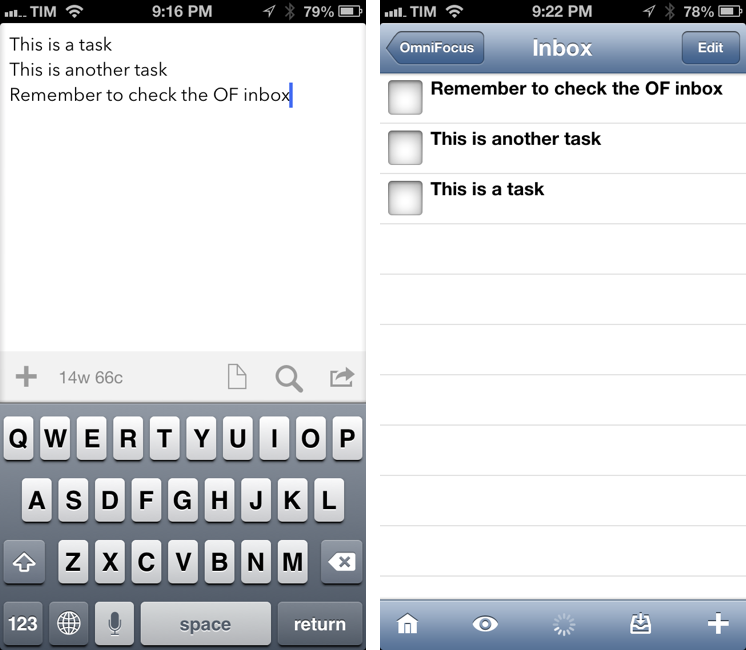
Nice workflow by Nathan Henrie to send multiple tasks to OmniFocus at once using Mail Drop, Drafts, and Pythonista:

I’ve also recently started playing with Pythonista, and I came across a Python script written by the dev himself that creates a little SMTP server and sends email directly from Pythonista. Between the two, I found it pretty easy — even for a beginner like me — to put together a combined Drafts / Pythonista workflow that makes for a superior way to import a bunch of tasks to OmniFocus at once (aka “brain dump”).

The Python part is based on the same script I covered in November to send emails through Pythonista; Nathan added a clever Drafts integration by splitting multiple lines (from the draft) into separate email messages sent to your Mail Drop address. Make sure to check out his video to see the workflow in action; I have started using it myself and I like how fast tasks go from Drafts onto OmniFocus via email (I have configured the script with my Gmail address using 2-step verification).

I have become a big fan of OmniFocus Mail Drop. It’s been extremely fast and reliable in my experience, and it works well with Drafts’ email actions.

Permalink

Launch Center Pro 1.1

LCP

LCP

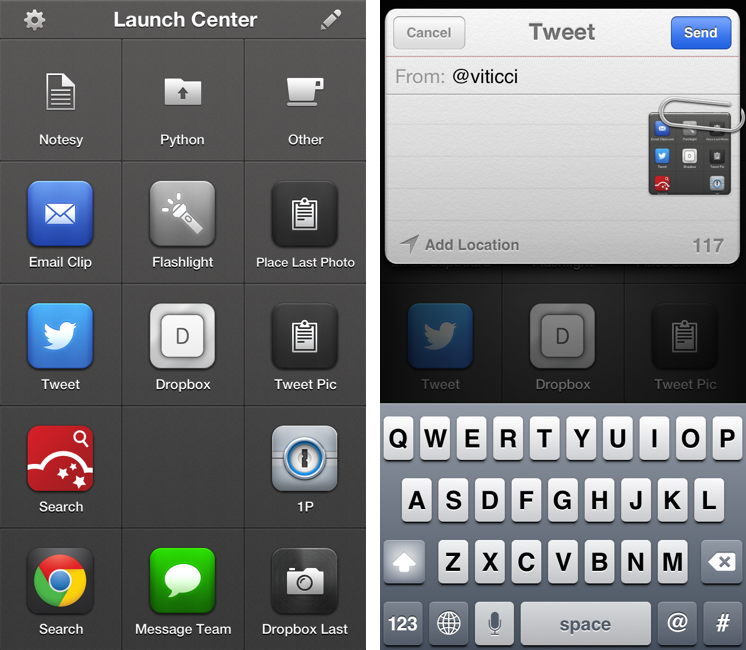
Released in December 2011, App Cubby’s Launch Center re-ignited interest in iOS URL schemes – shortcuts to automate communication between apps and get specific things done faster with less manual tapping and interactions. Its direct sequel, Launch Center Pro, was released in the summer of 2012 and doubled down on the entire idea of automating iOS tasks by providing a “Home screen for your actions” to allow users to better and more visually organize their shortcuts.

Launch Center Pro 1.1, released today, focuses on improving three key aspects of Launch Center Pro: native in-app actions, the Action Composer, and TextExpander support in URLs. Read more


Chris Hadfield And His iPad In Space

Chris Hadfield And His iPad In Space

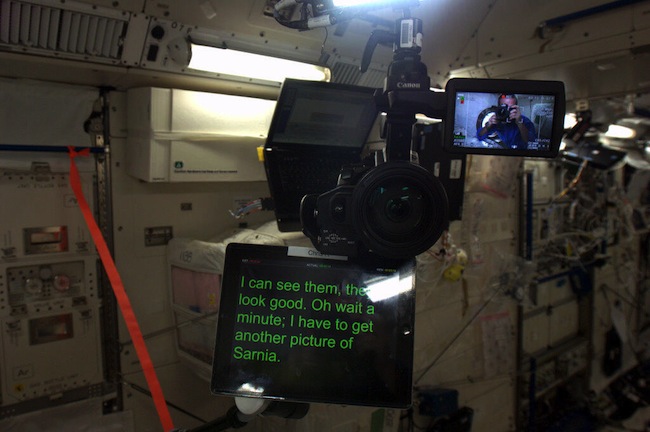
Canadian Space Agency astronaut Chris Hadfield has been orbiting Earth 16 times a day on the International Space Station. When he’s not busy operating advanced machinery like the Canadarm2, Hadfield seems to be enjoying his iPad a lot.

I got curious when I saw Hadfield’s photo of his iPad teleprompter yesterday on Twitter; as noted by Cult of Mac, the app should be Teleprompt+. I did some research, and it looks like Hadfield is using his iPad as an entertainment hub for the entire ISS as well. As written by the Canadian Space Agency:

Chris Hadfield has put a lot of music on International Space Station (ISS) already, directly from his iPad ─ thousands of songs.

In seeing the teleprompter photo, however, I also wondered: how did Hadfield lock the iPad in landscape mode in absence of gravity? The iPad has an accelerometer, and my limited science knowledge told me that gravity is a factor to consider when developing devices with embedded accelerometers on Earth. Did he lock his iPad in landscape mode before leaving Earth?

Of course, I asked Dr. Drang. The simple answer is: give the iPad a shake. The complex, scientific answer is here.

Permalink

Google Field Trip

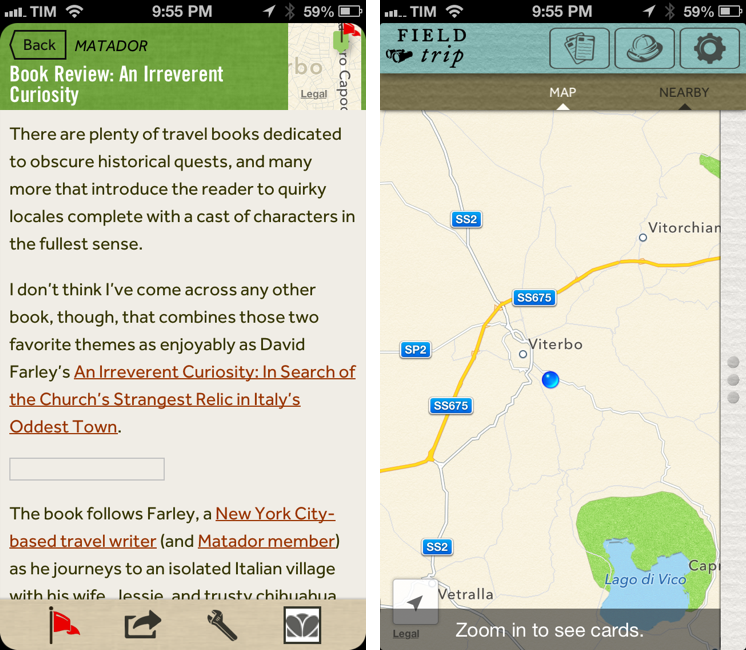
Earlier today, Google released Field Trip for iPhone, a tour guide app to alert users through notifications of ”cool, hidden, and unique things” that are nearby. Using your location, the app can provide notifications for “your interests” such as Food, Drinks & Fun, Museums, Deals, and more. The app uses various data providers, including their own Zagat, to provide information about places to the user.

Released on Android in the Fall of 2012, Field Trip can “speak” notifications using either a Bluetooth headset or the iPhone’s speaker. A cool thing about Field Trip, in fact, is that you have control over audio output in the Settings: you can choose whether the app should speak the name of an interesting place or also its description, or if you want to enable the app’s audio notifications when device is docked, connected via wired headset, or through a Bluetooth device. This part of the app is really well done. Field Trip can even detect while you’re driving (my guess is through GPS).

The interface and data availability leaves much to be desired. In terms of UI design, my personal taste doesn’t like the choices made by Google: there’s a strange mix of fonts, plus rounded and non-rounded flat buttons that make browsing Field Trip confusing. Furthermore, the app puts buttons to switch between views in the title bar rather than a bottom toolbar – something that is utterly confusing on iOS in my opinion. Read more


Jailbreak Tweak Creates An iOS Services Menu with URL Schemes

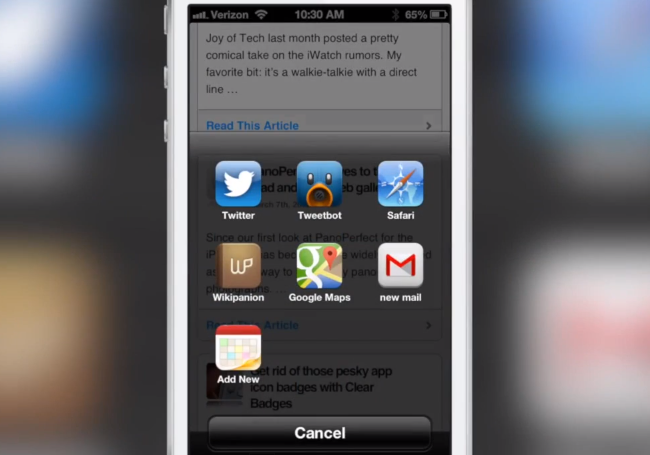
I don’t normally cover jailbreak tweaks here at MacStories, but I’m intrigued by ActivityAction after reading Jeff Benjamin’s preview over at iDownloadBlog.

ActivityAction is a an extension of Ryan Petrich’s Action Menu – one of my favorite tweaks when I had a jailbroken device. ActionMenu extends Apple’s Copy & Paste popup menu with additional actions and services to deal with selected text or an app’s content area. ActivityAction adds a button that lets you set up UIActivity-like actions based on app’s bundle identifier and its URL scheme. Read more