Federico Viticci

10758 posts on MacStories since April 2009

Federico is the founder and Editor-in-Chief of MacStories, where he writes about Apple with a focus on apps, developers, iPad, and iOS productivity. He founded MacStories in April 2009 and has been writing about Apple since. Federico is also the co-host of AppStories, a weekly podcast exploring the world of apps, Unwind, a fun exploration of media and more, and NPC: Next Portable Console, a show about portable gaming and the handheld revolution.

An Interesting iOS App Store Upgrade Example

Gabe Weatherhead:

In the end, I probably would have paid the full price for the new version even though it’s really only a re-skin of the old version. But I still applaud their cleverness. They’ve given their customers a way to feel good about an upgrade and apparently found a way to do it without relying on typical IAP unlocks to power their business.

My understanding is that the app comes with three separate In-App Purchases: two for a discounted upgrade, and one for people who don’t have previous versions of the app installed. If old versions are recognized by the app on the same device, the discounted upgrade IAP is activated; otherwise, the app only shows the full-price, $9.99 IAP to “unlock” the new app.

It’s not exactly a straightforward process and I’m not sure that Apple is a fan of the idea of having a standalone “Upgrade” app, but it’s clever considering the App Store’s limitations. I’d be curious to know how well this goes for Headlight Software.

Permalink

Essence Icon Set for iOS 7

When we first saw iOS 7 in June, we knew that we wanted to design an icon set for it. We took our time and we carefully crafted Essence, a set that includes 300 icons, ready for iOS 7.

Essence is exactly what you need to save time and get your app design ready for iOS 7. With a total of 300 unique designs, Essence offers high-quality, detailed, attribution-free icons that cover a wide range of categories from productivity and lifestyle to weather and food. Each of the 300 icons includes a filled “selected” version — so you can choose which icon is best for your app.

I helped my girlfriend Silvia launch this icon set for developers creating apps for iOS 7. Here’s the blog post about it.

The set is available here, and it’s on sale at $19.99 for a limited time.

Permalink

Unity Adds Support for iOS 7 Game Controllers

From the Unity blog:

Like most mobile games developers, we’ve been closely following what important additions and changes the recently released iOS 7 update has made. One of the biggest and most exciting of Apple’s initiatives is the standardization of game controllers for iOS-based platforms. So we’re happy to tell you that, in addition to several important bug fixes for Xcode 5 / iOS 7 (Build&Run, WebCamTexture and status bar), Apple Controller support is included with 4.2.2! This blog post aims to answer most common questions this addition will raise and serve as a short tutorial on how to add support for iOS Game Controllers to your game.

With iOS 7 now approaching its first full month of public availability, game companies are starting to show their support for iOS 7’s new Game Controller APIs. Besides Unity, ClamCase announced their first official controller and leaked photos showed one from Logitech.

With an Apple media event reportedly scheduled for October 22, I have to wonder if further game controller announcements will be held back until that date. Apple likes to invite developers on stage, and third-party controllers for iOS 7 and OS X Mavericks would certainly make for an interesting demo, perhaps showing compatibility for both iOS devices (new iPads are rumored to be announced at the event) and Macs.

As I argued in June, there is great potential for game controllers and AirPlay, and I’m curious to see if and how Apple will start promoting this feature more aggressively.

Permalink

Scale Model of Apple’s New Spaceship Campus

The concept of the building,” Oppenheimer said, “is collaboration and fluidity. It’ll provide a very open-spaced system, so that at one point in the day you may be in offices on one side of the circle and find yourself on the other side later that day.

Mercury News got an exclusive sneak peek at a scale model of Apple’s new “spaceship” campus, which goes before the Cupertino City Council Tuesday for an initial vote. The photos provide some context to Apple’s impressive proposal – not just for the spaceship-shaped building, but for the entire ecosystem that Apple plans to grow around it.

Check out the full gallery here, and a video of the model on YouTube.

Permalink

Status Magic Adds Support for iOS 7 Status Bars

Status Magic

Status Magic

I don’t like screenshots of iOS apps that show status bars cluttered with icons for carriers and Bluetooth, or, worse, red battery indicators. While it’s generally not the most important aspect of an app review, I do think that using screenshots of iPhone and iPad apps with clean status bars shows a level of care that extends beyond the written text. For app developers who only have a few slots for screenshots in iTunes, screenshots that don’t have poor cellular reception and rotation lock or Bluetooth icons are essential for a non-sloppy, professional, thoughtful presentation of their product. It’s a little thing, but I care about it.

Fortunately, other people care about this minor aspect of iOS apps as well. Created by Shiny Development, Status Magic is one of my must-have Mac apps because it solves the status bar problem with ease and a good feature set: once you have the screenshots you need to “clean up”, you can drop them into Status Magic, tweak some options, and export the cleaned up, more professional-looking screenshots with status bar that don’t have six icons in them. Read more


Trucks and Cars

David Sparks:

As the analogy goes, the desktop PCs are the trucks and the emerging classes of tablets and pocket computing devices, such as iPhones, are the cars. When he made the analogy, it made a lot of sense to me but I felt like it was still something pretty distant into the future. I don’t think that’s the case anymore. Looking at my new iPhone, it has a 64 bit processor and is more powerful than anything I could’ve imagined just a few years ago. Moreover, software developers are getting smarter about ways to implement these touch devices in a way that’s quick, efficient, and just better than a traditional PC.

For geeks and professionals, there are still many tasks an iOS device isn’t good at. And yet, when you think about the fact that just three years ago stuff like this, this, or this didn’t exist, I do believe, like David, that Jobs was absolutely right in his prediction.

Permalink

Launch Center Pro 2.0 Review

Launch Center Pro, developed by Contrast (née App Cubby), can be considered the app that spearheaded a small revolution among iOS power users. Initially envisioned as a Notification Center tool, following an Apple rejection in late 2011 the app was released as Launch Center; in the summer of 2012, App Cubby completely reworked the inner workings and design of Launch Center and turned it into Launch Center Pro, allowing users to create custom actions with personalized URL schemes and therefore kicking off a series of months that saw the apperance of several other apps focused on actions, URL schemes, and automated workflows. In looking back at the past year of iOS automation, I think that Launch Center Pro 1.0 was a major turning point in that it proved that many iOS users wanted to create actions and workflows to save time and be more productive.

In March 2013, App Cubby released Launch Center Pro 1.1, which focused on TextExpander integration in URL schemes, Action Composer tweaks, and deeper system integration with clipboard actions for text and more. The app’s library of supported third-party apps kept growing as more developers took the opportunity to address the interest sparked by Launch Center Pro to add URL schemes to their apps. I remember, however, that back then App Cubby’s David Barnard – the same developer behind the recently released and successful weather app Perfect Weather – started telling me about his plans for the future of Launch Center Pro and expanding to other supported services, apps, and devices.

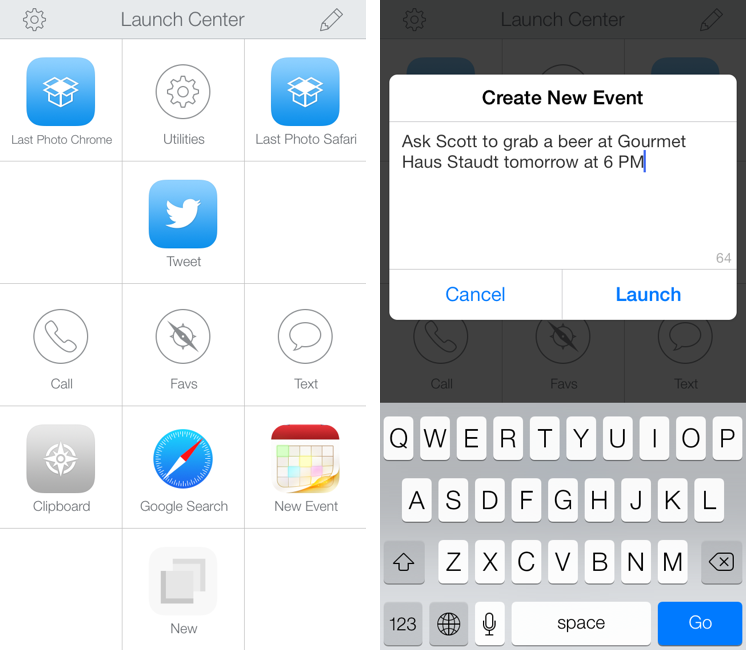
With today’s Launch Center Pro 2.0 for iPhone, a free update for existing customers, Contrast wants to ask: in the era of Drafts actions and Control Center, can Launch Center Pro still have a spot on a user’s Home screen, and possibly in the dock? Read more


Crunch Resource Extractor Updated with iOS 7 Support

In January 2012, I reviewed Crunch by Pragmatic Code, a Mac app to identify and extract icon and other resources from iOS apps:

Crunch is capable of automatically detecting apps from your iTunes library and filtering them by platform — iPhone, iPad, or Universal. Crunch will also install a QuickLook plugin, so you’ll be able to see each app’s icon overlaying the standard .ipa file preview in the Finder and QuickLook windows. Once you’ve selected an app, you can hit Export, and Crunch will ask you where you’d like to save an app’s resources, and if you’d like to keep all files with their existing folder hierarchy, or only Retina-ready @2x image files. The latter option can be particularly useful to pinpoint images ready for the rumored iPad 3′s Retina Display found inside several Apple apps for iOS.

Today, Pragmatic Code released version 1.5 of the app, which comes with support for iOS 7’s superellipse shape and a new Icon Composer tool to render icons from artwork.

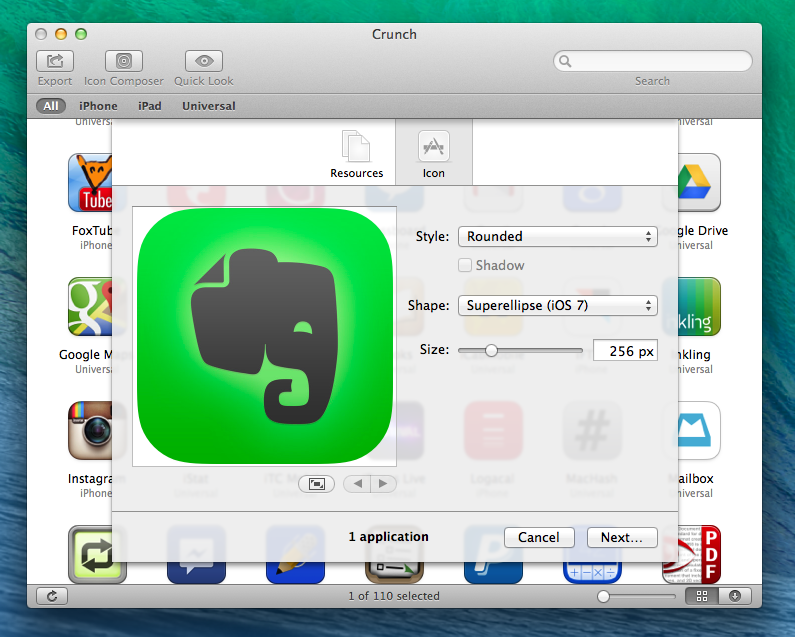
Support for iOS 7’s new icon shape has been enabled in the app’s browser (where Crunch automatically recognizes apps from your iTunes library), Quick Look panel, and Icon Export menu. I don’t think that Apple has published official specifications for the new shape, but the one in Crunch looks just like the real thing to my untrained designer eye. When you hit Export in the top toolbar, you can still find and export assets from inside an app’s bundle, but if you click on Icon you’ll now see options to choose Superellipse (iOS 7), Rounded (iOS 6), or Automatic. Additionally, you can choose to export an icon’s artwork with no shape or no border by clicking on the Style dropdown menu.

The new Icon Composer can be used to drop artwork into Crunch and export it with Apple’s icon shapes. There is a preview panel on the left, and a slider to tweak the size of the icon.

While extracting application assets could be done with built-in tools on a Mac, Crunch is a great utility that simplifies the process and lets you save time. Support for iOS 7 is welcome and handy if you want to take a look at how other developers are managing resources inside their apps – or, with the Icon Composer, if you just want to preview how artwork will look under the new OS. Crunch is $9, and a 15-day free trial is available.


AppleScript XML-RPC

Daniel Jalkut:

My mind was fairly well blown this morning to learn that for more than ten years, AppleScript on Mac OS X has included a built-in command for communicating with XML-RPC and SOAP endpoints on the web.

I had no idea this existed either. Following Daniel’s example script, I have put together a Keyboard Maestro macro that, with a single hotkey, gets the latest post from MacStories, shortens its URL, and tweets it with Tweetbot. It’s the Mac version of my Editorial workflow, and I’ll share it soon.

Permalink