
Federico Viticci

10758 posts on MacStories since April 2009

Federico is the founder and Editor-in-Chief of MacStories, where he writes about Apple with a focus on apps, developers, iPad, and iOS productivity. He founded MacStories in April 2009 and has been writing about Apple since. Federico is also the co-host of AppStories, a weekly podcast exploring the world of apps, Unwind, a fun exploration of media and more, and NPC: Next Portable Console, a show about portable gaming and the handheld revolution.

MailMate Developer Launches Crowdfunding Campaign for MailMate 2.0

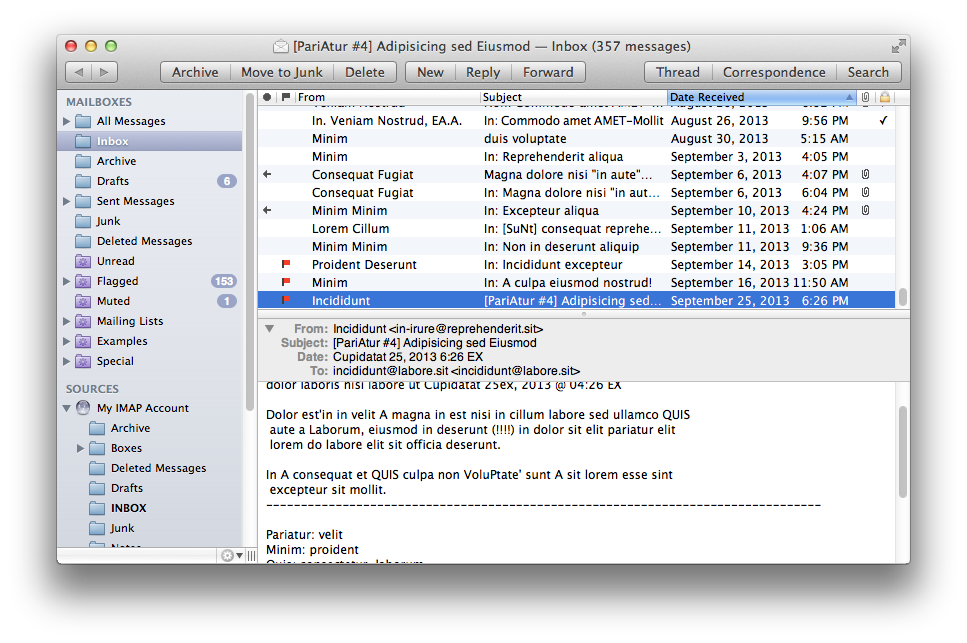
MailMate is a third-party email client for OS X developed by Benny Kjær Nielsen. The app was initially released in 2011 and it’s been actively developed for two years. Here’s a summary of the app’s features from the developer’s website:

MailMate is an IMAP email client featuring extensive keyboard control, Markdown supported email composition, advanced search conditions and drill-down search links, equally advanced smart mailboxes, automatic signature handling, cryptographic encryption/signing (OpenPGP and S/MIME), tagging, multiple notification methods, alternative message viewer layouts including a widescreen layout, and much more.

Today, Benny launched a crowdfunding campaign for MailMate 2.0. From his blog post:

The goal is now to fund the time needed to finish version 2.0 of MailMate. This requires a minimum of 6 months of 2014 and therefore I’ve set the initial fixed goal to $25,000. A fixed goal means that I get nothing if the goal is not reached. Anything beyond $25,000 increases the period I am guaranteed to work full time on MailMate. The exact period depends on daily sales, but a rough estimate is an additional month for every $5,000.

And from the campaign page:

I’m an academic by heart and to me MailMate is a never ending research project filled with challenging problems. To you I hope MailMate is one hell of a powerful email client — an email client worth paying for. I don’t ever expect MailMate to become a golden egg, but I have reached a point where MailMate has to put food on the table.

MailMate is a one-man business. I take care of development, support, homepage, marketing, sales, and now, crowd funding. It’s as personal a business as it can be. Supporting MailMate is to support me and my family. If you want to then you can read a bit more about me and the background for this crowd funding campaign.

Two weeks ago, I decided to start moving away from Gmail/Google Apps and go back to old-fashioned IMAP with Exchange support for iOS devices. I wanted to regain control of my email, and the fact that Mavericks’ Mail had serious issues with Gmail wasn’t helping. So I backed everything up, settled with Rackspace Email, and downloaded MailMate. I’ve been using MailMate intensively for the past week and I’m excited for the app’s future. Read more

Tweetbot 3.1 Brings Text Size Controls, Timeline Switcher, Quick Actions

Tweetbot 3.1

Tweetbot 3.1

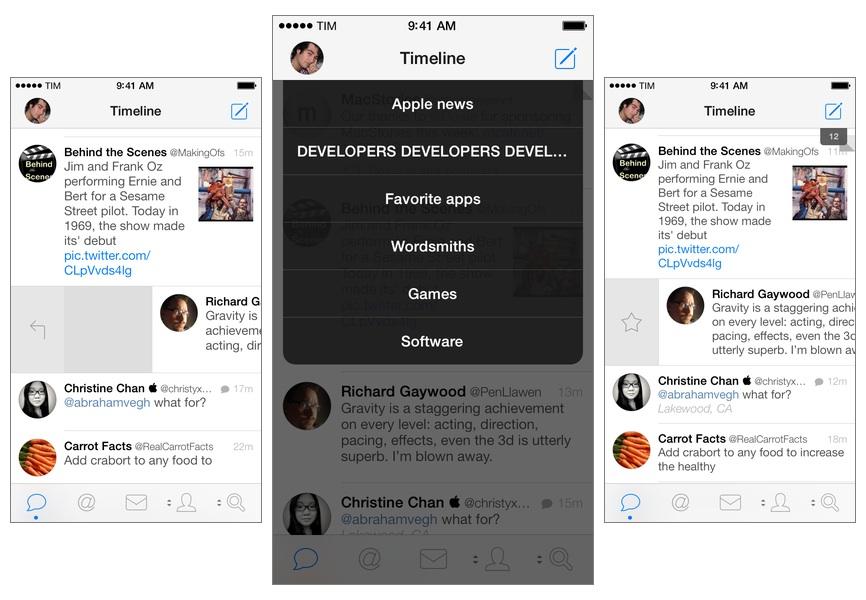
Tweetbot for iPhone may have grown up, but it hasn’t forgotten about the features and design decisions that made it a powerful and popular Twitter client among iOS users for the past two years. Tweetbot 3.1, available today on the App Store, improves upon last month’s major release by bringing back some old features of Tweetbot 2.x and introducing new ones, always taking advantage of iOS 7’s design and structure in interesting ways. Read more


Revolved

Speaking of crafting apps, here’s one that I’ve been playing around for the past two weeks and that’s pretty impressive. Revolved, developed by Bartosz Ciechanowski, is a $0.99 iPad app that lets you draw lines and watch them turn into 3D shapes in real-time.

Even if you don’t have any particular artistic skills, it’s just cool to play with the app and see how the split-screen layout renders lines on the right as shapes on the left. The app has been built for iOS 7, so there’s minimal interface chrome getting in the way and you can focus on your creations with controls for curves, colors, and sharing.

Seriously fun and a unique concept. $0.99 on the App Store.

Permalink

Characters As An Interface

Toca Boca CEO Björn Jeffery describes the unique approach they took with designing the user interface of Toca Builders, the company’s latest construction and crafting app for kids:

Now it may sound counter-intuitive to have characters as an interface, but the fact is that this works surprisingly well for our young builders. Instead of thinking about which buttons to press in order to create a certain effect, kids can identify themselves with certain characters and the construction powers they have. If they want to repaint a structure, they don’t have to look through a menu to find the “repainting button” but instead, remember that Jum Jum the Painter can shoot paint from a long distance to make something a different color. In essence, the player becomes each character for brief periods of time and by that, the question of how to create something is suddenly solved. The app removes the abstraction that a traditional menu would introduce and moves straight into identification instead.

Permalink

“Desktop-class”

Fraser Speirs comments on the practical advantages of the iPad Air’s “desktop-class” CPU:

What I know about the iPad Air is that I’m constantly being surprised by these apps being ready and waiting for me as soon as I try them. I’m having to speed up my muscle memory as the iPad is ready sooner than I anticipate.

I notice this in two particular situations. The first is in launching and resuming applications. Multitasking on the iPad has been around for a while now and has grown in capabilities over time. There was always a small wait when switching between applications before the resumed app became active. In large part, that delay no longer exists - except for apps where the resumption depends on some network activity, such as launching Netflix from a cold start.

I work on the iPad every day, and I can’t wait to get these improvements with the Retina iPad mini.

Permalink

The iPad 2 and Education

Good take on why Apple may be keeping the iPad 2 around for the educational market by Elia Freedman:

While the iPad mini and iPad Air keep changing on schools and forcing them to consider new devices during the period they are trying to purchase, the iPad 2 remains beautifully the same, keeping a reliable device on hand for them to consider.

Permalink

IFTTT 1.2

Released earlier this week, IFTTT for iOS 1.2 improves on native Reminders and Photos integration by allowing users to create recipes that save new items into the Reminders and Photos apps. Previously, IFTTT could only read data from Reminders and Photos and use that as a trigger for other actions.

I wanted to wait a couple of days before posting about this update to test how frequently the new background refresh API in iOS 7 would let IFTTT check for triggers and launch recipes. Unfortunately, I haven’t seen notable changes in execution times – for instance, bookmarks that I add on Pinboard sometimes take about an hour to be added to Reminders. My understanding is that IFTTT isn’t using silent push notifications to instantly trigger recipes in your account, therefore iOS 7 background app refresh can make the app check for updates more often in the long term, but that will require several weeks of testing. Thus, I’m happy to keep testing the feature and report back.

The improved Reminders and Photos integration is very nice. You can add new photos from URLs, create reminders into a specific list, and even set a priority for them. I wouldn’t rely on Reminders integration to save work-related tasks, but I find it very useful to let IFTTT check on, say, Instagram or Facebook from time to time and save the photos I want locally on my device.

I’m still impressed by what IFTTT is doing with their iOS app, and I’m looking forward to seeing what’s next for iOS 7 background sync.

Permalink

Better Document Management On iOS

Steven Aquino, writing at Tech.pinions:

The reality is that, as a nerd, I get by fine with Dropbox. However, just because one solution works for me doesn’t mean Dropbox is the answer, or that iOS and iCloud are above improvement. On the contrary, this piece (hopefully) illustrates that iOS and iCloud can be much better at certain things, like document management.

This topic isn’t new, but it’s still relevant because Apple’s implementation is anachronistic and strange considering other advancements in iOS. There’s a glimmer of hope in iPhoto for iOS 7, but nothing more. Open In is not the solution.

Permalink

Apple Releases Mail Update for Mavericks with Gmail Fixes

Apple:

Mail Update for Mavericks includes improvements to general stability and compatibility with Gmail, including the following:

Fixes an issue that prevents deleting, moving, and archiving messages for users with custom Gmail settings

Addresses an issue that may cause unread counts to be inaccurate

Includes additional fixes that improve the compatibility and stability of Mail

I don’t use Gmail as my primary email anymore, so I’m looking forward to reading reports about the stability of this update (will Joe Kissell tell us?). You can download it here or through the Mac App Store.

Permalink