Federico Viticci

10929 posts on MacStories since April 2009

Federico is the founder and Editor-in-Chief of MacStories, where he writes about Apple with a focus on apps, developers, iPad, and iOS productivity. He founded MacStories in April 2009 and has been writing about Apple since. Federico is also the co-host of AppStories, a weekly podcast exploring the world of apps, Unwind, a fun exploration of media and more, and NPC: Next Portable Console, a show about portable gaming and the handheld revolution.

This Week's Sponsor:

Crickets

The first alarm app for families.


Brett Terpstra’s New Adventures→

Brett Terpstra is now an independent developer and writer:

Monday will be the start of increased focus on existing projects and attention to new ideas that have been bubbling up. I’ll be writing, including finishing my tagging book and working on the children’s book. I’ll be developing Marked (starting with the App Store version) and adding a couple of smaller apps to the App Store list. I’ll continue blogging, which brings me to a final request.

If you’ve ever played with OS X automation workflows, Automator, scripts, or TextExpander snippets, it’s likely that you used one of Brett’s tools. Brett is the developer behind Marked 2 (one of my must-have Mac apps) and I’m excited to see what he’ll do next.

Permalink

Apple Airs New “Your Verse” iPad Air Commercial

Your Verse

Your Verse

Apple has today aired a new iPad Air commercial called “Your Verse Anthem” focused on the capabilities of the iPad as a device to express the creativity of the human race. The ad features voiceover by Robin Williams taken from the movie Dead Poets Society; in the clip that Apple chose, John Keating (Robin Williams) describes why people read and write poetry and how everyone can contribute a verse to the world. Interestingly, as noted by Linus Edwards, this isn’t the first time Apple has been inspired by Dead Poets Society. Read more


Save Photos As Reminders with Fantastical and Launch Center Pro

Fantastical and LCP

Fantastical and LCP

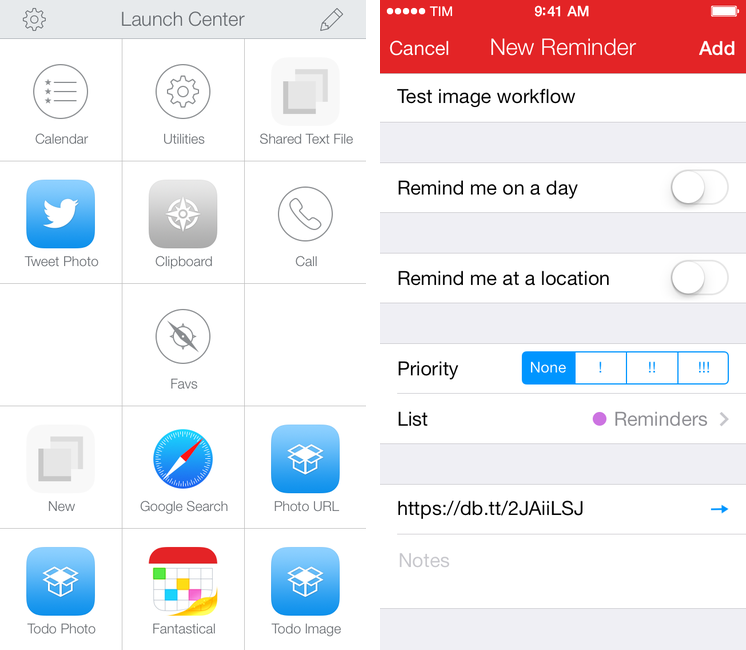
I recently realized that I wanted a way to quickly save photos or screenshots as todos, and being Fantastical 2 my todo manager (with Reminders) and Launch Center Pro the fastest way to take pictures and upload them to Dropbox, I combined them in two workflows.

I made two simple actions that mix the Launch Center Pro and Fantastical URL schemes to save a Dropbox image link as a reminder in Fantastical. You retain the ability to type natural language in a Launch Center Pro prompt, and Fantastical will also automatically recognize the URL and put it in the URL field of a reminder.

Some details worth noting about the actions:

  • The first one lets you take a new photo; the second one grabs any image from the Camera Roll;
  • Both actions will upload an image to Dropbox in the Photos/LCP/ folder; you can change this once you install the action;
  • Fantastical is set to create a reminder for the received text through the reminder=1 flag in the URL scheme.

Getting all the encoding right was a bit tricky at first, but the actions should work without any further configuration on your end. Feel free to modify them: with my basic structure in mind, you can replace Fantastical 2 with Drafts, Dispatch, or any other app that can receive text via URL scheme. I just find it handy to be able to quickly save photos in Fantastical as tappable links, but the workflow is really up to your imagination.

You can download the actions here:


Everpix Shares Full Company Dataset→

Everpix:

Building a startup is about taking on a challenge and working countless hours on solving it. Most startups do not make it but rarely do they reveal the story behind, leaving their users often frustrated. Because we wanted the Everpix community to understand some of the dynamics in the startup world and why we had to come to such a painful ending, we worked closely with a reporter from The Verge who chronicled our last couple weeks. The resulting article generated extensive coverage and also some healthy discussions around some of our high-level metrics and financials. There was a lot more internal data we wanted to share but it wasn’t the right time or place.

With the Everpix shutdown behind us, we had the chance to put together a significant dataset covering our business from fundraising to metrics. We hope this rare and uncensored inside look at the internals of a startup will benefit the startup community.

A comprehensive dataset that includes all kinds of metrics: besides user subcriptions, revenue, and monthly costs, you’ll also find metrics for latency between freemium trials and subscription purchases, user engagement, AWS cost breakdowns, and more. It’s sad that Everpix shut down, but the data they have open-sourced will certainly help anyone who’s building out a startup and never had access to this kind of documented data before.

Don’t miss the VC pitch decks and email exchanges. One of the investors’ primary concerns was that Everpix was difficult to explain to mobile users who just want their photos to “work”, and I think they have a point there. Apple needs to get their act together and streamline the way iCloud, Photo Stream, and the Photos app work. Everpix had built an impressive technology (check out their original plans for 2014 in the presentations) and, through the data, you can get a glance at the various reasons why it didn’t work out. Sections about their propretary image analysis tools have been redacted, which makes me even more curious to know who bought the company’s core technology.

[via Bradley Chambers]

Permalink

Terminology Workflows For Editorial→

Greg Pierce:

Terminology has always had great direct integration with our own apps, Drafts and Phraseology that allows you to easily lookup and select replacement words and have them directly replaced inline with your editing. You can see that integration in action.

In the latest version (3.0.6) of Terminology, I added a tweak to its URL schemes to allow it to integrate more easily with certain other apps, particularly Editorial, Ole Moritz’s excellent iPad text editor.

Terminology is my favorite dictionary app and I wish Editorial had a popover to replace Apple’s default dictionary, like Instapaper did. The workflows are the best alternative to that for now, and they work well.

It would be nice to have selectable synonyms and antonyms built into the system dictionary in iOS 8.

Permalink

Command-C: A Local Clipboard Sharing Tool for OS X and iOS 7

Command-C

Command-C

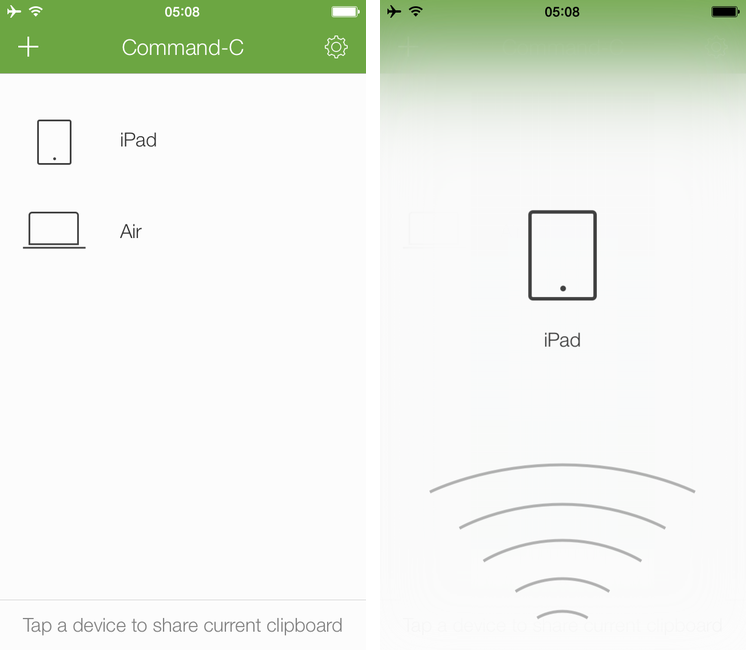
Even if my workflow these days primarily consists of reading and writing on the iPad, there are still times when I need to share content – either text or pictures – across my iOS devices, from my iPad to my Mac, or from OS X to iOS. While I can normally achieve inter-device communication using something like Evernote to keep my notes in sync everywhere, it’s not an ideal solution: why having to save and sync a temporary bit of text that simply needs to be acted upon once? Command-C, created by Italian developer Danilo Torrisi, is a clipboard sharing tool that I’ve been testing for the past couple of months and that has allowed me to eschew syncing services when I just want to quickly copy & paste between my Mac and iOS devices.

Read more


The Internet In Your Pocket→

On the seventh anniversary of the original iPhone announcement, the boys take a look back at Steve Jobs’ keynote.

Seven years ago today, Steve Jobs introduced the iPhone at Macworld. We wanted to properly celebrate the iPhone’s seventh birthday with a special episode that would offer a look back at the rumors, excitement, and speculation that led up to Jobs’ keynote. I think that we did a good job, and you can find the episode here.

Permalink

Capturing The Now with Kennedy

Kennedy

Kennedy

Developed by Brendan Dawes, Kennedy is an interesting new take on mobile journaling focused on “capturing the now” with a $1.99 iPhone app.

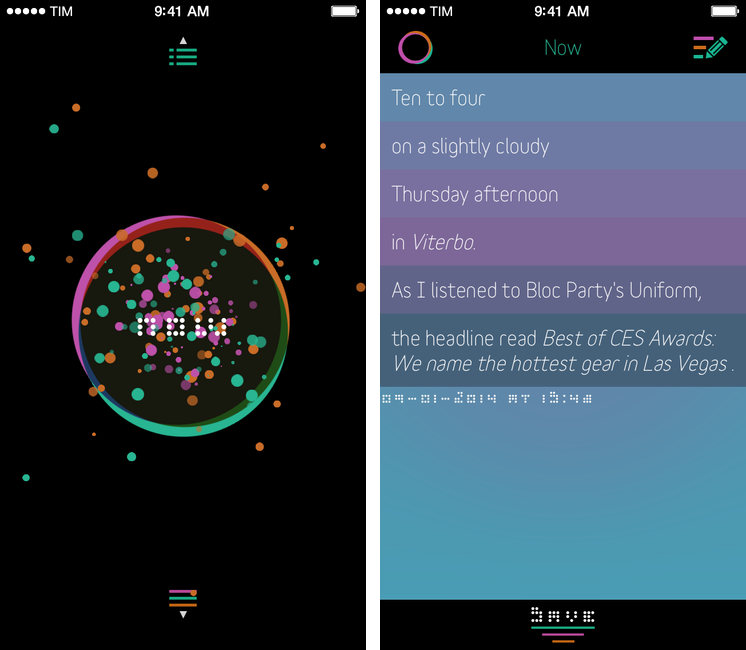
Kennedy is a data-oriented journaling app that can save your current location, date and time, weather conditions, what music you’re listening to, and even headlines from the news in individual collections of personal data points called Captures. When you open the app, you’re presented with a beautifully animated “Now” button that, once tapped, will start gathering data from built-in iOS services for location, time, and music; after a few seconds, the “Now” will become a list showing the data points that were captured by the app, such as “Ten past three, on a slighly cloudy Thursday afternoon in Viterbo”. When saved, Captures can be accessed by tapping a list button in the lower portion of the main screen; you can search for specific text in your Captures, as well as edit them at any time.

Read more


The Life Of A Porting House→

They take a popular PC or console game - BioShock Infinite is the latest one - and develop and publish a Mac version, historically released months or years later (though that’s not often the case now), earning ridicule and celebration from a frustrated audience long condemned to second-class treatment.

Except these days they’re actually doing a pretty good job.

Eurogamer has a profile on Aspyr Media, the software house that’s well known for porting Windows games to the Mac (and recently iOS). I had no idea they’ve been around for more than 17 years. It would have been interesting to know more about Feral, too.

Permalink