Federico Viticci

10929 posts on MacStories since April 2009

Federico is the founder and Editor-in-Chief of MacStories, where he writes about Apple with a focus on apps, developers, iPad, and iOS productivity. He founded MacStories in April 2009 and has been writing about Apple since. Federico is also the co-host of AppStories, a weekly podcast exploring the world of apps, Unwind, a fun exploration of media and more, and NPC: Next Portable Console, a show about portable gaming and the handheld revolution.

This Week's Sponsor:

Crickets

The first alarm app for families.


Storehouse: Visual Storytelling On iPad→

I’ve been testing Storehouse, a new visual storytelling app for iPad released today, and I think it’s gorgeous. TechCrunch has more details on what Storehouse is and where it’s going, but, in short, it’s a service/app that lets you create stories with text, photos, and videos. Stories you publish can be read on the iPad or through a URL on the web, and you can follow other Storehouse users to read the stories they’ll share.

The Storehouse app is beautiful and technically impressive in my opinion. It reminds me of Push Pop Press in the way it uses physics and gestures to make content feel “alive” as you interact with the app – for instance, as you scroll a story vertically and you reach the bottom or top of a “page”, the view will slightly tilt in 3D to indicate that you’re going back to content behind the story. When you create a story, you can choose a photo or video as background content for the cover, and videos will auto-play in the story’s preview behind text overlays for titles and subtitles. It’s a really cool effect. Storehouse’s use of blurs, transitions, depth, and edge-to-edge photography make for a unique iOS 7 app that’s far from obvious or derivative.

Storehouse wants to enable everyone to create “beautiful” stories but, personally, I don’t think that my photos are good enough to create narratives worth sharing on services like Storehouse or Exposure. Still, it’s an impressive app, and the people behind it know what they’re doing, so I’m curious to see how it’ll grow. Storehouse is free on the App Store.

Permalink

Inside Apple’s MFi Game Controller Program→

Great piece by Jordan Kahn on iOS 7 game controllers:

The launch for the first few controllers to hit the market was rushed, developers are disappointed and still trying to catch up, and manufacturers are limited in pricing, features, and quality due to Apple’s MFi program requirements. What does Apple have to do to overcome a rocky start to its game controller program which is supposed to control quality? And how are manufacturers limited by Apple in building better controllers at a fair price? We’ve dug into Apple’s MFi program and talked to developers and companies building the controllers to find out.

According to Kahn’s story, Apple rushed game controllers to market with dev kits that were made available to developers a month before public availability. There are several other issues of device fragmentation (why couldn’t Apple pick one controller spec instead of two?) and supplier requirements that suggest game controllers have been an afterthought for Apple thus far.

I had moderate hope for game controllers, but the launch has been disappointing. As I wrote in June:

Will Apple ever develop a culture and appreciation for gaming as a medium, not just an App Store category? While others (namely Microsoft) are trying to add more media and entertainment layers on top of existing game infrastructures, Apple is in the opposite situation — running the largest media store and selling devices that are increasingly used as gaming machines, but that still lack the catalog and support of dedicated home consoles.

Does Apple understand gaming? As a platform provider, do they need to?

Read the details in Kahn’s piece, and compare it to the development of a controller from a company that knows gaming – Valve. Apple sees iOS 7 game controllers as accessories and not an integral part of the experience, which, in a way, may be for the best after all.

Permalink

Sunlit→

Manton Reece’s new iPhone app, Sunlit, is out today and available for free on the App Store (with an In-App Purchase to unlock the full version). I think it’s a nice idea: Sunlit is Manton’s take on iPhoto web journals, but built for App.net file storage and sharing.

You choose some photos that “tell a story” – could be a trip, a family gathering, anything you want to remember – and the app pulls in their metadata for date and location. You can add text comments to jot down memories, import photos from Dropbox if you don’t keep them in the Camera Roll, and even add check-ins manually, from Foursquare, or from Steve Streza’s Ohai app. When you’re done, you end up with a story that has full-res photos, text, GPS and time metadata, check-ins, and possibility to invite other App.net users to collaborate (here’s my sample story).

I don’t think that I’ll use Sunlit regularly because I’m not sure I could get my parents (essentially, the only people I share personal photos with) to sign up and use App.net. But I think that Sunlit is a good idea that shows how the App.net API can be used for more than social updates (Broadcasts being another good example). Manton knows the importance of preserving digital memories and I’m looking forward to future updates to Sunlit (there’s no iPad version or video support for now). Sunlit is available on the App Store.

Permalink

When Apple Reached Parity With Windows→

Horace Dediu:

The decision making process for buying computers, which began with large companies IT departments making decisions with multi-year horizons, has changed to billions of individuals making decisions with no horizons. Companies have become the laggards and individuals the early adopters of technology.

The fundamental shift is therefore in the quantity of decision makers and the quality of those decisions. Those who buy are also those who use and their decisions will be perhaps whimsical, maybe impulsive and not calculated, but fundamentally, in the aggregate, wise.

Permalink

Thinking About An iPad Pro

iPad Pro

iPad Pro

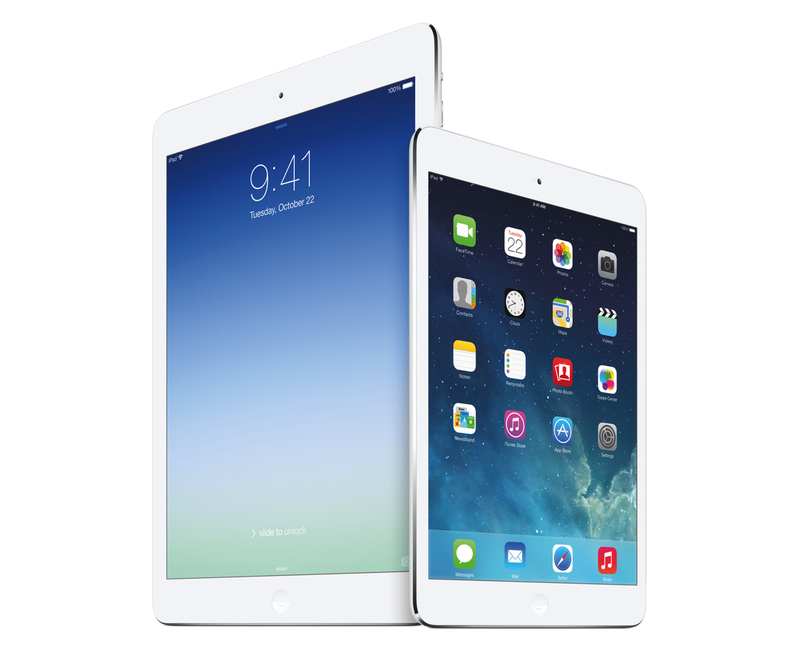
I’ve been thinking about a rumor that I’ve seen showing up in tech headlines lately – that Apple is working on a larger version of the iPad (dubbed “iPad Pro”) that is allegedly on track to be released in Fall 2014. While I haven’t been paying particular attention to rumors (with the exception of Mark Gurman’s original reporting), the idea of a larger iPad reported by the tech press thus far strikes me as an odd proposition. As someone who uses the iPad as his primary computer, I wanted to recollect past instances of this rumor and reflect upon the consequences that such device (and way of thinking) could have on the iPad line, iOS, and consumers. Read more


Second Gear Launches First Glassboard Update for iOS 7

When I was beta testing Editorial in 2012, I used Glassboard every day to report feedback, send screenshots, and discuss the app’s feature set. Glassboard is a private chat for groups and small businesses that has threaded conversations, attachments, notifications for new messages on mobile devices, and other cool features such as location sharing and possibility to bookmark messages. Aside from the Editorial beta, I used Glassboard to communicate with friends in private boards, send feedback for other betas, and discuss features of MacStories. I was worried about the future of Glassboard when it was put up for sale and relived when Second Gear announced that they acquired it. I’ve always believed in the idea behind Glassboard and I wanted to see it thrive.

Glassboard’s future under Second Gear management begins today with the launch of a long overdue update to the iPhone app, which is ready for iOS 7. The app still isn’t available on the iPad, but this new version provides a solid new foundation to build upon and I’m confident that Second Gear will consider an iPad counterpart.

For those not familiar with Glassboard, the service lets you create discussion boards where you invite people. Nothing is ever shared publicly and everything is kept private with an invite-based system. People can post new messages and add comments to them, which will be grouped in a conversation. What’s unique about Glassboard is that, in the age of social networks that demand constant public activity with opt-out systems for privacy controls, Glassboard is a modern, elegant, and private forum board for groups of friends or teams. My use of Glassboard may have been limited to work-related communication, but I know of several people who rely on it to organize meet-ups or get together at conferences thanks to the service’s location sharing feature.

The new iOS app is simple and nice. There’s a sidebar where you can switch between boards and access your personal Settings; next to each board, you’ll find a gear icon to control your notification preferences and see every member of a board. The All Boards view at the top of the sidebar offers a unified view of all conversations from all boards, but you can of course open a specific board and view messages pertaining to it.

The entire app has been polished for iOS 7 but there are no major feature additions for this relaunch. I like the cleaner look and I’m a fan of the Views at the bottom of the sidebar to view all Photos and Videos and Notifications from all boards at once.

Glassboard is supported by its users. There are no ads; instead, you can pay $24.99/Year to become a Premium user, which will give you access to extras such as export options, up to 1 GB of attachments per board, and more features that Second Gear will roll out in the future. The Premium subscription is available as an In-App Purchase in today’s iOS update, or it can be unlocked on the web.

Even without new feature additions, I’m glad that Glassboard is back on iOS with a refreshed app and plans for the future. As I mentioned above, I’m looking forward to an iPad version and a redesign of the web app, which still carries the original Glassboard design.

Glassboard 3.0 is available on the App Store. I’ve had the chance to ask a few questions about Glassboard to Second Gear’s Justin Williams, and you can find the interview below. Read more


A Software World→

Great article by Robert McGinley Myers on cynicism in the tech press. I agree with every word of it.

Software is the magic that makes our devices “indistinguishable from magic”. Many of us think of it as an art form, and yet it’s a strange sort of art form. Most art forms don’t remind you to take out the recycling or help you lose fifty pounds. But the things software can do are almost limitless. Maybe tech journalists would be less cynical about the advances of technology if they wrote more about software than hardware, and more about the how than the what — how software is not only changing its shape, but changing our shape, in more ways than one. That is the real, ongoing technological revolution.

Permalink

My iOS Screenshot Generation Workflow

Screenshots

Screenshots

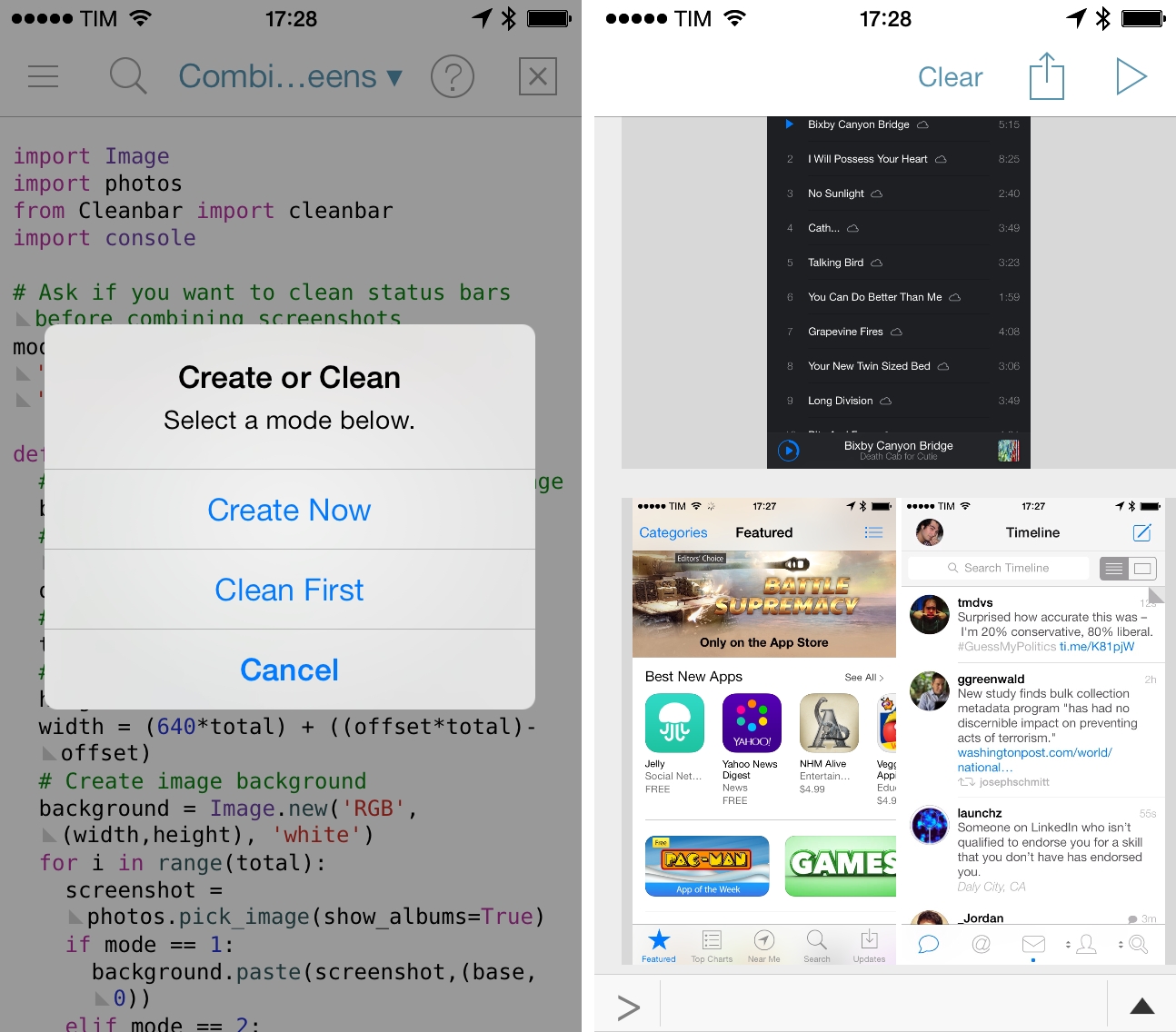
I didn’t think that complaining about iOS status bars on The Prompt would result in Dr. Drang going on a vision quest to produce better screenshots with Python. But I’m glad that I took the time to point out my dislike for messy status bars, because it led the good Doctor to work on some great scripts to automate the entire process with Python, which are compatible with Pythonista for iOS.

I waited to share my workflow for automated screenshot cleaning/generation because I wanted to see where Dr. Drang would end up with his script, Cleanbar. Now that he appears to have settled on a solution that requires standalone image files to act as partial status bar replacements, I think it’s the right time for me to share how I produce iPhone and iPad screenshots for MacStories.

The first step is to set up Cleanbar. I don’t need to repeat what Dr. Drang already explained, but to sum up: grab a black status bar, crop it to get two files similar to Drang’s, then run a script to pack those images as strings. Once set up, you’ll be able to a) use Cleanbar to clean single images picked from the Camera Roll with Pythonista and b) integrate it as cleanbar in other scripts to clean status bars programmatically.

As for my needs:

  • I usually need to combine two iPhone screenshots side-by-side in a single image as you can see in most reviews on this site;
  • I may or may not need to clean their status bars;
  • I don’t have to combine iPad screenshots. I only need to resize them and I may or may not have to clean their status bars;
  • Occasionally, I want to produce a banner with three screenshots (like this one), which can have original or cleaned status bars;
  • Sometimes, I only need to clean one screenshot out of two;
  • I always need to upload the final image to a Dropbox folder, which is monitored by Hazel.

And, because I’m not an animal, I wanted to automate all of this. The scripts that you’ll find below are the result of late night tweaking and lots of tests; they probably aren’t the most elegant or “Pythonic” way to handle this kind of image generation, but they work for me and they make me save several minutes every day. I haven’t been generating review screenshots manually in months, and they’re more flexible than my old workflow based on Keyboard Maestro.

Read more


Simbol for iPhone

Simbol

Simbol

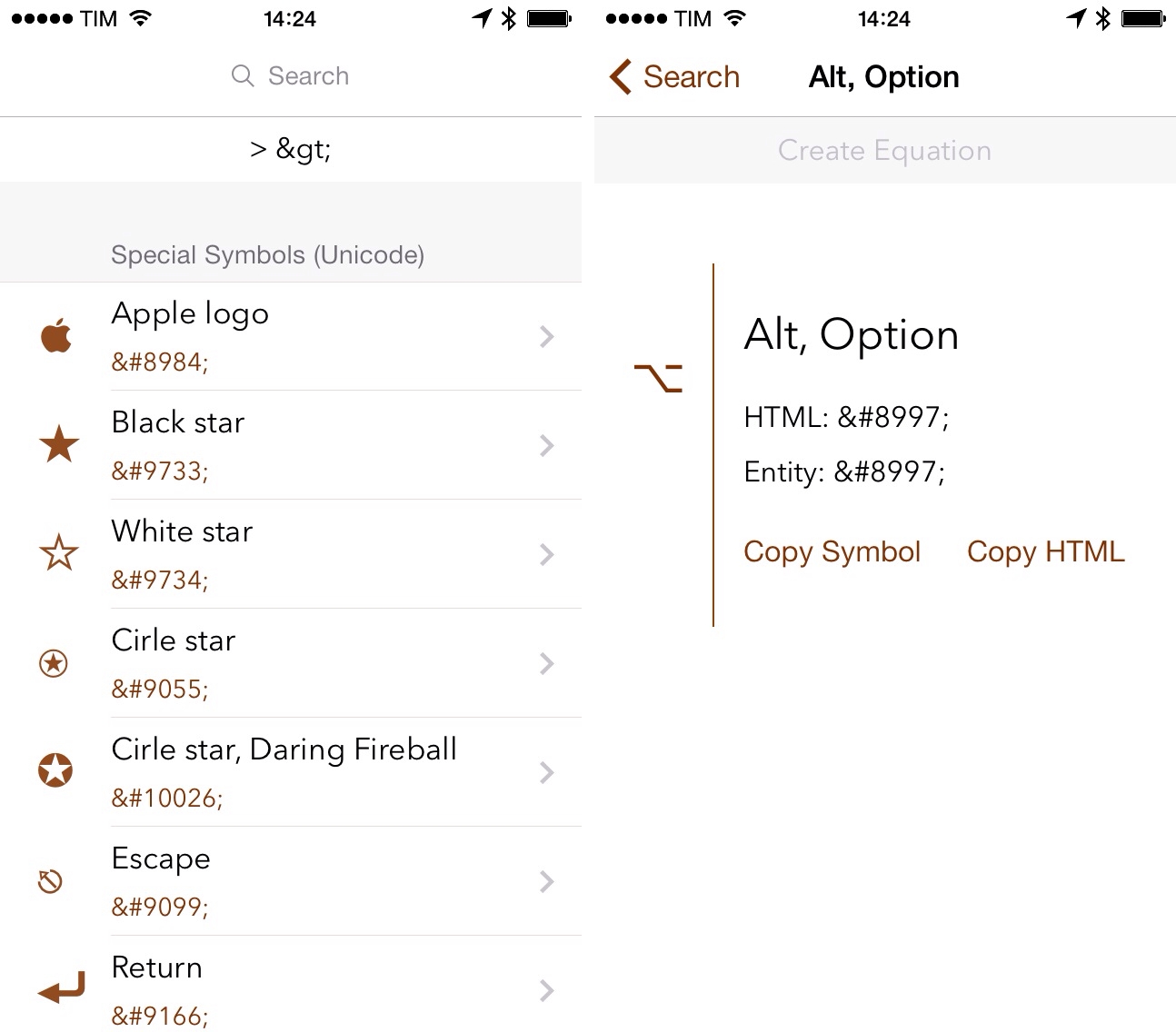
Developed by Amit Jain, Simbol is an iPhone utility to view symbols and special Unicode characters. If you ever play with URL schemes on iOS, you know how tedious it is to convert special characters to HTML codes: Simbol comes with this feature built-in, allowing you to tap on each symbol to copy its HTML or entity code (of course, you can also copy the symbols themselves).

The main screen of the app shows a list of symbols organized in categories; in this first version, categories include Special Symbols, Math Symbols, and Reserved Characters, among others. There is a search bar at the top to look for a specific character by name and you can tap & hold on each symbol to add it to a temporary holding tray for equations. Personally, I just find it handy to be able to quickly search for something like “greater than” and copy its HTML code without having to Google for it.

If I had to nitpick, I’d say that it would be nice to have Favorites, a way to launch searches from Launch Center Pro, and the possibility to hide characters in the main screen, showing only category names. Much like Apple did with albums in the Music app, you can’t view a simple list of categories because symbols will always be shown inline, which makes it hard to scroll the app’s main list if you only want to open a specific category.

Simbol is a good idea, does one thing well, and it’ll save me the time I’d spend looking for HTML codes on Google. It’s free on the App Store.