Federico Viticci

10763 posts on MacStories since April 2009

Federico is the founder and Editor-in-Chief of MacStories, where he writes about Apple with a focus on apps, developers, iPad, and iOS productivity. He founded MacStories in April 2009 and has been writing about Apple since. Federico is also the co-host of AppStories, a weekly podcast exploring the world of apps, Unwind, a fun exploration of media and more, and NPC: Next Portable Console, a show about portable gaming and the handheld revolution.

Launch Center Pro 2.1: Fleksy Keyboard, Lists, Photo Attachments, and Share Sheets

Launch Center Pro 2.1

Launch Center Pro 2.1

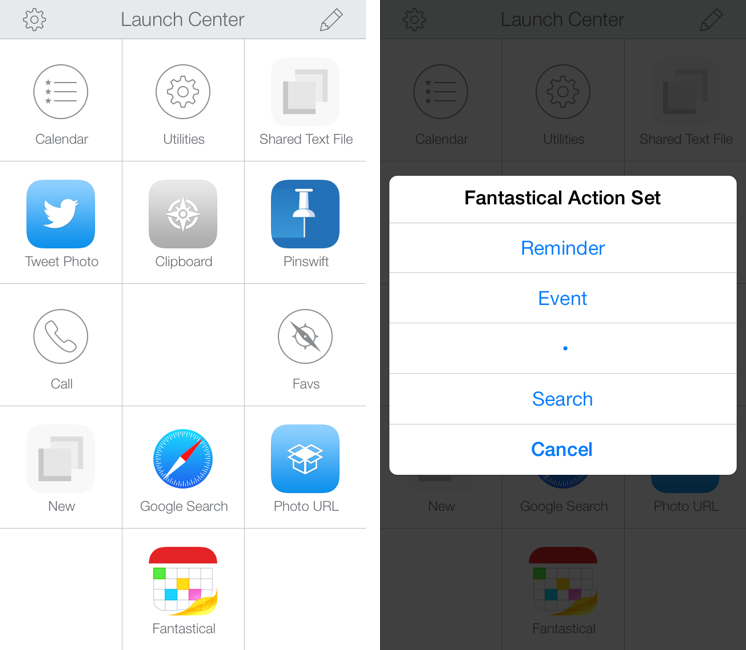
In October, Contrast released Launch Center Pro 2.0, a free update to their shortcut launcher and automation tool for iOS that brought a new interface for iOS 7 and, among other minor additions, Dropbox integration. Launch Center Pro is one of the three apps I keep in my dock[1], and I use it several times a day to create new tasks in Fantastical, launch Google searches, open my favorite websites, and more.

Today, Contrast is launching Launch Center Pro 2.1, a seemingly not-so-major update that, however, brings important changes to the app, including a new way to build visual actions and support for the new third-party Fleksy keyboard. I don’t think it’s an exaggeration to say that version 2.1 is just as important as 2.0 for heavy users of Launch Center Pro. Read more


Soulver for iOS 7 Updated with iPad Support

In late October, Aqualia’s Soulver was updated with iOS 7 support on the iPhone, and I noted how syntax highlighting ultimately made the app better than the iOS 6 version:

If you’ve used other iOS 7 apps like Byword, you know how syntax highlighting is beneficial to the user experience: numbers turn green, units are purple, operations are blue, and plain text is standard black. Syntax highlighting makes lines more scannable because operations and individual bits of text stand out more; furthermore, because Soulver allows you to type units manually (you can write “USD”, “usd”, “dollars”, etc) you’ll instantly know if what you typed has been recognized by the app thanks to color highlights. Besides being nice visually speaking, syntax highlighting — a simple addition in theory — makes the experience of using Soulver considerably better.

Today, Soulver 2.4 has been released with iPad support, making the app Universal. The iPad’s interface isn’t revolutionary – you still get a split layout but keys and number pads are larger on the iPad and you get easier access to some of the app’s features.

Soulver is a great app and on sale for a limited time at $1.99 on the App Store.

Permalink


Discover The Meaning of Acronyms with Acronymph for iPhone

Acronymph

Acronymph

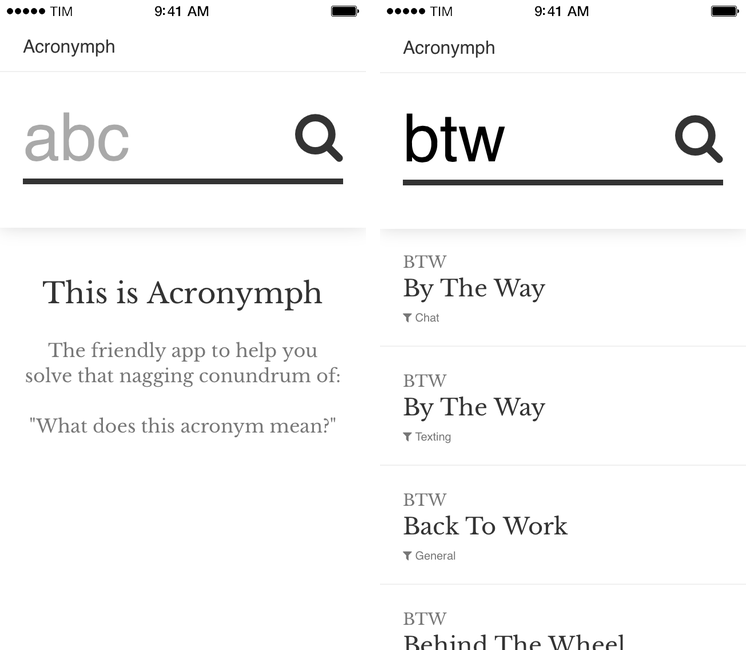
Acronymph, developed by Calvin Robertson, is an iPhone app to discover the meaning of acronyms.

With a variety of built-in categories that range from Internet slang and sports to music, economy, and goverment acronyms, Acronymph simply displays matches it finds in its built-in database. You can’t configure sources you want to see/hide because the app has no settings, but a recent update added a URL scheme that lets you send an acronym from apps like Launch Center Pro or Drafts directly to Acronymph without having to tap the app’s search box and type.

When results are found, you can tap on them to copy them, open a Google search, or share them to other apps. I’m nitpicking, but I don’t like how “@AcronymphApp” is appended to an acronym’s meaning when you’re sharing a result to Mail or Twitter.

Acronymph is simple and effective. I’ve looked up several acronyms in the past weeks and the app always found meanings in less than two seconds; it’s the kind of utility that you likely won’t need on a daily basis, but that will come in handy if you don’t need a full-featured dictionary app like Terminology. And, btw, Acronymph is $0.99 on the App Store.


Siri’s Accuracy Continues To Improve

Erik Slivka:

Piper Jaffray analyst Gene Munster, who has regularly assessed Siri’s accuracy in terms of correctly interpreting and answering queries, has issued the latest version of his Siri report card, noting that Siri has continued to improve under iOS 7, particularly in terms of being able to properly interpret questions being asked.

My experience in the past four months has been the opposite of what Marco describes: the Italian Siri of iOS 7 fails less than before, is faster (even on 3G), and it understands my queries better. Is it because of different servers and the amount of requests that Italian Siri gets? I have no idea.

As I noted in September:

A feature that I didn’t initially like and that I’ve criticized on multiple occasions, Siri, is much improved in iOS 7. I actually am using Siri quite a bit more now, and I was surprised by the quality of the Italian voice, its increased speed, clean new design, and new functions.

It’s still far from perfect, but I’ve been using Siri on a daily basis for phone calls, directions, and Wikipedia integration. I particularly appreciate how iOS 7 made Siri smarter in understanding pronouns, indirect speech, and verb conjugations.

I’m not a “Siri power user” (I don’t know all the possible tricks and commands), but I’m happy with the improvements in iOS 7.

Permalink

Daily Weather Summaries with Weather Notifications

Weather Notifications

Weather Notifications

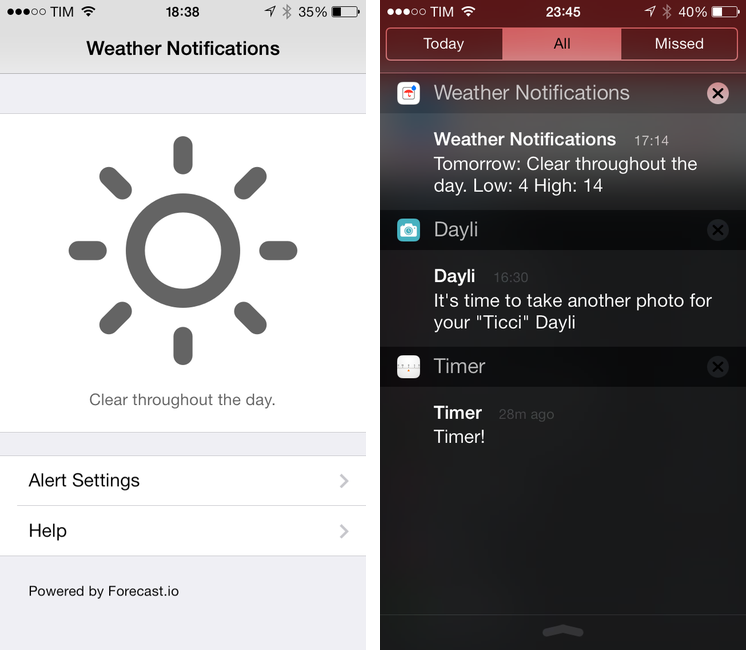
Weather Notifications, developed by Taco23, is a simple utility to get a daily notification with a weather summary on your iPhone. It’s not a weather app in the sense that it lets you browse forecasts, temperatures, or other weather data in a traditional way; instead, Weather Notifications is, as the name implies, a notification tool powered by Forecast.io.

Weather Notifications is, essentially, a Settings screen where you can configure the notifications you want to receive every day for your location. Alerts can be set to fire off at five different times: afternoon before, night before, morning, afternoon, or evening. You can only pick one, and, unfortunately, you’re also forced to pick one location; you can’t tell Weather Notifications to send you a notification the day before for Location A and in the morning for Location B. I set Weather Notifications to send me alerts for Rome the night before, so I’ll have an idea of the weather I’ll wake up to in the morning.

You can choose to receive a daily summary or condition-specific alerts for rain, snow, and fog. There are temperature, wind, and humidity thresholds that you can also optionally configure, but I’ve been enjoying the daily summary, which gives me a succinct recap of weather conditions for the following day.

And that’s it. Weather Notifications isn’t available on the iPad and it could use customizable alert sounds and support for multiple locations; Forecast.io’s accuracy may vary for your area, but it’s been fairly reliable for me in Italy.

Weather Notifications is $1.99 on the App Store.



Filibaba Egg Timer

Nice app by Filibaba (makers of other vegetarian and vegan recipe apps for iOS) that’s just a virtual egg timer for your iPhone. You can spin the egg in 1-minute increments and the app will send you a local notification when the timer is up. There are backgrounds to choose from and In-App Purchases to unlock different eggs (including a golden one, perfect for your new 5s).

Free on the App Store.

Permalink

Apple Releases 12 Days of Gifts App, Available In The U.S. Too

As in previous years, Apple has released a free “12 Days of Gifts” app for iPhone and iPad owners that will give them access to exclusive offers for free content on the iTunes Store. This year, the app is available for US customers as well, although Apple notes that not all content will be available in all countries; the promotion will run from December 26 to January 6, 2014.

From 26 December – 6 January, you can download a gift each day—songs, apps, books, movies, and more—with the 12 Days of Gifts app. Each day’s gift will only be available for 24 hours, so download the free app to make sure you don’t miss out.

Right now, the app comes with a countdown that shows how many days are left until the first free item becomes available; upon first launch, you’ll be asked to accept push notifications (to be notified when offers are released) and to confirm the country for your iTunes Store’s Apple ID.

The app has an animated background reminiscent of iOS 7’s dynamic wallpapers, and there is a built-in FAQ to learn more about downloads. Apple has also included an “Add To Calendar” button in the share sheet: tapping this button will create a recurring all-day event in your default calendar to remember to download the daily gift for every day of the promotion.

You can download the app here.