Federico Viticci

10763 posts on MacStories since April 2009

Federico is the founder and Editor-in-Chief of MacStories, where he writes about Apple with a focus on apps, developers, iPad, and iOS productivity. He founded MacStories in April 2009 and has been writing about Apple since. Federico is also the co-host of AppStories, a weekly podcast exploring the world of apps, Unwind, a fun exploration of media and more, and NPC: Next Portable Console, a show about portable gaming and the handheld revolution.

Terminology Workflows For Editorial

Greg Pierce:

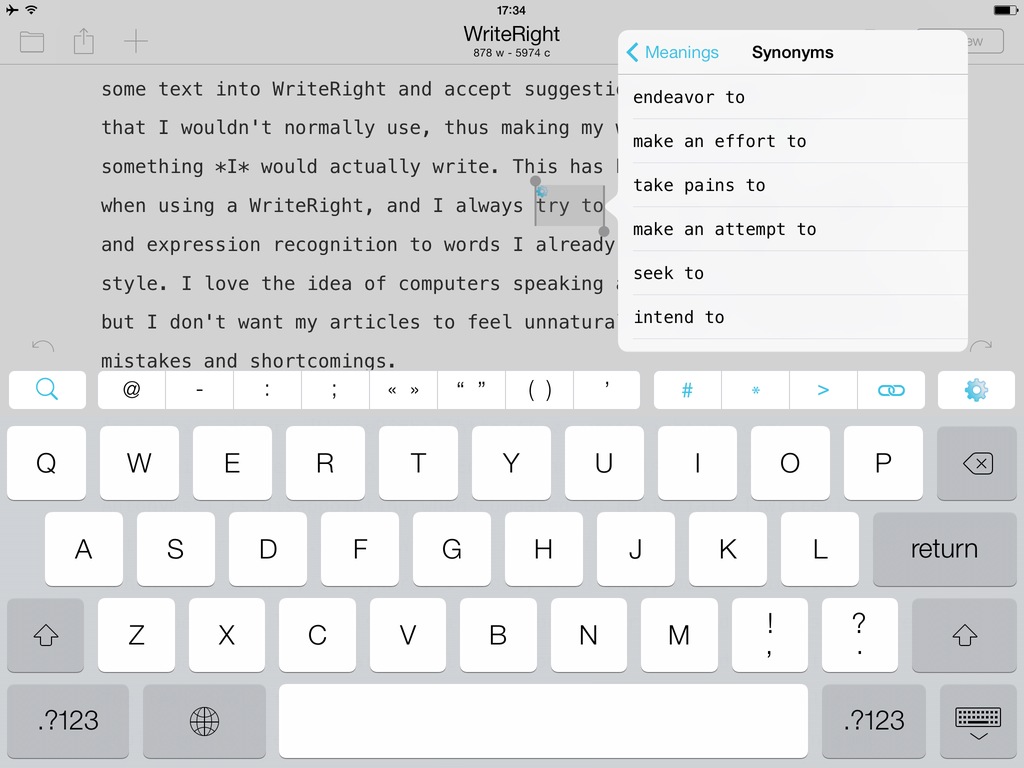
Terminology has always had great direct integration with our own apps, Drafts and Phraseology that allows you to easily lookup and select replacement words and have them directly replaced inline with your editing. You can see that integration in action.

In the latest version (3.0.6) of Terminology, I added a tweak to its URL schemes to allow it to integrate more easily with certain other apps, particularly Editorial, Ole Moritz’s excellent iPad text editor.

Terminology is my favorite dictionary app and I wish Editorial had a popover to replace Apple’s default dictionary, like Instapaper did. The workflows are the best alternative to that for now, and they work well.

It would be nice to have selectable synonyms and antonyms built into the system dictionary in iOS 8.

Permalink

Command-C: A Local Clipboard Sharing Tool for OS X and iOS 7

Command-C

Command-C

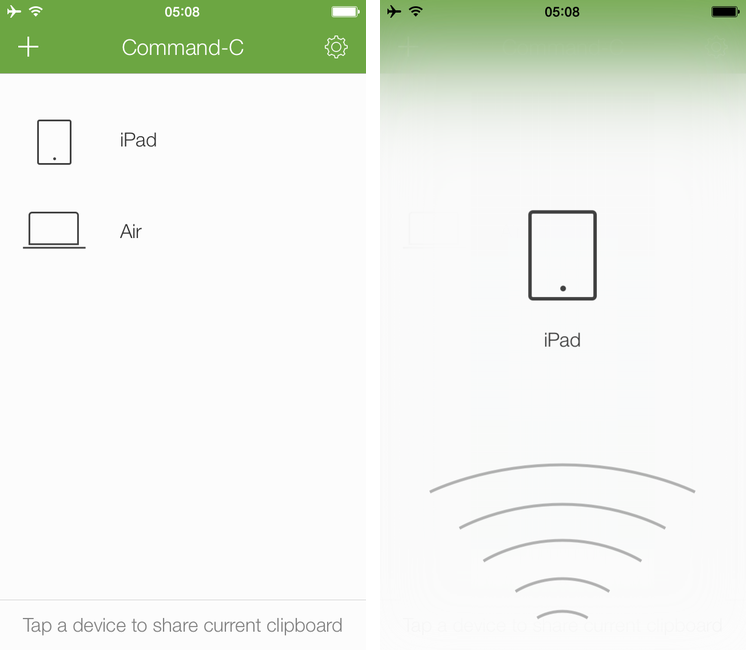
Even if my workflow these days primarily consists of reading and writing on the iPad, there are still times when I need to share content – either text or pictures – across my iOS devices, from my iPad to my Mac, or from OS X to iOS. While I can normally achieve inter-device communication using something like Evernote to keep my notes in sync everywhere, it’s not an ideal solution: why having to save and sync a temporary bit of text that simply needs to be acted upon once? Command-C, created by Italian developer Danilo Torrisi, is a clipboard sharing tool that I’ve been testing for the past couple of months and that has allowed me to eschew syncing services when I just want to quickly copy & paste between my Mac and iOS devices.

Read more


The Internet In Your Pocket

On the seventh anniversary of the original iPhone announcement, the boys take a look back at Steve Jobs’ keynote.

Seven years ago today, Steve Jobs introduced the iPhone at Macworld. We wanted to properly celebrate the iPhone’s seventh birthday with a special episode that would offer a look back at the rumors, excitement, and speculation that led up to Jobs’ keynote. I think that we did a good job, and you can find the episode here.

Permalink

Capturing The Now with Kennedy

Kennedy

Kennedy

Developed by Brendan Dawes, Kennedy is an interesting new take on mobile journaling focused on “capturing the now” with a $1.99 iPhone app.

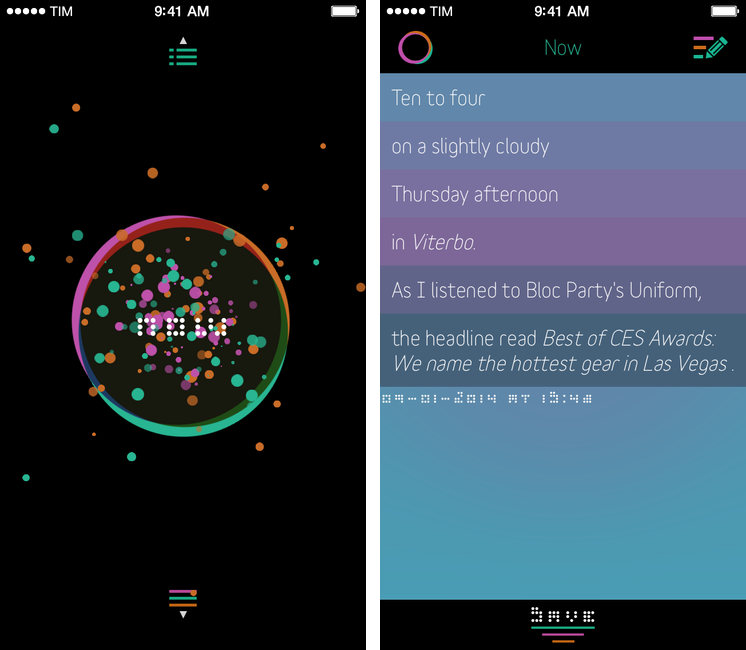
Kennedy is a data-oriented journaling app that can save your current location, date and time, weather conditions, what music you’re listening to, and even headlines from the news in individual collections of personal data points called Captures. When you open the app, you’re presented with a beautifully animated “Now” button that, once tapped, will start gathering data from built-in iOS services for location, time, and music; after a few seconds, the “Now” will become a list showing the data points that were captured by the app, such as “Ten past three, on a slighly cloudy Thursday afternoon in Viterbo”. When saved, Captures can be accessed by tapping a list button in the lower portion of the main screen; you can search for specific text in your Captures, as well as edit them at any time.

Read more


The Life Of A Porting House

They take a popular PC or console game - BioShock Infinite is the latest one - and develop and publish a Mac version, historically released months or years later (though that’s not often the case now), earning ridicule and celebration from a frustrated audience long condemned to second-class treatment.

Except these days they’re actually doing a pretty good job.

Eurogamer has a profile on Aspyr Media, the software house that’s well known for porting Windows games to the Mac (and recently iOS). I had no idea they’ve been around for more than 17 years. It would have been interesting to know more about Feral, too.

Permalink

Why Pull-To-Refresh Isn’t Such A Bad Guy

Nick Arnott:

Carr would like to see more developers experiment with new interactions for swipe down gestures, and I cautiously agree. Pull-to-refresh is one of those ideas that seems so obvious in hindsight, but took a talented engineer to think of it. The brilliance of pull-to-refresh is just how well it fit into the existing design. When users try scrolling past the top of a table cell view, they’re trying to view newer content. Pull-to-refresh intelligently extends that scrolling to have an app refresh the content to load any new data. A perfectly logical and intuitive extension of the existing functionality.

This, in response to an article by Austin Carr from December. I especially agree with Nick when he says that fast, reliable data connections that never fail aren’t a reality yet, though they have gotten better over the years.

Pull-to-refresh may seem simple and obvious today, but it was a great design challenge for its inventor back in 2010. Nick makes a lot of valid points about its existence and evolution.

Permalink


Sifttter: An IFTTT To Day One Logger

Sifttter takes the concept of Slogger and applies it to IFTTT by using Brett’s original TaskPaper script. Though it is essentially limited to current IFTTT channels, there is lots of flexibility through IFTTT itself, as well as the opportunity for individual input and customization. I’ve been using this for several months, and am happy to share it here for those who might be interested.

While I decided to avoid tools like Slogger for my Day One journal, I think that the solution Craig put together is fun and nerdy. Not for me, but a good weekend project.

Permalink

Quick iTunes Affiliate Link Creation with Affiliate for Mac

Developed by Bytesize Apps, Affiliate is a $1.99 utility for Mac that simplifies the process of creating affiliate links for iTunes and Amazon. I was especially interested in checking out Affiliate as, after Apple launched a new affiliate program with PHG in August 2013, we’ve been using affiliate links every day at MacStories, and I’ve been looking for a solution to quickly generate them.

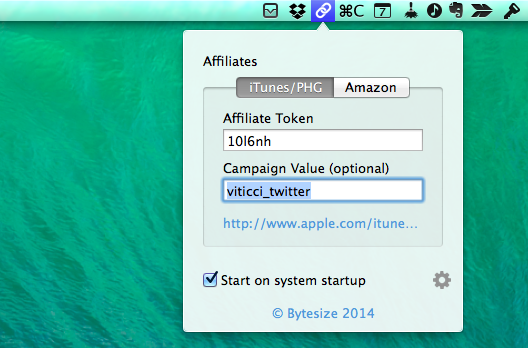
Affiliate lives in the menubar and intercepts iTunes/Amazon links you to copy to the clipboard, adding your affiliate token/tag to them automatically. In the app’s popover, you can configure an affiliate token and campaign tracking code for iTunes (PHG) and an affiliate tag for Amazon links. Every time you copy an iTunes link anywhere on your computer (iTunes, an email message, the browser – anything), Affiliate will see it, append your affiliate data in the proper format, and place the affiliate link in the clipboard for you to paste anywhere you want. The app plays a sound and displays a notification when it generates a URL and the process is simple and immediate.

Unfortunately, in its current version Affiliate doesn’t support international Amazon links (it’ll only work with .com Amazon URLs) and it doesn’t come with an option to choose from multiple campaign tracking codes for iTunes links. We use various tracking codes at MacStories, and I need to choose from multiple ones depending on the link I want to share; for this reason, I still have to use a fill-in snippet created in TextExpander with support for multiple options. I like, however, how Affiliate can detect an iTunes link that’s already an affiliate one and clean it up for you, turning it into an affiliate link for your token.

If you don’t care about the limitations mentioned above (that will likely be fixed soon) and if you generate affiliate links on a daily basis for your blog or Twitter account, I recommend getting Affiliate. It’s fast, it automatically puts affiliate links in the clipboard, it’ll save you time, and it’s $1.99.