Federico Viticci

10765 posts on MacStories since April 2009

Federico is the founder and Editor-in-Chief of MacStories, where he writes about Apple with a focus on apps, developers, iPad, and iOS productivity. He founded MacStories in April 2009 and has been writing about Apple since. Federico is also the co-host of AppStories, a weekly podcast exploring the world of apps, Unwind, a fun exploration of media and more, and NPC: Next Portable Console, a show about portable gaming and the handheld revolution.

Transloader 2.0

Nice update to Matthias Gansrigler’s utility for iOS and OS X, which I first covered in December 2012. Transloader lets you download URLs from your iPhone on your Mac: open the iPhone app, and a URL in the clipboard is recognized and synced within seconds to Transloader for Mac over iCloud. The URL will then be downloaded locally, in the Finder, without having to open Safari. It’s a great way to start downloads remotely when you’re not at your Mac.

The new version has support for iOS 7 and it lets you store multiple links before syncing them to the Mac app. Both apps have been redesigned, and iCloud sync is as stable and fast as I remembered. Transloader can be a good companion to Command-C if you want to transfer URLs over 3G (Command-C only works over local WiFi).

Transloader for iOS is free, and the Mac app is $4.99 on the App Store.

Permalink

The New Hotel Key: Your Smartphone

Craig Karmin, reporting for the WSJ:

Guests arriving at the Aloft Hotel in Manhattan or one in Silicon Valley will soon be able to do something hotels have dreamed about offering for years: walk past the check-in desk and enter their rooms by using a smartphone as a room key.
[…]
Guests at these properties will receive a message on a Starwood app containing a virtual key, which will unlock the door with a tap or twist of their phone through the use of Bluetooth technology. The company says the iPhone 4s or newer models and the Android phones running 4.3 or newer will be compatible.

Personally, I still enjoy the interaction with staff members when I check in, which is also the reason why I always go talk to an employee when I need to buy something at my local Apple store (I tried Apple’s EasyPay feature, and it felt odd).

This is where the future is going, though, and there are several elements worth considering. Bluetooth LE has stolen the spotlight from NFC for low-power, peer-to-peer wireless transfers, and there are obvious security concerns over solutions like this, as well as home products like the Lockitron. It’s an exciting time to watch pocket computers reshape our world.

Permalink

Evernote Sync Gets Faster

Evernote CEO Phil Libin:

Synchronization is now about 4X faster than ever before. This applies to any version of Evernote that you use. Sync now often takes a couple of seconds to complete, and when you get a new phone or computer, downloading your notes will take much less time. If you have a small account, you might not notice that much of a difference. On the other hand, if your account is large, or you’ve been using Evernote for many years, or you share notebooks with other users, or your entire company uses Evernote Business, you’ll see massive improvements. All four of these things happen to be true for many early Evernote employees, so the performance gains we’re seeing at the office are amazing. That explains the rejoicing.

The performance gains are noticeable for my account, which has over 2200 notes. This is especially good news for me as I use the Evernote apps a lot when I’m on 3G, and hopefully it’ll result in better handling of large attachments as well.

See also: the technical explanation of what the Evernote engineers did.

Permalink

Why Beats Music Matters

Beats Music

Beats Music

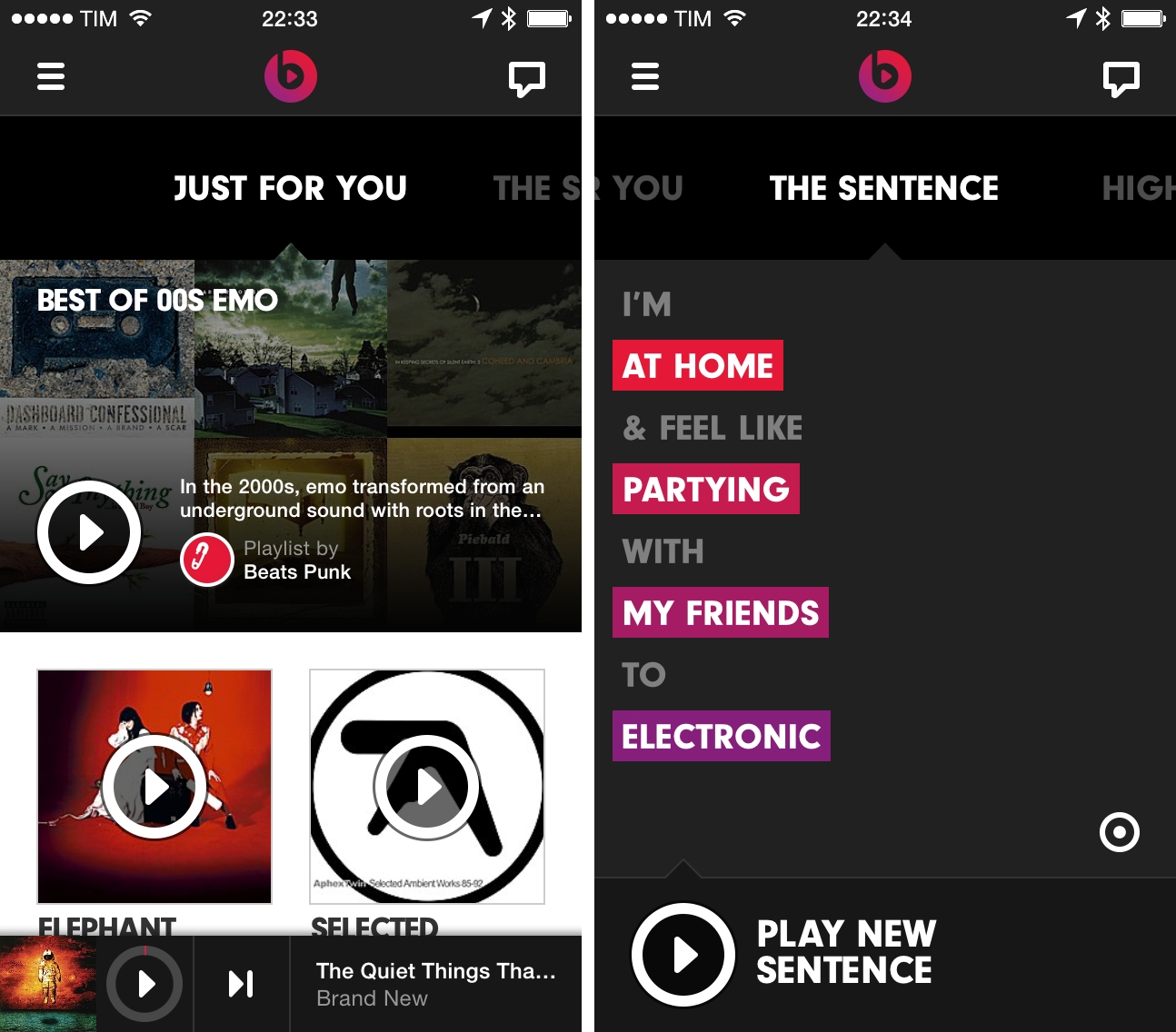
How do you treat music less like data and more like art, and make a business out of it? That’s the question Beats Music, a spin-off of Beats Electronics risen from the acquisition of MOG, wants to answer with their new music streaming and recommendation service.

I first got wind of Beats Music in December, and, when I heard the news last week that Beats Music was launching to the public, I thought I wouldn’t care. As MacStories readers and The Prompt listeners know, I’ve been happily using Rdio for the past three years: Rdio gives me all the music I want, it lets me check out New Releases and subscribe to playlists created by other users, and it’s got a Stations feature that automatically recommends music I may like based on my history and listening data collected about me. There are many reasons why I prefer Rdio over Spotify, which I’ve shared on several occasions in the past. Rdio works: you type stuff in, you get music back. If you don’t want to search, the service gives music to you with recommendations that go from “good” to “great”.

As coverage of Beats Music started coming in and cynics quickly derided the service for being part of a company that makes headphones audiophiles don’t like, I got curious. Beats Music’s CEO Ian Rogers, for instance, has a quite amazing story of being a pioneer of Internet-based music delivery and marketing, working (and touring) alognside Beastie Boys at a very young age, eventually going to work for Nullsoft, Yahoo Music, TopSpin Media, and now Beats Music.

The creation of Beats Music itself was spearheaded by Jimmy Iovine (historic music producer and co-founder of Beats Electronics with Dr. Dre), who ended up hiring Nine Inch Nails’ Trent Reznor as Chief Creative Officer of the new service because Reznor himself had been looking for a new take on music streaming services.

On a product level, Beats Music offers no free tier as it is a paid-only service that delivers 320kbps MP3 streams and promises to pay artists higher royalties thanks to the lack of cheaper, ad-supported streams. When I went to check out Beats Music’s website, I found an honest, well-written FAQ that explained the company’s vision and motivations for launching a paid service just after Spotify and Rdio extended their free tiers to tablets and desktops.

I could go on with a list of factors that contributed to piquing my interest in Beats Music. Such as the way Rogers worded his explanation of the service’s paid-only model, or how he explained their strategy to The Verge and then offered a simple screenshot as proof that ads in music may not always be the best option. Or how Reznor – for context, the guy who left his label to try “alternative” marketing campaigns that included leaving free copies of NIN songs in USB flash drives in bathroom stallssaid that “to brag about being agnostic and just providing access to music seems to me, as a culture person, as a fail” when asked about Spotify’s search and algorithm-based music platform.

As a music lover and iOS geek, it seemed silly to dismiss Beats Music just because of others’ opinions about headphones, and I’m glad I didn’t. I can’t stop using Beats Music. Read more


Ember 1.1 Brings Annotations, Screenshot Auto-Import To iOS

Ember

Ember

Ember for iOS, Realmac’s image organization app for iOS first released in December, has been updated today to version 1.1, which starts bringing some of the Mac app’s features to the iPhone and iPad as In-App Purchases. In this release, Realmac added support for Annotations and Screenshot Auto-Import as two separate IAPs priced at $4.99 and $0.99, respectively. The app is still free, and can be used with iCloud sync as a companion utility to the full Ember for OS X experience.

Ember is an app to collect and organize images, and the iOS app, especially on the iPhone, has the convenience of having a camera always available. Therefore, adding annotations to iOS is the right move for Realmac, as users who depend on Ember for pictures they take are likely to take those directly on iOS. In the app, you can now use the Smart Drawing, freehand, and text tools that Realmac first brought to Ember for Mac months ago; new to both Ember for iOS and OS X (the Mac version has also been updated to 1.3 today), blur and pixelate tools let you obfuscate parts of images that you don’t want anyone else to see.

Ember’s annotations tools on iOS are like a simpler version of Skitch. There’s a toolbar at the top of the screen with available tools, and edits can be drawn on screen by touching and swiping; once added, they can be rearranged on the canvas, but they can’t be manually resized with a pinch gesture like Skitch. In my tests, I found that I couldn’t make text annotations bigger, as Ember kept using a font size too small for my taste; I then realized that to change annotation size, you have to tap the color popover, which gives you three sizes to choose from.

Overall, Ember 1.1 provides a mix of the functionalities seen in Marco Arment’s Bugshot and Evernote’s Skitch, only in an app that syncs with iCloud across devices, including the Mac. At this point, the major feature missing from Ember for iOS is Subscriptions, which I assume will be added at some point as another In-App Purchase in the Ember Store.

It will be interesting to see how Realmac will keep adding more functionality to Ember on OS X in the future while trying a different business model on iOS. Right now, the annotations tools aren’t as flexible as Skitch in terms of manual editing options, but they work well and they’re easy to use.

Ember for Mac is available at $49.99 on the Mac App Store, with a free trial available from Realmac’s website. Ember for iOS is free on the App Store with In-App Purchases.


Let Me Share This Podcast With You

Joe Rosensteel:

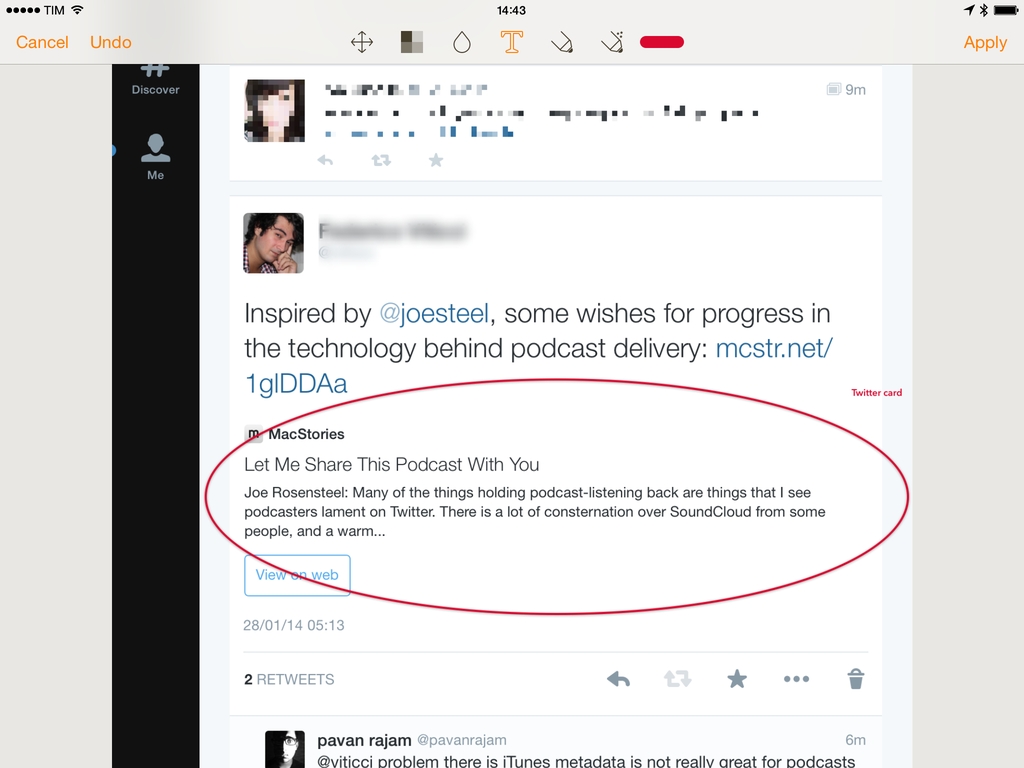
Many of the things holding podcast-listening back are things that I see podcasters lament on Twitter. There is a lot of consternation over SoundCloud from some people, and a warm embrace from others. Their program is in beta, and appears to have some quirks. People want searchable, legible, text versions of hour-long podcasts to spread links about the really good stuff. Even the ability to jump to a specific moment in playback as part of a URL has been bandied about.

The entire article is great and I agree with Joe’s points. There are several factors at play: iTunes’ stagnation for podcast producers (but, hey, at least it works), the lack of podcast-specific standards for annotations/players/show notes (podcasts themselves are delivered using another technology, RSS), and a fragmentation of independent producers, networks, and large publications that deliver podcast-like content but don’t care about interoperability with “open formats” , “clients”, and other “technologies” that could move the podcast medium forward.

Honestly, when I’m asked about my podcast by friends and family, I just point them to iTunes and Apple’s Podcasts app. That’s the easiest way in, and it gives an idea of the power of lock-in, ease of use and access, and discovery (“Just go to iTunes and search for The Prompt, mom”).

RSS helped spark the diffusion of podcasting and, now that it’s still relatively new, I wouldn’t mind seeing more efforts towards a standardization of features like show notes, transcriptions, and episode bookmarks. I don’t know how it could be done, but it needs to happen, it needs to be open for everyone to use, and developers shouldn’t have to hard-code their own custom solutions from scratch.

There’s so much potential in improving the presentation of podcast content, it’s depressing to see how primitive the basic technology is. It works, and it lets us do this stuff on a weekly basis, but it could – should – be better.

Until someone improves the technology behind podcasts, though, I’ll just have to recommend iTunes.

Permalink

Paid, Paymium Or Freemium?

Choosing the right pricing strategy for any new app is hard, but if you choose the wrong pricing model, it can cost you thousands of dollars in lost revenue. In this article I’m going to cover the three main revenue models on the App Store and explain how to make sure you pick the one that’s right for your app.

Good post by Realmac’s Dan Counsell about the three modern realities of the app business. This is the first time I see the term “paymium”, and it’s true that a few apps in the Productivity and Business categories of the App Store have been trying that model.

See also: Contrast’s David Barnard on shaping the App Store economy.

Permalink

iOS 7 iPhone Wallpapers

I’ve recently finished designing a collection of 50 wallpapers made for iPhone home screens. Without app icon shadows, iOS 7 can make the home screen look quite cluttered. I started with very simple ambient colour spectrums and decided to make a few more.

Beautiful wallpapers by Thomas Ricciardiello (via Mike Rundle). I’m trying one of the Light Spectrum ones on my iPhone now (I’ve been using an Apple default one since September). It’d be great to have iPad versions.

Permalink

The General-Purpose iPad

Ben Thompson has a good post about the differences between “computing” tasks on the Mac and the general-purpose nature of the iPad. I agree with his conclusion:

Ultimately, it is the iPad that is in fact general purpose. It does lots of things in an approachable way, albeit not as well as something that is built specifically for the task at hand. The Mac or PC, on the other hand, is a specialized device, best compared to the grand piano in the living room: unrivaled in the hands of a master, and increasingly ignored by everyone else.

Forget about this stuff and forget about “convergence”. My question is: for the future, does Apple think that the iPad – and by extension, iOS – will become suitable for traditional computing tasks?

Right now, Apple’s answer is that the Mac and iPad can coexist, each in a different space – and I believe that’s accurate. But as more people will choose tablets and smartphones as their primary computers in the coming years (with Mac sales further shrinking alongside the rest of the PC industry), will they start wondering whether spreadsheets, layouts, and photo management can be done on a multitouch display?

Does Apple think that their customers will want more from the iPad? And how would they deliver more without making the iPad more complex and less “magical”?

Permalink