Federico Viticci

10765 posts on MacStories since April 2009

Federico is the founder and Editor-in-Chief of MacStories, where he writes about Apple with a focus on apps, developers, iPad, and iOS productivity. He founded MacStories in April 2009 and has been writing about Apple since. Federico is also the co-host of AppStories, a weekly podcast exploring the world of apps, Unwind, a fun exploration of media and more, and NPC: Next Portable Console, a show about portable gaming and the handheld revolution.

Calzy 2.0

Calzy

Calzy


Calzy, one of my favorite iOS calculators, has been updated to version 2.0, which brings several new features and design changes over the old version. I reviewed Calzy in May 2013, shortly after the app had been released on the App Store, and I appreciated its clean design and gesture-driven interactions:

I use Calzy because it blends powerful features with delightful gestures and animations. For instance, the app comes with full undo/redo support: to activate this, you can swipe right or left, respectively. If you want to clear an entire expression quickly, you can tap & hold the backspace button. And – my favorite feature – if you need to edit, not just view, single items in the current expression, you can tap & hold on the display to bring up the expression editor (with another sweet animated transition). From the editor, you can swipe to delete numbers or use a button in the top left to achieve the same functionality.

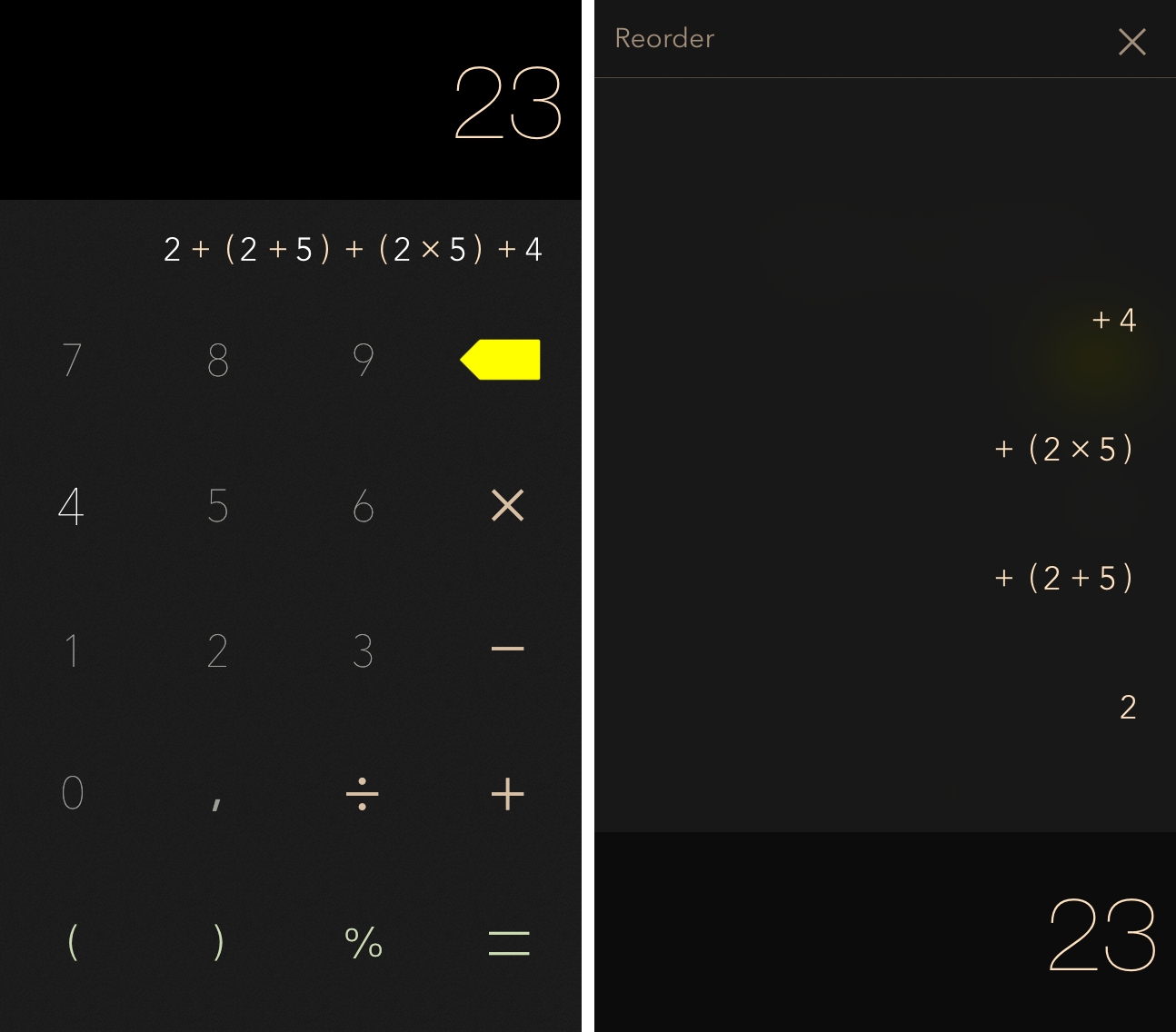
Calzy 2.0 is a free update that brings a new design for iOS 7, which isn’t dramatically different as it makes numbers thinner, brings some lightweight blurring in certain parts of the UI, and introduces themes – which I like (especially the Dark + Gold setting, pictured above). The expression editor has been revamped so you can easily reorder values in the expression, and the app has currency rounding available by tapping a button below the number pad. My favorite addition, though, is the ability to bookmark calculations with a note: tap & hold the equal sign, type a note, and a bookmark will be added (with a nice animation) and saved. Bookmarks have their own section in the History view, and I find this particularly handy to save how much I’ve spent while grocery shopping and access previous notes at any time.

Calzy 2.0 is a nice update that adds new functionality without compromising the app’s simple approach. Calzy is $0.99 on the App Store.


Permalink

logtempo

Our thanks to logtempo for sponsoring MacStories this week. logtempo is the easiest way to log time spent on any task: it only takes two taps.

Whether you’re a freelancer, consultant, or other professional who needs to account for time spent on client projects and tasks, logtempo removes all of the complexity and potential for error of time tracking tools and lets you focus on your work instead of your timesheet.

A natural progression from those hand-written notes and timesheets, with the reporting side already taken care of, logtempo takes a pragmatic approach: multiple tasks can be added to the app, and logged time can be added with another tap by choosing a time amount. When you don’t need a task anymore, you can remove it from your task list, but times logged against it are kept. Reports with times logged for the current day, working week, and last 7 days can be emailed or otherwise shared directly from the app, with an option to delete logged times from the summary report.

logtempo is a new approach to time tracking. Check out logtempo here, and subscribe for updates on Twitter and Facebook.

Permalink

Apple Adds Apple TV Channel To Celebrate The Beatles’ American Debut

As noted by MacRumors’ Richard Padilla, Apple today added a new channel to the Apple TV to celebrate The Beatles’ debut in the United States 50 years ago:

The channel allows users to view The Beatles’ groundbreaking performance on “The Ed Sullivan Show” for a limited time, and also offers download links to The Beatles’ U.S. releases, which are available digitally for the first time on iTunes.

The Beatles made their first appearance on American television on February 9, 1964, on The Ed Sullivan Show. From Ed Sullivan’s official website:

Never before had so many viewers tuned-in to a live television program, which with 73 million viewers, was three-fourths of the total adult audience in the United States. A music group from England had never crossed over into American culture in such a way, and, at the time, it wasn’t too common for a variety television show to book an English rock band. However, because Ed Sullivan traveled to England frequently, and had a great eye for talent, The Beatles caught his attention and earned a slot on his popular variety program on CBS.

After years of negotiations, The Beatles’ digital catalogue arrived on iTunes in 2010, with Apple celebrating the event with a press release and promotion on its website and iTunes’ front page. Apple has been adding standalone channels to the Apple TV in the past several months, including Yahoo Screen, PBS, Crackle, Bloomberg News, Vevo, Disney Channel, and The Weather Channel.

Permalink

Matching URLs In Editorial with John Gruber’s Regex Pattern

Editorial for iPad

Editorial for iPad

When I’m writing in Editorial, I often need to make sure I’m dealing with a valid URL in the system clipboard, the document editor, or in a variable. To do so, I’ve long employed John Gruber’s liberal, accurate regex pattern for matching URLs, which has reliably allowed me to confirm that a workflow is about to handle a proper URL rather than a string of text that contains something else. Gruber recently improved the regex pattern again, and that seemed like a good opportunity to briefly detail how I’ve integrated his pattern in my workflows.

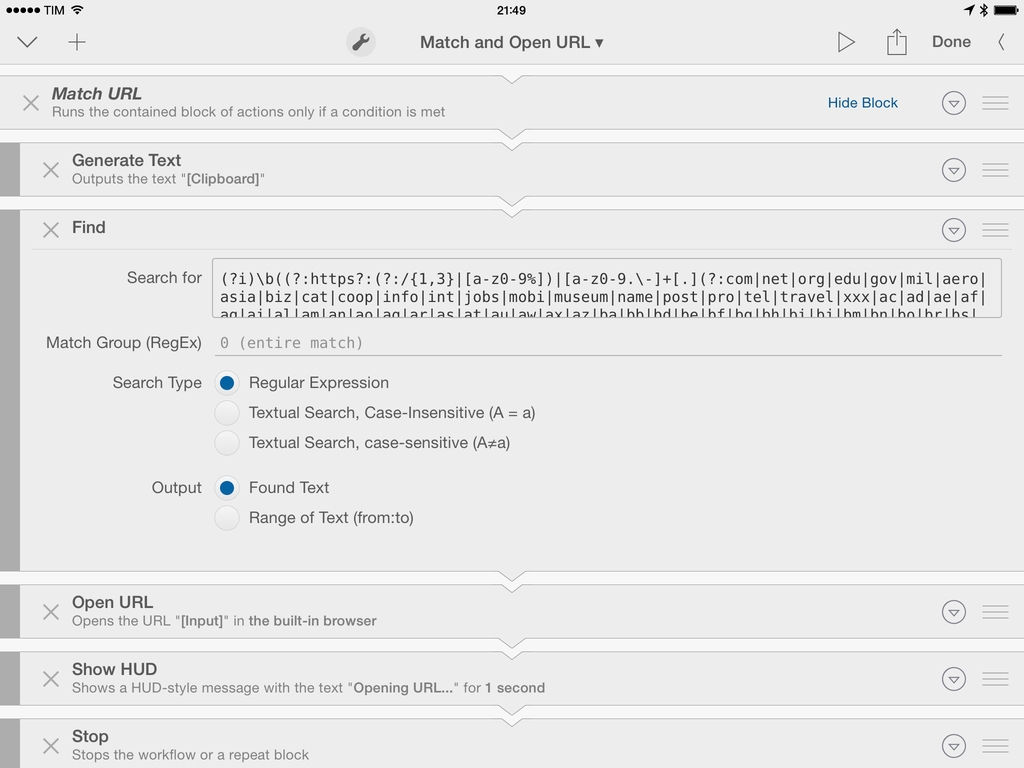
The key to match URLs and provide error-handling features in Editorial is to use a conditional block based on a regular expression pattern. Editorial comes with this functionality built-in: given a regex pattern, a block of actions can be run only if a value (plain text or variable) matches the pattern. In this way, you can run a set of actions if you have a URL, and another set if you don’t have a valid URL.

I’ve created a simple workflow that can be installed and reused as a preset in other workflows. The workflow, called Match and Open URL, consists of a single If block that checks for a URL contained in the clipboard. If you have a URL that matches Gruber’s pattern, the URL will be extracted from the clipboard and launched in the browser; if you don’t have a URL…it’s up to you to provide an alternative.

Editorial makes it extremely easy to build this kind of advanced workflow with just a few built-in actions. Gruber’s single-line version of the regex pattern can be pasted in Editorial’s If action with no modifications; inside the If block, the text in the clipboard is passed to a Find action that extracts a URL using the same, untouched single-line regex pattern. The extracted URL is opened in the browser and a HUD alert is displayed.

Combining Gruber’s regex pattern and Editorial’s workflow system can yield interesting results. You could use a variable instead of the system clipboard to match URLs; you could implement the pattern in a Repeat block that performs a set of actions for every matched URL found in the target text; instead of having my workflow inside an If block, you could match a URL among other bits of text, extract it, and do something with it. Editorial is a text automation playground and your imagination’s the limit.

You can download the workflow on Editorial Workflows’ website, and check out John Gruber’s regex pattern here.

Note: The screenshot above shows a beta version of Editorial, currently in testing.


Ending The App Store Top 200

Manton Reece thinks that Beats Music’s editorial curation efforts could work well as a template to improve how apps are discovered on Apple’s App Store:

The answer is in Beats Music. They have no overall top 200 list! Instead, they have a bunch of people — musicians and writers who deeply care about music — curating playlists. The top 25 playlists in a genre are so buried in the app that I had to search them out just to write this blog post, because they seem to carry no more weight than any other playlist. Much more common are playlists like “our top 20 of 2013”. That’s not a best-selling list; it’s based on real people’s favorites.

There are literally hundreds or maybe thousands of other playlists. Intro playlists for a band, related artists that were influential to a singer you like, playlists for a mood or activity, and more. This extra manual step makes it much easier for an algorithm to surface great music: just look for playlists that contain songs you already like, and chances are good that you’ll discover something new.

I’ve argued in favor of more editorial curation before, and while I’m a huge fan of what Beats Music is doing, it’s too early to tell whether the company will be successful or not.

I think there is merit to the idea of showcasing human-curated playlists in lieu of an automatic system (charts) that can be exploited with bots, paid installs, and other solutions. Beats Music’s curated playlists are updated every day, they are contextual to current events, and, more importantly, they are visible in search. Apple has been building a good collection of curated sections for featured apps and categories, but they are not regularly updated and they’re completely hidden from search.

Permalink

Why “Threes” Took A Year To Make

Ben Kuchera, writing about the creation of Threes (which we covered today) at Polygon:

That year-long journey of adding mechanics and art for testing, only to strip them away and get back to the core game again and again wasn’t wasted; the amount of testing and failed experiments gave them a sense of purpose and clarity when it came to the final game. It needed to be small, simple and easy to understand. The visual information needed to be clear and readable. Every other concept or theme was thrown out in deference to the original idea of matching tiles in multiples of three.

The article shows some of the concepts that the developers decided to throw out, and I think they made a good call. I don’t play many puzzle games, but Threes is fun and entertaining and challenging because it focuses on a simple mechanic: matching threes. Reducing the game’s feature set actually augmented the experience because it made the essence of the idea – numbers – immediate, easy to grasp, but hard to master.

I’m loving Threes. Its animations and sound effects are quirky and cute, the music is good, and the entire game can be played with one hand; you can pause and resume at any time, and there are no In-App Purchases or other tricks to let you win faster/more by paying. You either come up with a good strategy for matching and multiplying numbers, or you don’t get a high score – simple as that.

Go read Ben’s piece here, then get Threes for $1.99 because it’s a great iOS game.

Permalink


Collect and Share GIFs In Dropbox with GIFwrapped

GIFwrapped

GIFwrapped

GIFwrapped, developed by Daniel Farrelly and brought to my attention by Casey Liss, is making me reconsider how I organize my collection of reaction GIFs.

Until today, I’ve stored my GIFs in Evernote, using tags to group them together and search to filter results. Just a few days ago, I noted that the improved note editor in Evernote for iOS makes for smoother GIF animations, but the sharing aspect remains one of my system’s shortcomings – when I want to get a GIF out of Evernote and send it to someone else, I have to upload it somewhere else. Evernote works as a GIF archiving tool, but it’s not optimized for it. Read more