

 John
JohnThis week, Federico and John Federico and John explore workflows they’ve been trying in a variety of apps.
Add Timestamp Links to Apple Podcasts Next→
Yesterday, Apple began adding transcripts to Apple Podcasts, detailing the change on the Apple Podcast for Creators site and making them available for in iOS 17.4 developer beta 1.
This change is a huge win for accessibility, will surely improve searching in the Podcasts app, and makes quoting your favorite podcast an easy task by letting you copy and paste the text out – something I’ll definitely have to turn into a shortcut soon.
All these benefits are great in their own way and will make podcasts more shareable as a whole, allowing us to unlock so many people’s great ideas that are currently stored within hours of audio files and obscured behind URLs that point only to the show or episode as a whole.
However, I think Apple needs to go one step further in their next step and add timestamps to Apple Podcasts, a long-overdue feature that’d enable users to share links to individual moments within a podcast, directly to a specific point in the transcript.
I couldn’t agree more. From sharing to personal note-taking and research purposes, there several use cases I can think of to take advantage of timestamp links for podcast episodes – especially now that they have transcripts. (Pocket Casts, my favorite third-party podcast player, goes even further: it lets you share timestamp links and save private, time-synced bookmarks for specific parts of any episode.)
I like Matthew’s suggestions for how Apple could implement this feature, and I’ll add: Apple has already built this system for the Music app. When the company added shareable lyrics to the Music app in iOS 14.5, they did so with the ability to share selected lyrics as a special “snippet” on iMessage that is actually an interactive, timestamped song preview based on a special URL. Here’s what I wrote:
Besides Apple’s custom implementation of lyrics selection in the share sheet, what’s also interesting about this is the method the company is using to share Apple Music lyrics URLs. Unlike regular
music.apple.comlinks that reopen a particular song or album in the Music app or play a generic preview snippet in iMessage, lyrics URLs are timestamped: in iMessage, the lyrics card has a play button that will preview the lyrics you shared inline within a conversation; if you tap the link in iMessage and the same song is already paused in the Music app, the Now Playing screen will automatically advance to the section highlighted in shared lyrics.
I’m assuming that Apple is aware of this missing feature from the Podcasts app in iOS 17.4 beta 1; I have to believe their future implementation will be very similar to what already exists in Music.
Obsidian’s ‘2023 Gems of the Year’→
Silver, writing on the Obsidian blog:
It has been nearly four years since the first line of code of Obsidian was written on January 31st, 2020. Today we’re thrilled to announce the winners of our fourth annual Gems of the Year awards!
This year the Obsidian community nominated 287 projects, including plugins, themes, tools, content, and templates. After our panel narrowed down the selection and the community voted on the entries, we’re now excited to announce the winners.
Solid list of plugins and themes for the best note-taking app out there, many of which I wasn’t familiar with or hadn’t tested yet. The Border theme looks stunning and I’m going to give it a try as my primary theme in the app; the Home Tab plugin does exactly what I want from a new empty tab in Obsidian (a search box + recently opened files); Omnivore, which I’m testing as my read-later app after they added better Shortcuts integration, does a fantastic job syncing highlights to Obsidian with its plugin. Go check out this list of gems if you haven’t yet.
Side note: I’m really curious to see how the Obsidian team prioritizes updates to its iPhone and iPad apps (by far, the weakest spot of the app) in 2024.
The Vision Pro’s Most Important App Is Safari→
Interesting perspective by David Pierce, writing for The Verge, on how, for the time being, Vision Pro users may have to use Safari to access popular services more than they anticipated:
But what if you don’t need the App Store to reach Apple users anymore? All this corporate infighting has the potential to completely change the way we use our devices, starting with the Vision Pro. It’s not like you can’t use Spotify on the headset; it’s just that instead of tapping a Spotify app icon, you’ll have to go to Spotify.com. Same for YouTube, Netflix, and every other web app that opts not to build something native for the Vision Pro. And for gamers, whether you want to use Xbox Game Pass or just play Fortnite, you’ll also need a browser. Over the last decade or so, we’ve all stopped opening websites and started tapping app icons, but the age of the URL might be coming back.
If you believe the open web is a good thing, and that developers should spend more time on their web apps and less on their native ones, this is a big win for the future of the internet. (Disclosure: I believe all these things.) The problem is, it’s happening after nearly two decades of mobile platforms systematically downgrading and ignoring their browsing experience. You can create homescreen bookmarks, which are just shortcuts to web apps, but those web apps don’t have the same access to offline modes, cross-app collaboration, or some of your phone’s other built-in features. After all this time, you still can’t easily run browser extensions on mobile Safari or mobile Chrome. Apple also makes it maddeningly complicated just to stay logged in to the services you use on the web across different apps. Mobile platforms treat browsers like webpage viewers, not app platforms, and it shows.
As we saw when we surveyed the state of apps already submitted to the visionOS App Store, more companies than we expected have – for now – decided not to offer their apps on the Vision Pro, either in the form of native visionOS apps or iPad apps running in compatibility mode.
I think that “for now” is key here: if visionOS proves to be a successful platform in the long term (and early sales numbers for the Vision Pro seem encouraging), most companies won’t be able to afford ignoring it. And why would they? If the users are there, why shouldn’t they provide those users with a better app experience?
This idea is predicated upon the assumption that native apps still offer a superior app experience compared to their web counterparts. The tide has been turning over the past few years. Workflows that would have been unthinkable in a web browser until a few years ago (such as design and collaboration) can now live in a browser; the most popular AI service in the world is literally a website; the resurgence of browsers (with Arc arguably leading the space) proves that a new generation of users (who likely grew up with Chromebooks in school) doesn’t mind working inside a browser.
With this context in mind, I think Apple should continue improving Safari and extend its capabilities on visionOS. My understanding is that, in visionOS 1.0, Safari cannot save PWAs to the user’s Home Screen; I wouldn’t be surprised if that feature gets added before visionOS 2.0.
 Apple Vision Pro Preparations, Questions, and Apps

AppStories Episode 367 - Apple Vision Pro Preparations, Questions, and Apps
0:00
37:41
37:41
This week, Federico and John kick Apple Vision Pro preparations into high gear, sharing the questions they still have about the device and discussing the apps developers are working on.
 Trying Widgetsmith’s Updated Music Widgets
Does it really surprise you to know that I’ve already tweaked my Home Screen setup, which I last shared last week in Issue 400 of MacStories Weekly? Look, it’s not my fault that these “developers” keep updating these “apps” and giving me ideas. If anything, I’m a victim of the system. Anyway, the latest version...
How I Modded My iPad Pro with a Screen Protector, iPhone Holder, and Magnetic Stereo Speakers
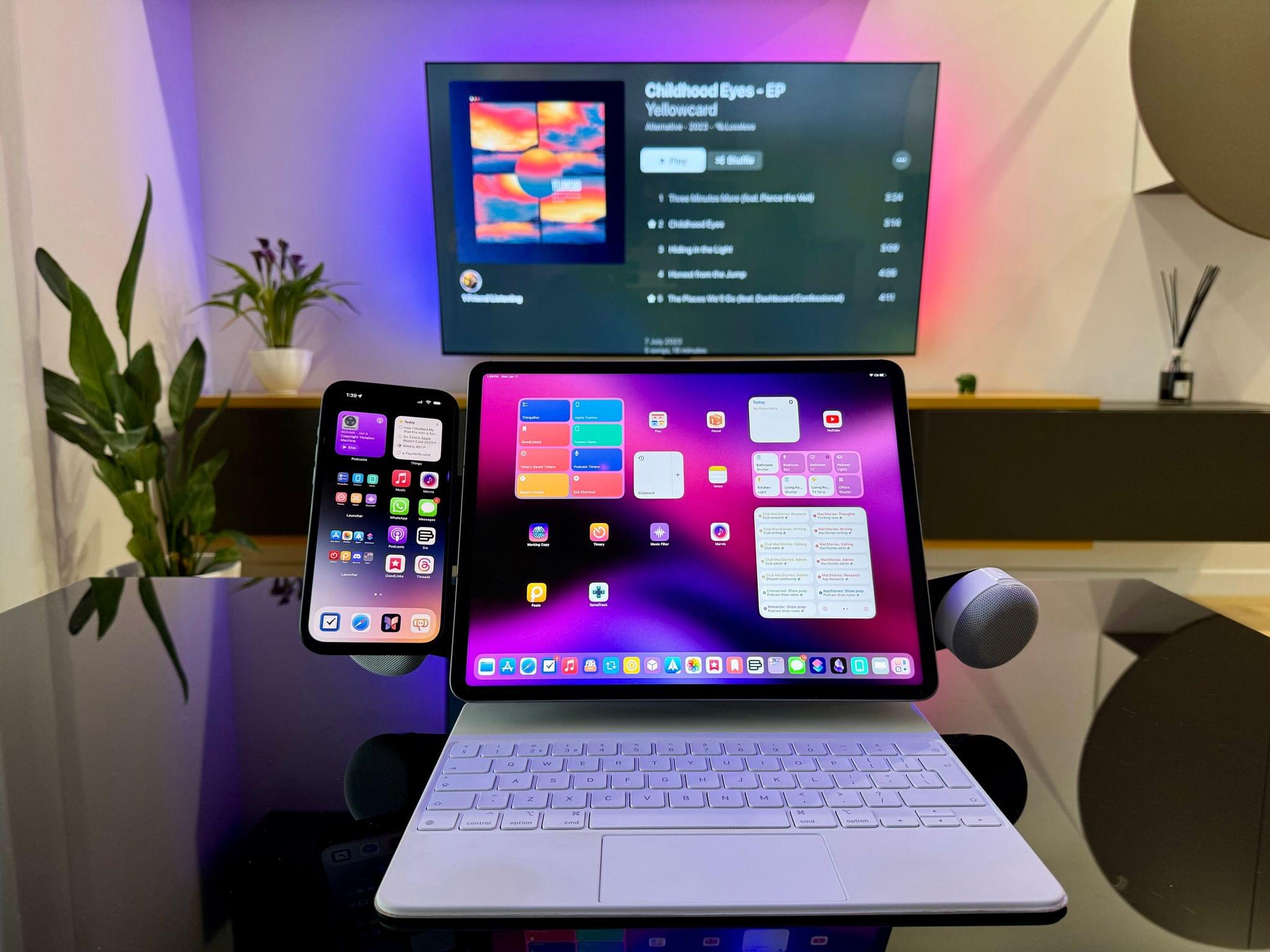
Those who have been reading MacStories for a few years should know something about me: I love modding things. Whether it’s customizing the silicone tips of AirPods Pro or adding kickstands to iPad covers (which I don’t do anymore), there’s something about the idea of taking an object and modding it specifically to my needs that my brain finds deeply satisfying. I’ve done it with videogame consoles; I’ve done it with IKEA furniture1; and I’ve done it – once again – with my 12.9” iPad Pro.
A new generation of iPad Pros and Airs is rumored to launch in the near future, and with the Vision Pro coming in a few weeks, what better way to wrap up my usage of the M2 iPad Pro than covering the mods I’ve been using?
Access Extra Content and Perks
Founded in 2015, Club MacStories has delivered exclusive content every week for nearly a decade.
What started with weekly and monthly email newsletters has blossomed into a family of memberships designed for every MacStories fan.
Club MacStories: Weekly and monthly newsletters via email and the web that are brimming with apps, tips, automation workflows, longform writing, early access to the MacStories Unwind podcast, periodic giveaways, and more;
Club MacStories+: Everything that Club MacStories offers, plus an active Discord community, advanced search and custom RSS features for exploring the Club’s entire back catalog, bonus columns, and dozens of app discounts;
Club Premier: All of the above and AppStories+, an extended version of our flagship podcast that’s delivered early, ad-free, and in high-bitrate audio.
Magic Rays of Light Joins MacStories, Plus Our Favorite Media Tracking Apps
AppStories Episode 366 - Magic Rays of Light Joins MacStories, Plus Our Favorite Media Tracking Apps
0:00
41:21
41:21
This week, Federico and John are joined by Sigmund Judge and Devon Dundee, the hosts of Magic Rays of Light, a weekly show that explores the world of Apple TV and Apple Arcade, which has joined MacStories, to discuss the show’s move to MacStories as well as tvOS and the apps we use to track media.