
macOS Sierra introduced picture-in-picture (PIP) for Mac users. As on the iPad, clicking the PIP button in the control bar of a video player places the video in a resizable window in the corner of your screen. Dragging the window towards another corner and releasing causes it to snap into that corner. As pointed...
SoundShare Adds an iMessage App
SoundShare is designed to bring music lovers together regardless of the streaming services they use. I reviewed SoundShare back in May when it launched a big update and since then, Matt Abras has continued to refine and improve the app with a series of updates.
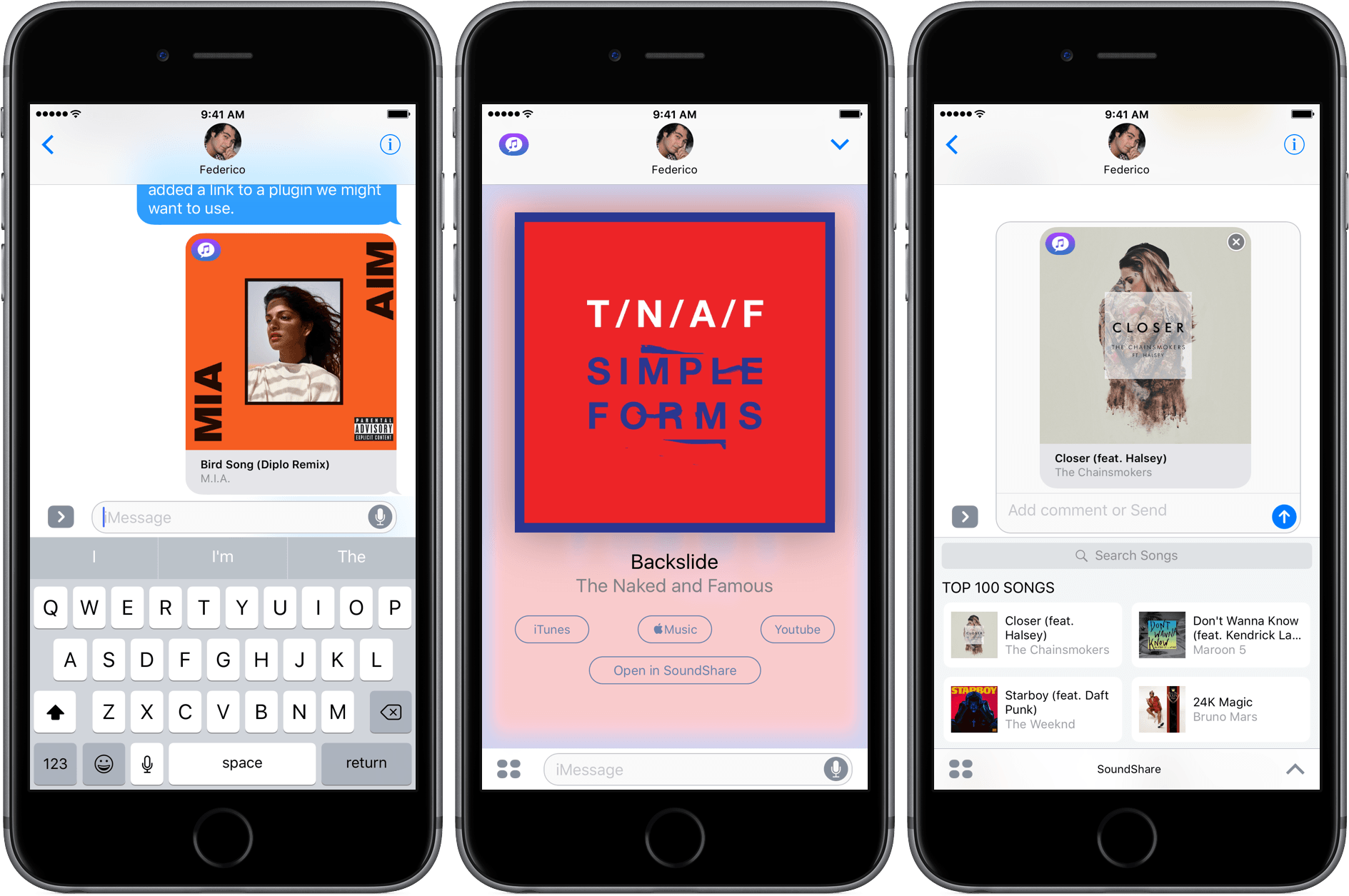
Today, SoundShare released an update that includes a great iMessage app. From SoundShare’s iMessage app, you can pick a song from among the iTunes Top 100 list or search for something else using the search bar at the top of the iMessage drawer. Tapping a song adds album art, the title, and artist to a message ready to send with or without a comment.
What makes SoundShare’s iMessage app so handy is that when your recipient taps on the album art, it opens full screen with options to open the song in iTunes, Apple Music, YouTube, or the SoundShare app. This isn’t the full compliment of services that SoundShare works with, but the others (Spotify and Deezer) can be accessed through the ‘Open in SoundShare’ option. That opens the SoundShare iOS app and immediately starts playback of the song with one of those services if you are logged into them through SoundShare.
We have started to see some interesting iMessage apps a month into the iMessage App Store that take advantage of platform. SoundShare is one of my favorites so far because it removes the friction of sharing music. I can send a nicely formatted link to a song without thinking about whether the person on the other end of my message has the correct service to play it.
SoundShare is iPhone-only and can be downloaded for free on the App Store.
Scanbot Turns Six
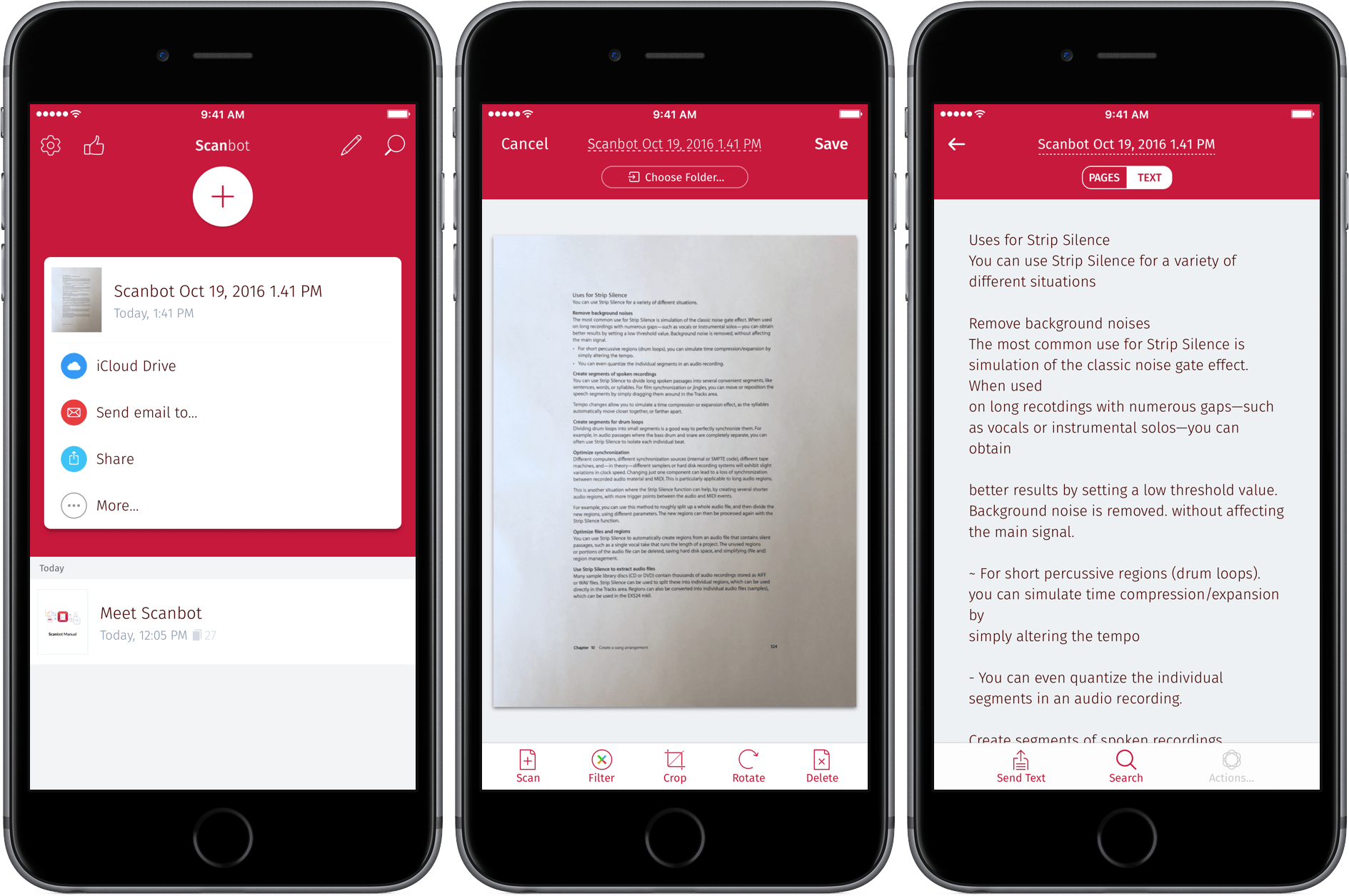
Scanbot, which can scan documents, QR codes, and bar codes, received a major update today. Version 6 adds a host of powerful features aimed at handling documents after they have been scanned and saved as PDF files.
Scanbot has always been an excellent tool for scanning documents to PDFs on the go, but its PDF editing tools were limited. With version 6, Scanbot can now add, move, delete and rotate scanned pages. You can also annotate PDFs with a pen tool, highlighter, and eraser. Version 6 adds an enhanced pen tool with several colors and stroke sizes. In addition, the Pro version, which includes optical character recognition (OCR), now lets you turn OCR off, only invoking it on demand when needed. Finally, Scanbot has added support for Microsoft OneDrive, OneNote for Business, and Amazon Drive.
Version 6 of Scanbot is a solid update to a mature app. The one change in version 6 that I don’t like is the icon. Scanbot’s old robot icon added a touch of whimsy and fun to an otherwise utilitarian app. It feels like Scanbot’s maker, doo, decided to go after a more corporate user base and perhaps had a hard time selling an app with a robot icon to ‘serious’ business customers. Whatever the reason behind the change, I will miss the old icon. What hasn’t changed though, is that Scanbot 6 is a powerhouse utility that should fill nearly anyone’s mobile scanning needs.
Scanbot 6 is available on the App Store as a free download. The Pro version is $7.99 as a separate app or via an In-App Purchase from the free version.
Apple Announces October 27 Event
As first reported yesterday by Ina Fried at Recode, Apple announced a media event for October 27 at 10 AM San Francisco time. The event will be held at Apple’s campus in Cupertino. As shared by Jason Snell at Six Colors, the invitation simply reads “hello again”.
Recode’s article and other recent speculation suggests that this media event will be primarily dedicated to unveiling new Mac products, many of which are well overdue for an update. In particular it is expected that the MacBook Pro laptop line will receive a significant update with a new touch screen strip that replaces the function keys, a thinner design, improved performance, and potentially Touch ID.
It is also expected that the iMac line will be refreshed. Less likely, but still plausible, are updates to the Mac Pro (last updated in December 2013), MacBook Air (last updated March 2015), and Mac Mini (last updated October 2014).
It is also possible that Apple may announce a ship date for the new wireless AirPods that were announced last month at Apple’s iPhone 7 keynote. At the time, Apple said that the AirPods would be available in “late October”. The iPhone 7 Plus’ new Portrait mode, which creates a depth-of-field effect, has been in a public beta of iOS 10.1 since late September and its official release date could also be announced at this event.
Apple and Homebuilders Work to Spread HomeKit Adoption→
Apple has begun working with large US-based home builders, like Lennar and KB Home, to incorporate HomeKit-enabled systems into newly-constructed homes. HomeKit was introduced with iOS 8. Makers of home automation equipment were initially slow to adopt HomeKit, but it has begun to gain momentum in recent months.
With device manufacturers embracing HomeKit in greater numbers, Bloomberg reports that Apple has turned to large homebuilders to help get those devices into homes. One drag on home automation adoption is cost. As Bloomberg points out, a touchscreen deadbolt lock costs $200 compared to $32 for a traditional lock. Another issue is incorporating smart devices into older homes that were not designed with them in mind. To address both problems, Apple is focusing on new homes:
’We want to bring home automation to the mainstream,’ said Greg Joswiak, Apple’s vice president of product marketing. ‘The best place to start is at the beginning, when a house is just being created.’
By focusing on new construction, the cost of smart devices can be rolled into a homeowner’s mortgage at the time of purchase, making the cost easier to rationalize. New construction also has the advantage that it is easier to design devices into a home when it is built than to retro-fit existing homes.
Kickstarting Season 3 of Welcome to Macintosh→
Mark Bramhill, the creator of Welcome to Macintosh: a Tiny Show About a Big Fruit Company, has launched a Kickstarter campaign to fund Season 3 of his highly-regarded podcast about Apple and the community that surrounds it. Bramhill’s show seemingly came out of nowhere in early 2015. In a sea of Apple-themed podcasts, Welcome Macintosh set itself apart by being short and tightly edited. Each episode of seasons one and two focused on a single story or theme from Apple history like skeuomorphism and the time Song a Day Mann made Steve Jobs dance onto stage at the antenna-gate Apple event.
Bramhill previews some of what he has planned if the Kickstarter succeeds:
In one episode, I pitch an emoji for adoption in the international Unicode standard, following it all the way from a concept through the bureaucracy of the emoji-industrial complex. In another, I trace the surprisingly dramatic past of an app that was on the forefront of the MP3 revolution. And there are a whole bunch of others. Beginning next summer: eight brand new episodes for Season 3.
The kind of show that Bramhill produces is time consuming, hard work, and it takes money. So for Season 3, Bramhill has launched a Kickstarter. He is trying to raise $10,000 to cover everything from file hosting, to travel expenses. The campaign is off to a good start and includes some nice perks for backers like vinyl stickers and t-shirts. Mark is a natural storyteller. Check out the past episodes of Welcome to Macintosh and the short episodes he will be releasing during the Kickstarter campaign. I bet if you do, you’ll find yourself on his Kickstarter page backing Season 3.
Game Day: Invisible, Inc.
iOS gaming is epitomized by games with short, simple interactions, which is why arcade and puzzle games dominate the platform. There’s nothing inherently wrong with that – it plays to the strengths of the iPhone where most iOS game are played. But the success of Apple’s smallest iOS device doesn’t have to be at the expense of its bigger cousin, the iPad. With lots of power under the hood, a big battery and a gorgeous screen, the iPad has a lot to offer as a gaming platform. Yet, games that take advantage of the iPad’s strengths feel few and far between.
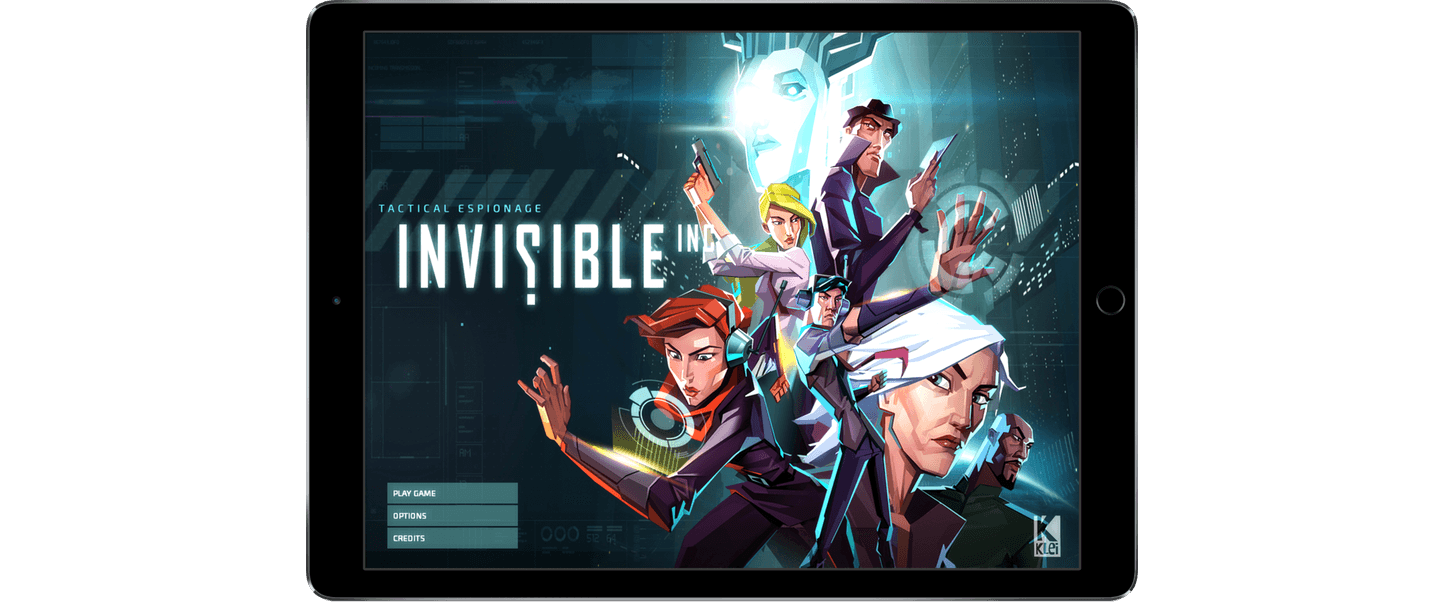
Earlier this month, Klei Entertainment, the Canadian studio behind Don’t Starve, released Invisible, Inc., an iPad-only turn-based stealth and strategy game that demonstrates what’s possible on the iPad. Invisible isn’t a new title. The game debuted on the PC and Mac in 2015 and earlier this year on the PS4, but this is Invisible’s first appearance on a touch-based device.

Invisible is set in a future where the world is dominated by corporations. Your security team has been compromised and you have 72 hours to solve a variety of missions leading up to a counterstrike against your enemy. Each mission poses unique challenges and obstacles that require stealth and strategy. The missions are also necessary to collect gear you will need to make your final assault on your enemy’s base.
The turn-based nature of Invisible gives you time to consider the best way to get around guards, cameras, drones, and other obstacles, but at the same time, Invisible creates a sense of urgency. Each turn you take raises the alarm status in the facility you’ve infiltrated, which leads to further complications as you navigate your enemy’s defenses. Guards you take out don’t remain unconscious indefinitely either. Waste too many turns and guards start to come to and look for you. Add to that an ominous electronic soundtrack, and you’ve got a game with a nearly perfect level of intensity.

Invisible is a deep game that is worth playing multiple times. You can unlock ten different agents to take through the missions, which are procedurally generated, adding variety to each play-through. You will fail missions over and over, but Invisible gives you ‘rewinds’ to retry missions, learning the best way to navigate their threats. On top of that, there are five game modes, all of which adds up to hours of challenges that are never the same twice.
Klei’s experience with bringing desktop gaming to the iPad shows. Invisible feels perfectly natural as an iPad app. The choice to bring the game to iPad only for now was a smart one. The game benefits from the larger screen. Klei did the same with Don’t Starve, but eventually did bring that game to the iPhone too. I could see that happening here as well, but doing so would undoubtedly require significant effort to make the interface work on a smaller screen.
I would love to see more games of Invisible’s ambition and quality on the App Store. The success of a game like Invisible on iOS seems like a no-brainer. A high-quality game for $4.99 that would cost you $20 on another platform is a great bargain. Unfortunately, people have been conditioned to expect games on iOS that are free or maybe a dollar or two at most. That’s a problem for the future of gaming on iOS, but with releases of top-notch games like Invisible, Inc., I remain optimistic that there is still a place for premier games to carve out a place for themselves on iOS.
Invisible, Inc. is available on the App Store for $4.99.

 Quick Access to Apps with Notifications in Folders
iOS 10 introduced a quick way to access apps with notification badges that are tucked away in folders. On iPhones that support 3D Touch, press the folder icon. The contextual menu that pops up will include any app with a notification badge on its icon....