John is MacStories' Managing Editor, has been writing about Apple and apps since joining the team in 2015, and today, runs the site alongside Federico.
John also co-hosts four MacStories podcasts: AppStories, which covers the world of apps, MacStories Unwind, which explores the fun differences between American and Italian culture and recommends media to listeners, Ruminate, a show about the weird web and unusual snacks, and NPC: Next Portable Console, a show about the games we take with us.
On this week’s episode of AppStories, we pick two apps and discuss how and why we use them for our work. For the first installment of Pick 2, Federico covers Ulysses and how he’s used it over the past year and for the iOS 11 review he is currently writing; John explains how he uses FullContact to keep in touch with developers and sponsors of MacStories and AppStories.
Sponsored by:
Audible - Audible books inspire and entertain anywhere, anytime.
Hello Weather - The exceptionally useful, no-nonsense weather app.
AppStories Episode 14 - Pick 2: Ulysses and FullContact
I love running with my Apple Watch, but I’m not a fan of most running apps; too many want to update me constantly about my progress while running. Other apps want me to share my runs on social networks. That’s not for me. I’d rather have an app parse the data collected after I’m home and can spend some time with it, which is precisely why I’ve enjoyed using Tempo.
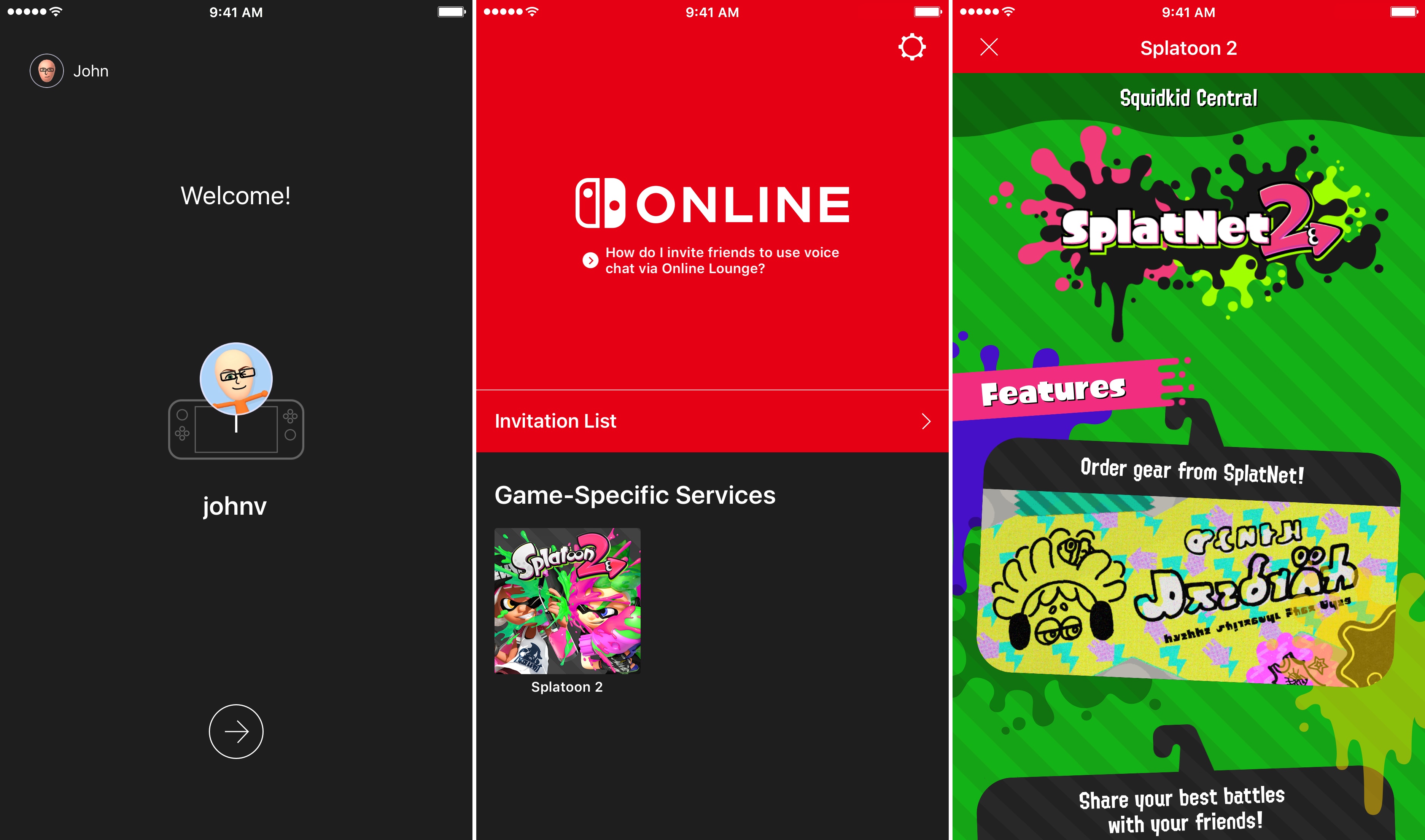
On Friday, July 21st, Nintendo will release Splatoon 2, one of its marquee titles for the Switch console, which will be the first game to take advantage of the Nintendo Switch Online app for iOS. The app is available to download now, but won’t be of much use until Splatoon 2 is released Friday. In the meantime, you can download the app, sign into your Nintendo account, and review instructions on how to invite friends to play. Invitations can be sent over social media like Facebook, WhatsApp, Twitter, and Line. The app will also allow players to chat with friends using a headset connected to their iOS device.
Nintendo Switch Online is a free download on the App Store. Nintendo’s online service is free while it is in beta, but will cost $19.99 per year or $3.99 per month when it launches in 2018.
Apple has announced that it has named Isabel Ge Mahe Managing Director of Greater China, a newly-created position within the company. Ge Mahe most recently led Apple’s wireless technology engineering teams working on cellular, WiFi, Bluetooth, NFC, location, and motion technologies. She has also overseen the engineering teams developing Apple Pay, HomeKit, and CarPlay.
Apple CEO, Tim Cook, had this to say about the appointment:
“Apple is strongly committed to invest and grow in China, and we are thrilled that Isabel will be bringing her experience and leadership to our China team,” said Tim Cook, Apple’s CEO. “She has dedicated a great deal of her time in recent years to delivering innovation for the benefit of Apple customers in China, and we look forward to making even greater contributions under her leadership.”
Ge Mahe, who will start in her new position later this summer in Shanghai, added:
“I’m honored to have this opportunity to represent Apple in China and work more closely with our incredibly talented team,” said Isabel Ge Mahe. “Everyone at Apple is proud of the contributions we make to the communities where we do business, and I am looking forward to deepening our team’s connections with customers, government and businesses in China to advance innovation and sustainability.”
As Ge Mahe’s appointment underscores, China is an important market for Apple. The country accounted for 29% of Apple’s revenue in the March 2015 quarter according to Recode. Since then, however, revenues generated in China have slipped as the iPhone has lost market share to other mobile phone manufacturers.
What if you had someone who would sort through your email and find only the important messages? That is exactly what SaneBox does. After you set it up, SaneBox leaves your important messages in your inbox and moves the rest to a SaneLater folder for reviewing later. That initial inbox purge is powerful because it reduces your inbox to a manageable number of messages. With additional training to tell SaneBox what’s important to you, it only gets better at dealing with the daily deluge of messages.
There’s much more to SaneBox than shuffling unimportant messages into a designated folder, though. If there’s something you never want to see ever again, send it to the SaneBlackHole, which is much easier than unsubscribing to unwanted messages.
You can also set up SaneReminders by sending messages to an address that sends a reminder to you at a later date if the recipient of your message hasn’t responded after a certain amount of time. Or forward messages to SaneReminders to have it pop back into your inbox at a later date when you are ready to deal with it.
SaneBox works on top of your existing email setup. There’s no app to download or new email account to set up. It all works server-side so you can use any email client you want.
Sign up today for a free 14-day SaneBox trial to take back control of your email. MacStories readers can receive a special $25 credit automatically by using this link to sign up.
Our thanks to SaneBox for sponsoring MacStories this week.
Federico and John pick two apps and discuss how and why they use them for their work. For the first installment of Pick 2, Federico covers Ulysses and how he’s used it over the past year and for the iOS 11 review he is currently writing and John explains how he uses FullContact to keep in touch with developers and sponsors of MacStories and AppStories.
Resynth creates a novel experience by fusing synthesizer tunes with a puzzle game. Stripped of the musical components, Resynth would be a fairly standard puzzle game that requires you to push blocks into positions and flip switches on a map to move to the next level. What makes Resynth unique though, is its music.
Each level begins with a looping synthesizer track. As you move blocks into the correct positions and toggle switches, notes are added to the loop, evolving the music. The changes to the music provide an added sense of accomplishment as you play. Pack 1 includes 36 puzzles. Pack 2 has another 36 puzzles that can be unlocked by earning stars or with an In-App Purchase.
Throughout each level, a white line loops across the screen in time with the synth loop, adding a sense of motion to the music. Also, once a block is pushed into position, it pulses to the beat. The approach reminds me of Sound Shapes, a musical platformer available on the Sony PS4 and Vita that combines music and motion in a similar way. Although Resynth is a very different game, the effect is similar, adding a sense of progress and motion to each level.
The mechanics are straightforward. You push blocks around the map by swiping. Moving around faster can be accomplished by swiping and holding. The levels get progressively harder requiring more complex maneuvers like moving two blocks in tandem. The maps become more complex too, limiting the space available for moving blocks into position. If you get a block stuck in a place where you can’t complete a puzzle, there are undo and restart buttons, which I appreciate with this type of game.
The challenge is mostly in the puzzles themselves, with one qualifier. There is a star system tied to each level. Stars are earned based on time to complete the puzzle and the number of moves it takes you to do so. Fortunately, it’s easy to ignore this, which I’ve been doing because I prefer the low-stress approach to this sort of puzzle game. The one downside to ignoring the star system is that unless you earn enough stars, you won’t be able to unlock the Pack 2 puzzles unless you buy the In-App Purchase. Still, challenging puzzles combined with an excellent soundtrack make Resynth an excellent way to unwind over the weekend.
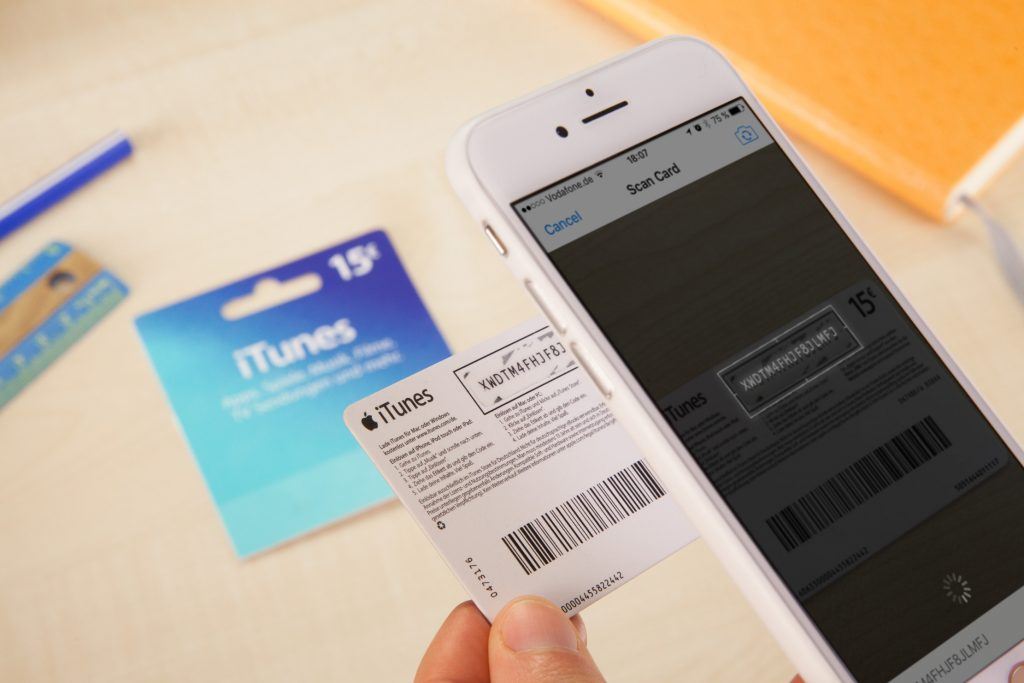
Equinux, maker of VPN Tracker, Mail Designer Pro, and other products has a fascinating look at the tech behind App Store gift and promo code cards that can be scanned and redeemed with an iPhone or Mac’s camera. The company wanted to make scannable cards of its own to hand out at events, so they began investigating how the alphanumeric codes found on the back of the cards work. It turns out there’s quite a bit to it.
When you look at some of the other folders inside iTunes, we found a tantalizing plugin called “CodeRedeemer.” It showed promise. But alas, no font files there either. The app binary does give a hint of where the heavy lifting is being done: “CoreRecognition.framework.”
Inside the CoreRecognition framework were two fonts, Scancardium and Spendcardium, which, along with the surrounding rectangle, are the keys to creating custom cards.
The entire story is an impressive bit of sleuthing and well worth a read. If you’re a developer and would like to make scannable codes of your own, Equinux’s post includes instructions for doing so, along with Sketch, Photoshop, FileMaker, and Mail Designer Pro templates.














 Federico