John Voorhees

5432 posts on MacStories since November 2015

John is MacStories' Managing Editor, has been writing about Apple and apps since joining the team in 2015, and today, runs the site alongside Federico. John also co-hosts four MacStories podcasts: AppStories, which covers the world of apps, MacStories Unwind, which explores the fun differences between American and Italian culture and recommends media to listeners, Ruminate, a show about the weird web and unusual snacks, and NPC: Next Portable Console, a show about the games we take with us.

Apple Publishes AirTag Additions to Its Personal Safety Guide

First spotted by 9to5Mac, Apple has expanded its Personal Safety Guide that serves as a hub for information about device and data access when your safety is at risk. New details in the guide cover AirTags, which have received a lot of attention as stories have surfaced of their use to stalk people, but the guide is broader than that, covering a wide range of topics. As Apple explains at the beginning of the guide:

This user guide is a personal safety resource for anyone who is concerned about or experiencing technology-enabled abuse, stalking, or harassment. It can help you sever digital ties with those you no longer want to be connected to and outlines the personal safety features that are built into Apple devices.

In addition to accessing the Personal Safety Guide on Apple’s website, it’s available as a downloadable PDF.

Regarding AirTags and other Find My accessories, Apple’s guide explains what the device’s alerts mean, providing users with the context necessary to know how to respond. The guide also offers suggestions of what to do if an unknown device is following them.

It’s good to see Apple’s Personal Safety Guide actively maintained. Apple has built-in safety measures for devices like AirTags, but it’s equally important that users know how to take advantage of those safety features, which the Personal Safety Guide should help with.

Permalink

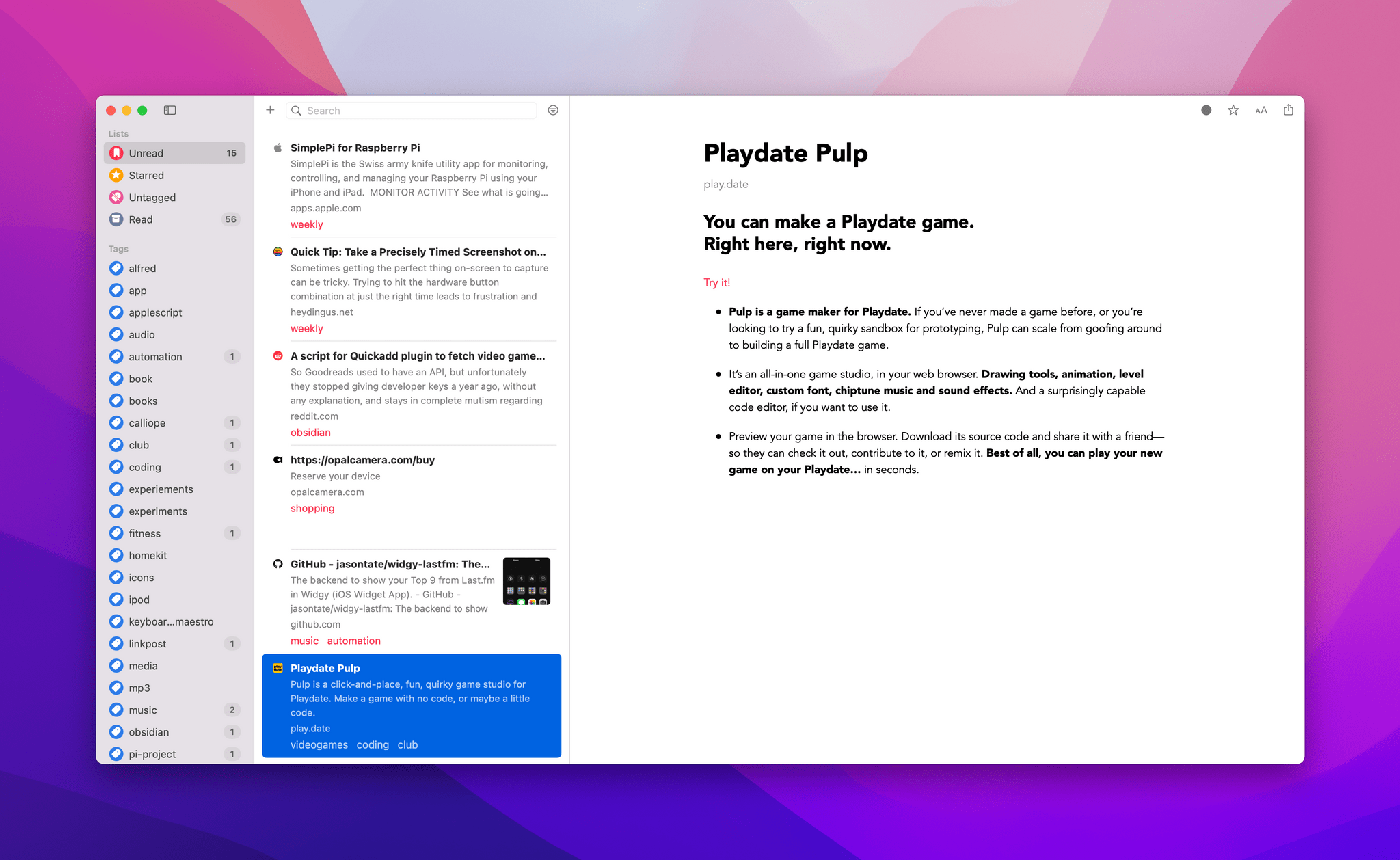
MacStories Starter Pack: Getting a Handle on Links By Treating Them Like Email

Editor’s Note: Getting a Handle on Links By Treating Them Like Email is part of the MacStories Starter Pack, a collection of ready-to-use shortcuts, apps, workflows, and more that we’ve created to help you get the most out of your Mac, iPhone, and iPad.

I’ve had a link problem for a long time. Links accumulate everywhere: in Messages, mail clients, text files, Discord, Trello, research tools, and elsewhere else imaginable. If they weren’t digital, I’m sure I’d be tripping over links on my way to the kitchen for breakfast each morning.

Part of my problem is an occupational hazard. Links to apps, articles I may want to link on MacStories, images on our CDN, podcast episodes uploaded for publication, and materials from advertisers are just a small sampling of the links I deal with every day.

But links are part of everyone’s lives. Friends and family send us links to things to read, videos to watch, itineraries for trips, and a lot more. Companies send us links to things we buy online and deals we want to check out. Most of all, though, there are the many links we collect ourselves throughout our day. The Internet touches every aspect of our lives, which means links permeate every corner of our days, yet links are collected, organized, and processed haphazardly on an ad hoc basis by most of us.

Over the holidays, I sat down to think about links and how I deal with them. It didn’t take long to realize that thinking about links in the abstract is about as useful as thinking about email messages and tasks. The trouble is that links can represent almost anything from a short video that will take two minutes to watch to an expensive purchase that you will need hours to research. They vary widely in importance, the attention required to deal with them, and relevancy. As a result, it doesn’t do you much good to treat links without also considering what they represent.

Leaving links locked inside the app where you found them isn’t much use either. I’d never considered that links could benefit from a more structured processing approach like email or tasks, but having just reorganized my approach to email, I realized that they absolutely can. The trick is to keep the system lightweight and flexible and to be willing to delete most of your links to avoid clutter.

Read more


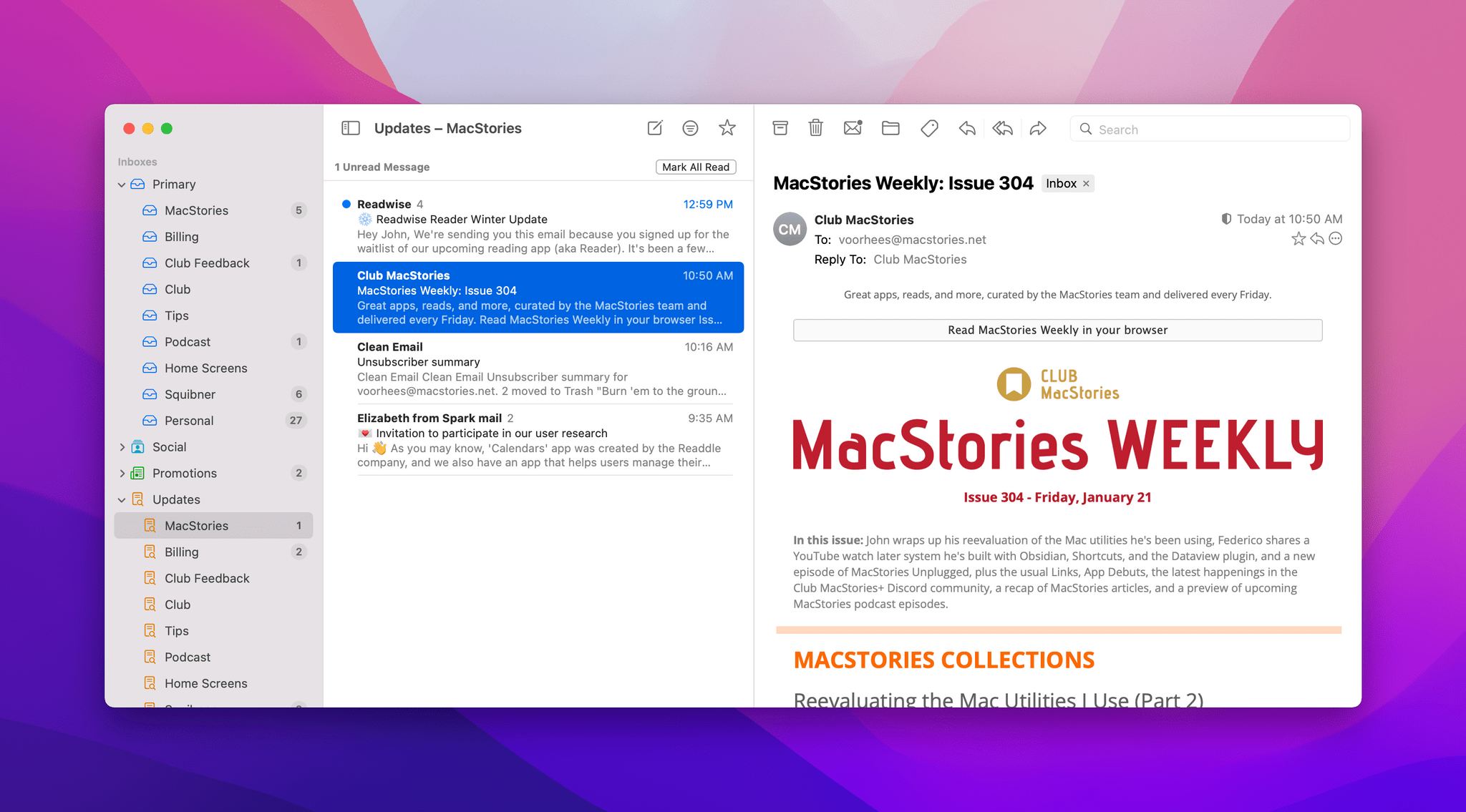
MacStories Starter Pack: Why I Abandoned the Search for the Perfect Email App and Am Making Do With a Hybrid Approach

Editor’s Note: Why I Abandoned the Search for the Perfect Email App and Am Making Do With a Hybrid Approach is part of the MacStories Starter Pack, a collection of ready-to-use shortcuts, apps, workflows, and more that we’ve created to help you get the most out of your Mac, iPhone, and iPad.

I’ve been revisiting my approach to email every year for what seems like forever. No matter which app I picked, I was never satisfied. On one level, that’s surprising because I don’t think my email needs are unique or complex. Even so, the features I value in an email app are ones that I care about a lot. The trouble is that a lot of MacStories readers could say the same thing but would pick an entirely different set of features they care about the most. This is a problem and conversation that goes back to the early days AppStories, and really, long before even that.

As 2021 came to a close, I knew something had to change and that I’d have to let go of my longstanding preference of using the same app across all of my devices. I don’t abandon that approach lightly because I don’t like the mental overhead of juggling multiple apps with different features to accomplish the same task. However, what started as patience as I waited for Apple to modernize Mail or a third-party developer to build something better, began to feel like stubborn inflexibility on my part. I knew it was time to make the most of an imperfect situation by cobbling together a hybrid solution that I hope will provide readers with some pointers on how they can improve how they manage email too.

Before I get to the apps I’m using to manage my email day-to-day, I want to cover how I dealt with my email backlog. My email accounts get messy as the end of the year approaches because it’s our busy season at MacStories. I used to feel bad about it, but I don’t anymore. It’s not my job to have a perfectly organized inbox, which is good because it can be a mess at times. Still, a backlog of messages makes any email app harder to use no matter how good it is, so I spent some time over the holidays tidying up.

Read more


New Apps We Are Trying or Revisiting

AppStories+ Deeper into the world of apps

AppStories Episode 257 - New Apps We Are Trying or Revisiting

0:00
40:27

AppStories+ Deeper into the world of apps

This week, Federico and John share a collection of apps they are trying for the first time or revisiting, including email apps, a new Mac launcher, an Apple Music utility, a podcast player, and a read-it-later app.

Read more


MacStories Unwind: The Legend of Zelda: The Minish Cap and The Protégé

AppStories+ Deeper into the world of apps
0:00
21:18

AppStories+ Deeper into the world of apps


This week on MacStories Unwind, Federico revisits The Legend of Zelda: The Minish Cap, a game originally released for the Game Boy Advance in 2004, and John enjoys an action-thriller movie starring Samuel L Jackson, Maggie Q, and Michael Keaton about a pair of globe-trotting assassins.

Federico’s Pick:

John’s Pick:

MacStories Rewind


Start The Year Off Right with Next Week’s 2022 MacStories Starter Pack Event

Monday, we’re launching a brand new special event: The MacStories Starter Pack. The idea is simple. As our busy OS review season winds down, Federico and I dig into a wide range of experiments every year. We build shortcuts, try new apps, and look for new ways to get more out of the technology we use. This year, we’ve collected the best of what we’ve learned from that annual process into a series of stories we’ll publish over the course of next week.

You’ll find a lot of variety in what we’ve got planned, but the common thread is that every story will have something you can take away and use right away. There will be shortcuts, app recommendations, workflow ideas, and more, spanning everything from ways to work more efficiently to making the most of your downtime. We think you’ll love what we’ve got in store for you.

Would you be shocked to learn that Federico has a bunch of shortcuts lined up for the Starter Pack? I’ve had a front row seat to what has to be one of Federico’s most inspired periods of shortcut creation ever. I won’t spoil his surprises, but what Federico has in store for next week represents weeks of reverse engineering, testing, and refinement of a collection of shortcuts that is incredibly useful on all of Apple’s platforms and will include two advanced, Club MacStories-only automations. Federico also has a special surprise for Obsidian users that I’ve been testing and has quickly become a cornerstone to my own note-taking and writing workflows.

The MacStories Starter Pack isn’t just about automation, though. A substantial part of what I do at MacStories changed in 2021 with the introduction of Club MacStories+ and Club Premier. Most of those changes happened behind the scenes, but changes in how we produce everything from Club newsletters to podcasts strained my existing workflows. As I headed into the holidays, it was clear that the old ways of doing things had to be rethought and adapted to last year’s changes and where MacStories is heading in 2022.

As a result of my holiday workflow experiments, I’ve done more than mix up the apps I use. I’ve also reconsidered how those apps fit together, which is something that is more important to me than ever and dovetails nicely with the app interoperability trend that Federico and I recently covered on AppStories. I also spent the holiday season reevaluating how I manage the torrent of information that crosses my desk every week, so I spend less time looking for things and more time writing about them.

Next week, I’ll share the apps I’m using, how I’ve improved the way they fit together, and how I’m managing more information more efficiently than ever. Along the way, I’ll share what’s worked, along with tips and strategies on how to adapt the workflows to suit your own needs. I’ll also round out the week with a hardware review.

The MacStories Starter Pack will begin Monday and continue throughout the week with new daily stories on MacStories. We’ll have special treats just for Club MacStories members on Friday, too, so be sure to stop by the site throughout the week to get the latest installment of the Starter Pack. We’ve got a Starter Pack hub and RSS feed you can follow too.


The MacStories Starter Pack is just the start of what promises to be a big 2022 at MacStories. Our WWDC coverage, the Summer OS Preview Series, each fall’s review season, and the MacStories Selects Awards have become traditions that the MacStories community looks forward to every year. With the Starter Pack and plans we’re working on for the spring, our goal is to offer something special you can look forward to throughout the year, regardless of whether an Apple event is on the horizon. We’ve got a packed schedule in store for everyone in 2022 and can’t wait to get started next week with our first-ever MacStories Starter Pack.


You can follow the MacStories Starter Pack on our hub, or subscribe to the dedicated Starter Pack RSS feed.