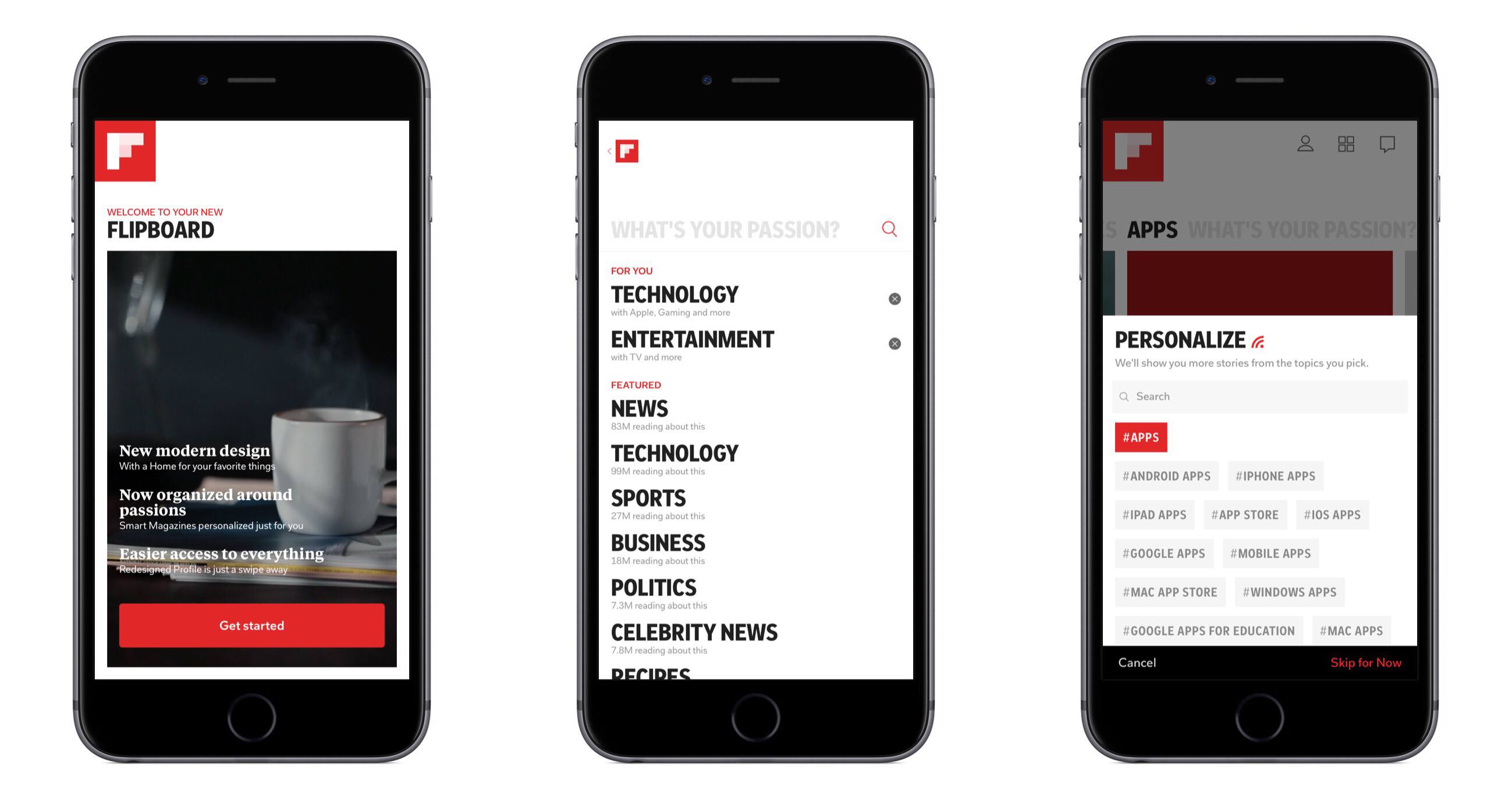
Last night, Flipboard released a 1.9 update for its iPhone and iPad app that, among various fixes and new features, introduces one important addition to the social magazine: audio. As the company writes on their blog:

Our Content Guide is now chock-full of some of the best sounds we could find. We’ve launched new partnerships with NPR and PRI and scoured SoundCloud’s massive community of sound creators to bring you some of our favorites—artists like Snoop Dogg and Diplo; music labels like Atlantic Records and Ninja Tune; podcasts from The New Yorker and Slate; and segments from shows like Radiolab and Science Friday.

Right now, support for audio content is mainly implemented through SoundCloud, which received a new login option in the app’s settings, and NPR and PRI, which have agreed on a partnership with Flipboard to make content available in the app’s content guide, properly reformatted to fit Flipboard’s unique style and interactions. In Flipboard 1.9, support for audio means you can start playing a podcast featured in the content guide (such as TWiT or TNW Daily Dose) or any content available in your SoundCloud account, and go back to browsing links and photos as Flipboard can keep playing audio while you’re reading something else. The app will show up as an audio source in the iOS multitasking tray, and you can control audio playback from within the app itself too with a “note” icon in the upper toolbar (on iPhone) that will display a folder-like animation for viewing and pausing audio.

Looking back at Flipboard’s evolution over the past months, I think support for audio in version 1.9 is yet another example of how the company has been gradually and relentlessly drifting away from a system that simply aggregates “your social links” to embrace a broader vision that’s turning Flipboard into “an Internet magazine”, whether it’s social or not.

Flipboard started off as a neat app to give a magazine-like layout to links shared on Twitter and Facebook. Then came Google Reader, Flickr, and Instagram with more content types and visual previews. The company started announcing partnerships with publishers to display their content beautifully inside Flipboard, and with more content came an explosive growth that led to a re-imagined version 1.5, focused on showcasing “popular stories” and making more great content available to users through a content guide that wasn’t necessarily social — rather, it was aimed at letting users know that more content was available on Flipboard beyond their existing social accounts. After that, Flipboard released the long-awaited iPhone app, unifying accounts with over-the-air sync and bringing Cover Stories — a dedicated view for interesting and popular stories — over to the iPad app.

While still prominently “social” in the way it puts the focus on accounts and supported services, Flipboard has become perfectly usable and enjoyable even without necessarily configuring a Twitter or Facebook account. The company has put great effort on building a content guide that spans different countries, themes, content types, and publishers. Flipboard aggregates top content shared by Pocket, it collects the best things found on the Internet under the “Cool Curators” section, and, alongside the usual Tech and Business news, displays popular videos from YouTube, Vimeo, and even Colbert Report in a Video category. With version 1.9, audio has been brought into the mix.

The social component of Flipboard is still strong (version 1.9 also brings “related sections” for social networks, such as “tweets mentioning you”), but it hasn’t been the only way to enjoy Flipboard for quite some time, and this is more visible than ever in the latest update. Flipboard doesn’t simply create a personalized magazine out of content “being shared with me” anymore — it still does that, but at the same time, it allows me to find other great content that I wouldn’t have discovered otherwise.

More than a “social magazine”, the “Internet magazine” aggregates and reformats content that is also social, but not strictly so. Curation and APIs are keys here. Flipboard was already rumored to be considering support for movies and TV shows last year. Would it be too absurd to think the app will someday gain compatibility with Rdio and Spotify to let you find the best music from your favorite streaming service? How about YouTube and Vimeo, to let users also find videos that are bring shared in those social accounts? According to TechCrunch, ”Flipboard will look into other ways it can do more with video”.

With social accounts, APIs, search, and curation, Flipboard has become more than a social magazine: it is restructuring Internet content for the screens of mobile devices with the help of a strong social counterpart.

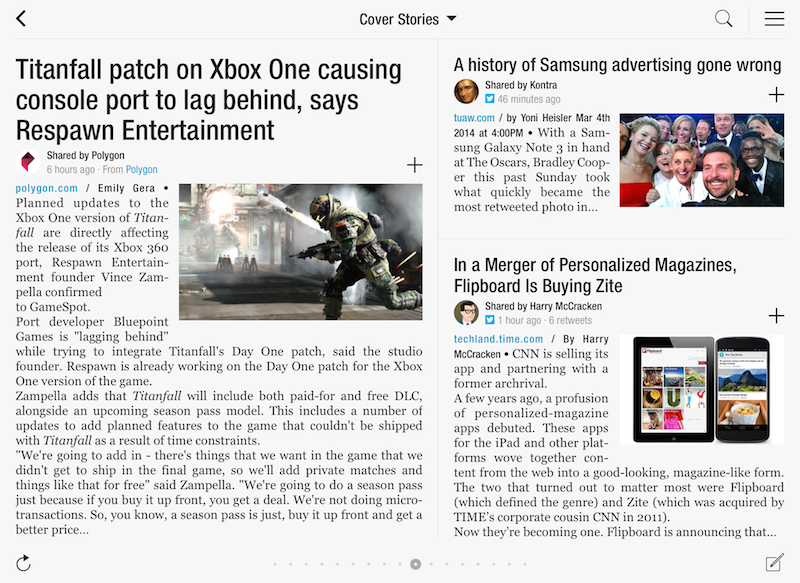
When Flipboard introduced its long awaited iPhone version back in December, the company rolled out a new functionality called “Cover Stories” that allowed iPhone owners to quickly catch up on the most interesting news, photos, and status updates shared by their friends and people they followed with a brand new, easy to use interface that took advantage of the iPhone’s smaller display and unique design of Flipboard. In the past months, Flipboard’s Cover Stories have become a fantastic way to get a quick overview of what’s happening online, with “curated results” that take into account a link’s popularity based on the number of retweets, comments, and social engagement. Cover Stories weren’t enabled on the iPad version of Flipboard — admittedly still superior to the iPhone app as a lean-back experience for relaxed reading and discovery — but this is changing today with version 1.8 of the app, which brings Cover Stories to the iPad, alongside a number of other improvements and new international content guides.

The new Cover Stories tile in the Flipboard start page doesn’t need an introduction — it’s really just a bigger version of the iPhone’s counterpart, beautifully laid out on the iPad’s screen. Whilst it’s unclear what kind of algorithm and process Flipboard uses to aggregate and build this personalized feed, the section undoubtedly works in fetching interesting stories based on the content that is being shared with you. The iPad edition of Cover Stories collects both articles and status updates, which are neatly organized in a column on the right.

With new typography, and improved photo layout and a third page of tiles, Flipboard for iPad now allows for more content, displayed in a more elegant way. The new International Content Guides are becoming to the go-to place to get started with Flipboard and great content, but I’d recommend adding sources like Instagram and 500px first to get an overview of the new photo layout — this will surely contribute to enhancing the “visual” aspect of Flipboard, which was already pretty remarkable.

For the past months, I’ve been using Zite to let “news come to me” thanks to the service’s fantastic discovery-based functionalities and system that learns from my reading habits and tastes over time. Flipboard’s Cover Stories seem like a great opportunity for the company to strengthen their offerings in smart news discovery and in surfacing relevant content for their users, and I’ll make sure to give the feature a try on a daily basis now that it’s available on the iPad.

You can get Flipboard 1.8 on the App Store. (more…)

Flipboard has today launched three new localized ‘Content Guides’ in Australia, Canada and the UK and Ireland. Users in these countries will now be shown recommendations that match their location. For example, Australian Flipboard users will now see The Australian, ABC News and the SMH prominently displayed in the News section of the content guide and UK users will be recommended the BBC, The Guardian and The Telegraph amongst others.

The localised recommendations aren’t just for the News section but the other categories such as Business and Tech & Science too. Similarly, it doesn’t mean that no international publications are recommended anymore, it just means that local publications are now recommended more prominently. Flipboard now has six Content Guides for countries outside the US with France, Taiwan and Hong Kong previously receiving localised Content Guides. Flipboard also has a dedicated app for the Chinese market which also has its own Content Guide.

Users in these countries needn’t do anything to receive the new content guides – they are automatically loaded based on the Region Format of the iPad (you can change yours in Settings > General). The Flipboard team does note that they are working on a way to easily change regions from within the app so you can look at recommendations for other regions.

[Flipboard Blog via The Next Web]

Flipboard 1.7 has just gone live in the App Store and it brings support for the iPhone and iPod touch. The iPhone version has been long anticipated and it has launched with a new feature called Cover Stories, which at the moment is exclusive to the iPhone and iPod touch. Cover Stories is a feature that curates a selection of articles and images being shared with you – it will even become ‘smarter’ over time. Whilst it isn’t yet available for the iPad version, the Flipboard team say that they are working on bringing the feature to the iPad.

With Flipboard for iPhone we’re introducing Cover Stories — one place to quickly catch up on some of the most interesting news, updates and photos being shared with you right now. The more you interact with your friends and the stories being shared, the smarter Cover Stories gets. You can refine what appears here by adding content to your Flipboard, muting anyone you’d rather not hear from, and connecting to your social networks. Cover Stories will be coming to your iPad in the near future.

The Los Angeles Times sat down with Flipboard CEO, Mike McCue about the new release. He revealed that the Flipboard team, now nearly 50 people, has spent most of the year developing the iPhone version – making sure it wasn’t just a shrunken version of the iPad app.

Building on Flipboard’s deep links to Twitter, Facebook and other social networks, McCue wants to harness the huge amount of data being generated by users of these major services to build a kind of social media nerve center — a digital brain that listens to all your social networks and picks the most important and interesting stories, and presents them to you in a simple and organized way.

The Flipboard team has also a made a short advert for the new iPhone version of Flipboard – we’ve included it and the version 1.7 release notes of Flipboard below the break. We’ll have some more thorough thoughts on the new iPhone version of Flipboard in the next few days – so stay tuned for that. You can download the universal Flipboard app for free on the App Store.

[Flipboard Blog via The Verge]

(more…)

The latest version of Flipboard for iPad, 1.6, is out in the App Store and, alongside support for Tumblr and 500px, it brings a new option to create a “Flipboard Account” and start storing your favorite content in the cloud. With the upcoming release of Flipboard for iPhone, or for those users who share an iPad in the family, accounts will be the easiest way to load a user’s existing sources, subscriptions and social accounts without having to start over every time. The feature is already enabled on the iPad app, and it takes a very few steps to create an account. Enter a username, password, email and real name, and Flipboard will create an account for you. The app is even smart enough to fetch a profile picture from the services you’ve already configured, such as Twitter or Facebook.

Starting today, you can sign up for a Flipboard Account. With Accounts, your reading preferences stay with you no matter how you access Flipboard. For example, families and friends who share an iPad can log into Flipboard and find their favorite sections. And when Flipboard comes to the iPhone, accounts ensure that your Flipboard is configured exactly as you like it, with your favorite reading sources already saved and your social networks connected.

I tested Flipboard’s account management feature, and it worked flawlessly. I was able to create an account, log out after a few minutes and, upon logging into Flipboard again, all my sources and social accounts were pulled from the cloud with no errors, in seconds.

Flipboard has been previously rumored to be considering a web app, and accounts would certainly come in handy to easily load a user’s reading material on any platform. Flipboard for iPhone should be coming out any week now, and the company was reportedly considering deeper integration with TV Shows and Movies as well.

According to a report by Reuters, the iPad app of the Year 2010, Flipboard, might add support for movies and TV shows by the end of the year. If the company and its CEO, Mike McCue, will manage to cut deals with studios and other content providers, Flipboard will expand beyond aggregating articles from social networks such as Twitter and Facebook or RSS services like Google Reader, becoming an all-in one solution to read, share, and watch.

Flipboard mixes articles from a growing list of brands like Oprah.com and the Economist with social media feeds from sites like Facebook into a personalized online magazine. It has received $60.5 million in venture capital funding and its app has been downloaded 3 million times.

Chairman and Chief Executive Mike McCue said he will tackle the video project at the end of the year. He declined to say which studio partners he has approached. He also hopes eventually to cut deals with publishers to sell electronic books through Flipboard.

Just when the concept of “consuming content” starts making less sense now that the iPad has turned into a full-featured platform and device capable of doing things like reading, writing, sharing news, and watching movies, the evolution of Flipboard towards broader audiences and media seems appropriate. The app was launched in 2010 featuring direct Twitter and Facebook integration to display stories from these networks, visualized through an elegant layout with beautiful typography that made great use of the iPad’s screen to present multiple stories at once, and allow readers to re-share them or comment of them without opening a separate client. The app went through a series of updates to further refine the interface, add more services like Google Reader for RSS feeds and Instagram for photos, recently receiving another major revamp to introduce visual search, a popular section, and a completely new UI to browse popular articles and get recommendations from the Flipboard team’s curated list of stories and sources.

We’re big fans of Flipboard here at MacStories, and I believe choosing to diversify the app’s offerings to include more content is step in the right direction. Obviously, as Reuters says, this may never materialize if deals aren’t reached with studios, but it’s reassuring to know Flipboard has been considering video as the next major addition to their social magazine. In the same report, Reuters also says the iPhone version of Flipboard is expected to hit the App Store in a few weeks, although no further details are available.

You can read more about Flipboard and our thoughts on it in our previous coverage, and check out the fantastic original promo video featuring Adam Lisagor below.
(more…)

The “big update number two” award today goes to Flipboard with a major 1.5 release that makes navigating the social magazine easier than ever. Just how great would it be if you could continuously flip through articles, fave everything, and jump into the content you’re interested in with a new visual search browser. It’s fantastic. Flipboard just got way cooler.

(more…)

It appears that the Chinese government yesterday blocked Flipboard, meaning the app, which is available on the App Store in China, is largely unusable from within China. Flipboad’s CEO, Mike McCue, made the revelation on Twitter yesterday and said in follow-up tweets; “Lots of folks in China had been using us happily until now” and “Guess we had unwittingly poked a hole in their wall which has now been shut down… Presumably unless we block Facebook and Twitter ourselves in China”

The block impacts on Flipboard’s Amazon servers, which are required for users to aggregate their content from various sources, effectively this means that services such as Google Reader, Instragram and Flickr are all blocked from Flipboard users in China. Facebook and Twitter, which were already blocked by the Chinese government, had previously been accessible to some users who used a VPN service, but this latest move has blocked Facebook and Twitter completely from the app.

[Via @mmccue]

Flipboard, an iPad app that aggregates content from your social networks, has in the last two months seen close to a tripling in daily usage. An average day will now bring between 8 and 9 million “flips” compared to what was 3 to 4 million flips just two months ago – flips roughly equating to page views for a website.

The CEO, Mike McCue, revealed the information in a chat last week and pointed to a number of factors that he believes contributed to the increase in popularity. Foremost in his mind is the release of version 1.2 of Flipboard on March 10th which greatly improved speed and brought other general improvements to the app. Then, of course, was the release of the iPad 2 which not only brought more users but has also made Flipboard even faster with its improved A5 processor.

McCue did also mention that the number of users has doubled – likely for the same reasons, although he declined to comment on how many users they now have in total. Meanwhile, Flipboard is continuing their work on a Flipboard iPhone app which is slated for release sometime this summer. Quizzed on how the iPhone app might work by AllThingsD, McCue said that it is being designed as more of a “weekday tool” catered towards power users that will more directly utilise real-time news and conversations.

[Via AllThingsD]


Apr
3

12 of the Year’s Best Ideas in Interface Design

Flipboard UX Design

User interfaces, when done well, are the unsung hero of product design. They’re the difference between a printer whose buttons you can figure out without even reading the instructions and one you want to throw across the room. Now, with the rise of personal computing, interfaces are more relevant than ever before, providing the crucial link between physical objects and the virtual world.

Fast Company’s Co.Design highlights some of the most spectacular and promising product designs of 2010, showcasing app favorite Flipboard alongside other notable user interfaces of FLUD and concept iPad app MetaMirror. It wouldn’t be a slideshow about good interface if Mozilla’s Seabird concept wasn’t in there, but two particular physical products, John’s Phone (Engadget review) and the Ref, shy away from our obsession with everything digital and return to the fundamental concepts of human communication, whether it be interpersonal or emotional feedback. We may often focus, and at times become overly engrossed in Apple’s product philosophies and culture, but we shouldn’t forget a world of innovation exists beyond Cupertino in numerous, brilliant ways.

Mar
23

What’s The Next Step For Social Magazines?

Former Design Director of The New York Times Khoi Vinh shares his thoughts on apps like Flipboard and TweetMag for iPad, digital magazines that plug into your Twitter, Facebook and Google Reader accounts to fetch articles to display in a beautiful magazine-like view. As Vinh points out — and as we argued in the past as well — the next step for these apps isn’t optimizing performances or improving the design. It’s all about making the apps “smarter” and capable of playing an important role in your social graph:

The apps could then become more than just a reader for links found in my Twitter stream. They could let me see which stories my friends are reading, sharing, or tweeting the most, and it could prioritize what I see based on that information. They could help me form and access communities around topics, or contribute content of my own, or add associations with other, similar content. There’s a deep reservoir of opportunity here; some of it would be easy to pull off but a lot of it would be difficult to make happen, because it would entail turning these apps from magazines into truly social products that just happen to look like beautifully designed magazines.

I was thinking about this the other day. What if Flipboard was capable of looking at my Twitter stream and automatically find out the topics that I really care about? And after that, what about filtering articles belonging to those topics and visualize the most relevant ones in a top position? With the acquisition of the Ellerdale Project last year, it seems like the Flipboard developers want to bring further integration with the social graph into the app.

The process, however, includes a difficult goal: making sure the algorithm is intelligent enough to understand whether a user wants to read about content he’s interested in, or discover new articles and material thanks to the app and his friends using the same application. It’s a complex system, but someone will get there eventually. The iPad is only one year old.

With the release of version 1.2 last night, the team at Flipboard has one again raised the bar for social magazines on the iPad. Flipboard 1.2, not different in the design from the previous iterations but richer in content,  manages to extend the platform’s capabilities beyond articles and status updates with Instagram integration. The coolest iPhone-only social network these days is now baked directly into Flipboard thanks to an API that allows you to browse photos, comment on them and like them, discover and follow users without leaving the app or jumping to Safari. Everything happens through Flipboard. Together with that, a new feature called “social search” lets you browse for any term or hashtag within an easy-to-use popup menu that aggregates content from a variety of sources like Facebook, Twitter and the aforementioned Instagram.

In an interview with Robert Scoble, Flipboard CEO Mike McCue confirms Social Search is the first example of the implementation of Ellerdale, a company Flipboard acquired last year to build a smart algorithm for aggregating and displaying relevant and personalized content. Whilst this “intelligent system” is still in the works, all the members of Ellerdale are now working at the Flipboard office and have shipped the very first feature last night, social search. It’s very cool in the way it catches tweets, photos, articles and status updates from social media, but it’s not intelligent yet. More will come in the next months, we’re sure.

McCue also gives a hint at advertising coming in future versions of Flipboard. Some fullscreen, elegant banners have already been implemented in the Flipboard-formatted version of SF Gate, and he says they’re indeed targeting for this kind of ads: beautiful photography, fast and lightweight. The opportunity for publishers to team up with Flipboard (like SF Gate) and set up iPad-optimized versions of their articles is also something McCue is heavily betting on. Last night, Flipboard rolled out integration with Wired and Pictory, too.

Last, Flipboard is going to take advantage of the iPad 2′s improved hardware with the possibility to create more than two pages in the main screen — currently a limitation of the iPad 1 hardware and memory constraints. With the iPad 2 coming out tomorrow, we can’t wait to see how Flipboard will benefit from faster processor, graphics and more RAM. As for the competition and all the tablets coming out this year, McCue says they’re just going to wait and see.

Check out the video below.
(more…)