Posts tagged with "music"

Seamless: Transition Playing Music From Your Mac To Your iPhone

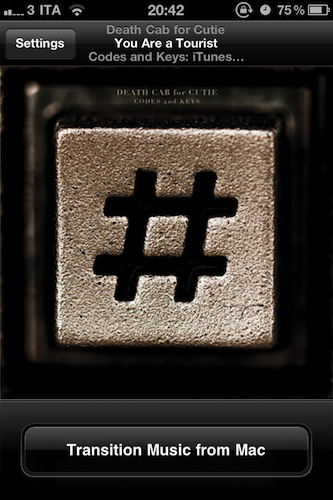
I’ve been there before: I’m working, I’m listening to some Oasis or Death Cab for Cutie on iTunes on my Mac, and iCal reminds me I have to go out. I take my iPhone, I quit iTunes, and I realize I was really liking the song I was listening to. So I’m forced to fire up the iPod app on my iPhone, find the song again, and start listening from the beginning of the track. I could manually move the on-screen cursor to the exact position the song was on iTunes, but it’s quicker this way, plus I really have to go out. Seamless, a new iPhone app by Five Details, provides the simplest solution to this problem: a button.

Once installed on the Mac (for free) and on your iPhone ($0.99 in the App Store) Seamless will communicate with your Mac to see what song is playing. If the song is found on your device’s iPod library and you’re ready to leave your computer, tap “Transition Music” and the song will quickly fade on your Mac, and magically start playing on the iPhone. Same position, same song, one button. You can do the opposite, too: you’ve just got home, with a song playing on your iPhone. Tap the button, and music will start playing on your Mac . This happens in less than a second, provided that both devices are on the same local WiFi network.

While Seamless is intriguing, clever and almost magical in its concept, there are some execution issues to iron out. For instance, I couldn’t get the app to work last night (it kept saying the “song was not present” on my iPhone, but it was) and the developer told me it’s because of a bug that won’t find songs on a synced device unless you’re playing from a playlist – not just the Music library. So I created a playlist, synced it to my iPhone, and now the app works just fine. This bug will be fixed soon with an update, I was told. And of course, the app won’t work at all if you don’t sync music – don’t expect Seamless to be able to transition music you haven’t synced on your iPhone.

As long as you keep in mind that this version might require syncing a playlist and that you can’t just transition music you don’t have on your iPhone, Seamless is a great idea. It’s simple, and it’s only $0.99 in the App Store. Check out the promo video featuring the omnipresent Adam Lisagor below.
Read more
Sonos Brings AirPlay Support With Latest Software Update

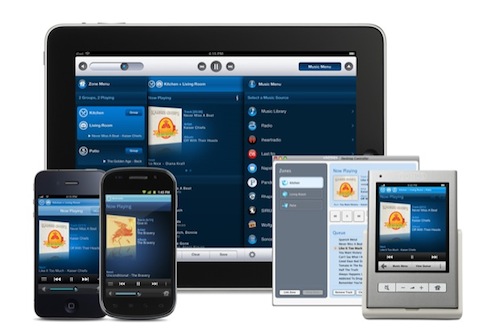
Sonos, makers of beautiful and efficient wireless music system including the S5 I reviewed here, announced today the release of the official Android client, and a software update that brings official AirPlay support to the Sonos Desktop Controller, and better multitasking integration on the iOS apps. What’s curious is that I was already able to accomplish AirPlay streaming by connecting a Sonos S5 to an AirPort Express as you can read here. I guess Sonos, however, added some overall polish to the desktop app to indicate support for AirPlay – I can’t test the feature now, but I can say that it was already working very well when I first connected an S5 to my AirPort Express with the line-in cable. Last, an update to the iPhone and iPad app should bring support for iOS multitasking (finally), although said update still isn’t available in the App Store.

Press release is embedded below. I’m a huge fan of Sonos’ products, so I’ll make sure to check out the new iOS app and updated AirPlay integration as soon as I can. [via CrunchGear] Read more


Alarmify Wakes You Up With Spotify Tunes

I’ve never really been a huge fan of third-party alarm applications for the iPhone, mostly because many of them can’t run in the background and, at the end of the day, they don’t provide any additional feature that I’d miss from Apple’s simple, unobtrusive Clock app. Sporadic Daylight Savings bugs aside, the Clock app does exactly what I need: it lets me set up alarms and lock my iPhone at night. I don’t need to stare at a flip clock while I’m in bed, I don’t need weather integration, nor do I feel I’m missing out because the Clock app doesn’t have themes. It’s simple, and it works for me.

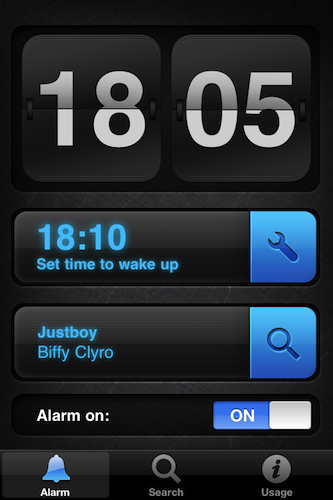
But Alarmify, a project by three students from Hyper Island, wants to bring something different to the iOS alarm scene by integrating music with the whole passive experience of scheduled alarms. Sure, picking songs from the iPod app isn’t new to unofficial alarm clocks for iOS: but how many of them integrated Spotify – the music streaming service – to let you choose a song you want to wake up? As far as I know, none of them did. And that’s exactly what Alarmify is doing, for free, with a beautiful interface.

As you fire up Alarmify, you’re presented a dashboard with a clock, a menu to set an alarm and another tab to find a song from Spotify. You’ll need to have the official Spotify iPhone app installed on your device – which unfortunately is only available to Premium users and it’s not on sale in the US App Store. The app basically acts as a bridge between the alarm you set and Spotify – when the alarm goes off, the app will launch Spotify and start playing a song. Which brings me to a major caveat of Alarmify: you’ll have to leave it running all night, as it can’t work in the background and forward a song to Spotify when the iPhone is locked. Not exactly “great”, but at least you can turn the device in landscape mode to get an elegant flip clock.

For Spotify users looking for an alarm app that can wake you up with songs, Alarmify is a no-brainer. Get it for free in the App Store.


JBL’s On Air Wireless AirPlay Speaker Dock Now Shipping

Unofficially revealed by the FCC in December 2010 and teased a few weeks ago by JBL itself with a signup product page, the On Air Wireless speaker dock with AirPlay functionalities is now shipping to Best Buy locations and Apple Stores. We’ve covered the On Air Wireless in the past, but here’s a quick recap: the device has built-in AirPlay support, meaning that it can receive audio from iOS devices, or Macs through iTunes; with the integration of an LCD display, it can also display artists’ information and album artwork for a richer wireless music experience; with the exclusive HALO radial design, it should guarantee an optimal audio quality to send music throughout your room. It is one of the first speakers (let alone speaker / dock) to display metadata coming from AirPlay, but there’s more: the thing has got playback control buttons, a clock with dual alarms to wake you at different times of the day, a digital FM radio and a USB port for firmware updates. It can be yours for $349 – it’s a premium product with lots of functionalities and deep AirPlay integration clearly meant for iOS and Mac users.

Press release below, order page available on the Apple online store. [via Engadget] Read more


Cracked AirPort Express Key Could Allow AirPlay Streaming To Any Device

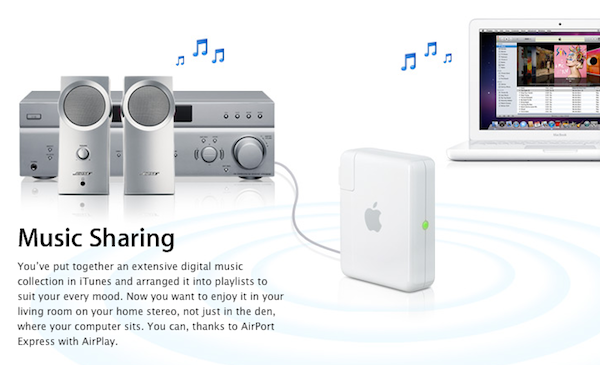
When Apple introduced AirPlay with iOS 4.2, they brought wireless streaming for music and video to iOS devices, as well as iTunes on the desktop thanks to the old AirTunes technology that allowed music streaming to an AirPort Express station connected to speakers with a simple audio jack. After the unification of streaming under the AirPlay name, several hacks in the past months allowed iOS and Mac users to enable streaming on unsupported devices such as iPhones or Macs. Developer James Laird, however, has achieved a different goal than simply activating audio and video receiving functionalities: by reverse engineering the AirPort Express (and thus AirTunes) private key used by Apple to stream audio to external music speakers, he released ShairPort, an open source AirPort Express emulator.

My girlfriend moved house, and her Airport Express no longer made it with her wireless access point. I figured it’d be easy to find an ApEx emulator - there are several open source apps out there to play to them. However, I was disappointed to find that Apple used a public-key crypto scheme, and there’s a private key hiding inside the ApEx. So I took it apart (I still have scars from opening the glued case!), dumped the ROM, and reverse engineered the keys out of it.

The concept behind ShairPort is very simple: instead of enabling streaming from an app to an official AirPlay device from Apple or third-party vendor, Shareport can turn any software or hardware into a wireless music receiver thanks to the cracked private key used by Apple. Being the project open source, virtually anyone could build a hardware receiver or application that streams music just like the AirPort Express station does through the AirTunes protocol.

While it’s very unlikely that manufacturers will adopt this hack to turn their devices into AirPlay receivers (why using the hack when you can just become an official AirPlay partner?), I’m sure we’ll see interesting things on the software end this week. ShairPort can be installed anywhere, opening to the possibility of gaming consoles, computers, or mobile devices gaining AirPlay functionalities previously reserved to the AirPort Express.

Go download ShairPort here. [via MacRumors]


Hands on With iheartradio for iPad

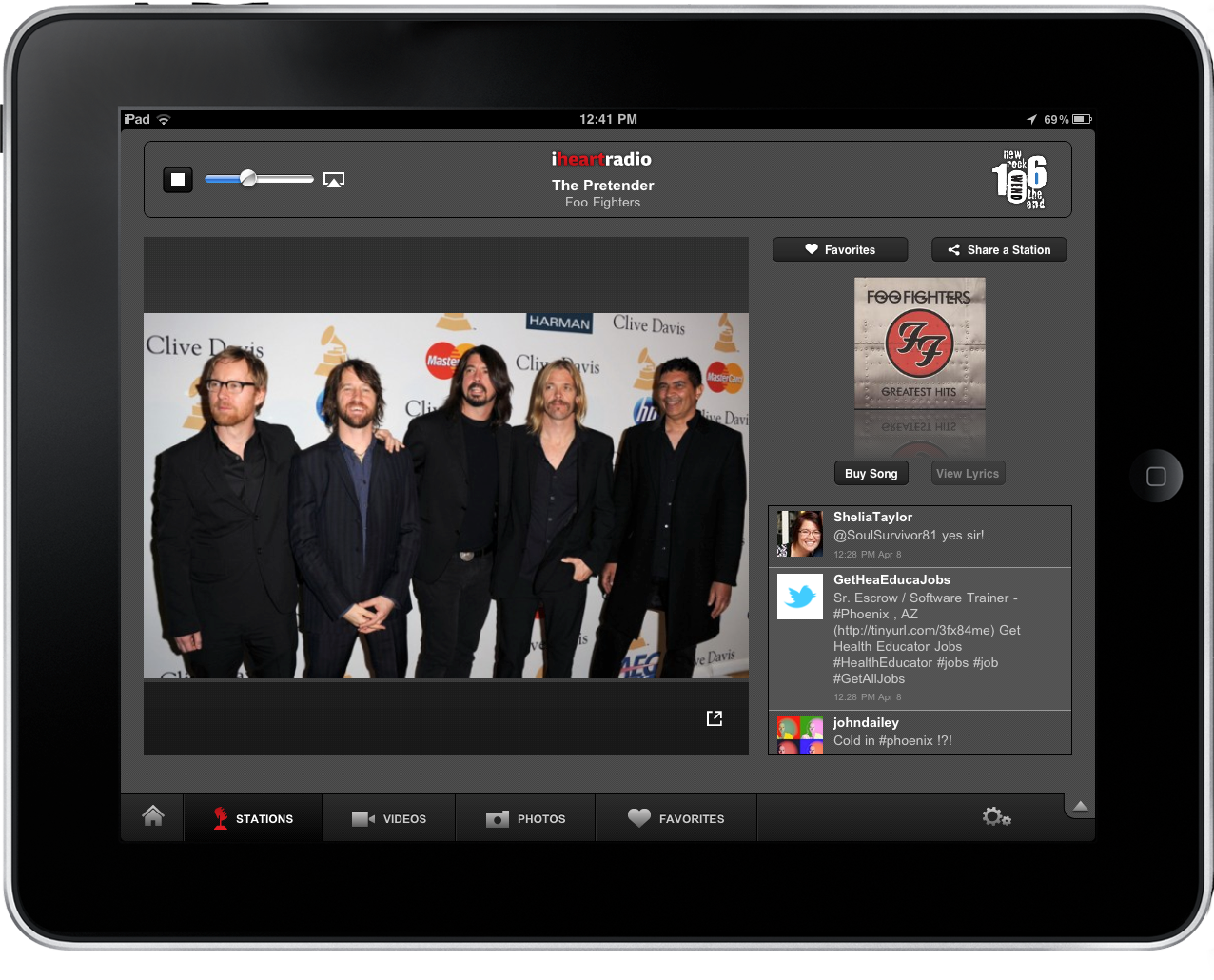
It’s Friday afternoon, and if you’re not already slacking off at work why not put your feet up on your desk and turn on some tunes. The iheartradio app has launched on the App Store, giving you access to all of your favorite artists, local (Clear Channel) and national radio stations, artist interviews and videos, and image galleries captioned off for your entertainment. It’s been a while since I’ve checked out an iheartradio app (which is gratuitously advertised by my local radio station), but I have to say I’m impressed with just how fast the iPad app is. Radio station’ connect instantly, there’s AirPlay built in to pipe tunes and video to your Apple TV, and you can favorite stations so you can quickly access all of your favorite radio channels from a handy playlist. If you hear a song that tickles your boom-tubes, you can purchase the song from iTunes in a snap. The features only get better, and we’ll conclude our short review just past the break.

Read more


Plex Releases Major 1.1 Update: The King Of iOS Media Players

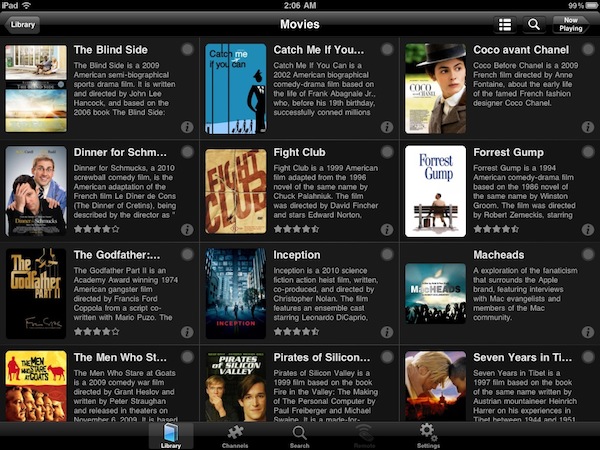
If you’re serious about your media library, you’ve probably heard of Plex: dubbed as the “solution for local and online media”, Plex is a fantastic multi-platform media center that runs on Macs and Windows PCs and has great iOS and Android clients. Once installed on your desktop machine (which becomes a “server”) Plex can fetch music, movies and TV shows stored on your computer or anywhere else on an external hard drive, organize them properly into categories by adding the correct metadata, and handle streaming to the clients (such as the iPhone or iPad apps) with live conversion of unsupported video formats. All your media can also be played locally on a computer without the need of a mobile client thanks to the desktop Plex app, which is highly customizable: you can add your own themes, install plugins (like Spotify) and connect to online content providers such as the CNN, Vimeo, Cnet TV, Youtube, Apple Movie Trailers and many others. If that’s not enough for you, Plex can also enable you to connect to your media library remotely via WiFi or 3G with a global hostname, through the iOS apps. Read more


Spotify iPhone App Updated With New Design

In spite of the issues with music labels the company is facing in the attempt to launch the service in the United States, Spotify is still committed to making great mobile apps to stream, organize and cache music for offline access while on the go. A major update to the iPhone client (not available in the US App Store) was released last night, and you can find it here for free.

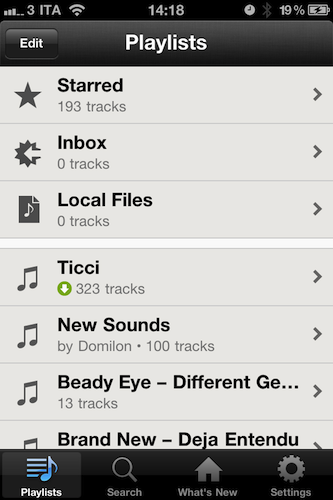
The Spotify iPhone app requires a Premium account: this subscription enables you to use the mobile apps for iOS, Android and other devices, removes ads and lets you stream songs at a higher bitrate. Premium also allows you to save music offline and access the service from another country (that’s what I do). The new iPhone app (version 0.4.11) is a rather big update as it brings a completely new (and elegant) UI design, much cleaner than before. With this new design style, I can’t wait to see what the iPad app will look like – Spotify hasn’t detailed plans for an iPad client but that’s most likely in the works and (finally) ready to ship. The new Spotify for iPhone has also been localized into French and Spanish, and marks the comeback of the Edit button to create and manage playlists, select them for offline usage and delete them. In the main screen, the “Local Files” tab indicates the music files wirelessly synced from Spotify on your computer. The (very unstable) iPod integration feature has been removed in this version.

Spotify for iPhone is available here. More screenshots below. Read more


The Spotify Box

Spotify Box: Package Contents

Spotify Box: Package Contents

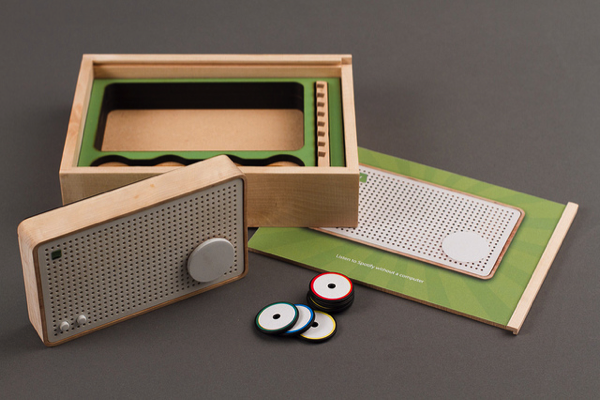
Occasionally minds more creative than mine combine technologies physical and virtual to create delightful products that make radio nerds like me ooze with excitement. If the fat grin on my face isn’t enough to show you just how much I enjoy this particular concept, then you must clearly be an American (at least we still have Rdio) or perhaps you can’t appreciate the simpler times when wood vinyl FM/AM radios played fuzzy music from our bedroom dressers. The concept – evolved through research and development from Jordi Parra – bonds RFID tags (which look kind of like poker chips) with a Spotify URL that when attached to the radio playback a playlist or radio station over WiFi. While the radio itself stores the information you assign from Spotify over USB, the RFID tags are nothing more than the “on switches” that relate to the stored playlists. These playlists are associated with colors, thus to play a particular sample of songs you’d simply attach a red RFID tag to the radio for example. The beauty of a concept like this is that it maintains the simplicity of a manual radio, while introducing and integrating with modern and intuitive technologies. The world may be going digital, but there’s still something about being able to touch music with your fingers that emotionally makes the analog experience so much more palatable and personal. Parra’s prototype doesn’t have a name, but the Spotify Box as it’s dubbed on Vimeo is a great reminder that good design doesn’t always have to have a touchscreen, or even an LCD display. It’s a return to the basics, and while I understand a student project such as this would take a considerable amount of effort to produce, I do wish Jordi and his team all the best if something like this gets off the ground. If you do start a Kickstarter, you’ve got my support.

Past the break we’ve embedded the concept video, and you can also check out the project in it’s entirety on Zenona. There’s a Flickr group if you want to see the project from draft to inception, but I have to say: having this much access to the workings of the prototype Spotify Box can drive an author to be a little too giddy, don’t you think?

[Zenona via TNW]

Read more