How do you improve the default OS X calendar application? How do you set out to create an alternative that can be appealing to power users, and accessible for calendar novices at the same time? While beta testing Fantastical, an upcoming Mac app by Flexibits, I thought these were the questions the developers tried to answer with their latest creation. Like in Twitter clients, developing a third-party calendar isn’t an easy task: you have to make sure it will work with all those calendar protocols out there, but most of all you have to know you’ve got something on your hands that will stand out from the crowd – especially when Apple itself ships a full-featured iCal.app with OS X that does its job just fine for most users, and doesn’t require an additional purchase. As usual, though, I believe there’s plenty of room for alternatives if you’re willing to take a risk and believe in your product. And it shows when testing Fantastical: Flexibits believes in its new app so much they wrote “your Mac’s calendar will never be the same again” on the teaser website.
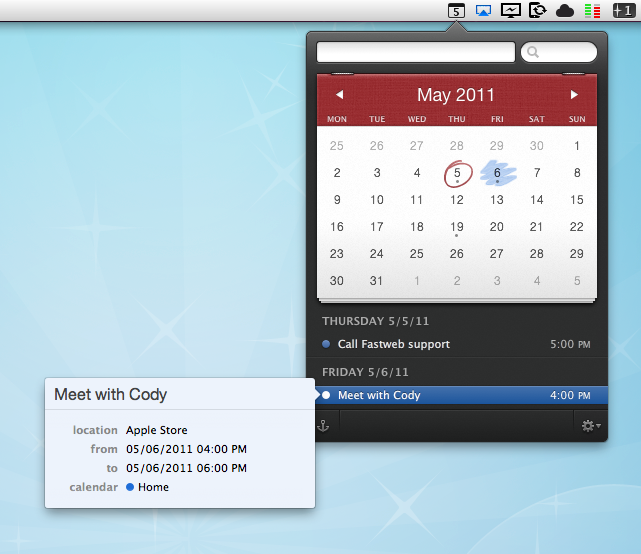
Indeed, Fantastical does some things the default Mac calendar client can’t even imagine. First off, it’s elegant, minimal and unobtrusive, yet beautiful to look at. I know the very own purpose of a calendar app isn’t that of letting you stare at it, but when compared to this or this you’ll notice the difference. User interface, however, is functional to Fantastical: it’s minimal because Fantastical wants to be simple to use, and it’s gorgeous for as much as it’s powerful inside. Fantastical uses a natural language parser that will let you write down events in plain English, and have the app correctly recognize the input in various fields. Example: Meet with Cody tomorrow at Apple Store, Viterbo 5 PM to 6 PM. Adding this sentence to a new iCal event does nothing. But writing it in Fantastical? It creates a new calendar event with “Meet with Cody” as the title, “tomorrow” as the relative date, “Apple Store, Viterbo” as the desired location, and 5 PM to 6 PM as the timeframe. It’s almost unbelievable how well this thing works and how deeply it improves the way I can add events using nothing but English. I don’t have to navigate with my keyboard and mouse, I just write and hit Enter to process the event and add it to my default calendar. Sure, I could still do things manually and adjust dates or location with the cursor, but since installing the first beta of Fantastical I haven’t found a reason why I should.
The language parser is the big feature of Fantastical, but there’s lots more. Without revealing too much right now (let’s save it for a final review, shall we?), I can say Fantastical’s huge advantage over several third-party calendar apps for OS X is that it works perfectly in conjunction with Apple’s iCal, which is responsible for keeping all your calendar configurations. You can start using Fantastical seconds after launch without doing anything, as the app fetches the accounts you’ve already set up in iCal. This means Google Calendar, MobileMe, CalDAV, Exchange, Yahoo Calendar – they all work out of the box. And if you want, you can make a calendar the default one so that adding new events will be as fast as hitting a shortcut, and write.
I wasn’t sure I was going to use Fantastical much initially, mainly because I didn’t think a replacement for the standard calendar interface was needed on a Mac. But after trying it, I have to say Fantastical is the calendar app to look forward to. You can sign up for updates here, and stay tuned for a complete review on MacStories soon. Read more