Posts tagged with "featured"

Todoist’s iOS 14 Widgets Make Managing and Creating Tasks Easier than Ever

Todoist’s three new widget types.

Todoist’s three new widget types.

Even before iOS and iPadOS 14 brought a new form and function to widgets on Apple platforms, one of the tried and true widget use cases in previous years was task lists. Some of my most used widgets over the years have been those provided by my task manager, so I was excited to see the slate of new widgets Todoist has introduced in its latest update for iPhone and iPad.

Before detailing the new widgets, though, it’s important to state up front that for all the advantages of iOS 14’s new widgets, they bring a regression that negatively impacts task managers especially: widgets can no longer be fully interactive. In the iOS 13 widget for Todoist, you could check off tasks as you completed them without needing to open the full app. With the app’s new widgets that’s no longer possible, because the only interactions Apple currently allows in widgets is launchers into different parts of an app. The good news is that apps are allowed to offer both iOS 13 and iOS 14 widgets to users, so on iOS 14 Todoist users will find both options available. If you really need the old functionality it’s still available to you, there’s just no way to add a legacy widget to the Home screen.

That bad news out of the way, let me focus on how Todoist’s team has made the most of the new widget system in a couple key ways.

Let’s start with its basic Tasks widget. In iOS 14 you can configure a list of your tasks to appear in either a small, medium, or large widget. Each widget can be set to show tasks from your Today or Upcoming lists, or one of your projects, labels, or filters. Despite being unable to check off tasks from the widget, there are two advantages over Todoist’s previous widget: information density and the ability to create multiple widgets. Since Todoist’s developers no longer need to create large touch targets for users to check off tasks, the widget is able to display a bit more information than before. And you can now create separate widgets tied to separate lists of tasks, even stacking them if you’d like, offering a lot more flexibility than before.

Besides widgets for lists of tasks, Todoist offers two other widget types: Productivity and Add Task. The former displays stats relating to your task completion goals for the day and week, along with your karma score. I’ve never been big on tracking the number of tasks I complete in a given day, but the Productivity widget’s nice to have for users who care about those numbers. The Add Task widget, however, is exactly what I would want from every task manager.

Configuring Todoist’s Add Task widget.

Configuring Todoist’s Add Task widget.

Both the medium and large Tasks widgets already offer a button to quickly create a new task inside Todoist, but the dedicated Add Task widget is special because it can be customized to create tasks that have their metadata pre-filled. You can set which project and section the newly created task will have, its due date, priority, labels, and even the task name if there’s a specific task you commonly create. Once it’s set up for your preferences, the Add Task widget eliminates the monotony of filling in metadata over and over again for every new task. If you commonly create tasks assigned to a certain project and with a certain due date, the widget is now the quickest way to do that.

Add Task is only available as a small widget and as a result it can only have a single group of pre-sets for creating a single type of task, but that makes it a perfect candidate for stacking. Using a few different Add Task widgets for different types of common tasks you create and having them stacked will still provide a faster task creation method than having to enter the metadata over and over with every new task.


Todoist already offered the fastest task creation of any task manager I’ve used thanks to its natural language input system, but now with the Add Task widget it provides an even faster method. Todoist’s developers have clearly spent time considering the needs of their users and have built a suite of widgets that meet those needs well. The OS restriction against full interaction will hopefully be removed in the future, but even if it never is, Todoist has delivered value with its new widgets that more than makes up for what it lost.

Todoist is available on the App Store.


LookUp 7 Debuts Widgets on iPhone and iPad Alongside Powerful New watchOS 7 App

LookUp’s new widgets and watchOS app.

LookUp’s new widgets and watchOS app.

Widgets in iOS and iPadOS 14 are here and can be saved to your iPhone or iPad Home screen. A lot of third-party app updates will be trickling out in the days and weeks ahead with support for their own custom widgets, vying for your limited Home screen space.

If you’re interested in expanding your vocabulary, a word of the day widget seems like a perfect fit for the Home screen where you can glance at it throughout the day. That’s exactly what LookUp 7 provides, alongside widgets for running quizzes and opening your word collections. The dictionary app has also upgraded its watchOS component in a big way, offering new functionality that was previously limited to the full iOS version.

Read more


CARROT Weather Gains Flexibility with iOS 14 Widgets, Watch Complications, and Watch Face Sharing

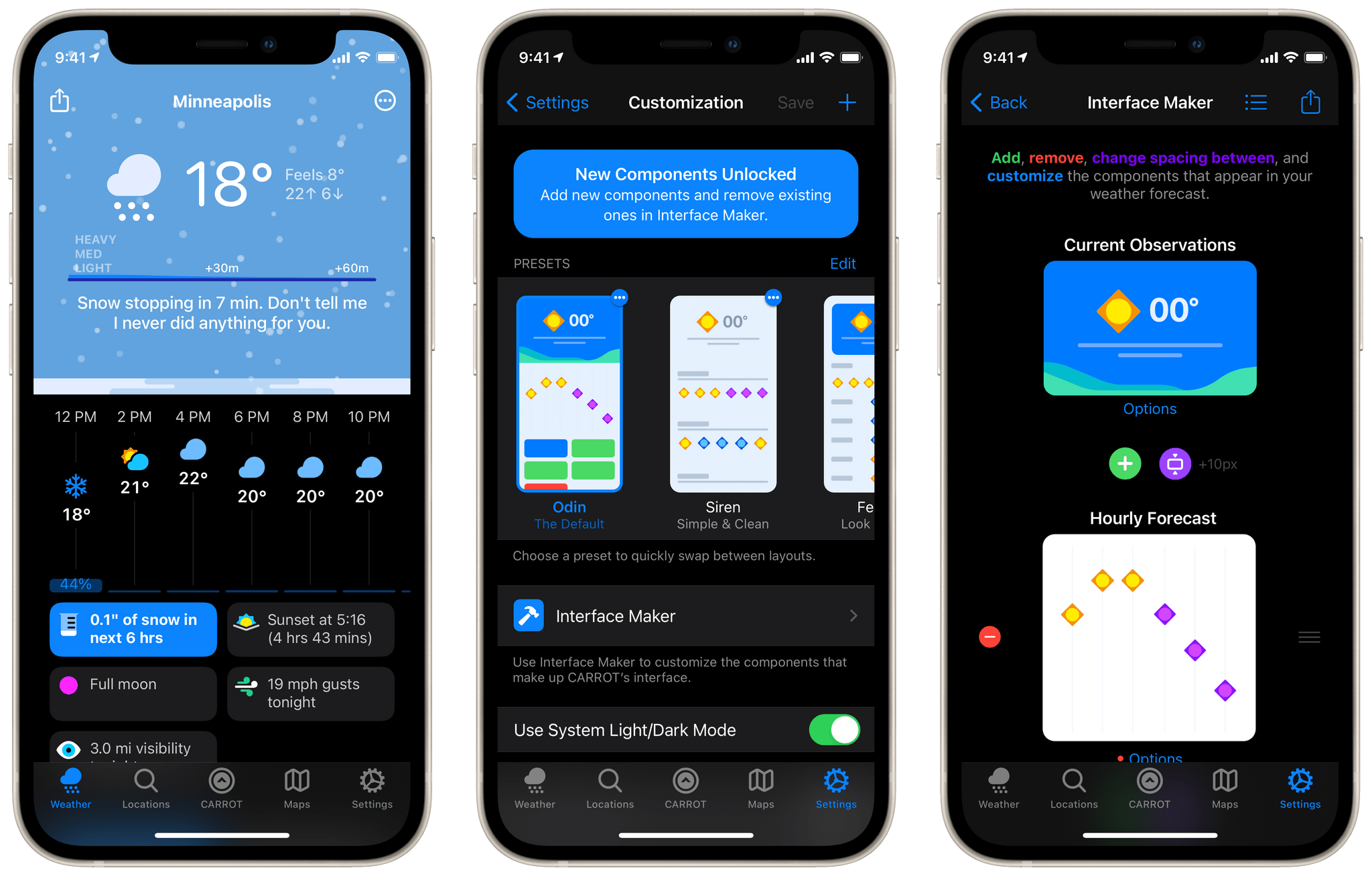
The weather can vary a lot day-to-day in Chicago, so I’ve always had a weather app on my iPhone’s Home screen. For the past few years, I’ve used CARROT Weather, one of the most comprehensive such apps available on the App Store. CARROT’s Today widget and Watch complications are among the best of any app category, but with the release of iOS 14 and watchOS 7, developer Brian Mueller has taken CARROT Weather’s widgets and Watch complications to a new level.

iOS 14 widgets and watchOS 7’s more flexible complications and watch face sharing feel like they were tailor-made for an app like CARROT. The variety of data available in weather apps makes them perfect for creative widget and watch face implementations, which is precisely what you get with CARROT Weather. Let’s dig into what’s new.

Read more


Apple One: The Long-Awaited Services Bundle Is Coming Soon in Three Tiers

Today during an event in which Apple revealed new Apple Watch and iPad models, the company also had some big services news to share: to increase adoption of the company’s growing slate of services, a new Apple One bundle will be launching soon to bring together multiple paid services at a discounted price.

Although Apple One doesn’t carry an official release date yet besides simply ‘fall,’ Apple did detail the breakdown of pricing and included services across three different Apple One tiers:

  • Individual: Includes Apple Music, TV+, Arcade, and 50 GB of iCloud storage for an individual at $14.95/month, a savings of $6/month.
  • Family: Also includes Apple Music, TV+, and Arcade, but with 200 GB of iCloud storage and Family Sharing for all services, at $19.95/month for savings of $8/month.
  • Premier: This is the big bundle, including Apple Music, TV+, Arcade, News+, the newly announced Fitness+, as well as 2 TB of iCloud storage for $29.95/month, a savings of $25/month.

The Individual and Family tiers of Apple One will be launching in over 100 countries to reach the widest number of users possible. Premier, however, since it includes services like News+ which are only available in limited territories, will only be available in the US, UK, Canada, and Australia at launch.

When Apple One launches, users will be able to try any of the three tiers with a 30-day free trial for services that they aren’t already paying for. It’s also worth noting that according to Apple’s website, Fitness+ likely won’t be available until after Apple One debuts, since it carries a launch window of ‘Late 2020’ while Apple One is ‘Coming this fall.’

Apple One’s tiered structure makes a lot of sense, and the savings seem pretty enticing, especially for the Premier plan. As someone who already subscribes to every Apple service, Premier will be a no-brainer to me as I’ll gain Fitness+ and a higher iCloud storage plan for less than the $38/month I’m paying right now.


You can follow all of our September event coverage through our September 2020 event hub, or subscribe to the dedicated RSS feed.


Apple Watch Series 6 and Apple Watch SE: The MacStories Overview

The new Apple Watch Series 6.

The new Apple Watch Series 6.

Today in what would normally be an iPhone-led September event, the Apple Watch was able to serve as headliner since new iPhones won’t be coming until October. It was a fitting change because Apple had news to share about not one, but two new Apple Watch models: the Apple Watch Series 6 and Apple Watch SE.

These two devices follow Apple’s strategy with the iPhone, where there’s a flagship line plus a more affordable option that uses a mix of old and new parts. The Apple Watch Series 6 includes a new blood oxygen sensor, improved always-on display, S6 processor, an always-on altimeter, and new finishes. The Apple Watch SE also features the always-on altimeter and a similar design, but without the new color finishes, it includes the S5 processor from last year, but it doesn’t get the blood oxygen sensor nor does it include an always-on display. A new software addition is another key incentive for both the Series 6 and SE: Family Setup, which enables children to be Apple Watch users without having their own iPhones.

Both new Apple Watches are available to order now, and will ship this Friday, September 18. Here’s the full run-down on each new device.

Read more


Club MacStories Turns 5: A Month-Long Thank You to Members Featuring Exclusive Discounts and Many More Perks

Today marks the fifth anniversary of Club MacStories. For the past five years, the Club has grown to become an integral part of what MacStories is. It’s the fuel that has allowed us to do more on the site, add new perks for Club members, and expand into podcasts.

Thank you to all of our Club members, past and present. You’re a big part of what allows us to do what we love, and we truly appreciate it. A special thanks to those of you who have been along for the ride for all five years too. There are quite a few of you, and your loyalty is humbling.

To celebrate this year’s anniversary, we’ve got a lot planned over the next four weeks:

  • App, Service, and Hardware Discounts: Below are discounts from developers of some of our favorite apps, services, and hardware.
  • App Giveaways: We periodically do app giveaways in MacStories Weekly, one of the Club’s email newsletters, but we’re taking that to a whole new level over the next four weeks, as you’ll begin to see in this Friday’s issue.
  • eBooks: When Federico’s iOS and iPadOS 14 review is published, and we’ve concluded our Summer OS Preview series, both will be available as eBooks exclusively to Club members.
  • Shortcuts and Automations: Alongside his review, Federico will share a set of advanced iOS 14 shortcuts and automations in MacStories Weekly.
  • ’Making Of’ the iOS 14 Review: When Federico’s review is published, we’ll have a behind-the-scenes look at the making of the review in MacStories Weekly.
  • MacStories Unplugged: We’ll also publish special episodes of MacStories Unplugged, our Club podcast, covering the nerdy, behind-the-scenes details of Federico’s review and our favorite iOS and iPadOS 14 apps.
  • Surprises: Of course, it wouldn’t be a MacStories celebration without a few surprises, so keep an eye on MacStories Weekly for more details in the coming weeks.

Read more


The New Fitness App in iOS 14

Last year Apple introduced Activity Trends, a new feature for tracking your fitness over time. Trends complemented the Apple Watch’s classic Activity rings feature, and found its home alongside the rings in the iOS Activity app.

Activity rings are binary metrics: did you or did you not meet your goal for moving, exercising, or standing today? Trends, on the other hand, track your past year of activity through rolling 90-day windows, and inform you as to whether you’re improving or declining. If necessary, Trends then suggest improvements such as walking a little more than usual each day or standing for a bit longer each hour. Together, Activity Trends and the classic Activity rings seek to help you develop and maintain an overall healthy lifestyle across a handful of monitored metrics.

Last year, Trends got their own tab in the Activity app alongside the four tabs that had existed previously: History, Workouts, Awards, and Sharing. These tabs always felt a bit sparsely populated for my tastes, and it seems that Apple agreed. In iOS 14, Apple has redesigned the Activity app, consolidating its tab structure, and renamed the app ‘Fitness.’

Read more


Deeper Controller Support and a Revitalized Game Center: Exploring Apple’s 2020 Gaming Updates

I’m perpetually confounded by Apple’s approach to gaming. For every encouraging development like Apple Arcade last year and the controller and Game Center announcements at WWDC this year, there’s a story like the blocking of Microsoft’s xCloud service from the App Store and the ongoing legal dispute with Epic. As uneven as Apple’s recent and long-term history with gaming has been, though, it’s clear that the company understands that games are a lucrative part of the App Store as it continues to introduce new gaming enhancements to its OSes. This year’s updates center on deeper game controller support and a refreshed Game Center experience.

Last year saw the surprise introduction of support for Microsoft’s Bluetooth-enabled Xbox controllers and the Sony DualShock 4 controller on Apple devices. As I wrote at the time, the initial integration of the controllers was excellent, and a substantial improvement over most of the expensive MFi controller options previously available. As a result, it’s no surprise this year that Apple has extended its support for controllers, even further expanding coverage to new controllers and adding support for features like haptics, rumble, motion, lights, and special input options. Apple is also adding support for button and other input remapping on iOS, iPadOS, and tvOS, but curiously not macOS.

The other pillar of Apple’s gaming story is Game Center, which hasn’t seen much love in recent years. Game Center debuted alongside iOS 4 in 2010, but with iOS 10 the dedicated Game Center app was eliminated, relegating Game Center functionality like leaderboards and achievements to APIs that developers could incorporate directly into their apps. Game Center isn’t returning as a standalone app in 2020. Instead, it is receiving a significant makeover that raises its profile in games and on the App Store, creating the potential to make gaming on Apple devices more social than in the past.

Read more


Apple and Privacy in 2020: Wide-Reaching Updates with Minimal User Intrusion

Privacy has increasingly become a competitive advantage for Apple. The bulk of the company’s revenue comes from hardware sales, in stark contrast to competitors like Google who depend heavily on ad revenue and thus benefit tremendously from collecting user data. Apple calls privacy one of its core values, and the structure of its business makes it easier to hold true to that value. But that doesn’t mean its privacy work is easy or without cost – behind the huge number of privacy enhancements this year was surely significant effort and resources that could have been diverted elsewhere. The company’s privacy discourse isn’t empty marketing speak; it’s product-shaping. Not only that, but thanks to Apple’s enormous influence in tech, it can be industry-shaping too, forcing companies that otherwise may not prioritize user privacy to do business differently.

This year in its WWDC keynote, Apple dedicated an entire section of the presentation to privacy, detailing its latest efforts within the framework of what it calls its four privacy pillars:

  • On-device processing
  • Data minimization
  • Security protections
  • Transparency and control

Evidence of each of these pillars can be seen throughout much of what Apple announced during the rest of the keynote. On-device processing, for example, powers the new Translate app in iOS 14, HomeKit Secure Video’s face recognition feature, and more. New security protections have been implemented to warn you if a Keychain password’s been compromised, and to enable Sign In with Apple for existing in-app accounts, both of which make your accounts more secure. But the majority of this year’s most prominent privacy updates fell under the remaining two core pillars: data minimization and transparency and control.

Here are the privacy-focused changes you’ll see this fall across iOS and iPadOS 14 and macOS Big Sur.

Read more