Posts tagged with "calendar"

Week Calendar 3.0 Is A Powerful iCal Alternative for iPhone

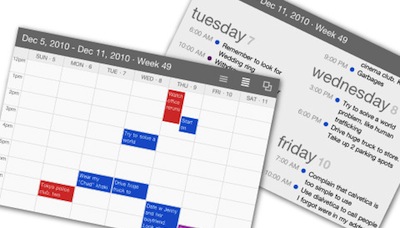
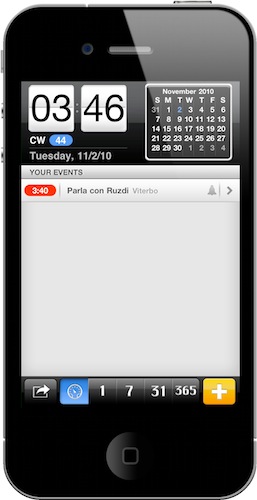
In the past months, I’ve taken a look at different calendar applications for the iPhone and iPad that aim at bringing more functionalities (either through particular interface approaches, extended Google Calendar support, or other features) to a device’s built-in calendar software from Apple. The iOS calendar app, a tiny version of iCal for the desktop, is fast and elegant and works just fine for most users, but sometimes you want or need more from a mobile calendar or agenda. For instance, the possibility to have more views available (rather than the List, Day and Month ones designed by Apple) or “do more” with events and reminders. And while I know most of MacStories readers are huge fans of Calvetica and Cloud Calendar for the iPhone and iPad, respectively, I’m pretty sure some of you have been looking for a slightly more “powerful” or, dare I say, “geeky” alternative to Calendar.app. If so, meet Week Calendar.

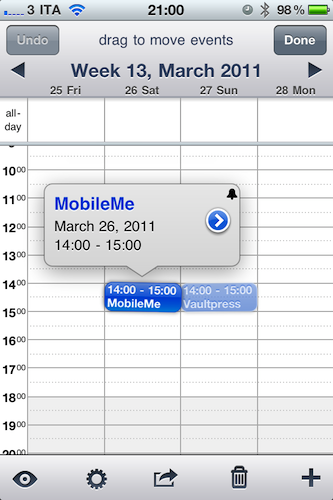
The name says it all: Week Calendar’s biggest feature is the weekly view that’s the focus of the entire experience and undoubtedly something that Apple’s calendar app really lacks. In the app’s weekly view you can pinch & zoom vertically or horizontally to show / hide hours and days, double-tap to focus on a specific event or rotate to landscape mode to gain an even broader view. Tapping on the top toolbar allows you to select a date to jump to, whilst selecting an event opens a desktop-like popup with related information. Tap on the popup, and you get to another screen with all the details you’ve entered and buttons to share, print (that’s right, AirPrint) or create a template off the event itself. You can edit an event at any time, and even display the assigned location on a map. Something that I really like about Week Calendar (well, weekly view aside): you can link contacts from the Address Book to an event. Like I said, everything’s pretty full-featured to offer a wide array of options and choices.

“Choices” seems to be a prerogative of Week Calendar: from the main screen, an iPad-like popover lets you switch between 7 different views: List + Search, Day, Week, Month, Year, Agenda, and Today. The “Go to a Day” shortcut lets you manually enter a date to open. Switching between sections and views felt fast and highly responsive to me, although I have to say I’ve only configured the app with two calendars: my personal one, and US Holidays. The app comes with this kind of optional, built-in subscriptions that you can activate from the Settings. Speaking of which, there’s a lot of stuff to choose from in there: from Time Zone support and “Week starts at” to an auto-coloring system for events with a specific title, you can stay assured the option you’re looking for has been implemented in Week Calendar. I can see how many will prefer the simplicity of an app like Calvetica, but sometimes an application for “nerds & power users” is more than welcome. Other features of Week Calendar that impressed me for the quality of the implementation were fullscreen support (you can activate it with a single / double tap and choose what UI elements to hide), possibility to cut and drag & drop events in any view for easy re-arrangement and TextExpander integration.

Week Calendar is an app that needs to be used for weeks – even months – to be fully appreciated. There’s so much stuff to play with, configure and customize it’s not really easy to fit everything into a single article – plus, I believe all these options have the added value of turning the app into a completely different experience depending on how you use calendars. So, head over the App Store now and buy Week Calendar 3.0 – at $1.99 it’s possibly the most “serious” calendar app for iPhone I’ve seen so far. Read more

Access Extra Content and Perks

Founded in 2015, Club MacStories has delivered exclusive content every week for nearly a decade.

What started with weekly and monthly email newsletters has blossomed into a family of memberships designed for every MacStories fan.

Learn more here and from our Club FAQs.

Club MacStories: Weekly and monthly newsletters via email and the web that are brimming with apps, tips, automation workflows, longform writing, early access to the MacStories Unwind podcast, periodic giveaways, and more;

Club MacStories+: Everything that Club MacStories offers, plus an active Discord community, advanced search and custom RSS features for exploring the Club’s entire back catalog, bonus columns, and dozens of app discounts;

Club Premier: All of the above and AppStories+, an extended version of our flagship podcast that’s delivered early, ad-free, and in high-bitrate audio.

Learn more here and from our Club FAQs.


Dayboard: Animated Clock, Weather and Twitter Widget for iPad

Dayboard by Blend is a beautiful and, at the same time, interesting application for all those who prefer to keep their iPads on the desk as a clock widget / second monitor while they’re working. The app, sold at $0.99 in the App Store, combines a minimal, elegant and sexy design with clock, weather, calendar and Twitter widgets displayed on screen at the same time.

Dayboard provides all kinds of information without being just a flip clock – like many other apps in the App Store. Upon launch you’ll be asked to grant location access to the app, and I’ve noticed Dayboard reliably and correctly fetches my current location – which, for some reason, has been kind of a problem with several apps lately. Together with location and weather info, Dayboard displays time and date. On top of the animated flip clock, there’s a button to switch from dark theme to light theme. Last, a widget at the bottom rotates Twitter trends – and you can even pick local trends for your country or stick with the worldwide ones. You can’t tap on them to load Twitter in Safari, but the animation is pretty cool.

Dayboard is available at $0.99 in the App Store. Give it a try if you’re looking for a great addition to your desk.

Access Extra Content and Perks

Founded in 2015, Club MacStories has delivered exclusive content every week for nearly a decade.

What started with weekly and monthly email newsletters has blossomed into a family of memberships designed for every MacStories fan.

Learn more here and from our Club FAQs.

Club MacStories: Weekly and monthly newsletters via email and the web that are brimming with apps, tips, automation workflows, longform writing, early access to the MacStories Unwind podcast, periodic giveaways, and more;

Club MacStories+: Everything that Club MacStories offers, plus an active Discord community, advanced search and custom RSS features for exploring the Club’s entire back catalog, bonus columns, and dozens of app discounts;

Club Premier: All of the above and AppStories+, an extended version of our flagship podcast that’s delivered early, ad-free, and in high-bitrate audio.

Learn more here and from our Club FAQs.


MobileMe Calendar Webapp Now With Alerts

A few minutes ago Apple announced the availability of calendar alerts on me.com. Just like on any iOS device, you’ll be able to set up alerts for upcoming events and be reminded in the-browser as long as the Calendar webapp is running:

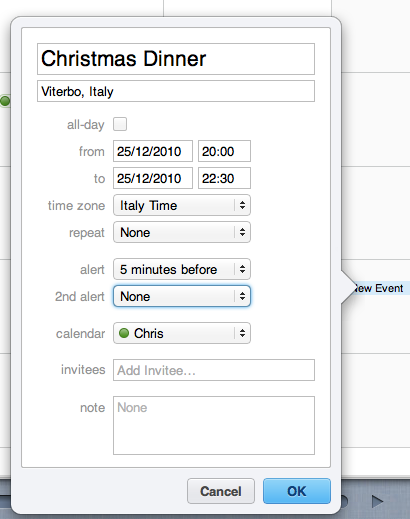
The new MobileMe Calendar web application now includes the ability to set and edit alerts to remind you of upcoming events. Like the calendar alerts you can already set on iPhone, iPad, iPod touch, Mac, and PC (with Outlook), they will be displayed on whichever device you’re using to remind you that an event is about to start.

The redesigned and improved MobileMe Calendar went public for all users in October.

Access Extra Content and Perks

Founded in 2015, Club MacStories has delivered exclusive content every week for nearly a decade.

What started with weekly and monthly email newsletters has blossomed into a family of memberships designed for every MacStories fan.

Learn more here and from our Club FAQs.

Club MacStories: Weekly and monthly newsletters via email and the web that are brimming with apps, tips, automation workflows, longform writing, early access to the MacStories Unwind podcast, periodic giveaways, and more;

Club MacStories+: Everything that Club MacStories offers, plus an active Discord community, advanced search and custom RSS features for exploring the Club’s entire back catalog, bonus columns, and dozens of app discounts;

Club Premier: All of the above and AppStories+, an extended version of our flagship podcast that’s delivered early, ad-free, and in high-bitrate audio.

Learn more here and from our Club FAQs.


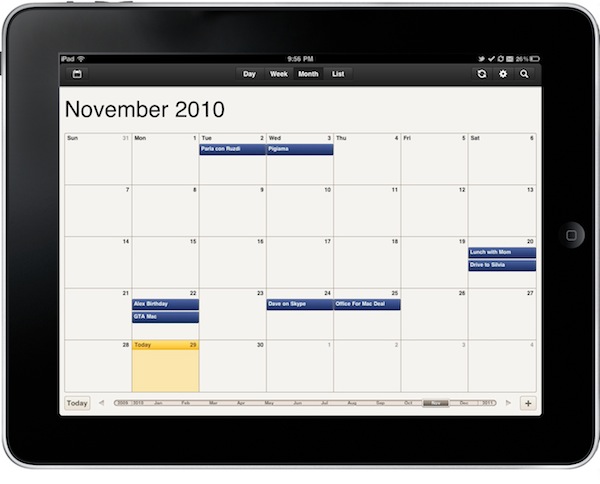
Review: Cloud Calendar, Google Calendar Client for iPad

While searching for interesting alternatives to Apple’s own calendar application for iPhone and iPad, I stumbled upon Cloud Calendar by Clean Cut Code. Cloud Calendar is a new calendar app for iPad that’s specifically meant to work with Google Calendar – and being Google’s calendar solution part of my workflow already, I decided to give it a try.

Cloud Calendar is undoubtedly a very good app to manage your calendars on the iPad, it comes with an elegant interface design and it’s intuitive enough to let you add new events with one tap. It still needs some additional customization options though, the ones that could probably break the app for “calendar power users” that can’t live without edit mode in shared calendars. It’s a very good app overall, so read on past the break for all the details. Read more

Access Extra Content and Perks

Founded in 2015, Club MacStories has delivered exclusive content every week for nearly a decade.

What started with weekly and monthly email newsletters has blossomed into a family of memberships designed for every MacStories fan.

Learn more here and from our Club FAQs.

Club MacStories: Weekly and monthly newsletters via email and the web that are brimming with apps, tips, automation workflows, longform writing, early access to the MacStories Unwind podcast, periodic giveaways, and more;

Club MacStories+: Everything that Club MacStories offers, plus an active Discord community, advanced search and custom RSS features for exploring the Club’s entire back catalog, bonus columns, and dozens of app discounts;

Club Premier: All of the above and AppStories+, an extended version of our flagship podcast that’s delivered early, ad-free, and in high-bitrate audio.

Learn more here and from our Club FAQs.


Calendars for iPad: Google Tasks and Calendar Sitting In A Tree

In my ongoing search for the best iOS and OS X calendar setup, I found a great iPhone app called Calvetica which I’m currently using and loving. Calvetica features a great UI design and a simple yet powerful feature set, make sure to read my review if you missed it. I asked for calendar suggestions on Twitter and I received lots of app recommendations, but I’m sticking with Calvetica on the iPhone. No wonder it was also the most recommended app.

On the iPad, though, the situation is much different. The device has been around for a few months, there aren’t as many calendar apps as on the iPhone (whose App Store launched in 2008) and Apple’s own calendar software is simply great – anything like the iPhone counterpart. There’s a huge market for alternative calendar solutions on the tablet, and it looks like developers are starting to understand this. A slew of iPad apps came out in the past weeks, and we’ll review the most notable ones here on MacStories in the next weeks.

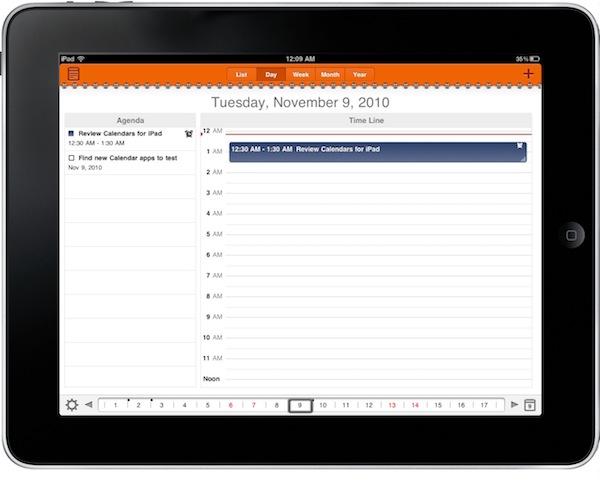
Today I’m taking a look at Calendars by Readdle, the same guys behind my beloved PDF Expert, which aims at blending the usual calendar environment with the possibilities offered by another Google product, Google Tasks. Read more

Access Extra Content and Perks

Founded in 2015, Club MacStories has delivered exclusive content every week for nearly a decade.

What started with weekly and monthly email newsletters has blossomed into a family of memberships designed for every MacStories fan.

Learn more here and from our Club FAQs.

Club MacStories: Weekly and monthly newsletters via email and the web that are brimming with apps, tips, automation workflows, longform writing, early access to the MacStories Unwind podcast, periodic giveaways, and more;

Club MacStories+: Everything that Club MacStories offers, plus an active Discord community, advanced search and custom RSS features for exploring the Club’s entire back catalog, bonus columns, and dozens of app discounts;

Club Premier: All of the above and AppStories+, an extended version of our flagship podcast that’s delivered early, ad-free, and in high-bitrate audio.

Learn more here and from our Club FAQs.


Calvetica, The Minimal App That Reinvented Calendars On My iPhone

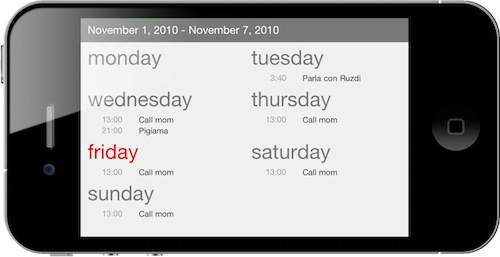
In my quest to searching for the perfect Google Calendar setup on iOS and OS X, I’ve already stopped by the gates of miCal, a full-featured calendar software for iPhone that could use some UI refinements, but allows you to swipe between lots of calendar views in seconds. miCal isn’t exactly elegant or “great-looking”, but it gets the job done.

When I first asked on Twitter which was the “app to have” when it comes to calendars, practically everyone replied with one word: Calvetica. What’s the deal about Calvetica? I had heard about it before I went asking on Twitter for calendar app suggestions, but I had never really focused on exploring its functionalities – nor did I bother to download it for that matter. So when I got all those recommendations (even from people I deeply respect and admire such as Dave) I realized it was time to try the Helvetica-based calendar thing.

A week later, I’m completely addicted to the features and interface schemes offered by Calvetica. Do we already have a winner here? Read on past the break to find out. Read more

Access Extra Content and Perks

Founded in 2015, Club MacStories has delivered exclusive content every week for nearly a decade.

What started with weekly and monthly email newsletters has blossomed into a family of memberships designed for every MacStories fan.

Learn more here and from our Club FAQs.

Club MacStories: Weekly and monthly newsletters via email and the web that are brimming with apps, tips, automation workflows, longform writing, early access to the MacStories Unwind podcast, periodic giveaways, and more;

Club MacStories+: Everything that Club MacStories offers, plus an active Discord community, advanced search and custom RSS features for exploring the Club’s entire back catalog, bonus columns, and dozens of app discounts;

Club Premier: All of the above and AppStories+, an extended version of our flagship podcast that’s delivered early, ad-free, and in high-bitrate audio.

Learn more here and from our Club FAQs.


miCal, Powerful Calendar App for iPhone

If you follow me on Twitter, you might have noticed I’ve been tweeting about Google Calendar integration on iOS since last week. Indeed, I’m looking at all the possible ways to integrate Google’s calendar utility on iOS, especially on the iPhone which is the device I always have with me. It turns out there are many ways to get your Google Cal up and running on the iPhone, the default one requiring you to create an Exchange or CalDAV account in Mail, Contacts and Calendars. In that way, you’ll be able to use Google Calendar in Apple’s default Calendar app and enjoy the additional sync services offered by Google (very similar to MobileMe).

Or, you can just go looking for a 3rd party calendar application in the App Store and play with features Apple didn’t implement in its default app. So I did, and here’s the first app I downloaded, miCal.

Read more

Access Extra Content and Perks

Founded in 2015, Club MacStories has delivered exclusive content every week for nearly a decade.

What started with weekly and monthly email newsletters has blossomed into a family of memberships designed for every MacStories fan.

Learn more here and from our Club FAQs.

Club MacStories: Weekly and monthly newsletters via email and the web that are brimming with apps, tips, automation workflows, longform writing, early access to the MacStories Unwind podcast, periodic giveaways, and more;

Club MacStories+: Everything that Club MacStories offers, plus an active Discord community, advanced search and custom RSS features for exploring the Club’s entire back catalog, bonus columns, and dozens of app discounts;

Club Premier: All of the above and AppStories+, an extended version of our flagship podcast that’s delivered early, ad-free, and in high-bitrate audio.

Learn more here and from our Club FAQs.


MobileMe Calendar Beta NOT Public

[Update]: What was implied as an update available to all users, the author must have just received his invite and got a bit excited over it. The MobileMe Beta is still invite only - you can learn more and request access to the beta here: Apple calendar preview.

With MacStories on pause between a bit of R&R, we hope you haven’t missed out on the new MobileMe Calendar Beta now available to you iPad, iPhone, and iPod touch savvy subscribers. Having just launched yesterday evening, your MobileMe calendar now includes redesigned views, along with improvements to calendar sharing and event invitations. We’ve shown it off before, but you actually get the chance to play with it. Enjoy!

[via The Loop]

Access Extra Content and Perks

Founded in 2015, Club MacStories has delivered exclusive content every week for nearly a decade.

What started with weekly and monthly email newsletters has blossomed into a family of memberships designed for every MacStories fan.

Learn more here and from our Club FAQs.

Club MacStories: Weekly and monthly newsletters via email and the web that are brimming with apps, tips, automation workflows, longform writing, early access to the MacStories Unwind podcast, periodic giveaways, and more;

Club MacStories+: Everything that Club MacStories offers, plus an active Discord community, advanced search and custom RSS features for exploring the Club’s entire back catalog, bonus columns, and dozens of app discounts;

Club Premier: All of the above and AppStories+, an extended version of our flagship podcast that’s delivered early, ad-free, and in high-bitrate audio.

Learn more here and from our Club FAQs.