This Week's Sponsor:

Hello Weather

Half Off for WWDC Week, Just in Time for Summer.


Posts tagged with "app store"

App Store About to Hit 10 Billion Downloads, Apple Celebrates

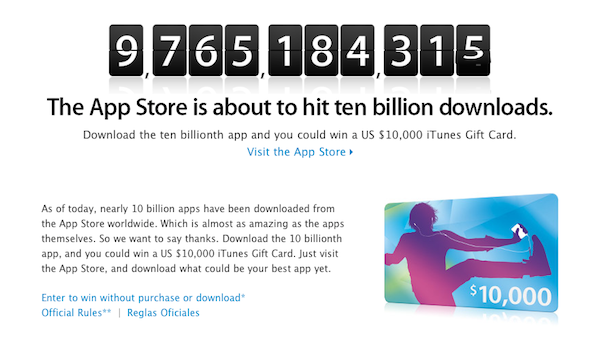
Nearly 10 billion apps have been downloaded from the App Store, which was launched in 2008. In January 2010, App Store downloads topped 3 billion; during Summer 2010, Apple reached the 5 billion milestone. Now, it’s time to get to the 10 billion figure, and Apple wants to celebrate and “say thanks” by giving away a $10,000 iTunes Gift Card (also valid for the Mac App Store) to a lucky user who will download the 10 billionth app.

Check out the contest’s official rules here, entrants have to be at least 13 years of age and resident in a country where the App Store is available.  You can also enter without a purchase or download by filling this form.[9to5mac via iSpazio]


App Store Updates: “Previous Picks” for Apps Of The Week, More Sections

Just like every Thursday, Apple has updated the homepage of the iPhone and iPad App Stores to include this week’s featured apps, updated New & Noteworthy sections and staff picks. This week’s refresh, though, comes with a few more surprises.

First off, we’re one week into the Mac App Store: Apple started refreshing the homepage of the new Store as well, although no custom sectionshave been launched. Guess Apple is still waiting for more Mac apps to become available. Anyway, go check out the updated Mac App Store homepage, as some sweet apps and games like Compartments and The Incident are being featured. Read more


Doodle Jump Creators Going After “Doodle Games” In The App Store

Look, we get it. There are too many “Doodle” games in the App Store. If you look closer, I believe you’re going to find some Doodle Browser or Doodle Twitter in there, too. Since the incredible success of Doodle Jump, many indie developers have tried to follow its path with not-so-clever marketing moves that, indeed, involved using the word “Doodle” next to something else. Like Doodle God. Or Doodle Army. Just take a look in the App Store. Still, I’m a firm believer of the “users decide” philosophy and I think what Doodle Jump developers, Lima Sky, are doing is just wrong. Read more


The Verizon iPhone Is For App Lovers

Let’s state the obvious, Fink. Geez. I’ll be blunt: this is an, “Should I keep my Android phone or get the new iPhone on my Verizon contract?” post. Specifically, I’m talking to my fellow Android owners who’re on the fence about switching to the Verizon iPhone.

I’ve been sitting on this article all day between five thousand or so words of rant material, iPhone gawking, Android squawking, and just about every title under the sun that would attract more iPhone and Android fanboy rage than my little heart could handle. Good grief! I told Federico that this piece could do me in for a few days – this one was hard to write. “Ticci!” I said. “This is too controversial for the Internetz! They’ll explode!” After much deliberation I decided to focus on one specific aspect of Android and the iPhone, instead of comparing the platforms as a whole (there’s simply too much to talk about). After dramatically toning down the content, today’s topic is all about apps and the phones that have them, but which one is better for you?

As someone on Verizon who’s had a year long matrimony with an Android… do you dare click the read more link? I think you should.

Read more


Enable Hidden Mac App Store Debug Menu

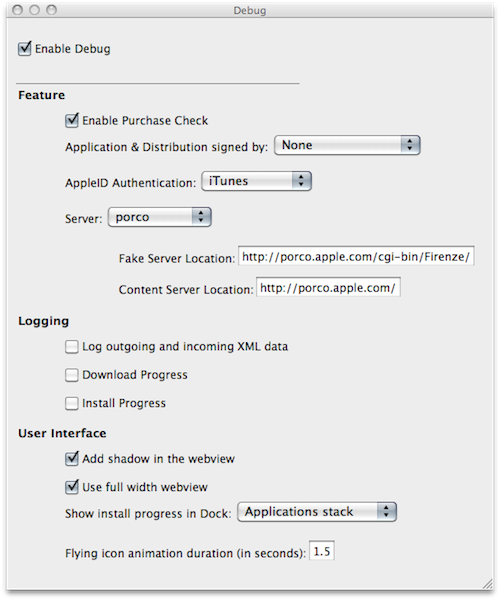
We’re not sure why the average Mac App Store user would want to do this, but we couldn’t resist to post about the Debug menu Apple left behind in the Mac App Store. Discovered by Daniel Jalkut of Red Sweater earlier today, enabling the menu is fairly easy: you just need to quit the Mac App Store, open Terminal and write:

defaults write com.apple.appstore ShowDebugMenu -bool true

Then relaunch the Mac App Store. To revert back to a Mac App Store without Debug menu, simply replace “true” in the string above with “false”. The menu, anyway, is quite interesting as it allows you to play around with a bunch of hidden settings such as shadows and width in the App Store’s webview, the animations and duration of “flying icons” (when you download an app and it goes straight to the Dock). You can also enable and disable the Purchase Check, although we wouldn’t really recommend to tweak these default settings – you don’t want to break the Mac App Store app.

We think this Debug menu will be removed in a future update, as Apple doesn’t want users to modify, or even see, this stuff. Still, you can check it out for now.


Apple Featuring “College Survival Guide” in App Store Homepage

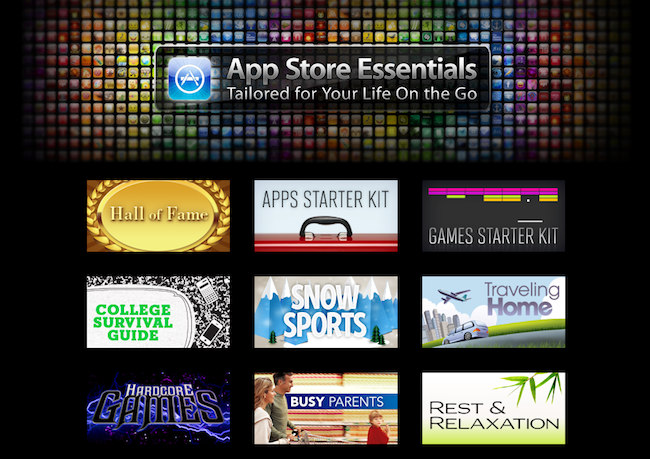
Once again, Apple is featuring apps for college students in the iOS App Store homepage. The new section, called “College Survival Guide”, is available here and showcases more than 40 free and paid apps for iPhone and iPad.

Among the apps included in the guide, iBooks from Apple, iStudiez Pro, AP Stylebook, Momento and Instapaper. We’re not totally sure about Twitter and Facebook during classes but hey, at least they’re useful tools to stay in touch with friends. What about Netflix and Pandora Radio, though? I’m personally not sure about them either. Still, it’s good to see gems like Evernote and Put Things Off in the list.

Apple’s College Survival Guide can be accessed from the App Store’s homepage here.


VLC for iOS Pulled From The App Store, Now on Cydia

Just like we expected in October, VLC for iOS has been removed from the App Store. But this time, the removal of one of the most popular free apps for iPhone and iPad has nothing to do with Apple and the app review team’s rules. Instead, we have to thank developer Rémi Denis-Courmont, who since October has been busy trying to get the app out of the App Store because it violated VLC’s GNU public license. Rather than keep calm, carry on and let other developers (Applidium, the guys behind the VLC port to iOS) distribute VLC for iOS for free, he forced to get the app removed. Read more


How Apple Could Fix The Issue with “Installed” Mac App Store Apps

How Apple Could Fix The “Installed” Mac App Store Issue

Since the Mac App Store launched yesterday, hundreds (if not thousands) of users noticed that apps previously installed on a Mac through a developer’s website show up as, well, “installed” on the Mac App Store. That may lead you to think the new Store can handle updates for apps purchased and downloaded out of it just fine, but it can’t. Either a bug or a “feature” in Apple’s system, those apps seems to be “installed” simply because the Mac App Store sees the bundle identifier of an app already present on your Mac’s hard drive. So say you have iPhoto, Pages, Panic’s Coda or Coversutra already installed on your Mac and you fire up the Mac App Store, those apps may be listed as “Installed”. But they won’t go through the handy automatic update process apps you really purchase in the Mac App Store have. It happened to me. And if you ask me, that’s bad user experience.

Daylen Yang has an interesting mockup on his personal blog of a simple feature that could fix this issue of apps showing up as “Installed”. Apple could simply offer a way to re-purchase applications found on your Mac although, yes, you’d have to pay again. But considering that several developers are moving to App Store-exclusive applications offering discounted prices now looking forward to future free version upgrades (example: you can buy Pixelmator again now at $29, but the future 2.0 version will be a free update), it doesn’t sound like a bad idea. Or, Apple could evolve the concept seen in this mockup developing a way for the Mac App Store to recognize installed apps and provide more detailed information and options about what you can do.

Permalink

Weather HD by Vimov Victim of Name Squatting in Mac App Store

iOS and Mac development studio Vimov saw an unpleasant surprise yesterday in the Mac App Store: another developer, Presselite, is selling an application called “Weather HD” in the Mac App Store. The problem is, Weather HD is the popular application the Vimov guys released for the iPhone and iPad, featured multiple times by Apple in the App Store homepage and covered by all the major tech blogs.

The “Weather HD” that’s being sold in the Mac App Store is not affiliated with Vimov in any way – actually, Presselite “stole” the name from Vimov when registering the app’s name in iTunes Connect. This practice is known as name squatting. Read more