
Reporter for iPhone Privately Tracks Your Life Story

Ellis Hamburger for The Verge on Reporter, a new app that tracks your daily activities:

Reporter works by buzzing you several times per day with a brief quiz based on the questions Felton asks himself. They range from “Where are you?” to “What are you doing?” and “Who are you with?” Some questions can be answered by tapping Yes or No, while others are multiple choice questions, let you type in text, or offer a location picker that polls Foursquare for nearby places. You can also add your own questions (like “Are you happy?”) or program certain questions to occur only when you hit the app’s Awake or Sleep switch (like “How did you sleep?” and “What did you learn today?”). Each time you report, the app also pulls in various pieces of information like the current weather, how many steps you’ve taken today (using the iPhone 5s’ M7 motion coprocessor), and how noisy it is around you using your phone’s mic.

There’s lots of little interesting things that bubble up in Ellis’ review, such as Nicholas Felton’s ideas for printing your records into a book. The best thing about this app is that everything stays on your phone and you can export it in CSV or JSON. The downside is that you have consistently use the app to make it work. The app only costs a few bucks on the App Store, and the website looks great.
Permalink

Beep Synchronizes Music Across All of the Speakers You Already Have

Beep provides a sort of middle ground between a $99 AirPlay receiver, like an AirPort Express or Apple TV, and a system like Sonos where a wireless bridge costs $50 bucks in addition to a Connect or Connect:AMP which are $349 and $499 respectively. If you already have your own stereo system and a few bookshelf speakers throughout the house, Beep can sync music across them at $149 for each receiver. Beep requires their app to play music, which currently gets music from Pandora or directly from your phone, with more sources coming soon.

Permalink

Why “Threes” Took A Year To Make

Ben Kuchera, writing about the creation of Threes (which we covered today) at Polygon:

That year-long journey of adding mechanics and art for testing, only to strip them away and get back to the core game again and again wasn’t wasted; the amount of testing and failed experiments gave them a sense of purpose and clarity when it came to the final game. It needed to be small, simple and easy to understand. The visual information needed to be clear and readable. Every other concept or theme was thrown out in deference to the original idea of matching tiles in multiples of three.

The article shows some of the concepts that the developers decided to throw out, and I think they made a good call. I don’t play many puzzle games, but Threes is fun and entertaining and challenging because it focuses on a simple mechanic: matching threes. Reducing the game’s feature set actually augmented the experience because it made the essence of the idea – numbers – immediate, easy to grasp, but hard to master.

I’m loving Threes. Its animations and sound effects are quirky and cute, the music is good, and the entire game can be played with one hand; you can pause and resume at any time, and there are no In-App Purchases or other tricks to let you win faster/more by paying. You either come up with a good strategy for matching and multiplying numbers, or you don’t get a high score – simple as that.

Go read Ben’s piece here, then get Threes for $1.99 because it’s a great iOS game.

Permalink

Spacious 2 for OS X is a Mouse Friendly App for Navigating the Desktop

If you’re not a fan of Apple’s unergonomic Magic Mouse, or making broad gestures with Hot Corners, Spacious 2 gives you a wheel of commands with a click of the middle mouse button. Spacious presents a small palette of tools for switching to the Dashboard, activating Mission Control, or switching to another space. The app includes an alternative app switcher, and can be configured to your liking if the defaults aren’t for you. If you don’t like using keyboard shortcuts or regularly use your Mac’s trackpad gestures, Spacious can help make the most of your desktop with your favorite mouse. You can download a free trial for 30 days, and purchase the app direct for €9.99.

Permalink

Threes: A Game of Multiples

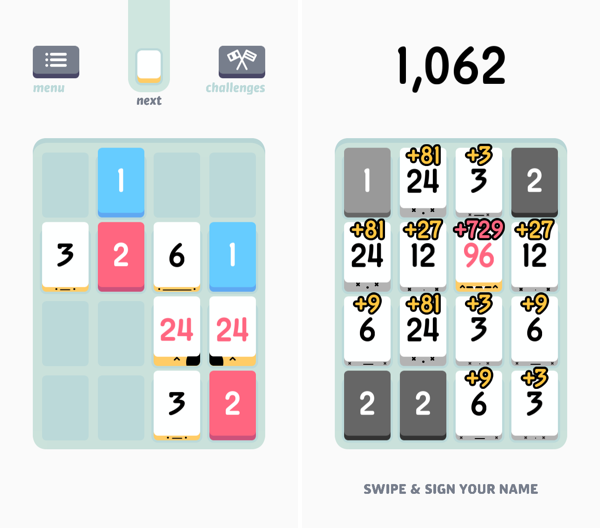
Threes is a game of multiples. It’s a game of combining pairs of numbers to make even bigger numbers. It plays on idea of a sliding puzzle, except the board becomes more populated the longer you play. A new piece falls onto the board after every slide, until the board is completely populated. The end goal is to end up with a board full of large numbers, hopefully in the greater double digits, and maybe even a triple, for a high score.

You play on a 4 x 4 grid, shaped like mahjong pieces, where you slide pieces up, down, left, and right. The game doesn’t really start until you begin combining your blue ones and red twos to create threes. Threes combine to make sixes, which combine to make twelves, etc. Every time you combine two numbers, the result doubles. Only multiples of three count towards your end score, thus the name of the game.

While Threes is largely a game about numbers, there’s lots of little touches in the game, including an unintended achievement system, where creating bigger multiples of three unlocks new personalities. Each multiple of three has a different face, and they’ll smile at each other if they can combine. Threes maintains a history of your previous scores, and includes a toggle to reduce animation frame-rate to save battery life if you’re out and about.

If you love games like Letterpress and Dots, you’ll love Threes. It’s easy to grasp and hard to master. It’s classy.

Threes is $1.99 on the App Store.


How to Optimize Your Settings in Paper by Facebook

Facebook’s new Paper app is the best excuse yet to ditch the social network’s older offering. But while the re-imagined mobile experience adds beautiful fullscreen images and new, intuitive swipes to the mix, it also comes with a few limitations. So before you banish that blue and white standby to the netherworld of discarded apps, you probably want to make a few quick changes.

Roberto Baldwin for Wired writes about how toggling a few switches can make Paper by Facebook better and turn off some annoyances, like videos that automatically play.

Permalink