

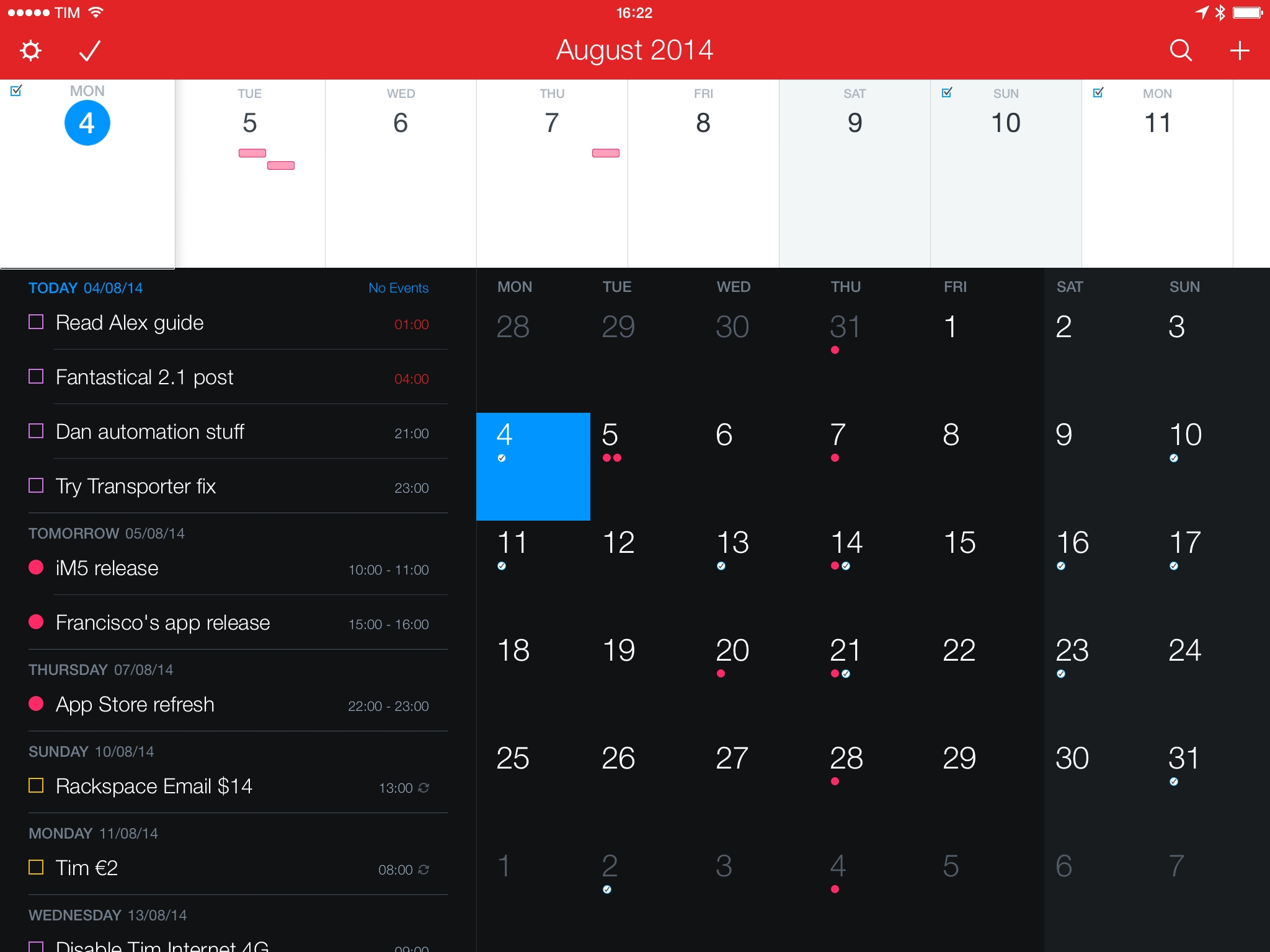
Released last week, Fantastical 2.1 is a pretty big update to my favorite calendar app for iPhone and iPad that brought the usual variety of fixes and improvements, snooze options for notifications (which I don’t use, as I rely on native iCloud alerts), and other enhancements such as upcoming birthday and new event invitation notifications. Being on vacation prevented me from preparing a review in time for the update’s release (it turns out, this is not an ideal spot for good 3G coverage), but I still wanted to focus on three additions to Fantastical that I’m particularly fond of.
Fantastical 2.1
The Original BioShock Is Coming to iOS→
BioShock, Irrational Games’ masterpiece originally released on Xbox 360 in 2007, is coming to the iPhone and iPad this summer with a mobile port developed by 2K China, the same studio that handled XCOM: Enemy Unknown for iOS devices. BioShock is considered one of the most important games of the last generation of home consoles, and, for the upcoming mobile version, Polygon’s Brian Crecente notes that it “feels very much like the original, especially when played on an iPad and with a controller”.
In order to fit within the size limitations of the App Store, BioShock’s graphics and effects have been toned down, which, according to previews of the game published this morning, results in visually inferior experience for those who remember the original game on Xbox. Here’s Ben Gilbert, writing at Engadget:
Yes, BioShock doesn’t look as good on iOS. It’s the truth. In-game lighting and shadows are cut down pretty dramatically, as are art assets. The grandeur of Rapture is distinctly less grand, which sucks some of the life out of one of my personal favorites. The first thing you’ll notice is “iOS fire.” The game’s opening – a plane crash – puts main character Jack in the ocean surrounded by some hideously ugly fire animations. It’s the first hint that the iOS version of Rapture has been shrunken down to fit within Apple’s app store file size limitation, and it’s a nagging issue that I couldn’t shake in my hands-on time.
Over at TouchArcade, Jared Nelson has another preview of BioShock for iOS with a hands-on video:
One thing that struck me about playing Bioshock on a mobile device is that it’s a very intimate experience. Over the last decade, high end televisions and home theater systems have become common, making for incredible environments to play through immersive and atmospheric games. And Bioshock is one of the most atmospheric of all time. However, there’s really something to be said for having your very own little screen running the game, right up in your face as close as you want it to be.
BioShock was released in 2007, in the formative years of last-gen consoles. Based on the previews and first impressions published today, it sounds like modern iOS hardware would be capable of handling the original game’s graphics and assets, but file size limitations are preventing developers from putting a full console experience into an App Store download. Considering Apple’s push for console-quality game technologies such as controller frameworks and Metal, this seems fairly anachronistic.
BioShock Mobile will be released sometime this summer for iPhone and iPad at a “premium price” with no In-App Purchases, and it will include a digital art book and Game Center integration. Make sure to check out the hands-on video at TouchArcade.
A Preview of the SpeakerSlide, A Kickstarter Project
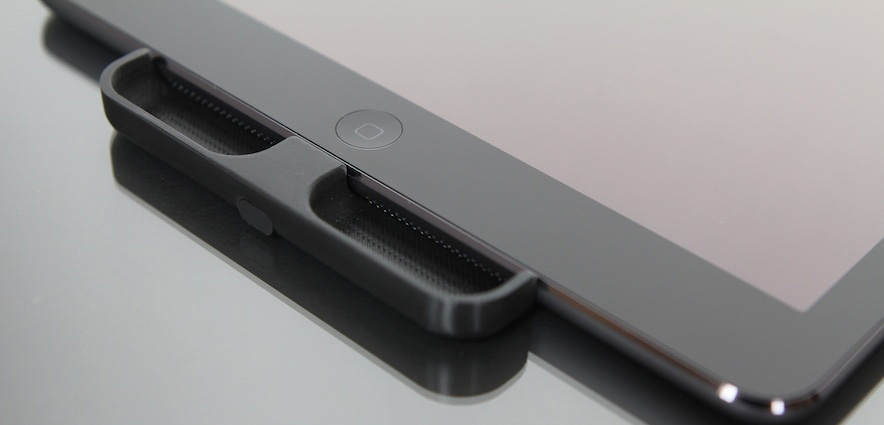
Over the past few years Apple has continued to improve the speakers in the iPhone and iPad quite significantly, except for the fact that they continue to be directed out to the side rather than the front. In fairness, this is probably the most practical location for Apple but it has meant that I’ve purposefully cupped my hand around the iPad’s speakers to help redirect the sound on a number of occasions. It is exactly this weakness where a Kickstarter project, the SpeakerSlide, is trying to improve things. It’s a simple plastic (polycarbonate) accessory that redirects the sound out to the front of the device. The SpeakerSlide team were able to ship me 3D-printed evaluation models of the SpeakerSlide for both iPhone and iPad, so I gave the product a test run over the last week.
I first tested the SpeakerSlide with the iPad Air and I can honestly say that the effect it had was instantly noticeable and fairly significant. Sound coming from the iPad actually sounded like it was directed to me, which shouldn’t be surprising, but what was surprising to me was how much more natural that felt. When I started taking the SpeakerSlide on and off to try and hear the difference, the effect was even more noticeable. It almost felt like the sound (without the SpeakerSlide) was muffled because of the direction of the speakers. Because the sound is being directed at you with the SpeakerSlide, it also means you don’t need to have the volume as loud as you would without it, and that shouldn’t be underestimated.
Yep, Apple’s ‘Stickers’ Ad Gave MacBook Sticker Sellers a Huge Boost

When Apple published their new ‘Stickers’ ad for the MacBook Air last week, I presumed it would be a boon for sellers of MacBook stickers and decals. So earlier this week I decided to reach out to a few sellers of MacBook stickers and decals to see what kind of impact the ad from Apple has had on their store visits and sales.
Now this was not an in-depth investigation and the result is probably what you would have guessed: visits and sales rose dramatically last week when Apple’s ad was released. It was the universal reaction I got from the sellers I talked to.
One of the sellers that was willing to give me more detailed information was Benjamin Clark from The Decal Guru. They saw a quadrupling of orders for MacBook decals since the airing of Apple’s ad. In terms of unique visitors they saw an increase from a steady 500 per day (prior to the ad) to 4,500 at its highest last week.
Apple Refreshes Retina MacBook Pro With Faster Processor, Doubled RAM on Two Models
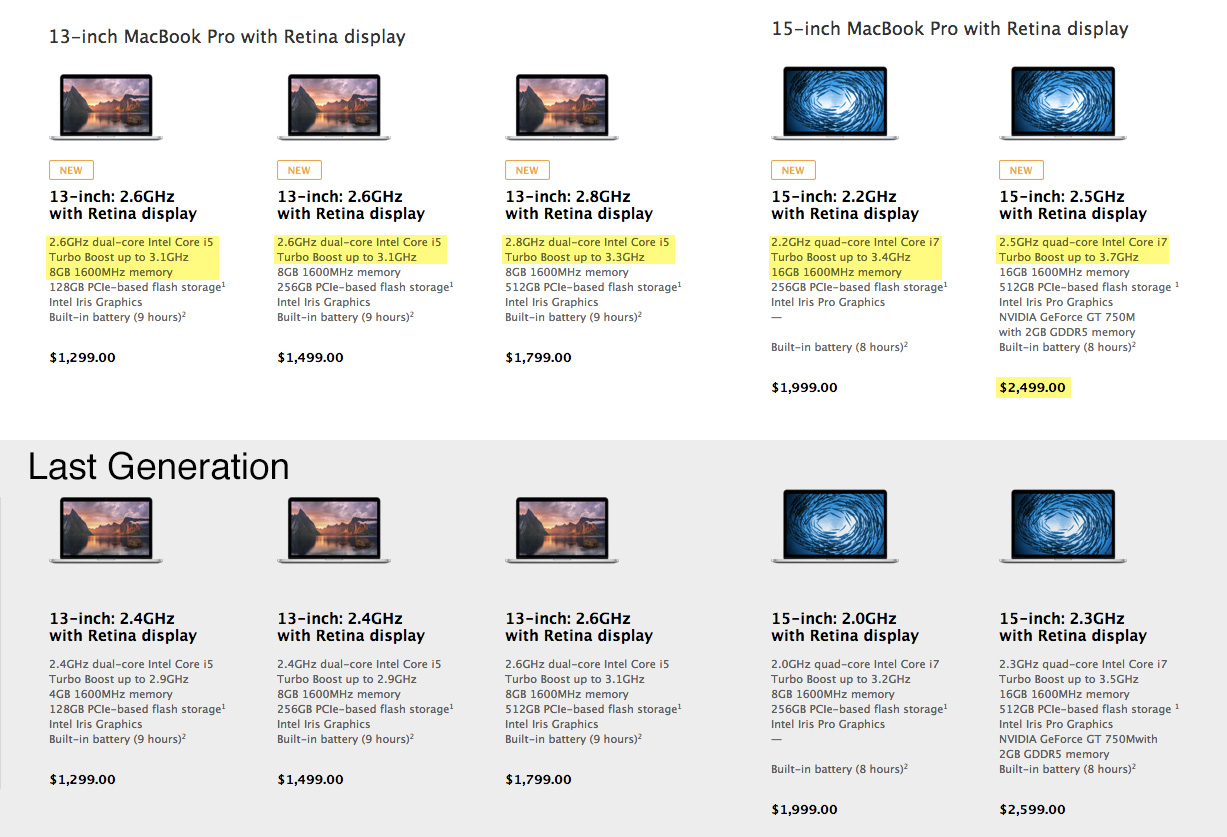
Apple this morning refreshed their MacBook Pro with Retina display models with the latest generation of Intel’s Haswell processors. All things considered, it’s a minor update with each of the five base models receiving a 0.2GHz processor speed bump. All that means is the base model goes from 2.4GHz to 2.6GHz, whilst the most powerful preconfigured model goes from 3.5GHz to 3.7GHz. The other notable hardware change is the doubling of RAM for the base model 13-inch Retina MacBook Pro (from 4GB to 8GB) and base model 15-inch Retina MacBook Pro (from 8GB to 16GB). Finally, the 15-inch 2.5GHz model gets a price drop of $100, now selling for US$2,499.
“People love their MacBook Pro because of the thin and light, aluminum unibody design, beautiful Retina display, all day battery life and deep integration with OS X,” said Philip Schiller, Apple’s senior vice president of Worldwide Marketing. “The MacBook Pro with Retina display gets even better with faster processors, more memory, more affordable configurations and a free upgrade to OS X Yosemite this fall.”
Also worth noting is that Apple today also dropped the price of the MacBook Pro (without the Retina display) by $100, so it now sells for $1,099. For those of you considering purchasing one of the new MacBook Pros, and live in the northern hemisphere, keep in mind that Apple’s Back to School promotion is currently running. So if you purchase one of these new Retina MacBook Pros (or any other Mac) before September 9 you’ll get a $100 Apple Store card.
Read Apple’s Press Release or view the new models on Apple’s website.
A Candid Look at Unread’s First Year→
Unread for iPhone has earned a total of $32K in App Store sales. Unread for iPad has earned $10K. After subtracting 40 percent in self-employment taxes and $350/month for health care premiums (times 12 months), the actual take-home pay from the combined sales of both apps is: $21,000, or $1,750/month.
Considering the enormous amount of effort I have put into these apps over the past year, that’s a depressing figure. I try not to think about the salary I could earn if I worked for another company, with my skills and qualifications. It’s also a solid piece of evidence that shows that paid-up-front app sales are not a sustainable way to make money on the App Store.
The story of Unread is not one of failure, we were big fans of the app and it has made money. But for the creator of Unread, Jared Sinclair, it has not been a success either. The income that Unread has generated just isn’t sustainable on a long-term basis. The story about Unread’s first year is fascinating thanks to Sinclair’s transparency and I’d highly recommend you read it, particularly if you are developer considering to go ‘indie’ on the App Store.
Sinclair’s story clearly hit a nerve because since his post earlier today, there have been a number of others who have written about the situation with their own perspectives. For example, Benjamin Mayo makes some perhaps obvious points that I think deserve reinforcement:
Betting on apps of incredibly large scale means you bear proportionately more risk, with the possibility of no return whatsoever. If you want to maximise your profitability, make small apps that do a few things well. The amount of effort you put into an app has very little to do with how much of the market will buy it. This means that making big apps exposes you to substantially more risk, which is not fairly counterbalanced by significantly higher earnings potential.
At this point, you may be despairing at the reality of the situation and Cezar Carvalho Pereira offers some commentary on that, in a sense giving a reality check on what it means to go indie on the App Store:
So, while I believe the mythical indie is far from dead, I think the path to going indie is a lot less glamorous than what most have come to expect. A beautiful idea followed by a great execution doesn’t necessarily guarantee success.
If you want even more, Stephen Hackett, Tyler Hall, Ben Brooks, and Brent Simmons have all also posted stories on a similar theme today.
What Makes a Name in the App Store?→
I looked at the top 200 apps in each category for both paid and free iPhone apps, 8400 apps in total. Although some developers use up to 49 words (and all 255 characters), the majority are around 4-5 words (24-35 characters). Around one third of apps use a delimiter / separator like ‘Flipboard: Your Social News Magazine’.
Stuart Hall takes a brief but interesting look at what exactly makes a name for apps in the App Store. Specifically, he is talking about the full app store name such as ‘Wish - Shopping Made Fun’. Whilst Apple allows a name with as many as 255 characters (remember a tweet is only 140 characters), a big chunk of developers stay under 30 characters - which is about as long as it can be on an iPhone before the App Store cuts the name.
Hall also offers some suggestions for coming up with an app name, which are fairly straightforward and make a lot of sense. But one thing missing from the post (through no real fault of Hall’s) is some anecdotal evidence from App developers who may have experimented with different length or style of App names - I’d love to hear how it affected their sales (if at all).
FiftyThree Releases SDK for Their Pencil Stylus
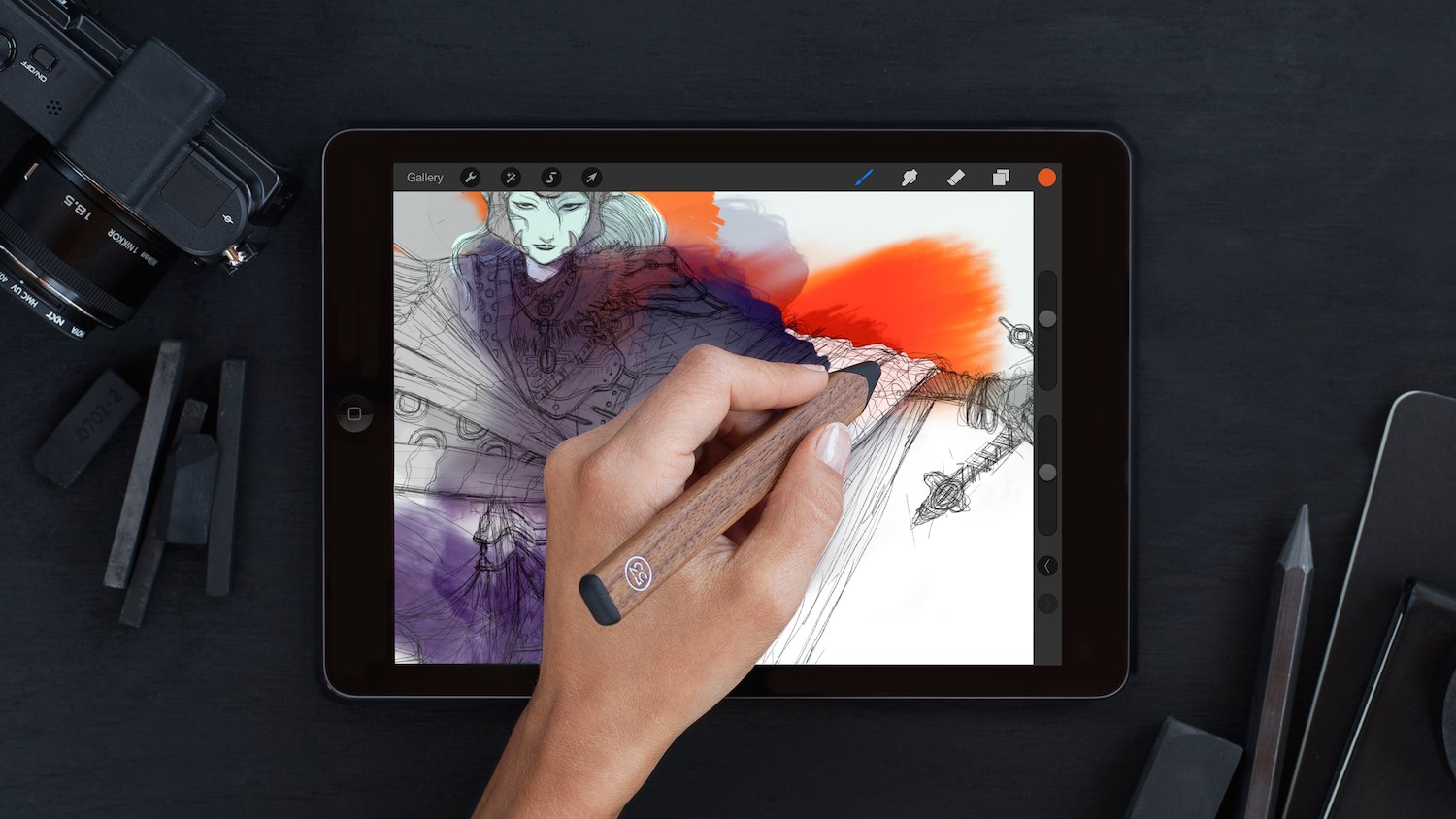
The FiftyThree SDK has been implemented by Procreate, allowing it to fully support the Pencil Stylus
FiftyThree, the company behind the popular ‘Paper’ sketching app, have today released an SDK for their ‘Pencil’ stylus which is now available internationally. The SDK incorporates advanced features enabled by the Pencil that were previously limited to FiftyThree’s own Paper app. In preparation for today’s release, FiftyThree has worked with the developers of Procreate, Noteshelf, and Squiggle which will offer full support for the FiftyThree SDK.
With the FiftyThree SDK, developers worldwide can now tap into Pencil’s industryleading technologies and find support from a team that values true partnerships. Developers are already discovering new ways of using Pencil to bring the power of natural creativity to their apps, from professional drawing to making music, starting with our partners Procreate, Noteshelf, and Squiggle.
Apple Q3 2014 Results: $37.4 Billion Revenue, 35.2 Million iPhones, 13.3 Million iPads Sold
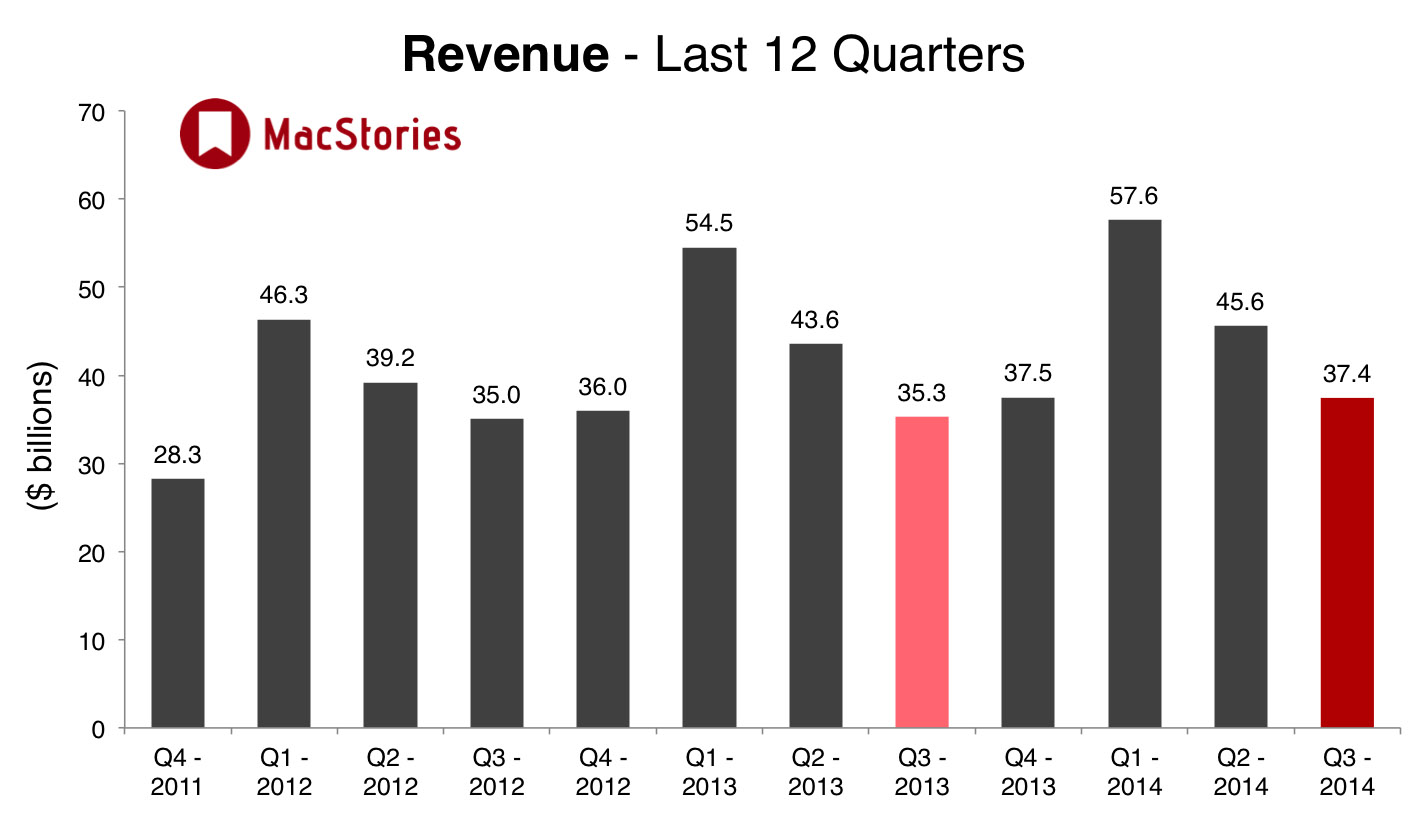
Apple has published their Q3 2014 financial results for the quarter that ended June 28. The company posted revenue of $37.4 billion. The company sold 13.3 million iPads, 35.2 million iPhones, and 4.4 million Macs, earning a quarterly net profit of $6.9 billion.
“Our record June quarter revenue was fueled by strong sales of iPhone and Mac and the continued growth of revenue from the Apple ecosystem, driving our highest EPS growth rate in seven quarters,” said Tim Cook, Apple’s CEO. “We are incredibly excited about the upcoming releases of iOS 8 and OS X Yosemite, as well as other new products and services that we can’t wait to introduce.”
Notably, Apple’s gross margin jumped back up to 39.4% this quarter, compared to 36.9% in the year-ago quarter. International sales also accounted for 59% of all Apple’s revenue. You can see all our usual earnings call charts below.