We’ve collected the best #MacStoriesDeals for August 6th, 2014, so be quick and get them! If new deals become available, updates for each category will be listed at the top.
You can find us as @MacStoriesDeals on Twitter.

We’ve collected the best #MacStoriesDeals for August 6th, 2014, so be quick and get them! If new deals become available, updates for each category will be listed at the top.
You can find us as @MacStoriesDeals on Twitter.
The agreement shows Apple and Samsung may be nearing a conclusion to what has been a drawn-out and occasionally nasty worldwide patent fight, which has sprouted alongside the booming market for touch-screen smartphones. Apple has accused Samsung of copying its iPhone designs, while Samsung has countered that Apple is using pieces of its wireless-transmission technology without permission. Neither has won a decisive decision and judges have repeatedly urged the two companies to reach a settlement rather than play out their dispute in court.
Today’s announcement, sent to Bloomberg and other media organizations, means that all disputes between Apple and Samsung outside the United States are being abandoned. The international disputes had been fought for years in Australia, Japan, South Korea, Germany, Netherlands, the U.K., France and Italy.
“Apple and Samsung have agreed to drop all litigation between the two companies outside the United States,” the companies said in the statement. “This agreement does not involve any licensing arrangements, and the companies are continuing to pursue the existing cases in U.S. courts.”
Much has been written about being an indie developer on the App Store recently, with not much of it positive.
I think this experiment has shown us a few really important things.
Since last year, I’ve continued to follow Stuart’s experiment with great interest. While not indicative of the indie app market as a whole, his experience can be useful to understand the impact of In-App Purchases, pricing experimentation, and cutting down on non-development or design costs, such as customer support, through the built-in AppbotX service (our coverage). Stuart’s app has reached almost 2 million downloads and $60,000 in revenue.
Simogo, makers of some of my favorite games for iOS (Year Walk and DEVICE 6), have announced their next game, The Sailor’s Dream, launching later this year. The Sailor’s Dream will be a “challenge-free experience in which you explore a non-linear story through words, music, sounds and illustrations”, and, based on the trailer and screenshots seen so far, it looks like Simogo is once again trying to redefine the scope of innovation in mobile gaming.
Don’t miss Leigh Alexander’s interview with Simogo at Gamasutra, which provides background and context on the studio’s latest creation:
“We want it to feel both relaxing, like diving into a tiny little world in which you can enjoy just interacting with, looking at and listening to things,” Flesser continues. “But then there’s also this element of exploring a quiet story, and tying it together in your head. So in that way it is like a dream, exploring a strange world, with tiny bits of reality breaking through in different ways.”
You can watch the trailer below, and check out the game’s first screenshots at the official website. You can read my review of Year Walk, Simogo’s hit from 2013, here.
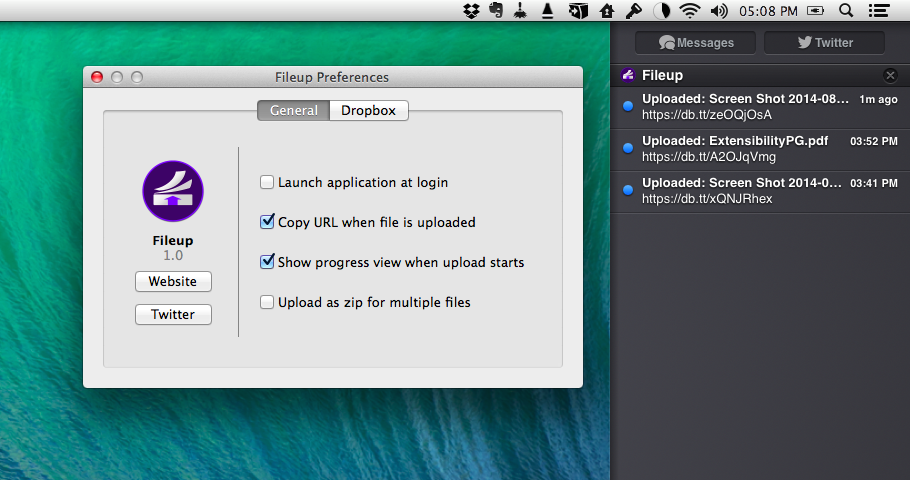
Developed by Francisco Cantu, Fileup is a new OS X utility that lets you quickly share files through Dropbox by dragging them onto a menu bar icon. Unlike other apps that have implemented the same sharing mechanism and user interaction (which Dropbox surprisingly doesn’t support with their own menu bar app), Fileup adds filters for file types, integrates with Notification Center, and lets you set up templates for naming files through a simple syntax. The idea is reminiscent of Vemedio’s shortlived Sharebox experiment, but, as required by Dropbox, Fileup is a separate menu bar utility that doesn’t interact with the official Dropbox client.
Adobe yesterday published a six-page document outlining a workflow for those users who want to transition from Aperture to Lightroom. Its an interim measure for those users who want to switch to Lightroom now, but Adobe also affirmed their commitment to develop a proper migration tool for Aperture and Adobe Lightroom.
At Adobe, we’re working on a migration tool to help you bring your photos into Adobe Photoshop Lightroom from Aperture, but if you’re eager to switch before the tool is ready, this guide can help ease your transition. We recognize that this migration may be a challenging process and offer the following resources and methodology to help get you up to speed with Lightroom and provide a road map for successfully migrating your photos.
This all comes after Apple announced in late June that it was ending development of Aperture. Apple is instead focusing its development efforts on the new Photos app, launching on Yosemite early next year.
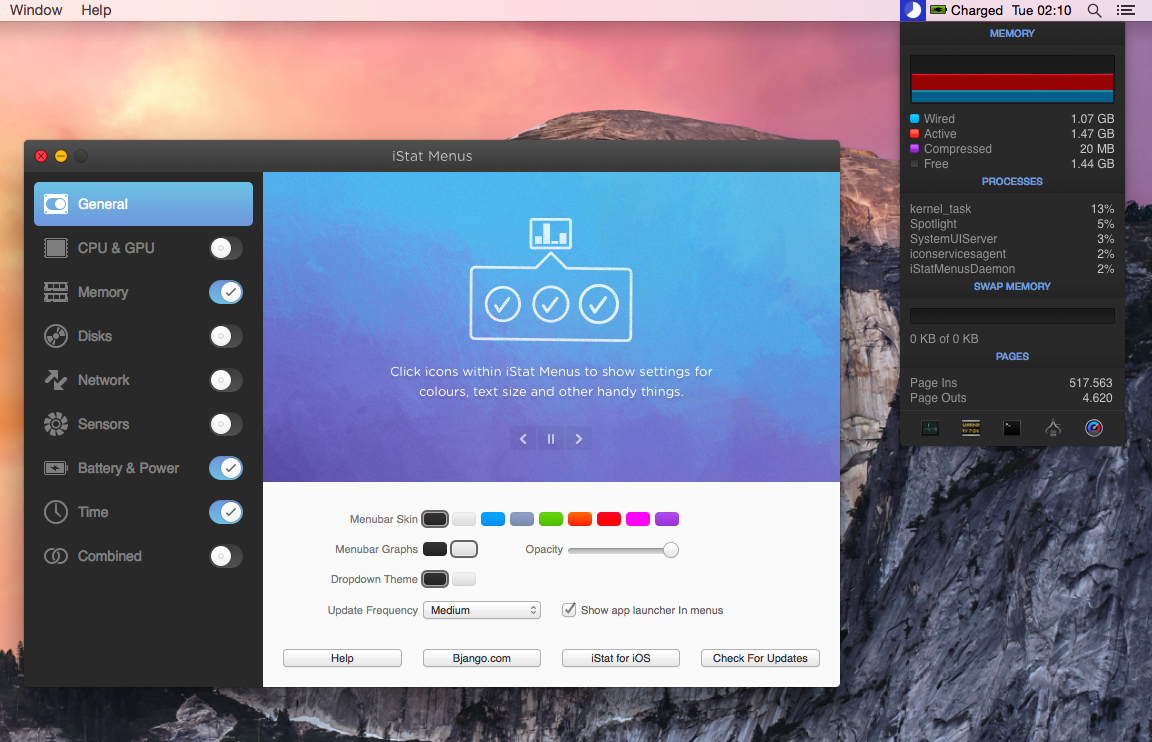
Two years after the release of version 4.0, Bjango has launched iStat Menus 5 today, adding hundreds of new features and improvements, and bringing a new design for both OS X Mavericks and Yosemite.
David Smith has a great analysis of the “freshness” of apps on the App Store – data about when apps were last updated, for both Top Charts and the entire App Store.
For a very long time I’ve talked about my concerns about the size and health of the iOS App Store catalog. The App Store currently sits around 1,200,000 apps. For years the depth and diversity of the App Store has been one of the platforms strongest differentiators. However, as it grows the challenge becomes ensuring that it doesn’t begin to strain under its own size.
What has always annoyed me in my discussions about how to improve the App Store was that I didn’t have actual data on the composition of the App Store. Since it wasn’t (to my knowledge) available I started working out ways to get at it myself.
The numbers about the size of the App Store in relation to updates and the release of iOS 7 last year are surprising to me, as I was expecting a much worse scenario. The charts in David’s post clearly show a developer interest in updating for iOS 7 – make sure to check out the charts.
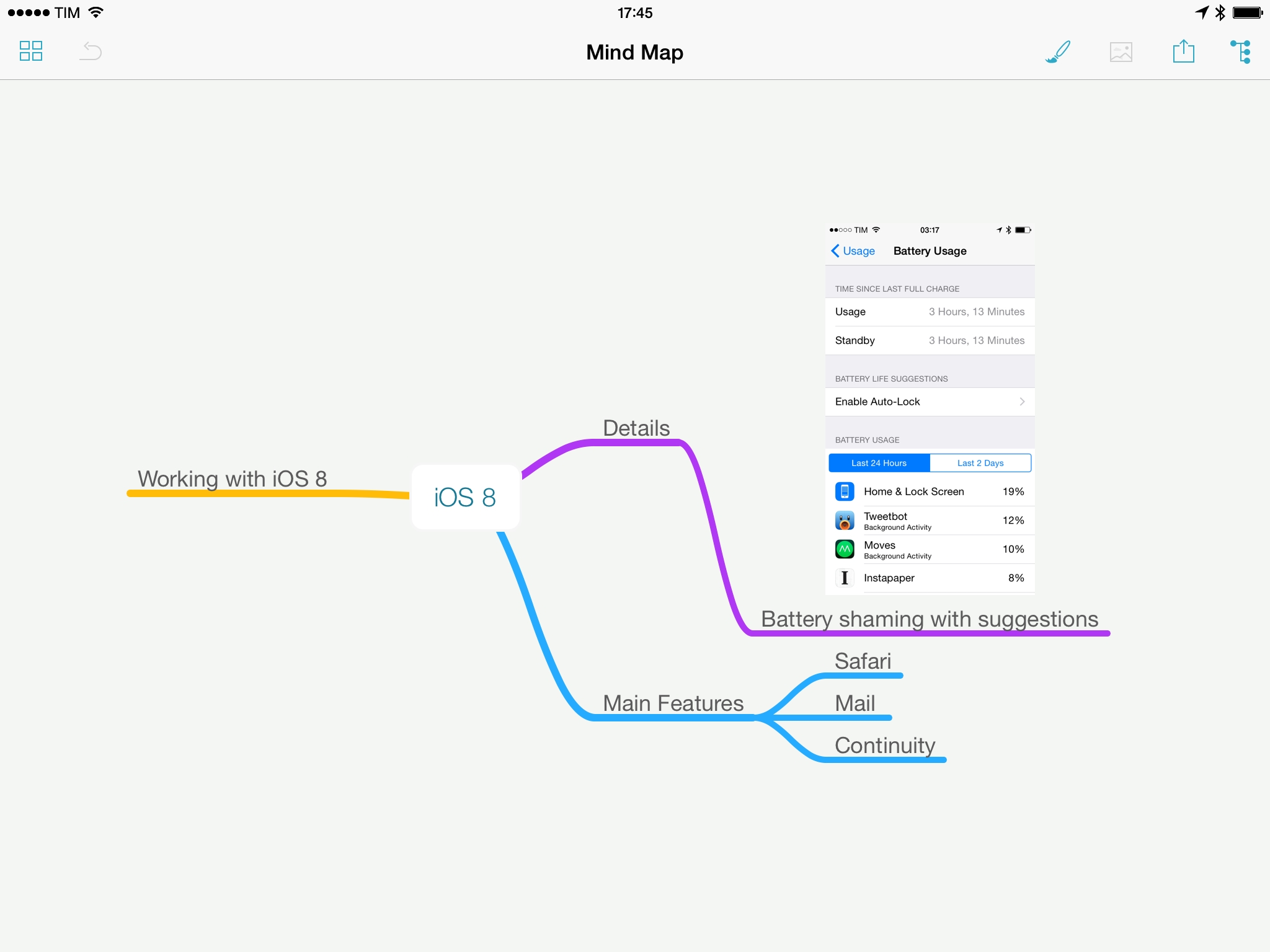
MindNode, my favorite app to outline ideas visually on both iOS and OS X, was updated last week with a notable addition: embedded images.
I use MindNode to flesh out ideas and thoughts that help me find connections and relationships through the use of colors, branches, and formatting of text. Typically, large reviews, roundups, and articles for this site start as a plain text list in Evernote, but before writing in Editorial, I transform that list into a map in MindNode to get a better visual understanding of the topic(s) I want to cover. Images were an obvious candidate for mindmaps, and while other apps already supported them, I wanted to be able to insert images in maps with the simplicity of MindNode’s interface and iCloud storage.