
 Monthly Log: November 2015
Virtual: You Make Your Own Classics→
This week Federico and Myke discuss whether old games are really still worth playing today, before talking about Goat Simulator, and a Hydraulic set-up for GTA V.
If you’ve ever wondered whether you still like old games or if you’re looking at the past with rose-colored glasses, this week’s Virtual should help in your quest. You can listen here.
Sponsored by:
- Squarespace: Build it Beautiful. Use code INSERTCOIN for 10% off.
MacStories Weekly: Issue 10
Facebook SDK for tvOS→
Chris Pan, writing on the Facebook developer site:
The new Apple TV brings the App Store to the big screen, and today we’re introducing the Facebook SDK for tvOS beta to help you build immersive social experiences on that platform.
The key feature of the Facebook SDK for tvOS apps is an easy way to log into apps without having to type emails and passwords with the Siri Remote:
A fast and easy way for people to log into your app and for you to provide rich, personalized experiences. To log into an app with their Facebook account, people can simply enter a confirmation code displayed on the TV into their smartphone or computer, rather than entering their username and password with the remote.
For developers who don’t mind adding Facebook code to their apps, this seems like a decent stopgap solution until Apple builds something similar for iPhone users (as I assume it would be nice to log into apps with iCloud Keychain and Touch ID).
#MacStoriesDeals Black Friday & Cyber Monday 2015: The Best Deals for iOS and Mac Apps & Games

Every year, thousands of iOS and OS X software deals are launched for Black Friday and Cyber Monday. At MacStories, we handpick the best deals for iOS and Mac apps and collect them in a single post with links to buy or share discounted products directly. You don’t have to be overwhelmed by app deals; we take care of finding the best stuff for you.
Bookmark this post and come back to find updated deals starting today through Monday. Updates will be listed as new entries at the top of each category. This year, we’ve also organized iOS apps in sub-categories to make navigation easier.
For real-time updates, you can find us as @MacStoriesDeals on Twitter.
Apple Posts ‘Someday at Christmas’ Ad Featuring Andra Day and Stevie Wonder

Apple uploaded a new holiday commercial today (just ahead of Thanksgiving in the United States) featuring soul singer Andra Day and Stevie Wonder playing Wonder’s 1967 classic ‘Someday at Christmas’.
The ad is notable for a couple of reasons. First, it’s not focused on any particular Apple product, although MacBooks and Apple Watches make a brief appearance. The theme of the ad is Day and Wonder playing and singing together – the ad immediately highlights VoiceOver integration in GarageBand for Mac, one of the Accessibility features that Wonder uses to interact with OS X and manage recorded tracks in the app.
Earlier this year, Apple was honored as a recipient of the Helen Keller Achievement Awards for its implementation of accessible technologies, with a particular mention of VoiceOver by the American Foundation for the Blind.
In a subtle note, the ad closes to a “Love, Apple” message. You can watch the video below.
iPad Pro in the Classroom→
Karan Varindani has a great story about the role of the iPad Pro in his college studies, and how he’s been consolidating his textbooks, notes, and more into a portable, digital workflow:
I saved writing about my experience doing Linear Algebra homework for last because it is, by far, my favorite anecdote about the iPad Pro. I usually have the assignment sheet open on my Mac in front of me, the textbook open on my iPad to my left, and sheets of A4 paper scattered everywhere else on my desk. I first go through the assignment, making lots of mistakes along the way, then rewrite everything again neatly on the second run. Next, I scan the 10–15 pages to my Mac, merge them into a single PDF document, and upload them to the course server. The entire process takes about 3–4 hours depending on the number of questions assigned and leaves me with a pulsing wrist every time. Last week, I did the entire assignment on the iPad Pro. I had both Notability and PDF Expert open in Split View; the former was a blank canvas where I wrote down my answers and the latter had both the assignment and textbook open in tabs. I was able to erase mistakes as I made them and I didn’t have to scan anything afterwards, both of which saved me a tremendous amount of time. I uploaded the document in Safari using iCloud Drive when I was done.
Almost immediately after I got the confirmation email, I decided that I wasn’t going to be returning the iPad Pro.
A good primer for those who argue that the iPad is only being used by tech bloggers – with a fair assessment of the Pro’s portability trade-offs.
Automatic: A Smart Driving Assistant on Your iPhone [Sponsor]
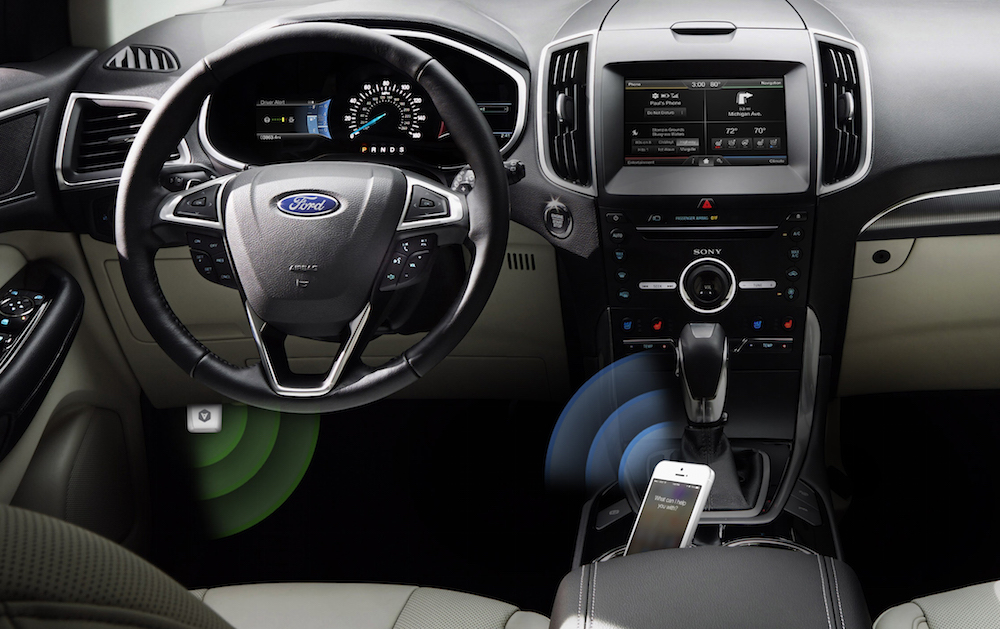
There’s a mountain of data inside your car waiting to be unleashed, and all you have to do is plug in a quick little connector and download a mobile application.
Automatic is a smart driving assistant that plugs into your car’s data port and lets you connect your smartphone (either iPhone or Android) with your car. By talking to your car’s onboard computer and using your smartphone’s GPS and data plan to upgrade your car’s capabilities, Automatic will allow you to easily diagnose your engine light, never forget where you parked your car, and save hundreds of dollars on gas.
Automatic learns your driving habits and gives you suggestions through subtle audio cues to drive smarter and stop wasting gas. Thanks to a map view available on your phone, Automatic can display a trip timeline after every driving session, showing you how you’re doing with a Drive Score; the app can even track local gas prices and tell you how much you’re spending.
In case of engine problems, Automatic can decipher what the “check engine” light means and show you a description of the issue with a possible solution. And thanks to a feature called Crash Alert, Automatic can detect many types of serious crashes and automatically alert local authorities as well as your loved ones when you can’t.
Automatic is currently available in the US for iPhone and Android devices, with a 45-day return policy and free shipping in 2 business days.
MacStories readers can go to automatic.com/macstories to get $16 off and buy Automatic at just $63.99. For more information, check out Automatic’s website.
Our thanks to Automatic for sponsoring MacStories this week.
The Worst App→
An odd App Store story by Allen Pike:
One of the various things I do at Steamclock is provide support for our apps. Our music apps don’t require much support, and much of the email we get is positive, so tending to support is generally pleasant.
Or at least it was pleasant, until recently. On September 30 I received a very concerning support email.
I don’t know what the solution to these App Store problems is, but it doesn’t seem right to me that developers have to spend time dealing with them over the course of several weeks.