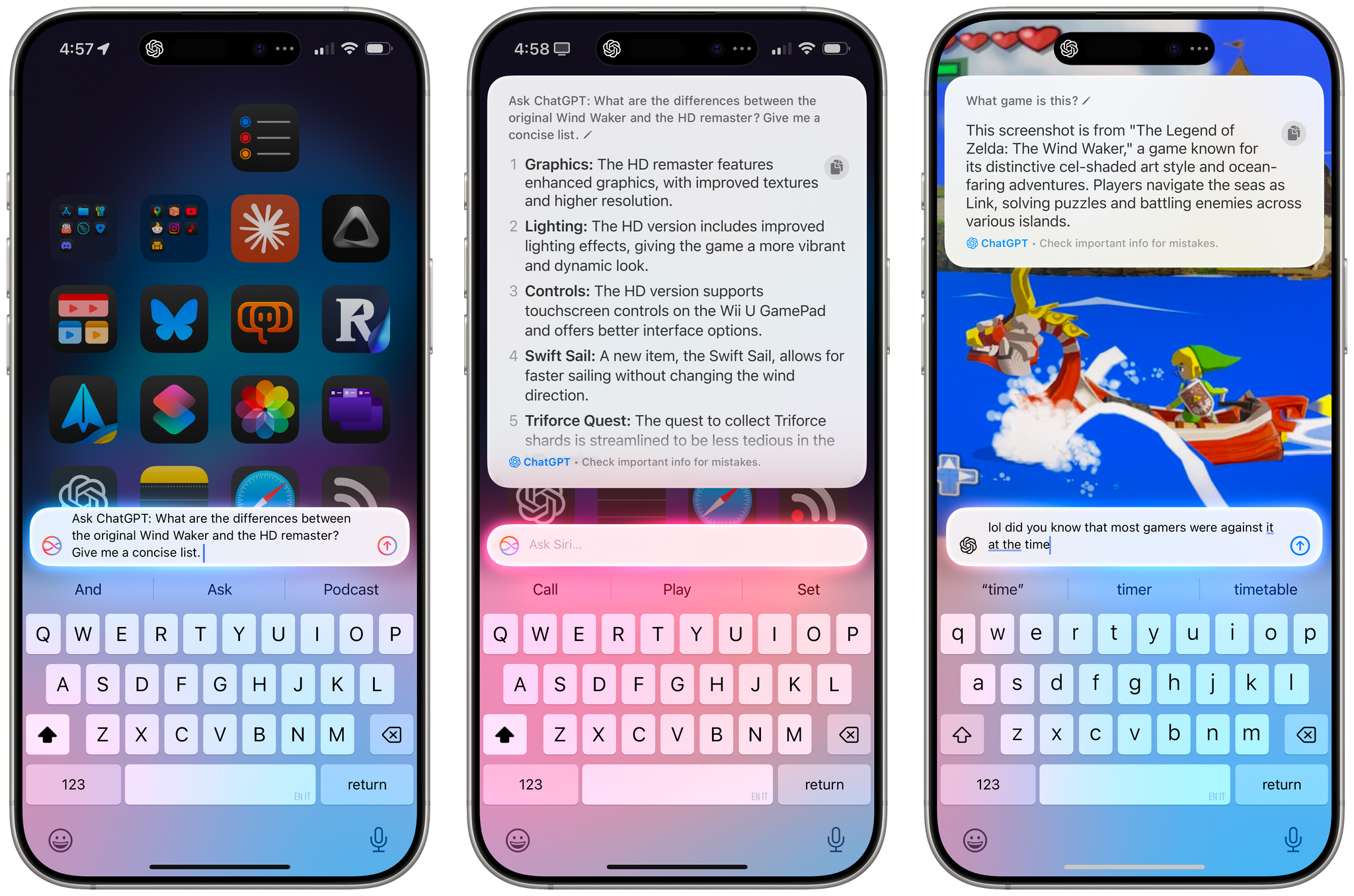
Apple is releasing iOS and iPadOS 18.2 today, and with those software updates, the company is rolling out the second wave of Apple Intelligence features as part of their previously announced roadmap that will culminate with the arrival of deeper integration between Siri and third-party apps next year.
In today’s release, users will find native integration between Siri and ChatGPT, more options in Writing Tools, a smarter Mail app with automatic message categorization, generative image creation in Image Playground, Genmoji, Visual Intelligence, and more. It’s certainly a more ambitious rollout than the somewhat disjointed debut of Apple Intelligence with iOS 18.1, and one that will garner more attention if only by virtue of Siri’s native access to OpenAI’s ChatGPT.
And yet, despite the long list of AI features in these software updates, I find myself mostly underwhelmed – if not downright annoyed – by the majority of the Apple Intelligence changes, but not for the reasons you may expect coming from me.
Some context is necessary here. As I explained in a recent episode of AppStories, I’ve embarked on a bit of a journey lately in terms of understanding the role of AI products and features in modern software. I’ve been doing a lot of research, testing, and reading about the different flavors of AI tools that we see pop up on almost a daily basis now in a rapidly changing landscape. As I discussed on the show, I’ve landed on two takeaways, at least for now:
- I’m completely uninterested in generative products that aim to produce images, video, or text to replace human creativity and input. I find products that create fake “art” sloppy, distasteful, and objectively harmful for humankind because they aim to replace the creative process with a thoughtless approximation of what it means to be creative and express one’s feelings, culture, and craft through genuine, meaningful creative work.
- I’m deeply interested in the idea of assistive and agentic AI as a means to remove busywork from people’s lives and, well, assist people in the creative process. In my opinion, this is where the more intriguing parts of the modern AI industry lie:
- agents that can perform boring tasks for humans with a higher degree of precision and faster output;
- coding assistants to put software in the hands of more people and allow programmers to tackle higher-level tasks;
- RAG-infused assistive tools that can help academics and researchers; and
- protocols that can map an LLM to external data sources such as Claude’s Model Context Protocol.
I see these tools as a natural evolution of automation and, as you can guess, that has inevitably caught my interest. The implications for the Accessibility community in this field are also something we should keep in mind.
To put it more simply, I think empowering LLMs to be “creative” with the goal of displacing artists is a mistake, and also a distraction – a glossy facade largely amounting to a party trick that gets boring fast and misses the bigger picture of how these AI tools may practically help us in the workplace, healthcare, biology, and other industries.
This is how I approached my tests with Apple Intelligence in iOS and iPadOS 18.2. For the past month, I’ve extensively used Claude to assist me with the making of advanced shortcuts, used ChatGPT’s search feature as a Google replacement, indexed the archive of my iOS reviews with NotebookLM, relied on Zapier’s Copilot to more quickly spin up web automations, and used both Sonnet 3.5 and GPT-4o to rethink my Obsidian templating system and note-taking workflow. I’ve used AI tools for real, meaningful work that revolved around me – the creative person – doing the actual work and letting software assist me. And at the same time, I tried to add Apple’s new AI features to the mix.
Perhaps it’s not “fair” to compare Apple’s newfangled efforts to products by companies that have been iterating on their LLMs and related services for the past five years, but when the biggest tech company in the world makes bold claims about their entrance into the AI space, we have to take them at face value.
It’s been an interesting exercise to see how far behind Apple is compared to OpenAI and Anthropic in terms of the sheer capabilities of their respective assistants; at the same time, I believe Apple has some serious advantages in the long term as the platform owner, with untapped potential for integrating AI more deeply within the OS and apps in a way that other AI companies won’t be able to. There are parts of Apple Intelligence in 18.2 that hint at much bigger things to come in the future that I find exciting, as well as features available today that I’ve found useful and, occasionally, even surprising.
With this context in mind, in this story you won’t see any coverage of Image Playground and Image Wand, which I believe are ridiculously primitive and perfect examples of why Apple may think they’re two years behind their competitors. Image Playground in particular produces “illustrations” that you’d be kind to call abominations; they remind me of the worst Midjourney creations from 2022. Instead, I will focus on the more assistive aspects of AI and share my experience with trying to get work done using Apple Intelligence on my iPhone and iPad alongside its integration with ChatGPT, which is the marquee addition of this release.
Let’s dive in.
Read more