How Scotty Allen Managed to Add a Headphone Jack to an iPhone 7

Scotty Allen wanted an iPhone 7 with a headphone jack, so he set out to build his own. Jason Koebler at Motherboard chronicles Allen’s epic quest:

This sorcery took four months of engineering, Allen told me. Many iPhones were sacrificed, and lots of grey-market parts purveyors were enlisted in the quest.

The process wasn’t cheap either:

“I shifted everything up a little bit and took out protective brackets and shields and shaved things down,” Allen said. “I lost three full phones trying this, a good handful of screens, a stack of components. I broke easily close to $1,000 worth of parts in the last week, which just about broke my will. But it got to a point where I told myself—I am going to keep doing this until I prove to myself it can’t be done.”

Allen also had to design and connect a custom flexible circuit board that allowed switching between the lightning connector and his custom 3.5 mm headphone jack.

Allen’s elaborate iPhone hack isn’t something most people could accomplish and even if they could, it isn’t economical at this scale. Still, the story is an incredible tale of ingenious DIY engineering and a fascinating window into the electronics marketplaces in Shenzhen, China. I highly recommend watching Allen’s detailed account of his efforts on YouTube.

Permalink

Connected, Episode 158: The EchoSystem

Everyone is back, and it’s a good thing, because there’s lots of news: Siri has moved in with Craig, Alexa and Cortana are hanging out and the Apple September event looms large on the horizon.

On this week’s Connected, we discuss our usage of voice assistants and smart speakers as we prepare for next week’s Apple event. You can listen here.

Sponsored by:

  • Casper: Because everyone deserves a great night sleep. Get $50 off with the code ‘CONNECTED’
  • Squarespace: Make your next move. Enter offer code WORLD at checkout to get 10% off your first purchase.
  • Balance: Find out more about Balance Open and get $2 in Etherium.
Permalink

AppStories, Episode 21 – Breaking up iTunes is Hard to Do

On this week’s episode of AppStories, we consider ways to break up iTunes into multiple apps that are designed to accommodate how media consumption has changed, but also account for legacy devices and uses.

Sponsored by:

  • Screens - Connect to your desktop from anywhere in the world.
    • Use coupon code APPSTORIES at checkout for 25% off Screens for macOS.
  • Mutable - Specializing in iOS development from idea to App Store.
AppStories+ Deeper into the world of apps

AppStories Episode 21 - Breaking Up iTunes Is Hard to Do

0:00
37:16

AppStories+ Deeper into the world of apps

Permalink

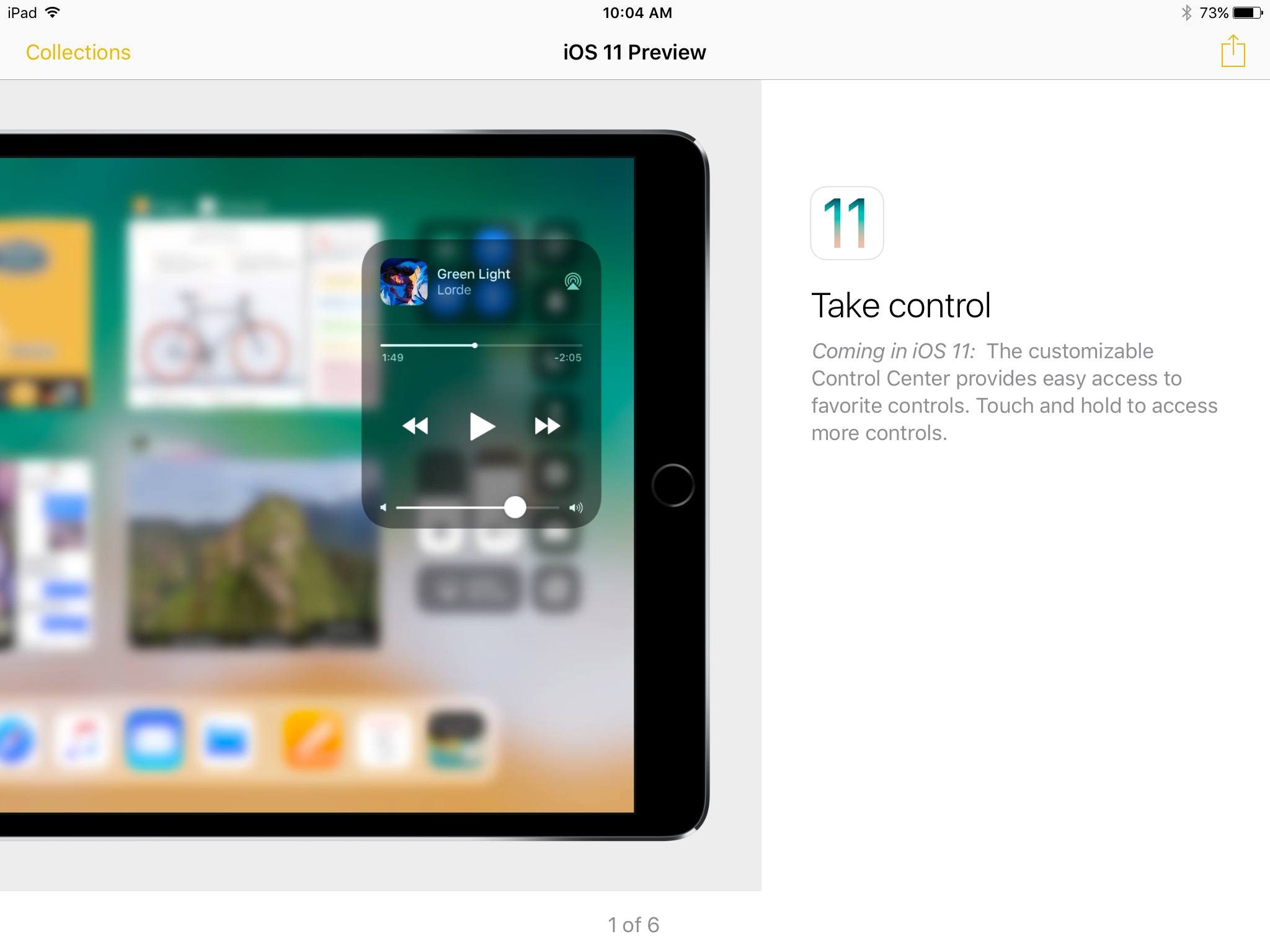
Apple Uses Tips App to Promote iOS 11 Features

We’re less than a week out from Apple’s big September 12 event, when the release date for iOS 11 is expected to be revealed. As part of the lead-up to that release, Apple is now using its Tips app to promote upcoming iOS 11 features to iOS 10 users. Mitchel Broussard reports for MacRumors:

Apple has begun sharing tips to users on iPhone and iPad concerning the newest features of iOS 11…Users on Twitter and Reddit pointed out the new iOS 11 Tips section starting last night, noticing a few push notifications that encouraged them to read up on tips for Control Center, Siri Translate, the new iPad Dock, and more.

This news makes sense considering the how-to video series Apple surprisingly launched last month to explain iOS 11 features like the Files app and the iPad’s new dock. While those videos focused on iPad features, the items seen in the Tips app so far have been iPhone related as well. Clearly, Apple wants to get people excited about upgrading to iOS 11 while simultaneously helping prepare users for the changes that update will bring.

Permalink

Soulver Updated with Split View Support and File Management Features

The iOS version of the calculator-replacement app, Soulver, received a big update today. The app, which combines elements of a text editor with a calculator, lets you work out problems the way you would describe them in writing. The latest version of Soulver, released earlier today, adds some key features for iPad users, greater cloud storage flexibility, and a host of other improvements.

For iPad users, Soulver has added support for Split View and Slide Over. Soulver is the perfect app to put in Split View as you reference other apps to collect numbers. I expect to get a lot of use out of this feature alone.

You no longer need to pick between storing your Soulver documents in iCloud or Dropbox. The app can now access documents in both cloud services and move items between them. If you enable support for both services, you can set one as the default in the app’s settings. You can also migrate documents from one service to the other from settings.

Soulver now supports importing from any file provider on your iOS device by long-pressing the plus button in the navigation bar and can recover deleted files from the trash by tapping the folder icon. Shake to undo, which is a nice trick, but not very discoverable, has also been abandoned in favor of a dedicated button in the navigation bar.

Flexibility is necessary for utilities like Soulver to remain relevant. With Split View support and more file management options, Soulver has laid a foundation for iOS 11 and beyond.

Soulver is available on the App Store.


Moleskine Launches Paper Planner That Syncs Appointments to Cloud Calendars

Image Source: TechCrunch

Image Source: TechCrunch

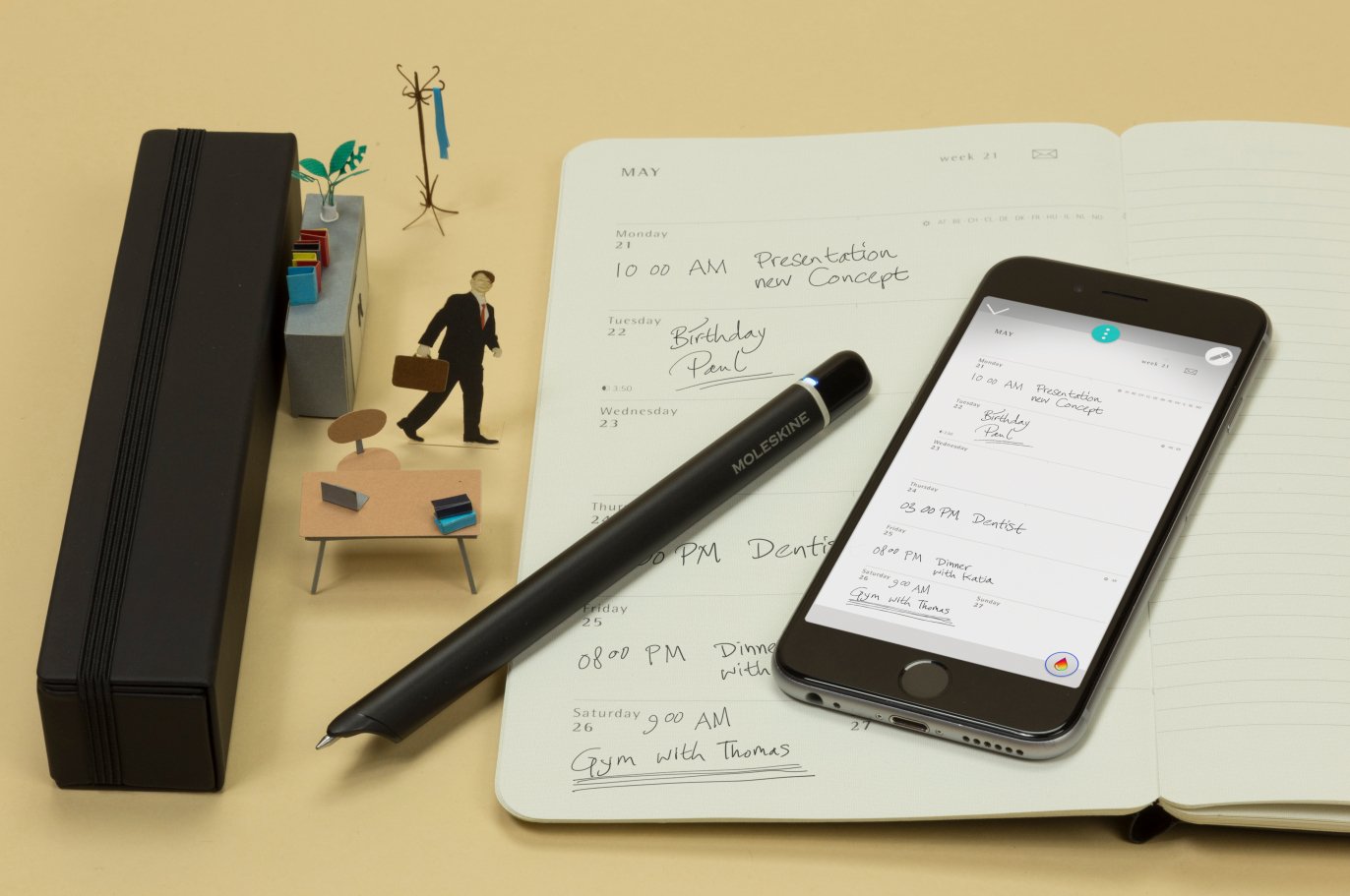
Today Moleskine unveiled its latest work in the area of integrating physical and digital methods of note taking: the Smart Planner. Matt Burns, writing for TechCrunch:

Like other Livescribe systems, the Smart Planner as it’s called uses paper embedded with sensors that can read and sync anything written by the Moleskine Pen+. Meetings and appointments written on the planner part of the paper are synced automatically to the user’s Google or Apple account and placed appropriately on their calendar.

Both the pen and the paper are required for this system to work.

The system will be available worldwide on September 12…The set will cost $199 or $29 for just the planner.

Moleskine’s reputation in the area of physical notebooks is top-notch, and its work in the digital space with apps like Timepage is excellent as well. It should come as no surprise, then, that a company with expertise in both physical and digital realms would put that skill to use creating a system that seamlessly blends both worlds.

I prefer to avoid handwriting anything if I can help it, but for the huge market of people who love their handwritten notes – in this case, handwritten calendar appointments – but also want the benefits of keeping that data in the cloud, Moleskine is building an exciting system here.

Permalink

HomeKitty: A Crowdsourced HomeKit Database Written in Swift

Recent days have seen an increasing number of HomeKit accessories released, making it more difficult to keep up with all the products currently on the market. Enter HomeKitty.

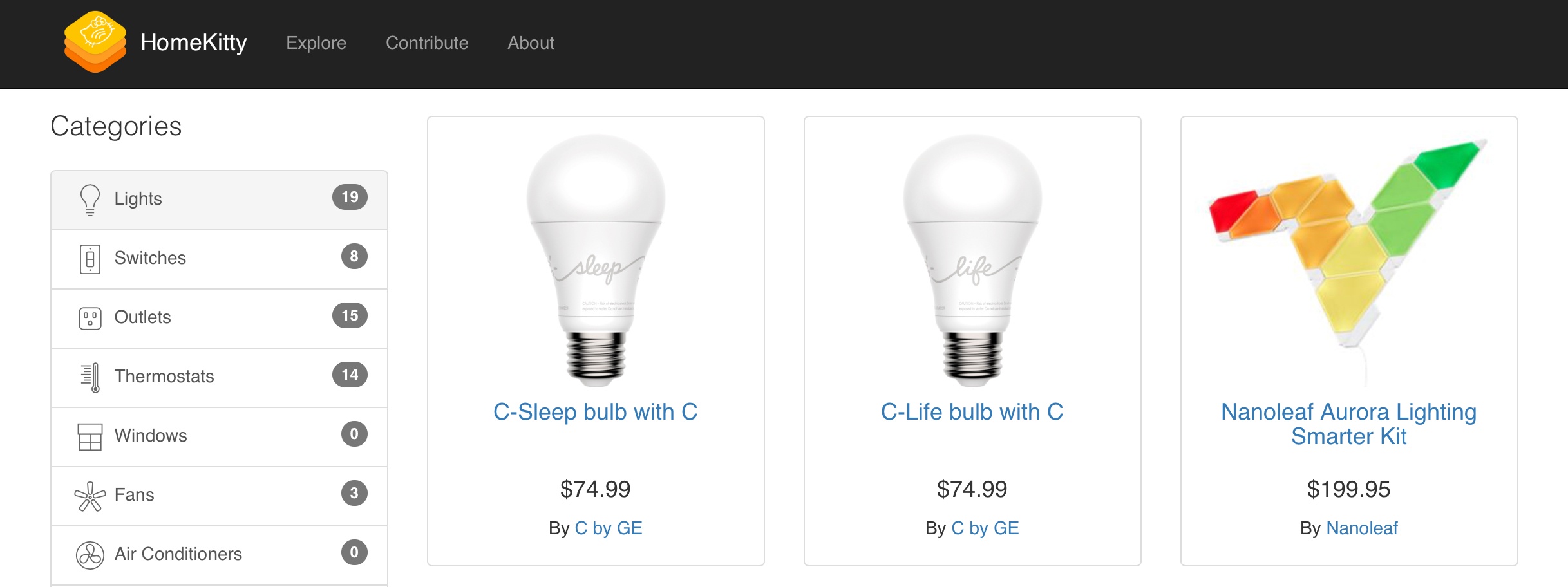
HomeKitty is a new site created single-handedly by developer Patrick Balestra as a hub for all things HomeKit. It was written entirely in Swift, and contains basic information about every currently available HomeKit accessory. Thanks to the site’s categorical listings, you simply select a category of device – such as lights, outlets, or thermostats – to view all available products of that type.

Alongside a product’s image, HomeKitty displays its name, price, maker, and a link to either the product’s official manufacturer site or its listing in the Apple Store – that’s it. Rather than include detailed listings and ratings/reviews for HomeKit products, HomeKitty keeps things clutter-free and serves as a sleek, easy-to-navigate database that can help point prospective shoppers in the right direction.

HomeKitty was designed to serve as a crowdsourced site, so anyone can submit a product for inclusion in its database. Once approved, the product will be displayed alongside existing entries; currently over 80 products are listed. For now, every listing is restricted to products currently available for purchase, but in the future Balestra plans to add announced-but-unreleased products as well.


The Apple Music Festival Comes to an End

Apple confirmed to Music Business Worldwide that the Apple Music Festival is coming to an end. The event, which was originally called the iTunes Music Festival, debuted in 2007. Over the course of 10 years the festival showcased some of the biggest names in music, as well as up-and-coming acts:

Artists who played the event over its decade-long run included Adele, Oasis, Mumford & Sons, Paul Simon, Ed Sheeran, Coldplay, Lady Gaga, Arctic Monkeys, Kendrick Lamar, Pharrell Williams (pictured), The Weeknd, One Direction and Beck.

The 2016 line-up included Elton John, The 1975, Chance The Rapper and Alicia Keys.

Music Business Worldwide says it expects Apple will concentrate on one-off concerts in the future and that ending the Apple Music Festival does not signal the end of the company’s involvement in live music events. I don’t think we’ve seen the last of Apple-sponsored live shows either, but I will miss the Apple Music Festival, especially streaming it to my Apple TV.

Permalink

Pixelmator Pro Announced

Just before WWDC, the Pixelmator team teased a Mac app they’ve been working on for five years. The big reveal came today with an announcement that Pixelmator Pro will be joining the Pixelmator family of image editing apps this fall. Reimagined and rebuilt from the ground up, Pixelmator Pro promises a whole new level of power and ease-of-use.

According to the announcement:

“Pixelmator Pro provides every tool you could ever need to create, edit, and enhance your images on a Mac in an incredibly intuitive and accessible interface”, said Saulius Dailide, one of the founders of the Pixelmator Team. “And with its GPU-powered, machine learning-enhanced tools, it’s truly one of the most advanced and innovative image editing apps on the planet.”

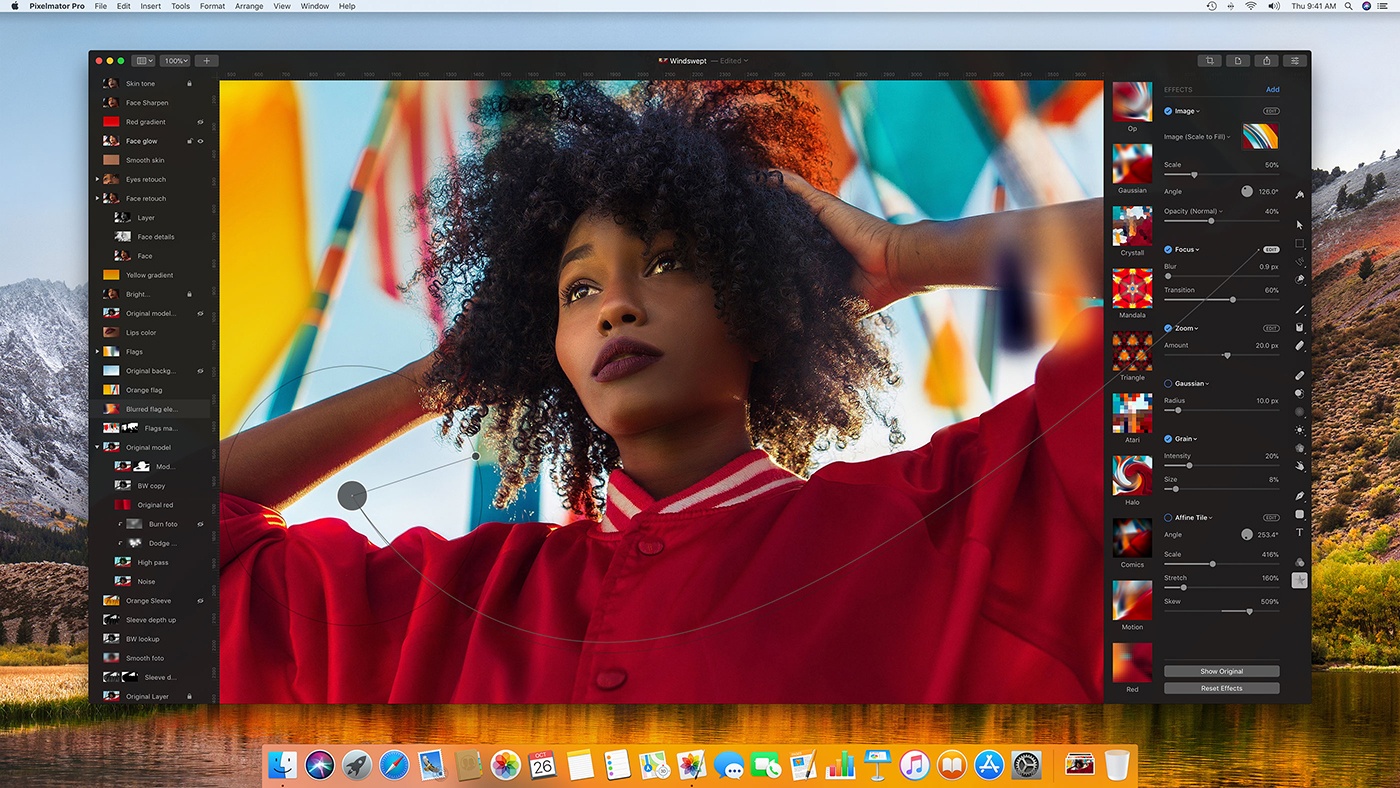
I haven’t tried Pixelmator Pro yet, but judging from the announcement, I expect we’re in for a treat. The most noticeable thing about the new app is its striking UI. Gone are the floating toolbars, replaced by left and right-hand side panels that fade into the background, so the image you’re working on dominates your workspace. I like the one window approach a lot, if for no other reason than I know exactly where my tools are at all times. The combination of a minimalistic toolbar, sparse chrome around the panels, use of transparency, dark interface, and ability to hide UI elements give Pixelmator Pro an expansive feel that emphasizes the image in your workspace instead of the tools.

https://vimeo.com/231354647

The changes announced go much deeper than just a redesign, though. The Pixelmator team has taken the opportunity to incorporate the latest Apple technologies and harness Machine Learning. Pixelmator Pro’s editor takes advantage of a Mac’s GPU using Metal 2, the graphics framework announced at WWDC that will debut with macOS X High Sierra. CoreML, also announced at WWDC, will drive much of Pixelmator Pro’s editing engine according to the announcement. There’s also support for the new HEIF image file format.

Also, editing in Pixelmator Pro will be non-destructive:

Pixelmator Pro’s color adjustments, effects, styles, and layouting tools are completely nondestructive, giving users the freedom and flexibility to go back and modify or delete individual changes at any point in the editing workflow. Thanks to the new presets feature, you can create endless combinations of multiple adjustments, effects, or styles, save them to your favorites and reuse them in any of your images. Drag-and-drop sharing also makes it a breeze to share presets with others.

I expect the ability to share combinations of effects, styles, and adjustments will be especially popular.

Pixelmator Pro will be available exclusively from the Mac App Store this fall alongside the current Pixelmator app.