Apple Cancels Data Center Project in Ireland

In 2015, Apple announced plans to build a data center in Athenry, Ireland. The facility was designed to run on renewable energy like other data centers Apple operates around the globe. However, the Irish project ran into problems from the start.

According to TechCrunch, concerns about the center’s environmental impact and effect on the electrical grid slowed the project down. Then, after Apple received the approval of the Galway County Council to begin building, individual objections were lodged and the disputes wound up in the Irish courts. With the prospect of appeals that would continue to prevent it from commencing construction, Apple decided to cancel the project.

In a statement to TechCrunch, Apple said:

“We’ve been operating in Ireland since 1980 and we’re proud of the many contributions we make to the economy and job creation.  In the last two years we’ve spent over €550 million with local companies and, all told, our investment and innovation supports more than 25,000 jobs up and down the country.  We’re deeply committed to our employees and customers in Ireland and are expanding our operations in Cork, with a new facility for our talented team there,” the company said in a statement provided to TechCrunch. “Several years ago we applied to build a data centre at Athenry. Despite our best efforts, delays in the approval process have forced us to make other plans and we will not be able to move forward with the data centre. While disappointing, this setback will not dampen our enthusiasm for future projects in Ireland as our business continues to grow.”

A second facility in Denmark that was announced at the same time the Irish data center is nearly complete. Apple has not announced any details about its ‘other plans’ referenced in its statement to TechCrunch.
Permalink

Valve Announces Game and Video Streaming Apps for iOS and Android

Valve has announced that during the week of May 21st, it will release Steam Link, an iOS app that allows gamers to stream Steam games over wired Ethernet or 5GHz wireless networks to an Apple TV or iOS device. The app will support the Steam Controller and MFi controllers like the Steelseries Nimbus. Although the bandwidth necessary to stream games will preclude users from streaming on mobile networks, Steam Link provides greater flexibility to gamers who would otherwise be limited to playing on Macs and Windows PCs. The app will also be available on Android devices.

Valve also announced that it will release Steam Video on iOS later this summer. Valve sells TV shows and movies, but this is the company’s first mobile solution for viewing that content. Valve says users will be able to stream videos over WiFi and LTE networks or download them to iOS devices for viewing. Like Steam Link, Valve’s video app will be available on Android too, but a firm release date has not been announced yet.


Google Introduces News App for iOS to Replace Newsstand

Yesterday at the keynote for Google’s I/O developer conference, the company introduced a News app launching soon for iOS and Android, which will replace the existing Google Play Newsstand app. The app is rolling out some time in the next week, but here are the highlights for what it’ll contain.

Like Apple News, the landing page for Google News is called For You, which is where Google aggregates stories based on your interests. The second tab, Headlines, is strictly about the biggest stories in the world each day. These stories will be the same for everyone within a given geographic region, with no personalized curation at all. Finally, Favorites and Newsstand give you quick access to the publishers you follow, including the ability to subscribe to publications from directly within the app.

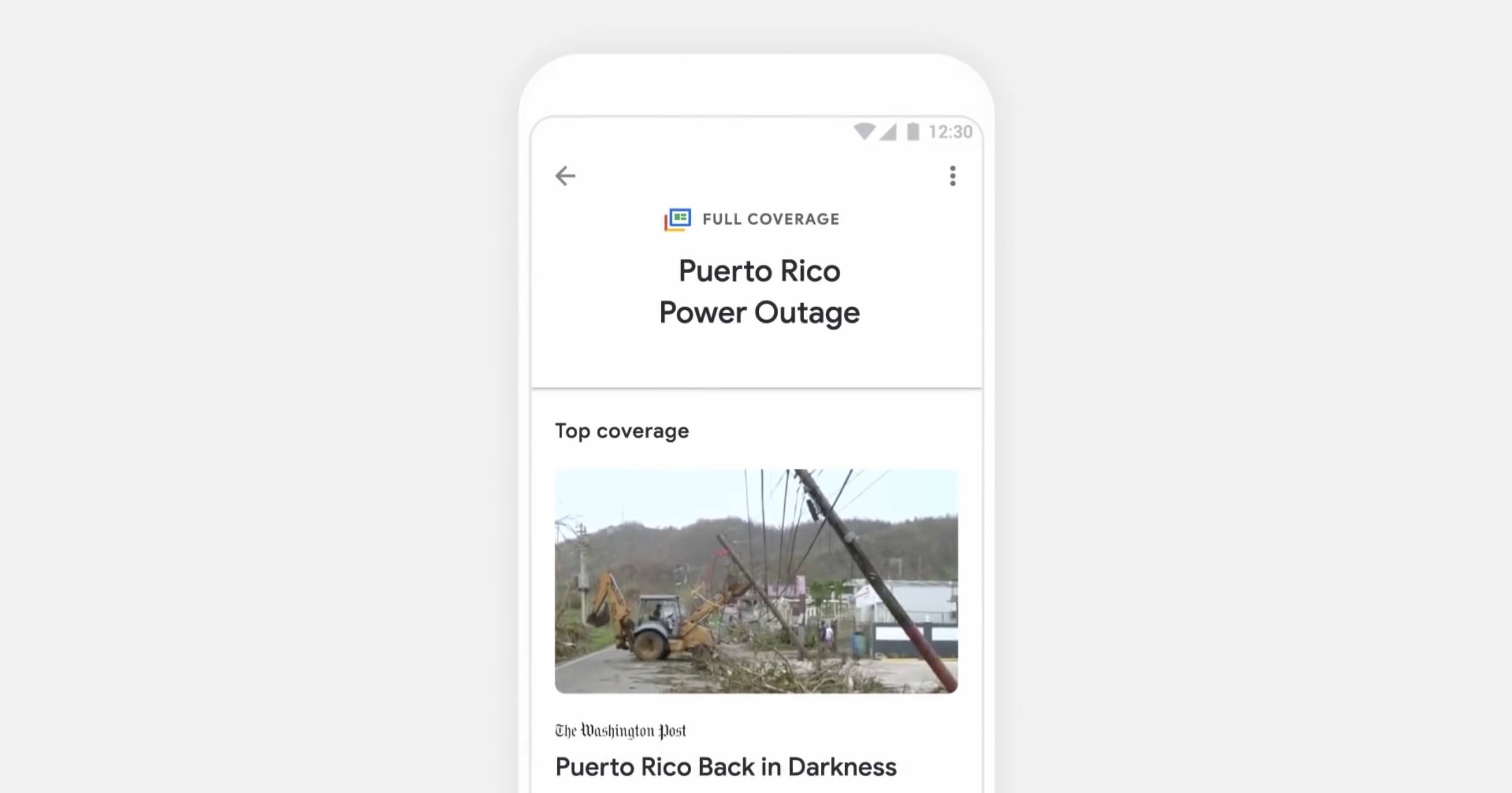
For the most part, Google News is a close imitation of Apple News – it has a similar layout, and a similar design with white backgrounds and a heavy focus on photography. The way it best differentiates itself is a feature that I think is the highlight of the app: Full Coverage. When you’re reading a story and want to gain more insights and perspectives on the same topic, tapping the ‘Full Coverage’ option opens a view that aggregates a wide array of sources covering a variety of angles on that story. It’s one way Google is aiming to promote solid journalism while gently combating filter bubbles. Based on the examples that have been shown so far, Full Coverage will list stories on an event timeline, offer answers to frequently asked questions about an event, highlight tweets and opinion pieces, fact checks, videos, and more. It’s meant to be a comprehensive overview of a given story, and I think it looks fantastic.

It’s unclear how widely available Full Coverage will be throughout the app, but we can assume that the most significant news events at least will include a Full Coverage component to them. Google demoed one Full Coverage story focusing on the Puerto Rico power outage situation.

Despite being different in execution, Full Coverage is similar in spirit to the Spotlight tab in Apple News: both aim to provide substantive overviews on a given topic by aggregating a variety of sources. While Spotlight is updated daily to cover a new topic, I appreciate Google’s approach with Full Coverage because it will make those aggregated pages more accessible and relevant to readers. I love Spotlight and check it regularly, but it’s frustrating that Spotlight stories can only be accessed the day they’re published. Apple should take a note from Google News’ playbook and start offering links to previous Spotlight features at the bottom of related stories.


New Ways to Explore and Interact with the World Are Coming Soon to Google Maps and Lens

Google announced a series of new features at its Google I/O developer conference that it will add to Google Maps and the Google Lens feature of its Photos and Assistant apps in the coming weeks and months.

During the Google I/O keynote, the company demonstrated augmented reality navigation that combines a camera-view of your location with superimposed walking directions. The feature, which works with a device’s camera, can also point out landmarks and overlay other information about the surrounding environment.

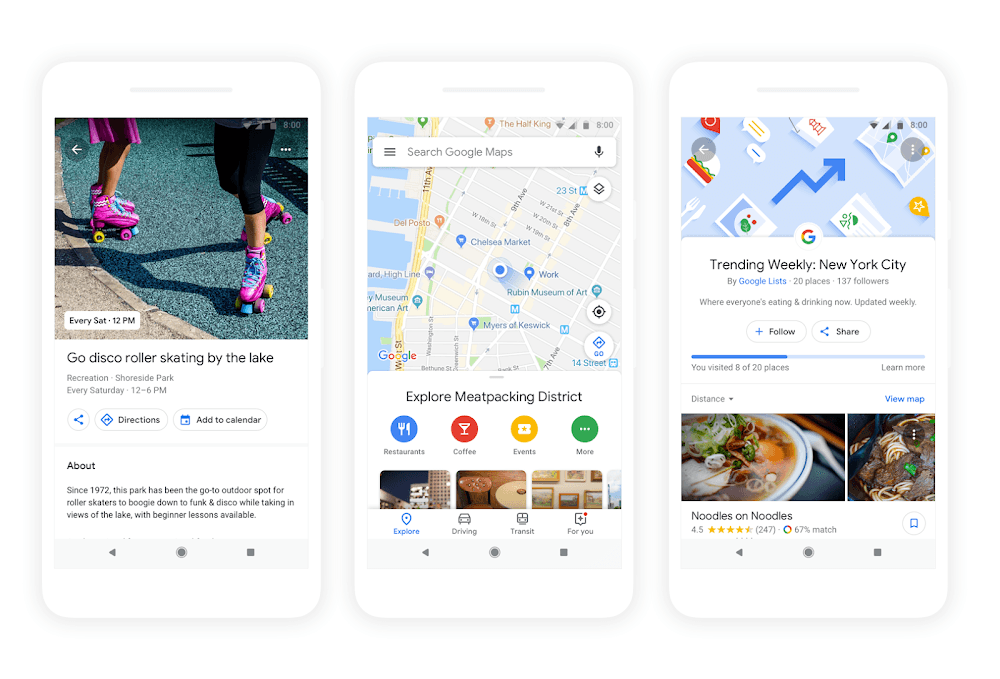
Google Maps is gaining a dedicated ‘For You’ tab too. The new tab will suggest nearby businesses, restaurants, and other activities based on things you’ve rated, places you’ve visited, and other input. The same sorts of inputs will be used in Maps’ new match score, which will predict how much you will like a particular destination and is designed to help make picking between multiple destinations easier. Maps will also allow users to quickly create lists of suggested destinations, share them with friends, and vote on where to go.

Google Lens, which is incorporated into the Google Photos and Assistant apps, is also gaining new features. Much like the iOS app Prizmo Go, Lens will be able to recognize text in books and documents viewed through the camera allowing you to highlight, copy, and paste the text into other apps. Lens is adding a Style Match feature which allows users to point a camera at something and see similar items too. In a demonstration, Google pointed Lens at a lamp, which generated a list of similar lamps almost instantly.

More than ever, Google is showing what can be accomplished with the vast amount of data it can bring to bear in real-time on mobile devices. The insights that are possible may seem creepy to some people, but if used responsibly, they allow Google to provide powerful contextual information to its users.


Streets 4 Adds Drag and Drop, Live Panorama Mode, and iPhone X Support

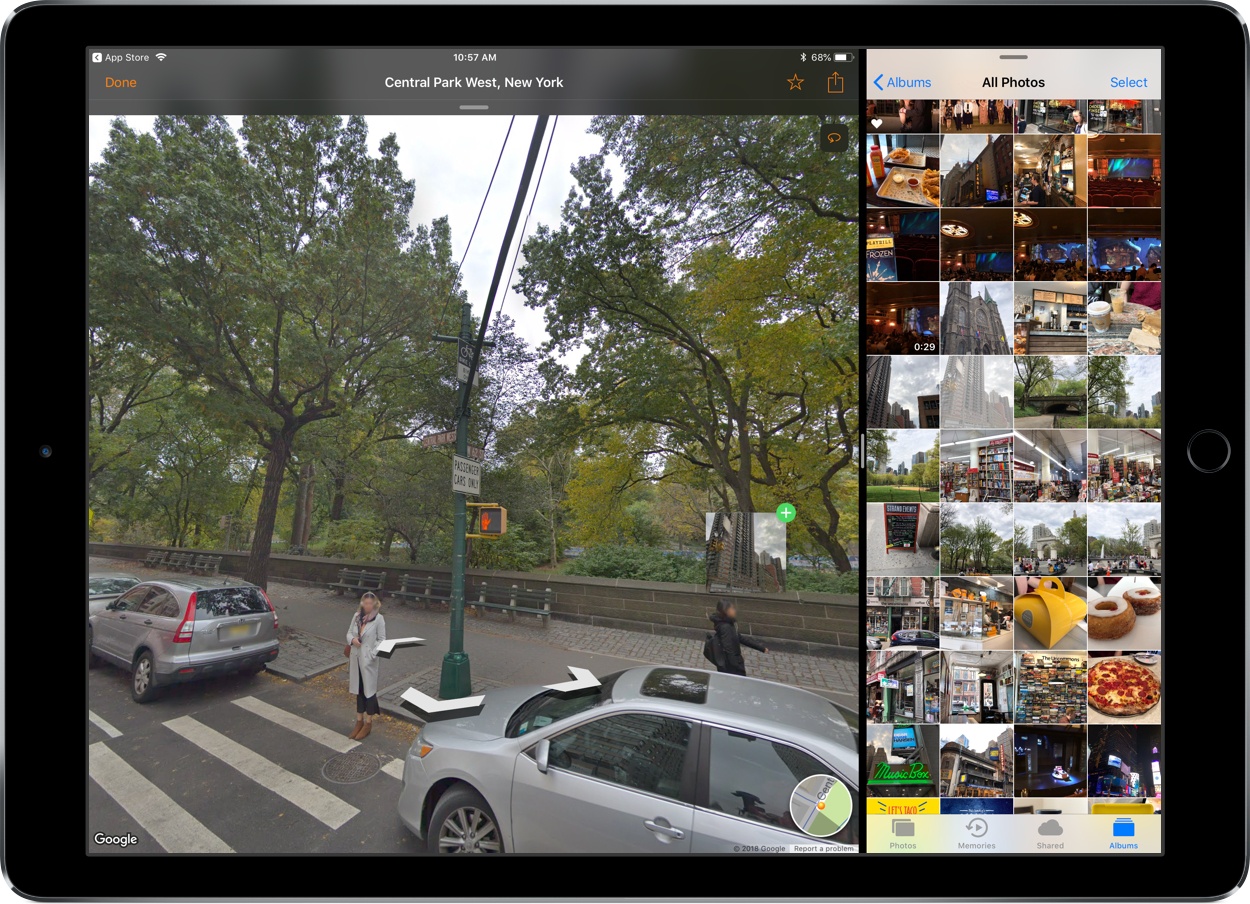
Last week my wife and I ventured to New York City for a vacation, and in the time leading up to that we planned out our agenda with the help of Google Street View. Unfortunately, our planning took place just a couple weeks too early to benefit from the newly released Streets 4 by FutureTap.

Streets is an iOS and watchOS app John reviewed upon version 3’s release. It provides an immersive, touch-friendly way to navigate Google’s Street View data. And in version 4, that experience has been upgraded with drag and drop support on iPad, a new Live Panorama mode, and optimization for the iPhone X’s display.

Drag and drop enables you to drop in a location from Apple Maps, a contact that includes an address, or any other linked address to load up nearby panoramas in Streets. My favorite feature enables dropping in any geotagged photo, which Streets will identify the location of so it can show you existing 360º images of the same or a nearby area – an easy way to discover great captures from other photographers.

Live Panorama mode can be toggled on by tapping the rotating circle icon in the top-right corner. Once activated, it offers a new interaction method for exploring street views. Rather than swiping around on the screen, simply move your device in the space around you and the visible street view area will change with your motion.

Whether you’re planning some time away, or simply want to explore the world from the comfort of your couch, Streets is the best way to do so on iOS.

Streets 4 is available on the App Store.


AppStories, Episode 54 – Pick 2: GoodNotes and Working Copy

On this week’s episode of AppStories, we pick two apps we use regularly to discuss. In this installment of Pick 2, John covers GoodNotes and how he uses it for planning and editing, and Federico explains how he and the MacStories team use Working Copy to collaborate on articles.

Sponsored by:

  • Daylite - Win more business and get more done with Daylite, the Mac CRM for small businesses that want to grow.
    • Sign up for a 30-day free trial today, and mention AppStories when you subscribe for 10% off your first month’s subscription.
AppStories+ Deeper into the world of apps

AppStories Episode 54 - Pick 2: GoodNotes and Working Copy

0:00
28:19

AppStories+ Deeper into the world of apps

Permalink

Newton: Supercharged Email [Sponsor]

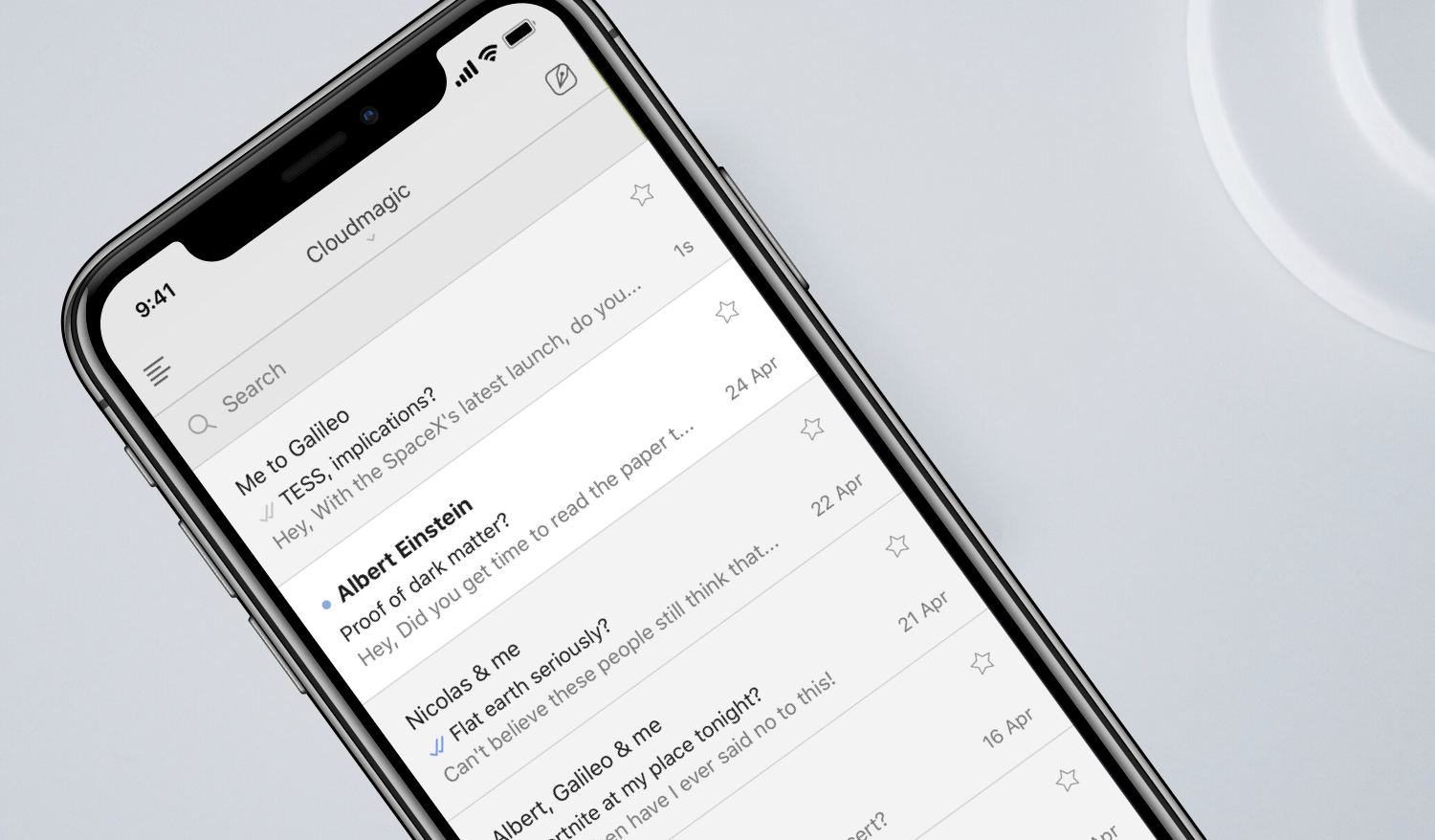
Newton rethinks email from the ground up. That starts with a rock-solid foundation. Newton works with all your email accounts whether they’re based on IMAP, Gmail, iCloud, Office 365, or another platform and syncs with all your devices.

Built on top of that foundation are cutting-edge features you expect from a modern email client. You can also schedule messages to be sent later and let Newton clean up your inbox by putting things like newsletters to the side until you have time to look at them. Other key functionality includes calendar integration, the ability to save email messages to Evernote, Trello, Todoist, Pocket, and other apps, read receipts, undo send, snoozing messages, and sender profiles, so you know more about the people with whom you interact.

With its latest update, Newton is taking email to a new level by re-imagining the inbox. Traditional email’s folder system meant you had to leave your inbox and go to the Sent folder to find the latest messages you’d sent. With True Inbox, Newton treats sent messages more like chat apps displaying them in your inbox even before someone responds to you. Conversations are sorted by activity when you reply too, so they float to the top of your inbox. Finally, every message can be found in just one place.

Harness the power of Newton to get control of your email once and for all. Download Newton today and start your free 14-day trial immediately.

Thanks to Newton for sponsoring MacStories this week.


The Fragmentation of iOS’s UI Design

Benjamin Mayo on the state of iconography in Apple’s built-in iOS apps:

My gripe is there is no consistency, no structure or logic to this. Apps introduced later sometimes use rounded icons, sometimes not, sometimes create all-new custom glyphs of their own. Incredulously, you could open flagship apps like Messages, Mail and Safari and have no idea Apple was even playing with bold icons as a conceptual change. These apps adopted the iOS 11 large bold navigation bar title formats, but their icons and glyphs have stagnated for more than four years at this point.

Mayo uses eight examples of Apple’s action icon to emphasize the design inconsistencies.

Since iOS 7, each revision of iOS has felt like a tentative design experiment, with icons in a handful of apps moving in different directions. The trouble is, Apple doesn’t seem to have settled on a clear winner among the several options tested, which has begun to make the UI feel directionless. Although rumors seem to indicate that a design refresh of iOS is at least another year off, I hope we’ll start to see indications of where iOS design is going this year at WWDC.

Permalink

Pocket Casts Acquired

Pocket Casts, one of the most popular cross-platform podcast clients (and among the top ones listeners use to download episodes of AppStories), has been acquired by a consortium of public radio stations and podcast companies. Here’s Shifty Jelly’s Russel Ivanovic, writing on the company’s blog:

Today we’re excited to announce a partnership with some of the biggest producers of podcasts in the world to take Pocket Casts to the next level. We’ve had a lot of companies in the past contact us about acquiring us and or Pocket Casts and we’ve always had one simple answer for them: thanks, but no thanks. In talking to each of them it was obvious that they didn’t have the best interests of our customers or us at heart and as much as cashing out and walking off into the sunset is a nice ideal, it’s a crummy outcome for all of you and in turn for us. You see we care so damn deeply about what we’ve built and our relationship with each and every one of you that we know deep down inside that would just eat away at us. That’s why when a combined group comprised of WNYC, NPR, WBEZ and This American Life approached us with the goal of partnering for the good of the entire podcast industry, we knew that this opportunity was something else entirely. Everything from their not for profit mission focus, to their unwavering belief that open and collaborative wins over closed walled gardens resonated deeply with us. Together we have the passion, scale and laser focus needed to achieve some truly great things. We’re not ready to talk about what those are just yet but we do want to quickly cover some questions you might have.

According to Ivanovic, Pocket Casts will remain a standalone, open, and premium podcast client in the short term. I’m curious to see how Pocket Casts will change over the next several months though. Large radio stations and podcast companies seem to have a certain affinity for locked-in ecosystems and proprietary listening features at the expense of the open nature of podcasting. I won’t be surprised if Pocket Casts eventually prioritizes programming by the companies that own the app. However, I also hope that the folks at Shifty Jelly will be able to continue making the open, elegant, and powerful podcast app I’ve used over the years.

See also: Chris Welch’s story at The Verge.

Permalink