Google Introduces YouTube Digital Wellbeing Features

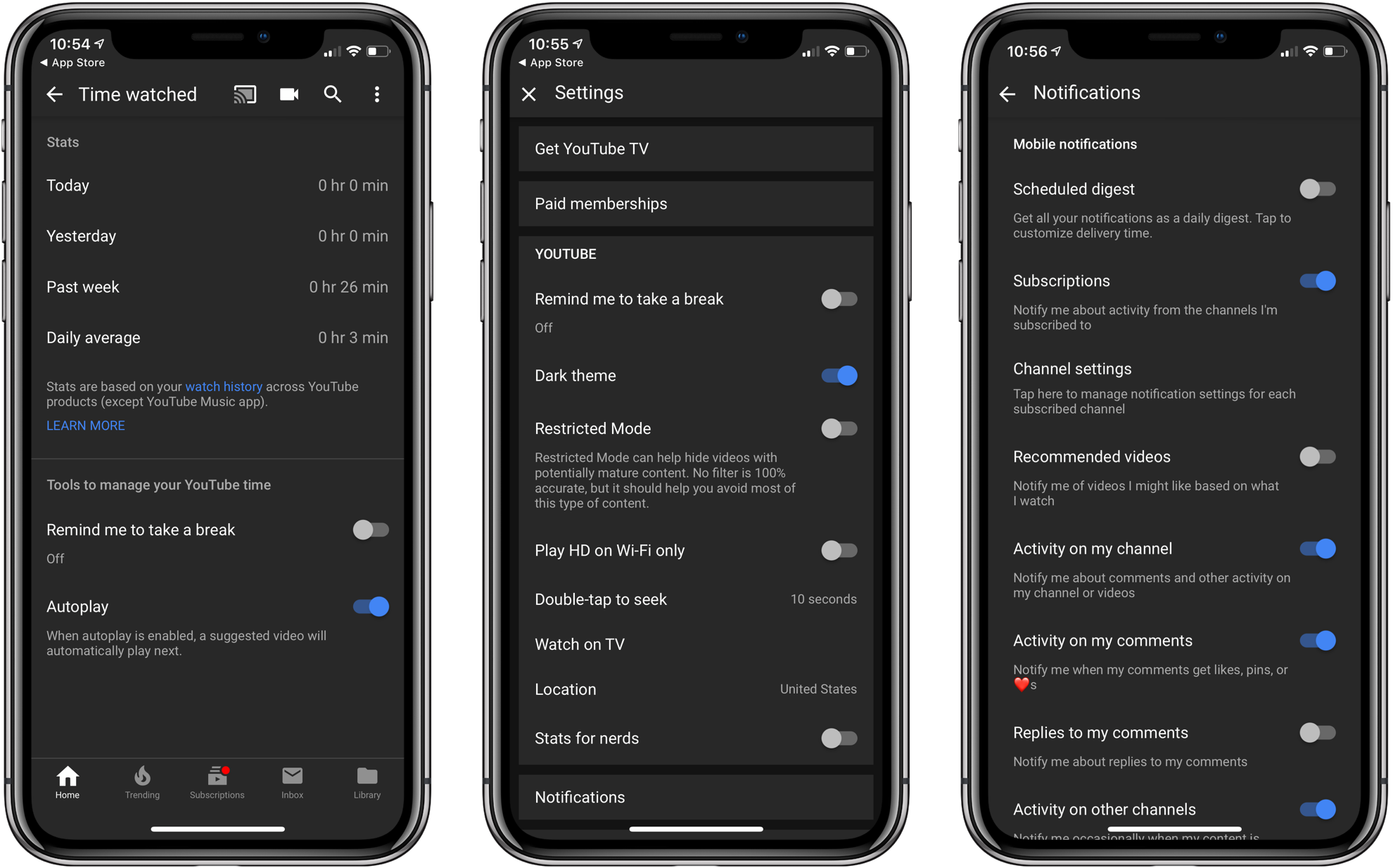
If you’ve ever wondered how long you spend watching YouTube, now you can find out. With an update that hit the App Store today, Google has added ‘Time watched’ statistics to the iOS app’s Account view. Tap your avatar in the upper right-hand corner, then ‘Time watched’ for your total viewing time today, yesterday, and the past week, plus your daily average. The statistics are based on your YouTube Watch History, so they don’t include anything deleted from your Watch History or watched in Incognito mode. Nor does Google include YouTube Music listening statistics.

The new ‘Time watched’ section also includes the ability to set up reminders to take a break periodically, which can be set in 5-minute increments between 5 minutes and 24 hours. There’s also a toggle for batching the notifications YouTube sends. There are 10 categories of notifications available in the YouTube app, so batching them if you have several turned on is a welcome addition. Notification digests can also be accessed from the app’s settings. From ‘Time watched,’ you can turn off Autoplay and disable sounds and vibrations too.

Originally announced at Google I/O earlier this year, it’s nice to see watch time statistics added at the app level, even though similar information will be available from the Screen Time feature coming soon with iOS 12. If you haven’t been running the iOS 12 beta, taking a peek at your YouTube usage statistics now is an excellent way to get a feel for the utility of having an objective measure of how long you spend on the service.


Game Day: Donut County

Tomorrow, Donut County by developer Ben Esposito will be published by Annapurna Interactive, which also backed the critically-acclaimed Florence. The game, which was announced in 2014, but has been in development since 2012, tells the story of a raccoon named BK, his friend Mira and an assortment of other characters from Donut County who are trapped 999 feet beneath the surface of the Earth. You play by manipulating a hole that grows as you move it across the landscape swallowing objects. If the premise sounds strange, that’s because it is, but it also works through a combination of a clever game mechanic, funny writing, and engaging sound design and artwork.

Read more


Master Email with SaneBox’s Customizable Tools [Sponsor]

At its core, SaneBox is about making sure that only your most important messages hit your inbox. Other messages are safely stored in automated folders like the SaneLater, SaneBulk, and SaneNewsletter folders for reviewing later. If there’s something you never want to see ever again, send it to the SaneBlackHole, which is much easier than unsubscribing to unwanted messages.

But email sorting is just the tip of the iceberg. With custom folders, custom snooze settings, and SaneReminders, SaneBox takes email management to the next level.

Set up a custom folder and train it by dragging in a few messages. SaneBox will send all messages from the senders to your new folder. It’s a painless way to set up organize messages for a special project.

SaneSnooze folders can be customized to defer messages anywhere from hours to weeks. SaneBox comes with default snooze folders like @SaneTommorrow and SaneNextWeek, but adding custom snooze folders lets you set when messages reappear in your inbox.

SaneReminders are a great way to keep on top of tasks. Send yourself a reminder to do something later or get a reminder that someone hasn’t responded to a messages. For example, bcc: [email protected] and the message will show up back in your inbox only if the recipient doesn’t reply within 3 days.

Also, don’t forget that SaneBox works on top of your existing email setup. There’s no app to download or new email account to set up. You can use any email client you want.

Sign up today for a free 14-day SaneBox trial to take back control of your email. MacStories readers can receive a special $25 credit automatically by using this link to sign up.

Our thanks to SaneBox for sponsoring MacStories this week.



Connected, Episode 206: A High Appreciation for Winning

Federico is back from vacation with a list of demands and opinions. Stephen posted a whole bunch of screenshots, and Myke is trying some new things with Twitter.

I’m back on Connected this week and we had fun discussing the future of the Mac mini and whether or not AirPower is ever coming out. You can listen here.

Sponsored by:

  • TextExpander, from Smile: Communicate smarter. Use this link for 20% off your first year.
  • Linode: High performance SSD Linux servers for all of your infrastructure needs. Get a $20 credit with promo code ‘connected2018’
  • Molekule: The only air purifier that actually destroys pollutants. Use connected for $75 off.
Permalink


Fascinating Close-Up Video of Apple I Being Auctioned Next Month

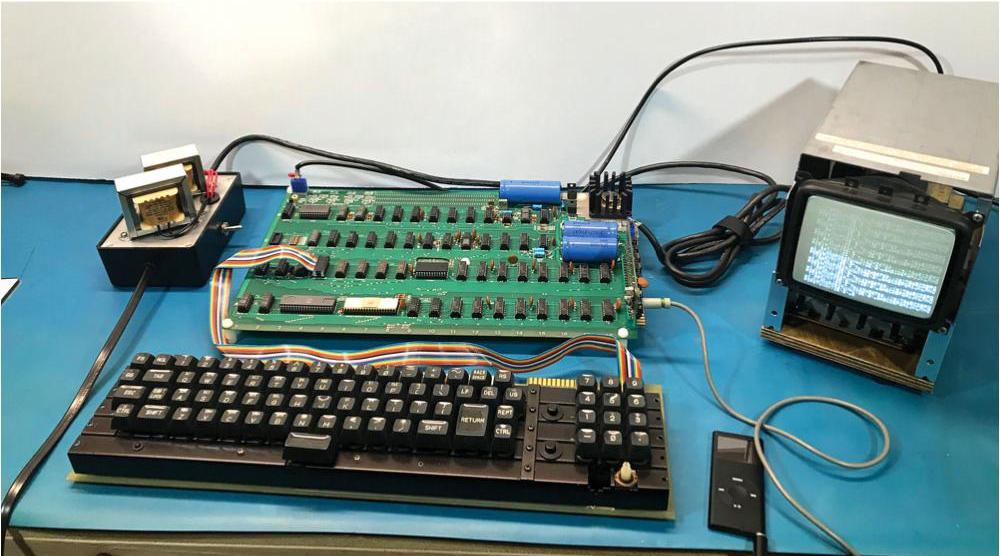
Every so often, an Apple I comes up for auction. The number still in circulation is small. Even rarer are working Apple Is. Next month, auction house RR Auction will sell a working Apple I that’s been rated 8.5/10. The computer, along with peripherals and the original manual, is expected to fetch around $500,000.

Earlier this summer, I had the good fortune of seeing a working Apple I in person during a trip The Henry Ford Museum with Stephen Hackett who donated his collection of iMac G3s to the museum. In person, it’s hard to grasp that the Apple I’s simple circuit board covered with neatly organized, hand-soldered chips played such a critical early step in the history of personal computing.

More interesting to me than the auction though, is a video that the auction house put together to promote the sale, which dramatically pans around the Apple I’s surface revealing the smallest details. It’s a fantastic close-up of a significant piece of computing history that is far closer than you’ll ever be to one in a museum.

You can learn more about the Apple I in this excellent feature by Communications and Information Technology Curator Kristen Gallerneaux on the Henry Ford Museum’s website.


Reigns: Game of Thrones for iOS Announced and Is Available for Pre-Order

Today, Nerial and Devolver Digital announced that they are working with HBO to create a Reigns: Game of Thrones, which is available for pre-order now. Reigns, and Reigns: Her Majesty are among my favorite iOS games. Both Reigns games require players to swipe cards left and right to make decisions about ruling a medieval country and require a careful balancing of multiple interests to survive as monarch.

As I said in my review of Reigns, which I also named one of my favorite games of 2016:

Reigns is perfect for mobile…. Swiping left and right to make decisions about your kingdom is quick and easy wherever you are. The combination of the number of cards, consequences that span generations, and need to balance multiple statistics adds an interesting level of strategy. But above all else, what has endeared Reigns to me most is that the artwork and questions are imbued with a sense of humor that gives Reigns a unique personality unlike any iOS game I have played recently.

Nerial’s follow-up, Reigns: Her Majesty, took the successful formula of Reigns and evolved it to create a deeper more immersive experience than the original.

The same team that created Reigns: Her Majesty is back for the Game of Thrones version, which features characters from HBO’s hit TV series. To get a sneak peek at the game, which will be released in October, Nerial has created a trailer, which is embedded below.

Reigns: Game of Thrones can be pre-ordered now from the App Store for $3.99.