
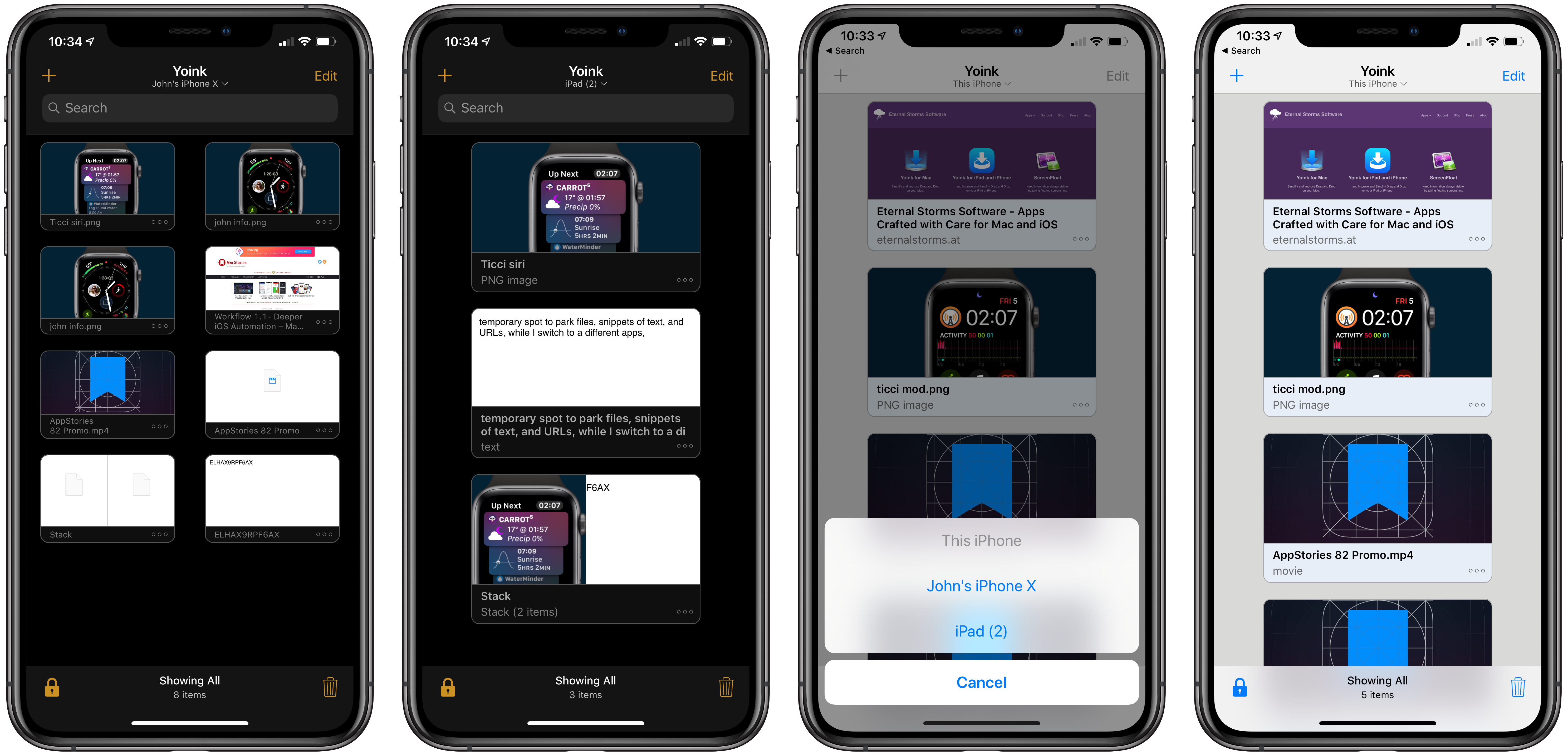
Yoink is the app I use on my Mac every day as a temporary spot to park files, snippets of text, images, and URLs. By itself, Yoink for Mac has been a fantastic time-saver. The latest updates to Yoink for iOS and the Mac, however, have been transformative. There’s more that can be done to support the cross-platform use of Yoink, but Handoff support, which makes it simple to move data between my Mac and iOS devices, and several other new features have already added a new dimension to the way I use the app and embedded it deeper into my day-to-day workflow than ever before.
Review: Yoink Adds Support for Latest Mojave and iOS 12 Features
Setapp: The Right App, Right When You Need It [Sponsor]

Setapp is a Mac app subscription service created by MacPaw, the maker of CleanMyMac X, Gemini II, and other great apps. For one low monthly fee, Setapp offers more than 100 of the very best Mac apps from big names like Ulysses, Bartender, iStat Menus, and iMazing. It’s a collection that is continually growing, becoming more and more valuable to subscribers all the time.
Setapp is an app store done right. With over 100 apps in 10 categories to choose from, Setapp is the key to making you more productive on your Mac. You can pick from task managers and time tracking apps, text editors, photo editors, developer tools, and much more.
Getting the apps you want to use is fast and simple too. When you sign up, Setapp installs a handy catalog on your Mac for browsing its offerings. The included apps are carefully vetted and curated, so you know that only the highest quality apps from the best developers are involved. Setapp is designed to make finding just the right app easy too with its powerful search for finding apps by task or keyword.
The business model couldn’t be more clear either. There are no hidden costs or gimmicks. You pay just $9.99 per month for access to the entire catalog of apps including any updates. There are no fees for upgrades, no In-App Purchases, or other hidden costs. Every app is a fully functional version that updates automatically.
Sign up today to unlock this fantastic collection of Mac apps. Setapp is free to try, and you can extend the trial period up to six months by referring friends.
Our thanks to Setapp for sponsoring MacStories this week.
Daily Dictionary’s New Watch App Showcases the Latest watchOS Capabilities
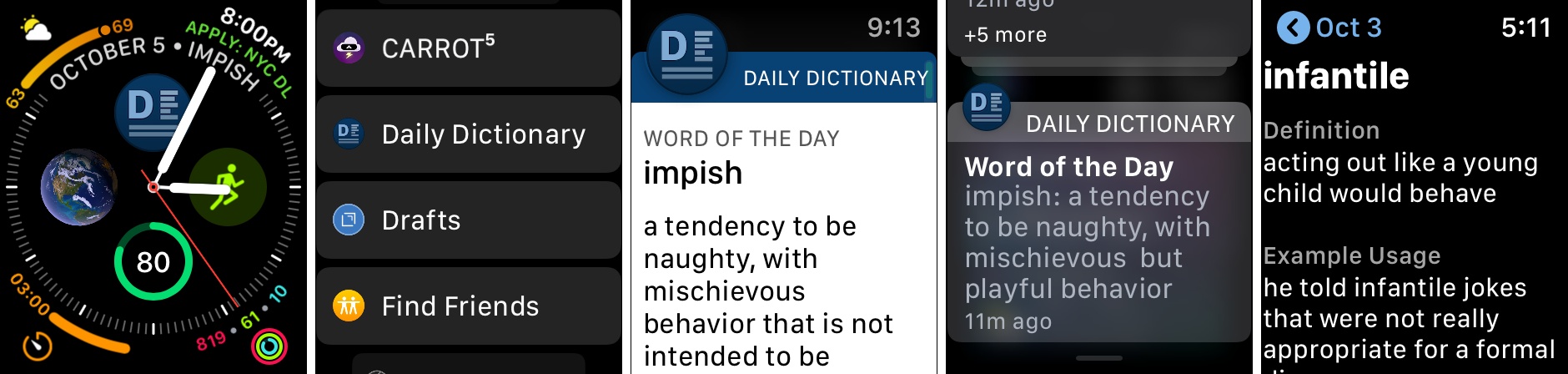
Developer Benjamin Mayo released an update this week to his new word of the day app, Daily Dictionary. Version 1.2 adds an Apple Watch app, making it easy and convenient to view each day’s featured word from your wrist.
Daily Dictionary’s Watch app is particularly noteworthy due to its complications for the Series 4’s Infograph faces, and its custom UI for notifications. For complications, you can use a smaller option containing the app’s logo which serves as a launcher, or you can select a larger complication that includes the logo alongside the word of the day itself. If you’d like it to, the larger complication can also display the current date, saving you the need for a separate date complication elsewhere on the face.
One of the ways Daily Dictionary can provide its featured word each day is through a push notification, and if you have the new Watch app installed, you’ll get to see a custom notification UI that reflects the design of the full iOS app. Watch developers can take advantage of APIs that enable crafting more customizable notification interfaces, and Daily Dictionary is a great example of that. Now that the Apple Watch is becoming a more mainstream product, and since one of the Watch’s chief strengths is as a notification conduit, I hope we see lots of apps follow Daily Dictionary’s example in providing more creative Watch notifications.
Daily Dictionary is available on the App Store.
 MacStories Weekly: Issue 146
Connected, Episode 212: NanoHippo→
Stephen answered Myke’s PopSocket challenge, and Federico attempts to name all of iOS 12.1’s new emoji.
On this week’s episode of Connected, the most accurate description of iOS 12.1’s new emoji you’ll ever find. You can (and should) listen here.
Sponsored by:
Apple Strongly Refutes Bloomberg Report That Its Servers Were Compromised by Malicious Chips
Earlier today, Bloomberg published a story claiming that Apple and Amazon discovered tiny, malicious chips on Elemental network servers built by Super Micro. According to the story, the chips were the work of Chinese spies and designed to infiltrate the tech companies’ networks. Shortly after publication, Apple responded in an email statement strongly refuting Bloomberg’s account.
Amazon’s chief information security officer similarly discredited the claims saying in part:
There are so many inaccuracies in this article as it relates to Amazon that they’re hard to count.
A short time ago, Apple elaborated on its initial statement to Bloomberg on its Newsroom website:
In response to Bloomberg’s latest version of the narrative, we present the following facts: Siri and Topsy never shared servers; Siri has never been deployed on servers sold to us by Super Micro; and Topsy data was limited to approximately 2,000 Super Micro servers, not 7,000. None of those servers have ever been found to hold malicious chips.
Topsy is a startup that Apple acquired in 2013.
For over 12 months, Apple says it repeatedly told Bloomberg reporters and editors that they and their sources were incorrect.
We are deeply disappointed that in their dealings with us, Bloomberg’s reporters have not been open to the possibility that they or their sources might be wrong or misinformed. Our best guess is that they are confusing their story with a previously-reported 2016 incident in which we discovered an infected driver on a single Super Micro server in one of our labs. That one-time event was determined to be accidental and not a targeted attack against Apple.
Security and privacy are cornerstones of Apple’s business that it uses to differentiate the company’s products from competitors’, so the fact that the company takes this sort of claim seriously isn’t unusual. This also isn’t the first time Apple has taken Bloomberg to task on the veracity of its reporting. However, the forcefulness of the responses from Apple and Amazon, followed by Apple’s press release on its Newsroom site is something that is unprecedented. It will be interesting to see whether Bloomberg responds.
Apple’s Watch Face Problem→
Jason Snell today published the article I’ve been itching to write, outlining the current mess that is Apple’s watch face ecosystem. The Apple Watch in so many ways is in its best position ever, which makes the lack of coherence in Apple’s watch face strategy particularly surprising.
As Apple continues to create new watch faces at a regular clip, those faces have grown more and more fragmented in what they can do. The Siri face introduced last year was an interesting new direction for watch faces, yet it remains one of a kind in many ways. The Series 4 Watch’s Infograph faces come with a whole new set of complications, all of which are wonderful except that they don’t work on other faces, nor do older complications work on the new faces. This lack of compatibility is frustrating enough, but what may be even more vexing is that Apple itself hasn’t even provided new complications for all of its apps, only some of them – I’d love a Podcasts complication on my Infograph face, but it simply doesn’t exist.
Snell offers up a handful of suggestions for where Apple should focus its watch face efforts going forward, all of which earn my total agreement. He writes:
Every face needs to be modernized and support the new complication styles, at least on Series 4. Key system apps and features like Messages and cellular status should be available on all faces. Every face design should be more flexible.
And moving forward, Apple should allow developers even more power in building complications. Complications should be able to appear when they have something to say and disappear when they don’t—for example, I’d love for a Timer complication to appear when I’m running a timer, but the rest of the time I’d rather not see it. If complications truly are the best face of Apple Watch apps, the developers of those apps need more power to build good ones.
Every one of these ideas is entirely reasonable, and would go a long way toward fixing the current watch face mess. I know we just got watchOS 5, but I hope watch faces are a strong area of focus for Apple in next year’s watchOS 6.
Philips Hue App Adds Siri Shortcuts Support
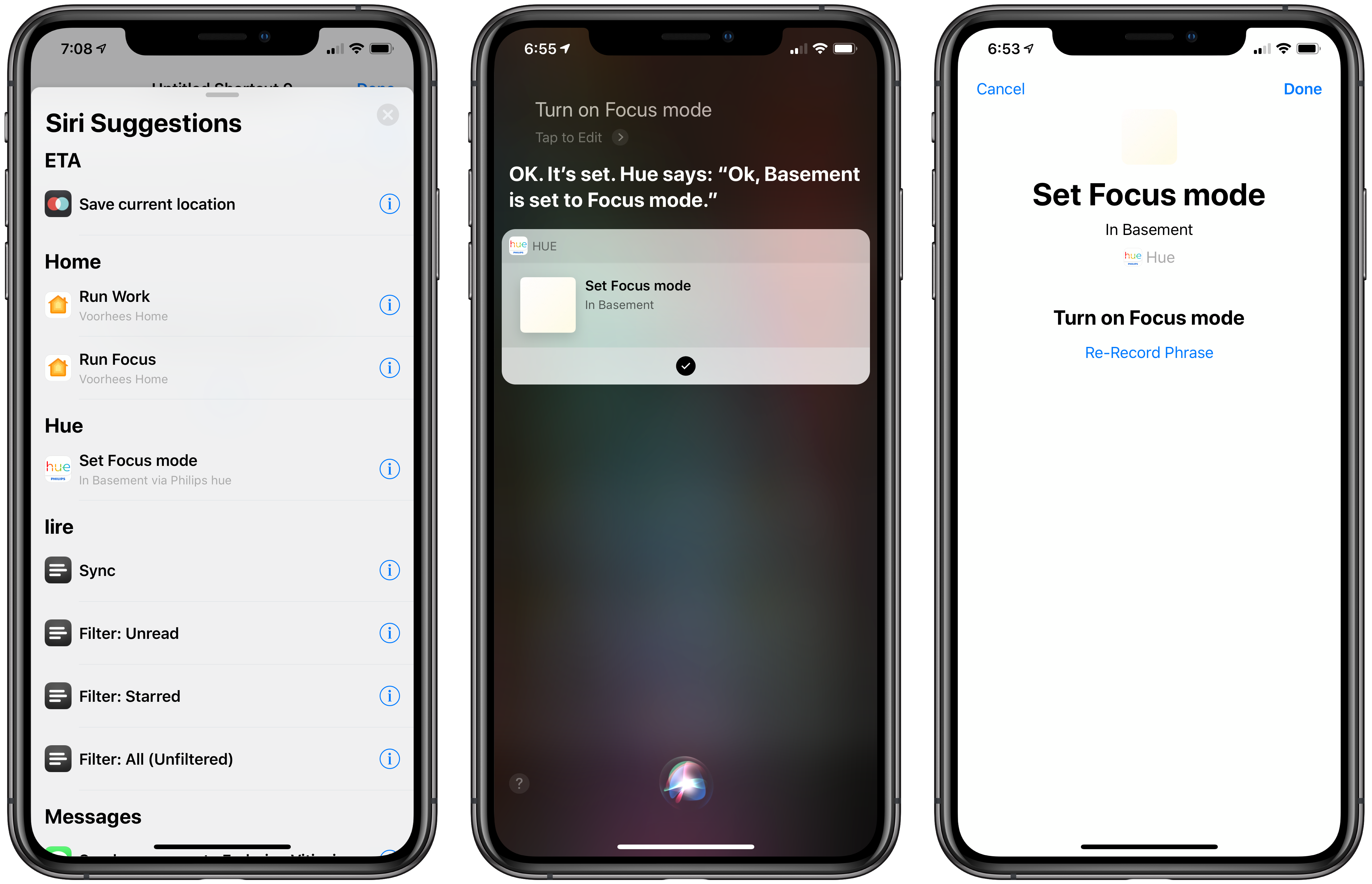
Promised earlier this year, the Philips Hue app now supports Siri Shortcuts allowing users to trigger scenes created in the app.
The Hue app received a major update earlier this year, which significantly improved the creation of scenes. Users can pick from pre-built scenes created by designers to evoke a particular mood or create their own using photos or a color picker to control the color and brightness of a group of Hue bulbs.
With the new Siri Shortcut support, those scenes can be triggered using Siri and incorporated as actions in custom shortcuts using Apple’s Shortcuts app. I have several Hue bulbs in my studio. They aren’t the kind that supports a wide range of colors, but I can adjust the brightness and warmth of each bulb. To test the Hue’s new shortcut functionality, I created a scene called Focus Mode that turns the brightness up to 100% with a cool blue cast.
After using the scene, the Siri & Search section of the Settings app suggested I add my new scene as a Siri shortcut, which is how many apps approach Siri shortcuts. Frequently-used scenes will also be suggested on the lock screen, Siri watch face, and search.
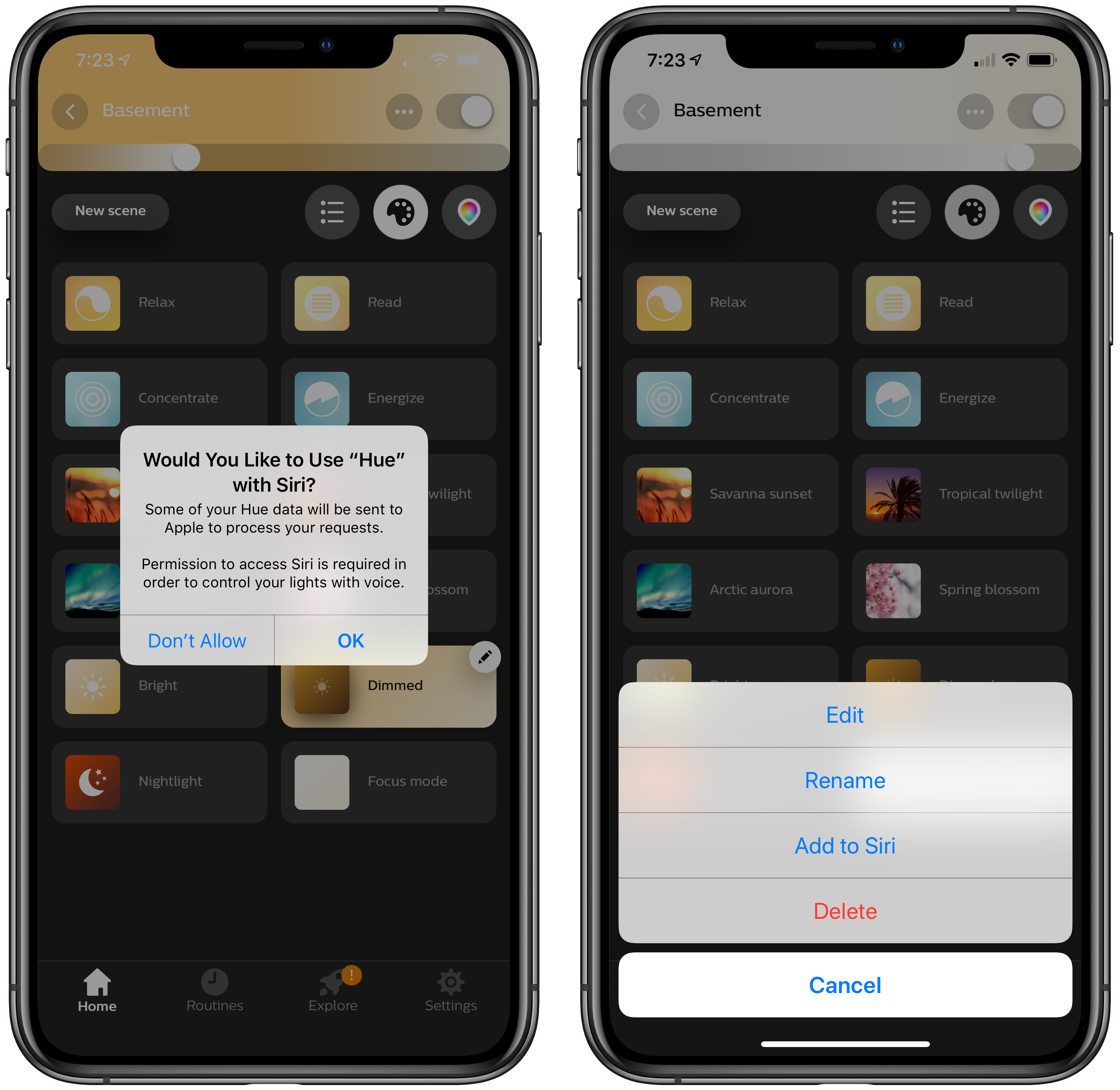
There’s an alternate, better route to setting up a Hue shortcut though. Inside the app, if you tap on a scene, a pencil icon appears in the corner. Tapping on it gives you the option to add the scene to Siri, as well as edit, rename, or delete it. Other developers have added the ability to add Siri shortcuts in their app’s settings, but I especially like Hue’s approach. If you’re in the Hue app creating a scene, that’s the natural spot to add it as a Siri shortcut too.
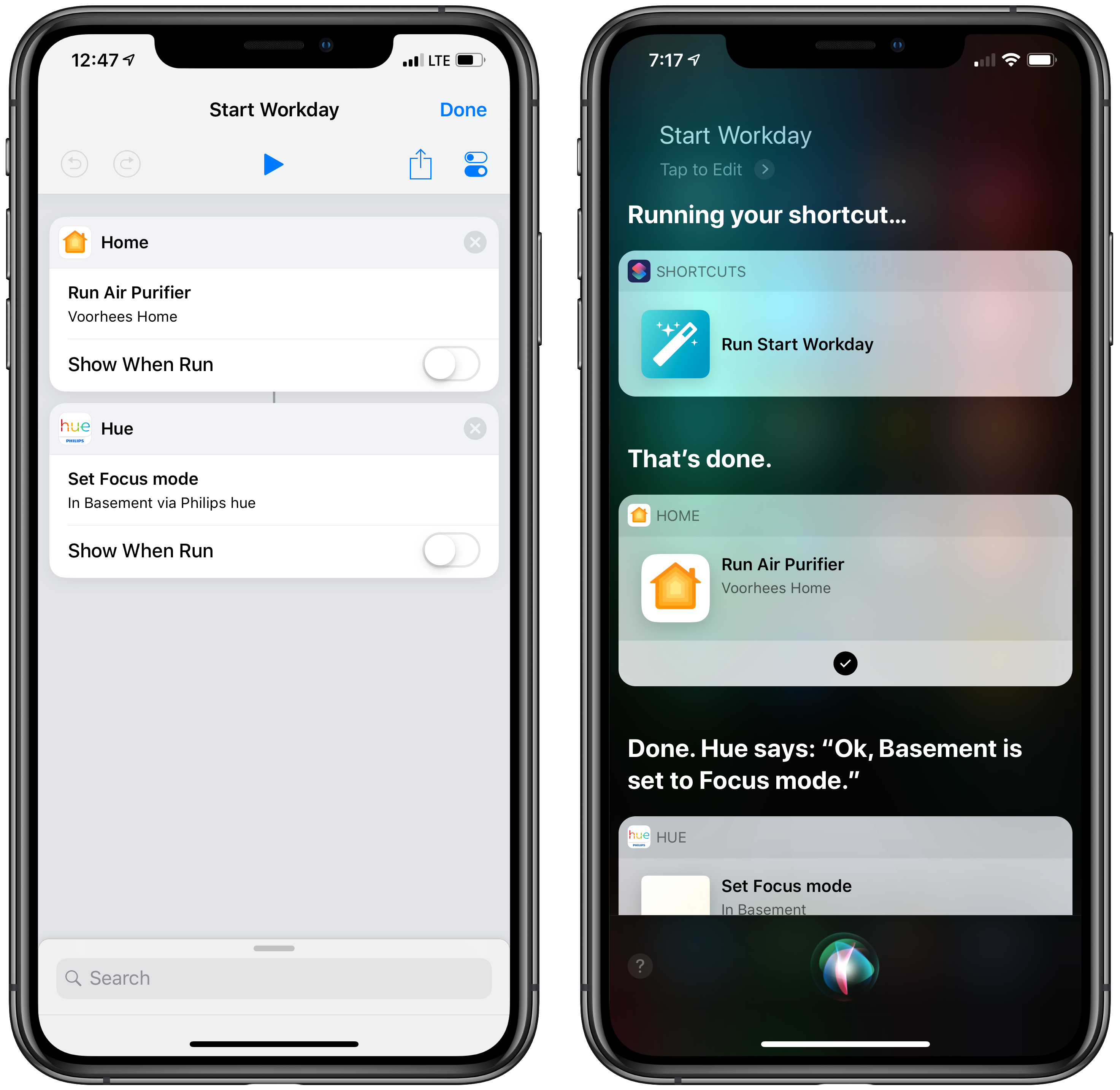
With a Hue Siri shortcut in place, you can also use it as an action in custom shortcuts you create in Apple’s Shortcuts app. I set up a simple shortcut that turns on the lights in my studio and enables a smart electrical outlet that controls an air filter. Now, as I finish my morning coffee, I can say ‘Hey Siri, start Workday’ and the lights and filter come on as I head downstairs. The same sort of shortcut can be created to control lights using Shortcuts’ HomeKit support added with iOS 12, but having similar functionality built into the Hue app is a useful alternative if that’s where you’ve set up your scenes.
The Hue app is available as a free download on the App Store.
Examining Dark Mode Implementations of Mac Productivity Apps
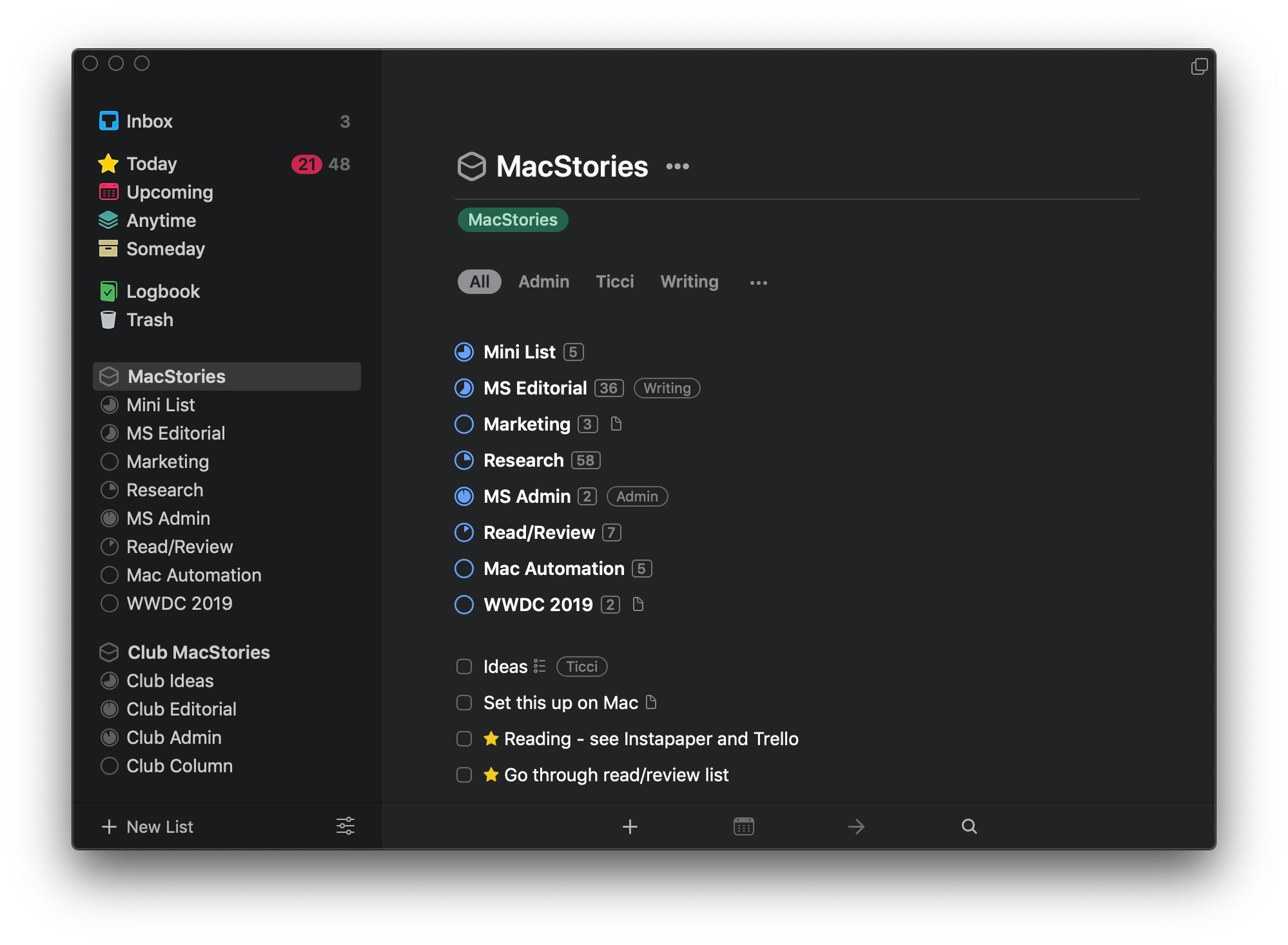
As I noted in my review of macOS Mojave, there’s a lot more going on with Dark Mode than dark gray window chrome. There were two sessions at WWDC dedicated to Dark Mode. Some apps are easier to adapt to Dark Mode than others from a technical standpoint, but beyond the coding, developers have to grapple with many design issues that affect apps differently.
As with many new features Apple introduces, there’s the way the company would like to see Dark Mode implemented and then there’s the way third-party developers use it in practice. Part of the variety you find is driven by the particular needs of each app. Other differences reflect compromises that are necessary to adapt existing designs to Dark Mode. Sometimes, however, developers intentionally ignore Apple’s recommendations, choosing to take a different path.
In my Mojave review, I collected some representative examples of apps that were ready with Dark Mode implementations when the OS update shipped. Since then, many other apps have been updated. I’ve spent time with many of them and have begun to see some design and implementation patterns among the early adopters that are interesting to compare to similar system apps by Apple. It’s also useful to consider how these variations will impact the experiences users have with these apps.
In the sea of dark gray floating before my eyes, I’ve identified a handful of app categories that illustrate some of the subtle differences between the apps I’ve tried. There are many other good examples, but email clients, task managers, text editors, and note-taking apps are categories that best illustrate how Dark Mode is being used by the first wave of developers to put the feature into practice.