


Today in version 4.12, CARROT Weather debuts a modernized iPad app that takes advantage of the features core to a great iPad experience: multitasking support, more keyboard shortcuts, and a tweaked design that better utilizes large displays. Additionally, since the iPad app is maturing in several key ways, CARROT has added iCloud sync for all of the app’s 150+ settings options, ensuring you won’t need to configure settings on both iPhone and iPad.
CARROT Weather iPad App Modernized with Multitasking and Expanded Keyboard Shortcuts, iCloud Sync for Settings
Flighty: A Pro-Level iOS App for Frequent Travelers

Good flight tracking apps are few and far between. Simply by having a top-notch design, Flighty is superior to most of its competition. There’s more to the app than superior design though. Flighty combines smart design choices with traveler-centric features to generate a comprehensive picture of every flight you track. The result is a pro-level travel app that’s an excellent fit for frequent travelers.
That said, Flighty isn’t for everyone. The app is free to download and use to track basic flight details. However, much of Flighty’s value lies in its granular level of flight detail, extensive push notification options, and inbound flight tracking, which require an expensive subscription.
You can try Flighty’s pro features free for 14 days, after which the subscription costs $8.99/month or $69.99/year, which is currently $49.99/year for a limited time. That’s more than any other flight tracking app I’ve tried, but I expect many travelers who spend lots of time in the air will be willing to pay monthly or annually.
Fliers who don’t need push notifications or the level of detail Flighty’s subscription offers can still track basic flight data with the free version of the app. However, as I’ll explain in greater detail below, the prominence of banners advertising the app’s pro subscription doesn’t make that a good option.
Video Game Narrative Design and Writing Science Fantasy Novels with Carrie Patel (Part 2)→
Today on Dialog, we are joined by video game narrative designer and novelist Carrie Patel for the conclusion of our conversation. This week, we cover where Patel finds inspiration, planning a novel, the writing process, the benefits of having a publisher, balancing writing and a full-time job, and a lot more.
You can find the episode here or listen through the Dialog web player below.






Sponsored by:
- Astropad Studio – Turn your iPad into a professional graphics tablet. Get started today wit http://hullopillow.com/dialog h a 30-day free trial.
- HealthView – A dashboard for Apple Health.
Next week, we’ll begin our final interview of this first season of Dialog with a very special guest, Pierce Brown, the author of the Red Rising series of novels who will join us the same day that Dark Age, the latest installment in his series, is published.
Pixelmator Pro for Mac Adds an Apple Photos Extension, New Zoom Tools, and Other Features
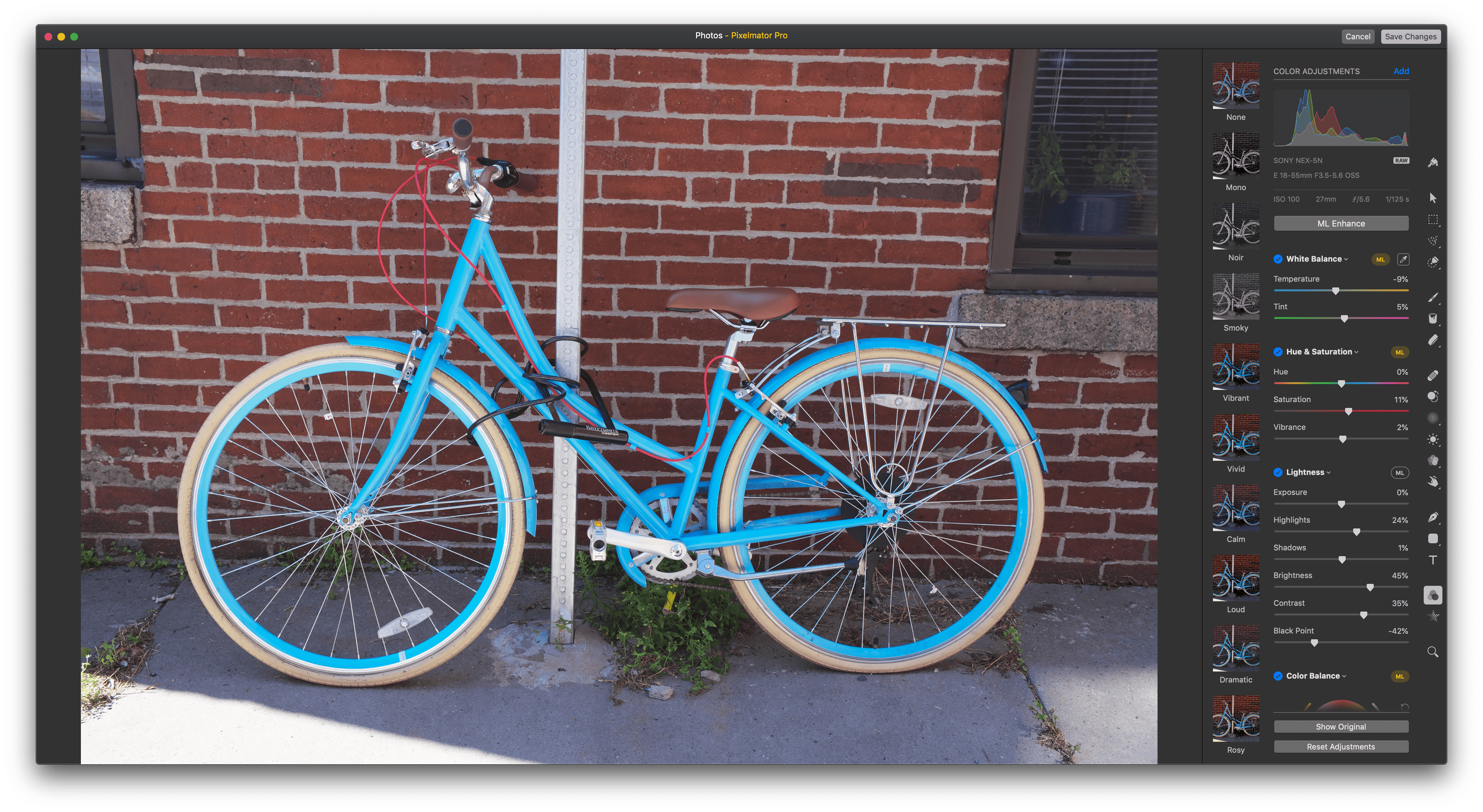
Pixelmator Pro released a significant update today that integrates the Mac app with Apple’s Photos app using a full-featured extension, adds enhanced zoom functionality, new cropping options, and more.
Pixelmator Pro is one of my favorite image editors on the Mac, but until today, I typically edited images in it that I pulled from an SD card or exported from Photos. That’s no longer necessary because Pixelmator Pro has been updated with a Photos extension that lets you use all of the app’s tools directly within Photos.
Photos extensions allow third-party developers to integrate their apps with Photos. Few of the photo editing apps I’ve used work with Photos though, which is a shame because Pixelmator Pro shows how much can be done with a Photos extension.
How iOS 12.4’s iPhone Migration Tool Works→
Yesterday Apple released iOS 12.4, an update that, during the beta phase at least, appeared to have little to no new features. Once the software went public with accompanied release notes, we learned that it contained a new iPhone migration tool, though it wasn’t immediately clear how that tool worked, or how it differed from existing migration options. Today Benjamin Mayo outlines the details on 9to5Mac:
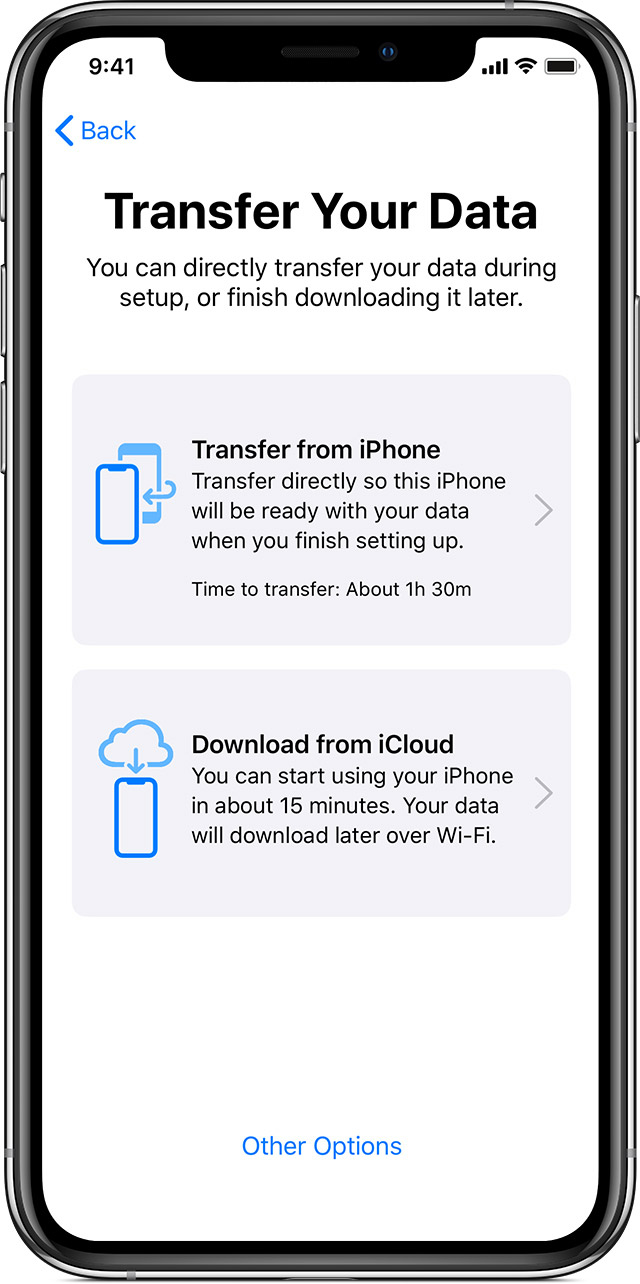
With iOS 12.4 or later, there’s a new iPhone set up option. You can now perform a local iPhone data migration when setting up your new iPhone.
As part of Quick Start, you can now Transfer Your Data directly, without requiring to use iCloud or an iTunes backup. The iPhone defaults to using local WiFi, but you can transfer wired using the USB3 Camera Adapter and a Lightning cable.
[…]
Direct transfer copies across the same data as an iTunes encrypted backup; all your photos, media, app data, settings and more are sent over a peer-to-peer wireless connection.
This tool seems like a fantastic alternative to restoring from an iCloud backup, or performing an encrypted iTunes restore. Both existing options are troublesome for storage reasons: many users only have the free 5 GB iCloud storage plan, which often isn’t enough to store a device backup in the first place, and to go the iTunes route, you need adequate local storage space on your Mac to back up your entire device, which I personally haven’t had in years.
Another common issue with restores from iCloud backups is that, while they let you start using your iPhone after a short period of time, often the restoration of data such as photos and offline music can take days, if it ends up taking place at all. With the new local transfer option, the wait time before you can use your device is a lot longer (Mayo shares a screenshot estimating 90 minutes), but once the transfer is complete, everything on the new device should be identical to the old one.
I tend to buy new iPhones every year, and recently have gotten in the habit of setting them up as new devices every time – partly because starting fresh can help eliminate clutter, but also because iCloud restores have historically been inconsistent for me. With the new options added in iOS 12.4, I may need to rethink that strategy.
AppStories, Episode 121 – How Travel Affects The Apps and Gear We Use→
On this week’s episode of AppStories, Federico provides an update on the progress he’s made on his iOS 13 review, and then we dig into how travel affects the apps and gear we use.
Sponsored by:
- Atoms – The world’s first shoe to come in quarter sizes.
- Moo – Custom business printing and design. Save 25%.

AppStories Episode 121 - How Travel Affects The Apps and Gear We Use
0:00
34:46
34:46
Apple Releases iOS 12.4 Update with Improvements to Apple News, iPhone Migration Tool, and Other Changes But No Apple Card

Apple has released iOS 12.4 with improvements to Apple News, a new iPhone migration tool, support for the HomePod in Taiwan and Japan, and a fix for the security flaw in the Apple Watch’s Walkie-Talkie app.
With the release of version 12.4 of iOS, downloaded magazines in the My Magazines section of the News app are now available for reading online and offline. The catalog of publications in Apple News includes newspapers like the Wall Street Journal, which previously weren’t listed in the catalog. There’s also a new option to clear downloaded magazines from Apple News by selecting History → Clear → Clear All.
In addition to the changes to News, the update introduces an iPhone migration tool that allows users to wirelessly transfer data from an old to a new iPhone during the setup process, support for the HomePod in Taiwan and Japan, and a fix for the security flaw in the Walkie-Talkie Watch app.
It was widely anticipated that iOS 12.4 would introduce the Apple Card, the credit card the company announced in March, but based on early reports, it looks like users will have to wait a while longer before signing up for the card.
Overcast Launches New Recommendations and Extended Clip Sharing

Over the weekend, podcast client Overcast launched a few new features in its latest update. Most notably, the app’s recommendation engine for suggesting new podcasts has been completely revamped and improved in a big way. Additionally, the recently added feature for sharing video clips of podcasts has an extended length limitation, and you can now set per-podcast settings for new parameters.
Atoms: The World’s First Shoe to Come in Quarter Sizes [Sponsor]

Atoms are the ideal everyday shoe designed for comfort and style with your feet in mind.
Not everyone’s feet are exactly the same size. In fact, 60% of people have one foot that’s a little bigger than the other, which is where Atoms sets itself apart. Atoms deliver an effortless fit by offering customers different sized shoes for their left and right feet. When you order, Atoms sends you three pairs in quarter-size increments, so you can pick the two shoes that fit your feet the best and return the others for free. It’s a concept so revolutionary that around 40,000 people signed up for the company’s waitlist before the shoes were publicly available.
Atoms are about more than just a perfect fit though. The Model 000 offers a simple, timeless design inspired by classic tennis shoes and careful attention to details that make them the perfect combination of form and function. The unisex design feature a proprietary foam midsole for cloud-like cushioning that’s resiliently comfortable day after day. The attention to detail extends to the stretch laces too, which were designed to stay tied and allow them to be slipped on and off easily. The shoes also feature a breathable upper with an antimicrobial copper lining that prevents odor.
With the $179 Model 000, Atoms has created a shoe that you not only can wear every day but one you’ll want to wear every day. It’s is available in three colorways (black/white, black/black, white/white), and there’s a special, limited-edition gray colorway for customers who already own a pair of Atoms.
So, visit atoms.com today to learn more about the Model 000, which is revolutionizing footwear, and order a pair for yourself.
Our thanks to Atoms for supporting MacStories this week.