This Week's Sponsor:

Halide

Unlock Your iPhone Camera


Billings Touch Sneak Peek

Sebastian de With of Cocoia has just posted an exclusive sneak peek of the upcoming Billings Touch for iPhone.

Here are some screenshots from his blog:
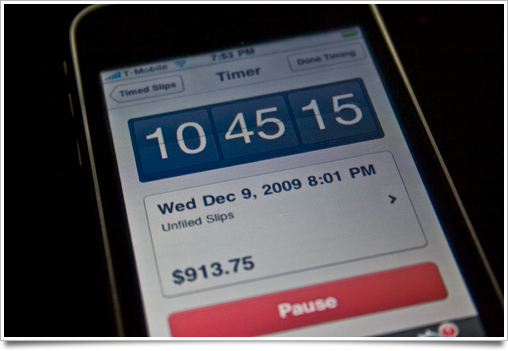
And a brief description:

“I can’t divulge much about it yet, but the app does pretty much everything I ever dreamed of having in my pocket for my on-the-go demands. I’ve even come to use its timer as a punch clock next to my computer so I can even more effortlessly pause or resume my time tracking when I go off to brew a nice cappuccino.

In short: the app syncs with your Mac database of Billings (and vice-versa, new slips and invoices you created and tick off on your iPhone get synced back to your Mac over the air), and every single nook and cranny is wonderfully designed, as I’ve come to expect from Marketcircle.

It also works great without the desktop app: as a standalone app, it’s already a very powerful set of tools to add to your workflow.”

It’s looking great.


HootSuite for iPhone: the Owl for Professional Users

So you’re really serious about Social Media. You manage your brand’s Twitter profile, you have a blog or a personal portfolio to promote, you’ve just set up a Facebook page (speaking of which, here’s MacStories Facebook page) and you need to post your updates to both these social networks. As you should probably know there are many webapps out there which claim to be the “ultimate solution for professionals” but let’s face it: there are only 2 great web applications out there, CoTweet and HootSuite. They’re meant for people who need a powerful management tool for their social identities, providing features like support for contributors on the same account (long before Twitter decided to implement it by default) and email notifications. I’ve actually tested both CoTweet and HootSuite and guys, HootSuite is far better if you need to track your business on social profiles.

Today I’ll talk about HootSuite’s recently released iPhone application, priced at $1.99, which brings many features of HootSuite.com to your mobile device, with a very good user interface.

Read more


Caffeinated: The Next Big Thing in RSS Readers for Mac?

I wrote many times how much I’m into Ember app: it’s a great place to find inspirational stuff and work in progress screenshots of Mac and iPhone applications. So, the other day I was browsing the Images section and stumbled upon this screenie of a RSS app for Mac  I never saw before: damn, it was sexy.

I tried to gather some additional info and I found out it was a screenshot of a working build of Caffeinated, an application that’s being developed by Curtis Hard. He was so kind to give me a quick preview of Caffeinated and guys - this one’s gonna be amazing.

Find out why.

Read more


Interview with Jürgen Schweizer, Developer of Things for Mac

As a part of the MacStories Apps Tree event (where you’ll find a huge giveaway worth $10.000 of 300 Mac and iPhone apps licenses), I had the chance to interview Jürgen Schweizer, the developer of  Things, the best Getting Things Done application for Mac OS X. You can read a great review of Things here.

This is 2nd of many interviews and guest posts I’ll publish on MacStories during this week. Enjoy!

Read more


An Ode to Droplr from Chris Bowler

Really nice and brief overview from Chris Bowler, who prefers Droplr over Cloud app. And like I said yesterday, Droplr is currently better than Cloud, let’s see if this is gonna change.

“I’ve been using either Droplr or Cloud for the past 3 months and both are great tools. But Droplr comes out ahead in a few ways. For those who haven’t caught the bug yet,here’s a list of things I regularly use Droplr for.

- Shorten URLs — every link I post in Twitter comes from Droplr. This way I can track what I’ve shared and how often it’s been clicked. Other URL shorteners do this for you, but Droplr includes this service in with everything else it does.

- No more attachments — do you have files that you regularly attach to emails? Rather than make slow emails, just upload your file to Droplr and include the link in the email.”


Mindnode Winners Announced

First, thanks everyone for the support and the comments! Then, I’d like to thank the Mindnode team for giving us these 3 promo codes for the giveaway.

Now, here are the winners:

Peter Steen Høgenhaug

Fabianaco

Christi M

You’ll receive the U.S. promo code straight in your inbox in a matter of a few minutes.

Cheers!