

With the iPad coming out in a few weeks, I guess many of you guys are doing some huge spring cleaning at your iTunes installation to cut down the garbage and assure that when the new kid will be in town, everything will be settled for a warm and polished welcome. You’d better do so, but I think this is all wrong.
Apple Needs to Move the iPad and App Store Out of iTunes
The Weather Giveaway Winners Announced
Thanks everyone who entered the The Weather giveaway. Also, we’d like to thank the ClinkApps developers for the promo codes they gave to MacStories.
Here are the winners:
JR007
iona64
Ammon Casey
Brian R
Zara
Cindy
Nate
Tony Martinez
k3mf0u
You’ll receive the promo code in your inbox in a matter of a few hours. Stay tuned for other giveaways coming this week.
In the meantime, you can follow the official MacStories Twitter account as @macstoriesnet .
Autodesk Maya 2011 Goes 64-bit on Mac OS X
Also: redesigned user interface, improved Maya composite and skinning workflow.
HippoRemote: Remote Controlling As It Should Be.
You know what, I won’t start this review by telling you what HippoRemote does; I’m going to tell you what it doesn’t instead. HippoRemote doesn’t display your Mac screen on your iPhone. But all the rest is just there, and it’s working greatly.
Brizzly Buys Birdfeed, Goes Free as “Brizzly for iPhone”
“Brizzly is the best way to view Twitter on the web, and now it’s taken the great foundation built by Birdfeed and added new features like lists and saved searches that sync with Twitter, news topics with user-editable explanations (a.k.a. Brizzly Guide), pull-down refresh, tab bar editor and more.”
Dan Moren on the iTunes LP
“For most people, listening to music is something you do while you’re doing something else, not an activity that occupies your entire mind. By contrast, the iTunes LP requires the same kind of attention that you might give to a movie or a book. While that might appeal to the serious music fan, it’s overkill for most consumers.”
Scribe Notes: Beautiful and Rich Notes for iPhone
There are so many apps to take notes on the iPhone, and we’ve covered this subject so many times that I don’t think talking about the ones we’ve featured is even worth anymore. I think the problem with note taking apps mainly resides in the lack of a real multipurpose application that lets you capture any kind of information and organize it into a unified, streamlined interface. No, don’t suggest Evernote please. And yeah, I’m not going to talk about Pastebot here, as its main function is that of capturing the clipboard and, eventually, sync it to your Mac computer. I always would have liked to have this app that could contain most every kind of data (be it photos, text or videos) and keep it stored into a single database.
Today I’d like to talk about a new application we’ve just downloaded from the App Store, it’s called Scribe Notes, it’s beautiful and it allows you to easily enter notes and organize them in notebooks. It’s cool, let’s check it out.
Reconsidering Dropzone
Dropzone is an application by Aptonic which I reviewed back in November here, and it was quite a positive review. I was impressed by the app, which was (is) a small utility that sits in the dock and enables you to perform many actions by simply activating them via drag & drop. Want to share a link? Drag it from Safari onto the Dropzone icon and boom, it shortens the URL using bit.ly and it automatically places it in the clipboard. With this same process you can install applications by dragging the original .dmg file, mount and unmount external hard drives, set desktop pictures and more. It’s extensible, it’s magical.
TextExpander Goes 3.0 - Adds Native Dropbox Support, Leaves Prefpane Format
TextExpander, the much popular utility from SmileOnMyMac that enables you to save a lot of time by assigning abbreviations to ferquently used text and images, has been updated to the 3.0 version with tons of new stuff.
First, the application is no longer a preference pane and comes in the usual .app bundle. I don’t know what’s the thought behind this, perhaps the developers wanted to give it a more “native” feeling. Alongside with the new application format, TextExpander 3 adds support for automatic Dropbox backups and sharing of snippets in the same local network; I still have to test whether this actually works with the iPhone though.
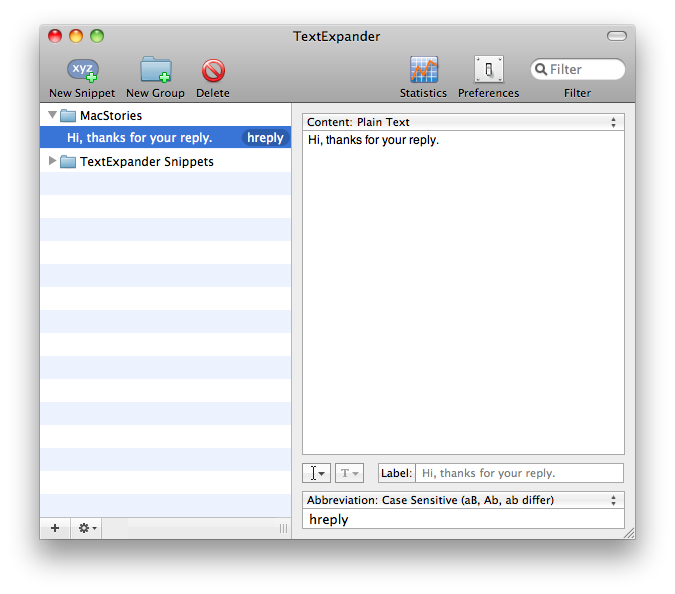
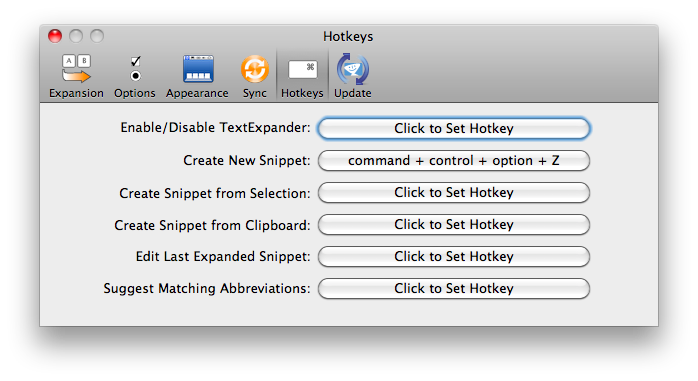
Also, with TE running in the menubar you can now search for snippets right from the icon and do some other things like edit the last expanded snippet. Last, TE 3.0 introduces support for global keyboard shortcut, meaning that you can assign a shortcut for entering new Snippets (basically, a quick entry panel) and invoke it everytime you want to add some text to your collection.
A regular license of TextExpander 3.x comes at $ 34.95, but if your purchased it after November 1, 2009 you can have it right in your Applications folder for free. Previous users can purchase a license saving $15.
Nice update.