

“As the Wall Street Journal reported, the mouse was considered a miss: “Useless,” said Charles L. Mauro, president of an engineering firm. “It isn’t all that easy to learn,” said Amy Wohl, president of a corporate consultancy. “I think it’s awkward,” added Clem Labine, a newspaper publisher. “Since it doesn’t get you away from the keyboard altogether, why go back and forth?”
Apple’s Long History of Lousy First Reviews
The Mozilla & Metalab Fiasco
I guess they’re gonna publish a statement tomorrow saying that you can’t blame inspiration. And of course, we won’t believe that.
But you know, worst part is Mozilla could have used some copy for Firefox - next time choose wisely which project to rip off for.
DestroyTwitter, unMac your Client
When people think of Twitter clients on the Mac, we immediately associate with clients wrapped in the fuzzy warm blanket of Cocoa. Sometimes these clients appear as HUDs that nestle in the menubar. Professionals might turn to the popular Adobe Air client Tweetdeck to keep track of trends and various search terms. Many of us would be lifeless without Tweetie, but before we finally sink our teeth into the latest MacHeist offering, I’m going to DestroyTwitter.
Notable Quotes, Words Not to be Forgotten. Review and Giveaway.
I don’t know if it’s a fetish, but reading those famous phrases from people I vaguely remember studying in senior high has become somewhat of a daily activity. I’ll wake up in the morning and flip through a few quotes before beginning my daily routine of Mail and Tweetie 2 checkups on my iPod Touch, before nesting it back into it’s own little neat space. I’ve been playing with Notable Quotes for the last day our so, and may I say it’s fancy. Between the script, leather-bound pages, and its coffee like glow, Notable Quotes has a very expensive feel to it. I like it.
AgileWeb Solutions Posts New Mockups of 1Password for iPad
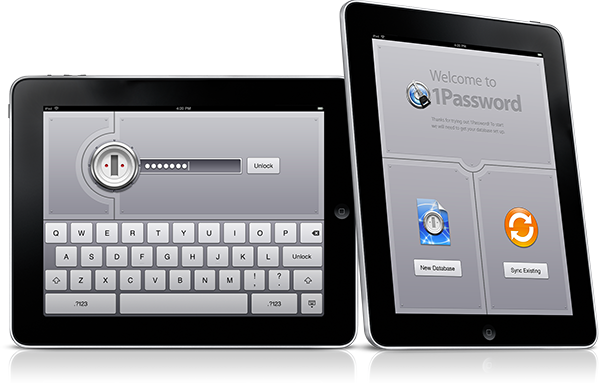
“One of the most interesting things about developing our iPad version is that we’re learning new ways to solve problems and make 1Password easier to use, but not just for the iPad. Dan says that they’ve discovered a lot so far that they want to bring back to our Mac and iPhone versions, which means all of our users will benefit from our iPad development, even if they never get an iPad.”
Apple Rolls Out 3.2 SDK Beta 4 [UPDATING]
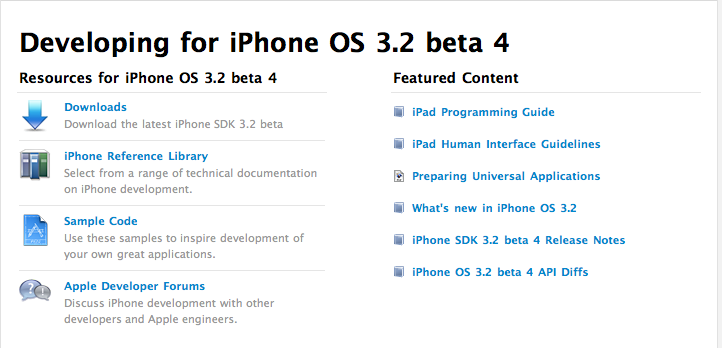
Apple has updated the 3.2 SDK to the beta 4 version. Available here.
Expect updates about it soon in this post.
UPDATE: We’ve got an email from a developer who’s already testing the new beta. Seems like the Camera tab is no longer there in Photos.app. I think we now have a pretty clear confirmation about the lack of camera in the iPad.
UPDATE 2. The Camera tab hasn’t completely disappeared, it’s there when you connect an external memory with photos.
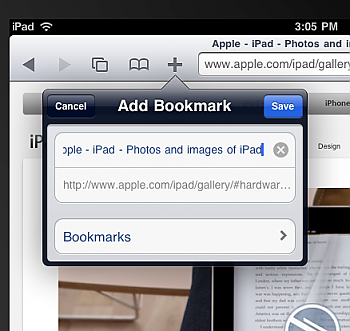
UPDATE 3: The Add Bookmark button works fine now:
Cisco Announces New Routers That Could Boost AT&T Service
“These new routers could mean big news to customers like AT&T who could use them as the backbone of their landline and cellular data services to better serve their customers. This in turn could mean that areas with slow-to-non-existent cellular data (i.e. SF, LA, NY etc.) could see a boost in network reliability. “
Scrup, Free and Open Source Alternative to Tinygrab and Droplr
Sharing picture across the internet could be a real problem sometimes. Not because there’s a lack of tools to do it, no - that is the real problem: there are too many apps that enable you to take a screenshot and upload it somewhere, and people don’t know anymore which app to use. We reviewed apps such as Tinygrab and Droplr before, but the one we’re talking about today is quite awesome and surely different from those ones.
Scrup by Rasmus Andersson (designer at Spotify) is simple and open source utility that, once installed and running on your Mac, can upload screenshots to your own webserver and automatically paste the url into the clipboard for easy sharing. You just have to upload a .php file to your server, insert some credentials in the Preferences of the app and you’ll be all set. Scrup runs in the menubar, it shows nice thumbnail previews of your “scrups” together with date and time.
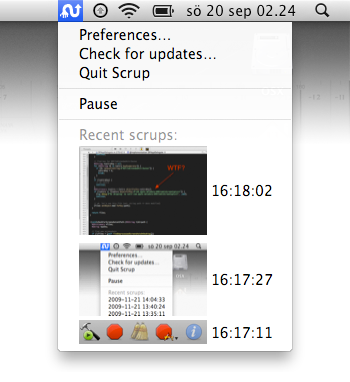
It works just as good as many other paid and famous apps. Scrup is free and available over at GitHub’s official project page here. Also, be sure to check out Django Scrup, a django-based web receiver for Scrup that forwards the screenshots to Amazon S3.
Being Flash Free
Interesting post over at Cocoia’s blog. It’s true, uninstalling flash precludes you to a lot of content on the current web - so you keep it installed on your computer.
And that’s exactly Adobe’s strongest point in why you shouldn’t uninstall Flash.