Mac App Store Review Guidelines Breakdown
Nilay Patel at Engadget takes a look at Apple’s review guidelines for the Mac App Store. This caught my attention:

Smart Autocomplete for Your Whole Mac
Nilay Patel at Engadget takes a look at Apple’s review guidelines for the Mac App Store. This caught my attention:
Uh oh, look at what Zynga released today: an update to their world-changing (really, must be something like that) game FarmVille which includes native support for the iPad. The latest 1.09 update allows in fact iPad users to enjoy cultivating their farms with much more real screen estate and redesigned and more accessible menus.
The app is free. Go download it, but you’ve been warned: I heard this one’s pretty addictive. Screenshots and changelog below. Read more
The announcement of the Mac App Store caused mixed reactions between developers and users alike. We don’t know if the App Store will work on the Mac platform, where we’re all used to software licenses, developer websites and no restrictions, but it’s very likely that Apple will nail this one once again.
MacStories polled a few developers about the subject, and I collected some thoughts from around the blogs of other devs. Here’s what they think of Apple’s latest plan for the Mac. Read more
Walt Mossberg loved the new Outlook. Pogues hates it.
Since the announcement of the Mac App Store yesterday, many developers started wondering how would the whole thing actually work. Apple then posted its first version of the Review Guidelines for Mac developers, and those guidelines raised even more questions.
Now developers have a better place to discuss their Mac App Store-related questions and problems by going to a specific section in the Developer Forums.
The Mac App Store section is available here for developers.
Ah, my first editorial. I felt the need to write this after being at a small social gathering last Friday with a group of friends, none of them being Apple Geeks like myself.
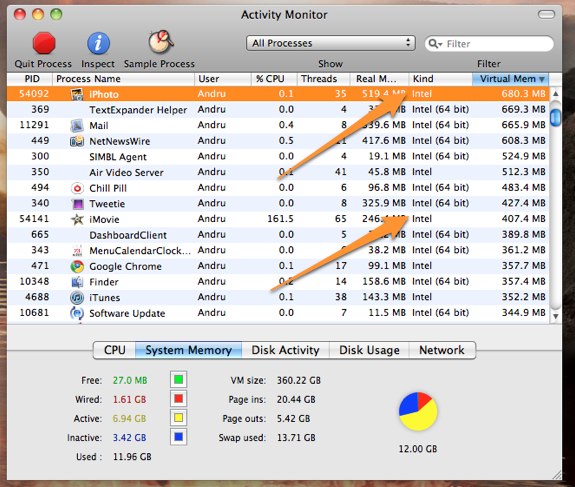
You would expect the shiny new iLife suite to be running at full 64-bit smoothness, wouldn’t you? Not so fast, literally. GearLive reports the bad news:
So we figured that one unannounced “feature” would likely be that the iLife suite had been converted to 64 bit. After all, Snow Leopard has had more than enough time to mature out in the wild, and it seems that developers left and right have jumped onto the 64 bit bandwagon. That’s why we were sorely disappointed when we launched Activity Monitor and found that, unlike just about every other process and application we are running on the Mac Pro, the iLife apps are still labeled as “Intel” rather than “Intel 64 bit.”
Many speculated iLife ‘11 would be 64-bit compatible, but it appears that the engineering team didn’t have time to rewrite the codebase. Here’s to hoping for an update, or - worse - 64-bit coming in iLife ‘13. [via MacRumors]
The App Store is famous because of its simplicity and one-click downloads, right? I mean, that’s the reason Steve Jobs is even bringing it to the Mac. Well it turns out that according to a survey by nielsenwire, 32% of iPad owners have never downloaded an iPad app, and 5% have downloaded only free apps.
You can see the numbers in the pie chart below. 63% of iPad owners have bought apps in the store, with Games obviously taking a huge 62% of the charts.
I believe nielsenwire is a reliable source, but I really can’t see why would anyone want to keep a device apps-free. Maybe it’s the iTunes account creation process? Read more
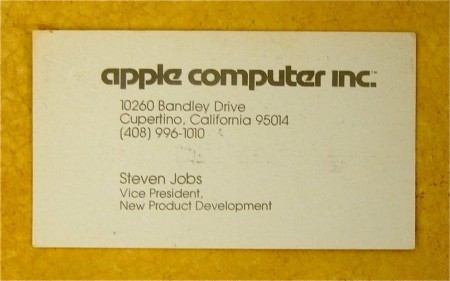
Business cards used to be simpler, and even Steve Jobs used to have one. This comes straight from the 1979 archives, discovered by a couple of techies somewhere in California.
Mozilla Labs director and tech-enthusiast Pascal Finette photographed Jobs’ groovy card after a colleague brought it into the office. According to Finette, Apple still uses the phone number seen on the card, but don’t give it a ring thinking you’ll get a direct line to Steve.
I can confirm that number is still active, but it’s definitely not Steve’s number anymore. As Finette also reports (but you can’t notice by the photo), Steve wanted an embossed Apple logo in the business cards.