
Walt Mossberg Loves The New Outlook for Mac

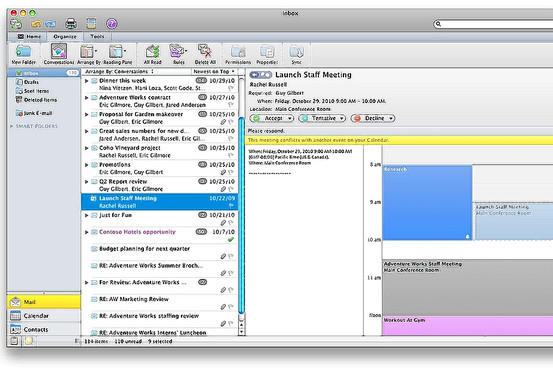
Our beloved Walt Mossberg is loving the new version of Office for Mac, dubbed “2011” and dropping on October 26th. Particularly, he seems to be liking the new Outlook a lot:

I was able to import a nearly 3-gigabyte Windows Outlook data file with no problems. And I was able to easily and perfectly import all my messages and settings from Apple’s own built-in Mail program and to sync with Apple’s (AAPL) built-in Mac address book. But Microsoft is still working on syncing with Apple’s iCal calendar program, and the Outlook calendar can’t sync with Google Calendar. Also, while the new Mac Outlook can import Windows Outlook data, it can’t export its data to Windows yet. Microsoft says it is also working on that.

In general, Outlook on the Mac proved fast and capable in my tests. It doesn’t work exactly like its Windows counterpart, but Windows users will find it very similar. And it has some Mac-specific features. For instance, its contents can be easily searched by the Mac’s built-in universal search feature, Spotlight, and can be backed up by the Mac’s Time Machine backup system.

Microsoft’s new Mac Office is by far the best Mac version of the suite I’ve used, and I can recommend it.
For as much as I understand the needs of companies willing to use Macs, but stuck on Office, there’s no way I’m giving up on Mail for when it comes to desktop email. I’ll give it a try, though.


Guess What, Apple’s “Back to the Mac” Event Is A Non-Event

What’s up, Gene Munster? You’ve always been a nice Apple-focused analyst. First you praise the iPad but you state Android tablets will eventually kill it and win the platform war; now you come out and say that next Wednesday’s event is, actually, a “non-event” for investors.

As Business Insider reports:

Munster tells us he expects some “speed bump” updates to the Mac line, a preview of the next OS, and maybe a new Macbook Air, but that’s about it.

“From an investor’s perspective, this is a non-event,” says Munster.

Basically, Munster argues that the company is now focused on iOS and the Mac doesn’t mean much anymore. He’s wrong: for as much as the Mac’s numbers might not be as jaw-dropping as iOS’ ones, investors should keep their Macs close. Where do iOS apps come from, again?

Update: Apple’s share of computer sales in the US surpassed 10 percent.


Mac OS 10.7 Dreams

Mac OS 10.7 Dreams

Ben Brooks shares some interesting points:

Updated Finder -  Any Mac power user will tell you, Finder is showing its age. Tabs are the biggest wish for most people. I would settle for better network drive support, for both WebDAV servers and network shares.

Yojimbo / DEVONthink type App - File folders are so 1999, today we just like to search or see things organized for us. This would be in addition to Finder, giving us a place to store and search all of our files, view and edit them – think iTunes for the rest of your crap.

Saving No More - I just feel greedy at this point, but one of my favorite features of Notational Velocity is that I don’t have to worry about hitting save. All that is done for me and backed up – saving needs to be a thing of the past. I can just imagine the commercials comparing saving on a Mac versus saving on a PC.

The Finder needs better WebDAV support (I’m forced to use Transmit for that, which is a great app anyway) and system-wide autosave would be great, even if ForeverSave has been doing that (kind of) for quite some time now.

The Yojimbo / DEVONthink app, though? I’m sold. I was a Yojimbo user until December of last year, then I switched to DEVONthink (Pro Office version) and never looked back. Even if DEVONthink’s approach is more “professional” (I feel bad for using this term, but that’s it) and complex than Yojimbo’s, I get Ben’s point here: a way for Mac users to throw anything to the Finder and see it properly organized, saved, tagged - whatever organization system you prefer - without any additional effort. That’s what these apps do: they can receive any kind of data easily and store stuff for as long as you need. It’s just a giant bucket where you throw items in, but it’s a well organized bucket.

Now imagine that app, with desktop sync capabilities, on iOS.

Permalink

Expenditure 1.1: iOS 4 Ready, More Currencies, Still One Of The Best Financial Apps for iPhone

When I reviewed the first version of Expenditure by Shape HQ in July, I called it one of the best financial apps for iPhone. I stand by my statement: even if I have a problem with financial apps, Expenditure is one of the finest implementations of the “track your income and expenses” system. It’s got a clean UI which doesn’t distract and doesn’t get in the way; it’s easy to navigate; it took 3 months for the developers to release the 1.1 update.

In spite of the delay, the new version of Expenditure is still great: there’s full iOS 4 support now, and the app finally really shines on the Retina Display. But the developers went further than a simple device and OS update, they implemented many (much needed) new features requested by Expenditure’s active userbase. The app now contains 13 new currencies: it should be enough for everyone. An import / export feature has been added, but I haven’t been able to test it; together with it, a passcode lock option for the privacy freaks among you.

The categories screen has been redesigned to provide a better overview, and now you can also rename categories - thank god. Last, there’s an option to reset sums every month. Oh, and lots of bug fixes.

Expenditure 1.1 surely sits on top of the best financial apps together with Squirrel, MoneyWell and MoneyBook. I may have my issues with these apps, but I acknowledge the quality. Two bucks in the App Store. Read more


Steve Jobs’ Personal Gift To Chilean Miners: An iPod

After 68 days of fears and hopes, the Chilean miners trapped underground have been rescued earlier today. You may have already heard of this great news. As a personal gift from Apple’s charismatic leader Steve Jobs, each of them will be getting an iPod.

LeFigaro is reporting the news, and we don’t know which model they’ll get, but I guess an iPod Touch 4th gen would be more than appropriate. If only they had FaceTime before, they would have had the chance to see their beloved ones during those terrible days.

[via AppAdvice] (photo: The Big Picture)


Is The Mac Ready for Multitouch?

Is The Mac Ready for Multitouch?

As good as I think Apple’s touch products are, I find it hard to believe they’d let the Mac grow stagnant, especially when sales continue to climb. The Mac may have taken a backseat to iOS products at WWDC, but it’s going to remain a core product for the foreseeable future. They’re not going to suggest you write iPhone apps on a Windows machine, if nothing else.

That’s why there’s some speculation—at least in the Gizmodo editor’s chat room—that the October 20th event could hold a big reveal for a new MacBook Air that includes some sort of new multitouch method, a flip-over touchscreen that turns the Air into a tablet. Instead of running iOS, however, the new Air would run OS X.

Something feels off to me about that idea. I have a hard time imagining that Apple would release a hybrid product that instantly makes current Macs feel outdated and makes iOS products like the iPad seem less powerful.

But at the same time, if Apple were going to experiment with bringing multitouch to the Mac, the Air would be the product with which to do it.

Joel Johnson over at Gizmodo argues that the Mac’s transition to multitouch technology is inevitable. I agree, but I think it’s in Apple’s best interest to keep product lines well separated and distinct. I frankly don’t see Apple releasing a “convertible computer” because the way I see it, Apple thinks compromises suck. They never liked “half & half” products. I may be mistaken (we’ll know on Wednesday), but I don’t see Apple ever shipping something like this.

Permalink

How Much Does It Cost To Develop An iPhone App?

How Much Does It Cost To Develop An iPhone App?

We started the iPad development from scratch, but a lot of our underlying code (mostly models) was re-used. The development was done by two experienced iOS developers.

With such a short schedule, we worked some pretty long hours. Let’s be conservative and say it’s 10 hours per day for 6 days a week. That 60 hours for 9 weeks gives us 540 hours. With two developers, that’s pretty close to 1,100 hours. Our rate for clients is $150 per hour giving $165,000 just for new code. Remember also that we were reusing a bunch existing code: I’m going to lowball the value of that code at $35,000 giving a total development cost of $200,000.

Craig Hockenberry is one of the Twitterrific developers. The whole reply is a must-read.

Permalink

Tasks Touch: The Simplenote of GTD Apps

Maybe you don’t need OmniFocus, and you don’t need Things. You don’t care about whatever David Allen has to say and seriously - the Emergent Task Planner? You just want to enter tasks and have them always available, right? I got you. You’re that kind of user who don’t care about features and UX innovations as long as what needs to be accomplished during the day is driven by a simple software that doesn’t get in the way and doesn’t require you to read a manual.

You’re anything like me, but I think I’ve got the app that might just change your productivity worfklow on the iPhone: meet Tasks Touch, the Simplenote of productivity apps. Read more