

Ah, my first editorial. I felt the need to write this after being at a small social gathering last Friday with a group of friends, none of them being Apple Geeks like myself.
Think Different. Always Feel Connected.
Secret Feature: iLife ‘11 Still 32-Bit
You would expect the shiny new iLife suite to be running at full 64-bit smoothness, wouldn’t you? Not so fast, literally. GearLive reports the bad news:
So we figured that one unannounced “feature” would likely be that the iLife suite had been converted to 64 bit. After all, Snow Leopard has had more than enough time to mature out in the wild, and it seems that developers left and right have jumped onto the 64 bit bandwagon. That’s why we were sorely disappointed when we launched Activity Monitor and found that, unlike just about every other process and application we are running on the Mac Pro, the iLife apps are still labeled as “Intel” rather than “Intel 64 bit.”
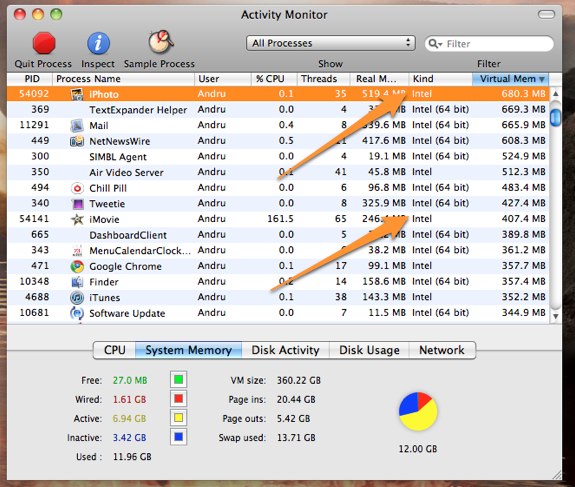
Many speculated iLife ‘11 would be 64-bit compatible, but it appears that the engineering team didn’t have time to rewrite the codebase. Here’s to hoping for an update, or - worse - 64-bit coming in iLife ‘13. [via MacRumors]
32% Of iPad Owners Have Never Downloaded An App
The App Store is famous because of its simplicity and one-click downloads, right? I mean, that’s the reason Steve Jobs is even bringing it to the Mac. Well it turns out that according to a survey by nielsenwire, 32% of iPad owners have never downloaded an iPad app, and 5% have downloaded only free apps.
You can see the numbers in the pie chart below. 63% of iPad owners have bought apps in the store, with Games obviously taking a huge 62% of the charts.
I believe nielsenwire is a reliable source, but I really can’t see why would anyone want to keep a device apps-free. Maybe it’s the iTunes account creation process? Read more
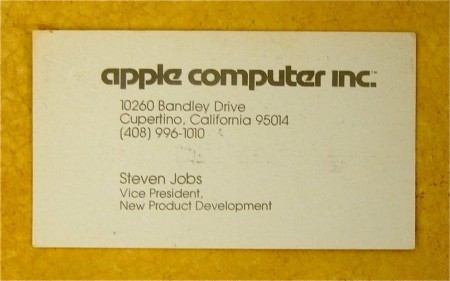
So This Would Be Steve Jobs’ Business Card in 1979
Business cards used to be simpler, and even Steve Jobs used to have one. This comes straight from the 1979 archives, discovered by a couple of techies somewhere in California.
Mozilla Labs director and tech-enthusiast Pascal Finette photographed Jobs’ groovy card after a colleague brought it into the office. According to Finette, Apple still uses the phone number seen on the card, but don’t give it a ring thinking you’ll get a direct line to Steve.
I can confirm that number is still active, but it’s definitely not Steve’s number anymore. As Finette also reports (but you can’t notice by the photo), Steve wanted an embossed Apple logo in the business cards.
Turn Your iPad Into An iMac with PadDock
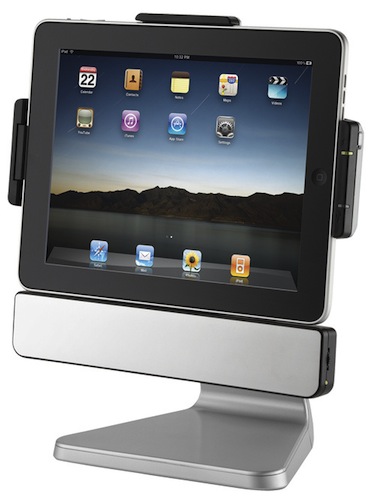
I’m not sure why would the regular iPad user want to do this, but the Apple geek in me is crying for attention: the PadDock turns your iPad into a terribly geeky iMac lookalike.
The PadDock can charge and sync your iPad, it’s got speakers and can rotate 360 degrees. Available at $99 here.
OS X Lion: The Details We Missed
In yesterday’s preview of Lion, we were shown 4 new features: fullscreen apps, Launchpad, Mission Control and the Mac App Store. In the demo Vice President of Engineering Craig Federighi offered on stage, though, we spotted some neat little touches Steve Jobs didn’t mention, but they were there.
Here’s what we’ve collected so far. Read more
Is Apple’s Lion a Lion?
Yesterday Apple gave us a sneak peek at some features coming in the next major iteration of OS X, Lion. For those who missed it, Lion will be available starting next summer, and more previews will likely be shown in January (when the Mac App Store will open), at the WWDC ‘11 or, perhaps, at another Lion-focused event. We don’t know yet.
Yesterday’s preview, however, was built around a simple concept: Apple brought OS X to the iPhone and iPad and created a new mobile operating system called iOS from it; now the best features experimented on those devices are coming back to where it all started, the Mac. Read more
An iOS-Powered Massage Chair
Who wants to use a wired analog remote when you can use a sleek, retina-displayed iDevice to do it? The Acutouch HT-9500 massage chair is being sold for only $4,999 (iPhone not included). After you drop $5K on the chair, head on over to the App Store and download the FREE (it better be) HT-Connect™ app to start making your iDevice your personal masseuse. It uses Bluetooth to send the controls/settings to the chair and grants you “instant access to a world of resources, massage programs and expertise designed to improve your wellness and life.”
Wow, my back feels better already, it’s my wallet that’s hurting now. Read more
Super Twario Turns Twitter Into A Platform Game for iPhone

Of all the great things you can do with Twitter (such as following Forstall or Conan O’ Brien), can you imagine turning it into a platform game for iPhone where you literally jump on tweets and earn Game Center achievements by replying to mentions or faving tweets?
Super Twario, a $2 game available here, does just that. You simply move around after the app has fetched tweets form your timeline and start walking and jumping and running. With Game Center integration, you can unlock achievements by doing things you would regularly do in any other Twitter client, without getting rewarded.
This opens the road to non-games achievements I think, like “read 150 articles in Instapaper” or “write 15 articles in Simplenote”. We’ll see. Check out the demo video of Super Twario below. [via Engadget] Read more