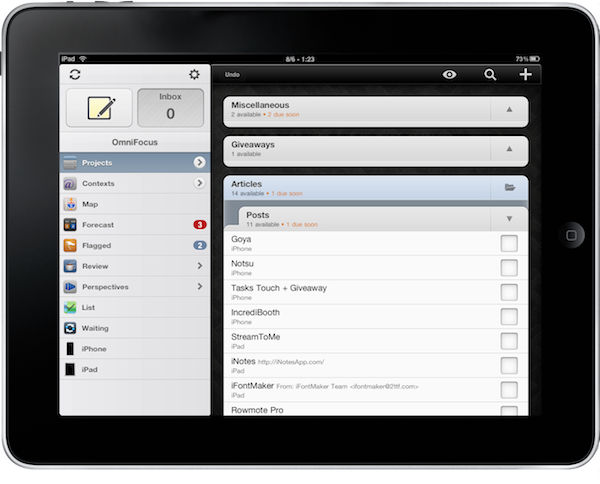
OmniFocus for iPad Updated for iOS 4.2 Multitasking

OmniFocus, my GTD app of choice on OS X and iOS, is now compatible with multitasking on the iPad. Although iOS 4.2 isn’t officially out and it looks like it won’t be at least until sometime next week, users running the latest iOS 4.2 GM can enjoy fast app switching, background sync and local notifications in OmniFocus for iPad.

The latest 1.2 update, released a few minutes ago in iTunes, adds a bunch of new features and lots of improvements, too. The changelog is really huge, so I suggest you go check it out below. Notable new features include the possibility to receive local notifications without the need of a sync server, seven new languages, a revamped editing panel and more geolocation functionalities.

Seriously, great update. The one users already on iOS 4.2 have been waiting for. Go get it. Then read why we love OmniFocus. Read more


From Apple’s Newton to Evernote

From Apple’s Newton to Evernote

The company was founded by Stepan Pachikov, who was kind of this brilliant mad scientist from Russia. He and his team were behind a lot of the pioneering work that went into the Apple Newton, fifteen years ago. The handwriting recognition engine was built by these guys. They had a company called ParaGraph, which Apple licensed.
So the original idea really started in the Newton days.

Evernote for iOS also got a nice update today with iOS 4.2 support, audio note improvements and printing.

Permalink

Hide and Disable Ping in iTunes 10.1

iTunes 10.1, launched a few hours ago, introduced two new options to hide Ping from the sidebar and disable it completely using parental controls. First, check out our previous post detailing how you can hide Ping’s dropdown menu using a Terminal hack.

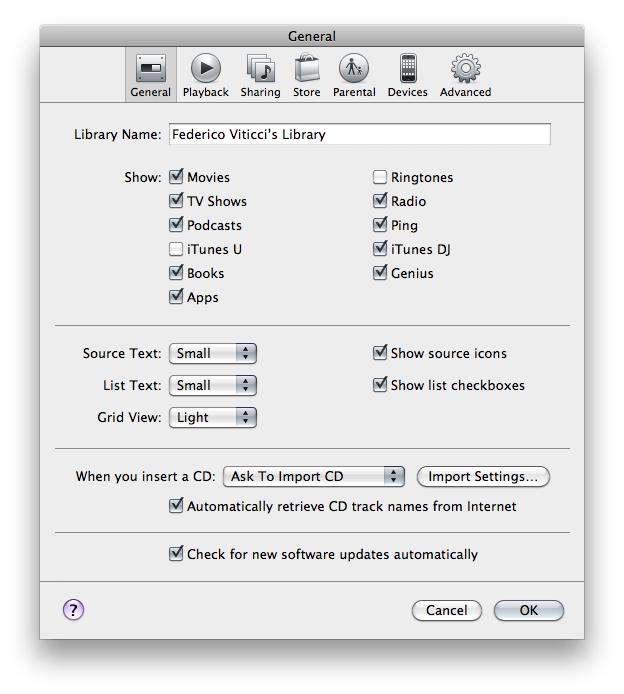
If you want to hide the Ping element from iTunes’ sidebar, open iTunes’ preferences, hit the General tab and deselect Ping in the “Show” section. That will remove it from the sidebar.

Read more


Microsoft Targets Mac’s Lack Of Blu-Ray Support In Latest Windows 7 Ad

I haven’t really ever felt like needing to watch a Blu-Ray movie on my MacBook Pro, but apparently the folks down at Redmond think it’s worth producing an ad focused on it. In order to promote entertainment on Windows 7 machines versus Mac machines through the support of Blu-Ray disks, the video we’re referring to shows a Mac and a PC on flight, watching Avatar on the PC’s screen.

It’s nice and well-realized, overall. Check it out below. Read more


MacStories Weekly Game: Robokill

This week’s featured game is the latest effort by Wandake, Robokill. See, Robokill on the surface may look a lot like other games available in the App Store such as Minigore or Age of Zombies. You control this robot, with a bird’s eye view, and you have to face enemies coming from all sides of the screen. Unlike Minigore, though, Robokill provides a greater attention to details in level design and enemy attack patterns.

For instance, Robokill’s droids are smart, while Minigore’s monsters just care about running against you. Enemies in Robokill shoot, cover, attack, back up. That’s not bad a simple action game for iPad. Plus, once you clear levels in the game your character will evolve and become able to equip new weapons and shields. With more than 450 levels and 13 missions, that’s quite an inventory to build. You can also collect cash and hidden loot to purchase upgrades through a virtual store – which is always welcome. I like this RPG-like side of Robokill, something the aforementioned similar games surely don’t provide. Not like in Robokill. Read more


Tweet Library 1.1 Brings iOS 4.2 Support, More Filters, Lots Of Fixes

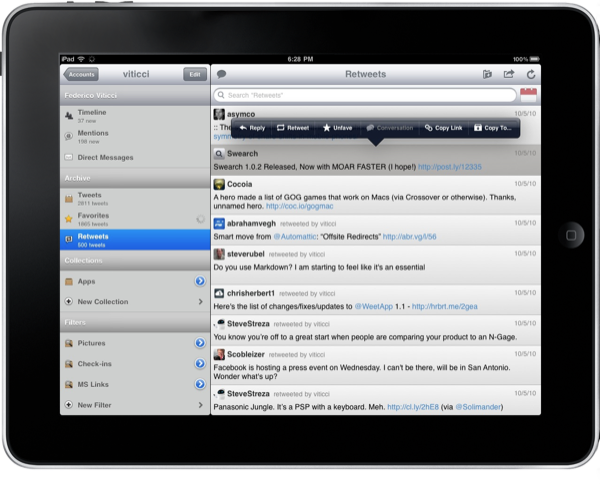
Tweet Library is an excellent app by Riverfold Software which allows you to “curate tweets”. You can create collection of tweets and publish them online, keep an offline cache of your tweets and favorites, filter your timeline and sort tweets by date. It’s a great companion to your default Twitter client. From my review:

Tweet Library is an app meant for letting you archive, collect and filter tweets. It’s great for conference tweeting, it’s a good tool for blogger when a new iOS beta comes out and they need to group tweets about new features, it’s a great app for users wondering “what happened to that tweet?”. Tweet Library is a searchable local archive of your Twitter activity.

The new 1.1 update brings full support for iOS 4.2, meaning multitasking and persistent state. It works perfectly. The app now also contains a bunch of additional filters for pictures shared on flic.kr, instagr.am, and plixi.com. The developer also introduced lots of performance improvements and fixes.

Tweet Library is available at $9.99. If you use Twitter on a daily basis and you care about keeping a personal record of your tweets, it’s well worth it. Check out the full changelog below. Read more


Apple Releases New iOS 4.2 GM Build For iPad (8C134b)

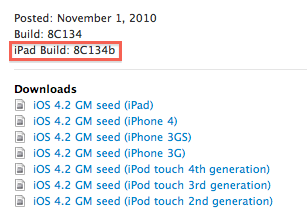
As we previously reported, Apple just released a second GM build of iOS 4.2 for iPad to deal with the WiFi issues. It’s available in the iOS Developer Center. Build number is 8C134b, and it’s a 551MB download.

This build is meant to address the WiFi issues experienced by several users. From what we’re hearing, Apple wants to get testing done as fast as possible – iOS 4.2 might drop next week.

Apple didn’t change the date of the original GM build, you’ll still see “November 1” on the dev center. The iPad build, however, is new.


Apple Releases iTunes 10.1, Brings iOS 4.2 Support

iTunes 10.1 just went live on Apple’s website. iTunes 10.1 is required to update your devices to iOS 4.2. You can download it here.

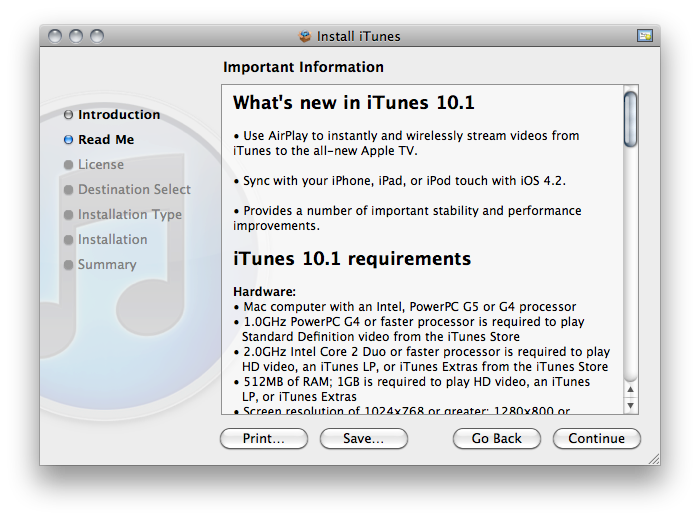
iTunes 10.1 introduces overall performance and stability improvements, sync support for iOS 4.2, video streaming to the Apple TV. After Mac OS X 10.6.5 and iTunes 10.1, iOS 4.2 is the next step.


Using Simplenote On Classic Mac OS

Using Simplenote On Classic Mac OS

First and foremost: as you may have guessed, there isn’t a ‘Simplenote client’ for Mac OS 9 or earlier versions, so your best option on a vintage Mac is to access your Simplenote account and your notes using the Web interface. On Mac OS 9, this is accomplished rather effortlessly using Classilla and enabling JavaScript for the Simplenote website. Classilla correctly renders the modern, iPad-flavoured Simplenote interface, and you can also use the old one if you so prefer.

It also works on Mac OS 8.6. Completely useless, but we love it.

Permalink