This Week's Sponsor:

Inoreader

Build your own newsfeed and cut through the noise


Google Voice App Now Works On The iPad and iPod Touch

One month after the release of the official Google Voice app in the App Store, here comes an updated version that works both on the iPad and iPod Touch. Announced by Google a few minutes ago, the new Google Voice app has been updated to work on non-iPhone devices allowing you to send and receive text messages. As you can guess, no – you can’t make cellular calls on the iPod Touch.

Still, the Google Voice team introduced a new functionality called Click2Call which lets you initiate calls with your phones. On your iPad or iPod Touch, tap on the “call” button and select which phone you want to ring. It’s a very easy way to let Google Voice call your phone and then connect the call to a contact’s number.

Among other improvements and bug fixes, text forwarding is now disabled by default when you activate push notifications so you don’t get multiple and annoying dialogue boxes. You can now set a “Do Not Disturb” status in the settings, access you Address Book contacts from a built-in Contacts tab, tap & hold on inbox messages to delete or archive. Nice. I’m pretty sure MacStories’ own Cody Fink (who’s a die-hard iPod Touch user) is going to love this.

Google Voice app is, as usual, free in the App Store.


OK Go’s New Video Takin’ It To The Streets

On November 17, OK Go took to the streets of Los Angeles for a GPS parade with hundreds of loyal fans and an app called  The Pulse of the City. Why? Because OK Go loves high-concept music videos and for this one they wanted and outdoor concert & to spell out their name (see header image) ON the streets.

The Pulse of the City app allows users to visualize their tracks via GPS, so OK Go “wrote” their name across the LA cityscape while performing a concert along an eight-mile route in the shape of the band’s name. (video and road visual of the parade after the break) Read more


A Beautiful Instagram Facelift

A Beautiful Instagram Facelift

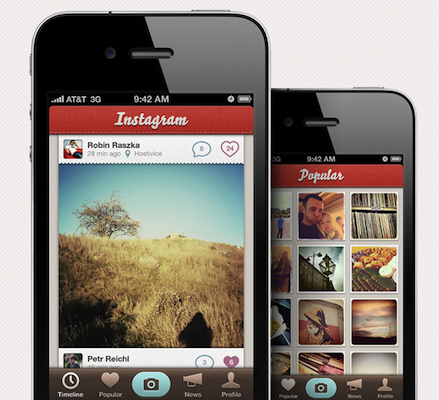
Instagram is one of the hottest photo sharing apps on the App Store right now but there’s one problem: it doesn’t look that great. At Tapmates, we take pride in our icons and user interfaces, so we decided to mock-up what it would look like if we made it.

The mockup surely sports some pretty pixels. Still, it breaks many of Apple’s interface guidelines, such as the camera button in the tab bar. Looks great nonetheless.

What do you think?

Permalink

Apple Releases “iTunes 12 Days of Christmas” App for iPhone and iPad

Yesterday we told you Apple re-launched the “iTunes 12 Days of Christmas” website in Europe for the 2010 holiday season. On the website, a banner suggested that an official iPhone app would come soon to let users receive push notifications for exclusive offers in the iTunes Store. The app is now available, it’s free and it runs both on the iPhone and iPad.

From December 26th until January 6th, Apple will give away a selection of books, apps, songs, movies and TV episodes for free. The app doesn’t show much right, except that it asks you for push notification authorization and it displays a countdown to the daily giveaway on screen.

The app is not available in the US Store, I downloaded my copy from the UK one. I guess it should be available in other European stores as well. If you have a UK account, you can go download the app hereRead more


iPad Portraits: The Woz

David Newman is one of the most talented artists that use the iPad as a canvas for their creations. We covered David’s impressive portraits before, but his latest is just too great and geeky to not deserve another spot here. I mean, it’s the Woz!

That’s right, a portrait of Steve Wozniak while using a MacBook with his custom white iPhone 4 sitting on a Glif. The portrait was entirely realized on an iPad and Steve set it as his new profile picture on Facebook. It can’t get any geekier than this.

Check out the animation video of the portrait below. As usual, Newman doesn’t disappoint.[via RazorianFly] Read more


CNN Releases Official iPad App

CNN released its first official app for the iPad earlier today, and it’s a solid first iteration on the tablet. It’s available now for free in the App Store.

The CNN app is meant to let you enjoy the full CNN experience with stories, insights and videos directly on your iPad. Being the iPad both a personal and communal device, the developers over at CNN thought it would be appropriate to build sharing features and a commenting system right into the app. You can share stories on Facebook and Twitter, send them via email, save a story for offline viewing (as you can guess, very useful on iPad WiFi devices). Read more


MobileMe Goes Down For Maintenance Tonight

MobileMe Goes Down For Maintenance Tonight

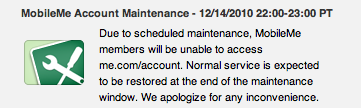
Apple has announced that MobileMe’s account page and sync services will be down for maintenance later today. MobileMe account will be down from 10 PM until 11 PM Pacific Time. MobileMe sync will be unavailable from 10 PM until midnight Pacific Time.

Due to scheduled maintenance, MobileMe members will be unable to access me.com/account.

Due to scheduled maintenance, some MobileMe members may be unable to sync between their computers, iPhone, iPad, and iPod touch or view their contacts and calendars at me.com.

Permalink

Fotopedia Heritage 3.0: Instant Slideshows, Suggestions, iOS 4.2 Support

Fotopedia Heritage is one of those iOS apps (universal, free) that keeps on getting better on each release. First they released a 1.0 version that aimed at becoming the digital encyclopedia for humanity. Version 2.0 added support for the Retina Display, 25,000 more photos and shuffle mode. Today, with the release of Fotopedia 3.0, the developers re-imagined the app from the ground up and redesigned the whole experience to make it more intuitive, fast and beautiful. Read more


Buddies for iPad Adds Facebook Chat

Buddies for Facebook is a neat app for the iPad we reviewed in November which provides a quick and easy way to check on your Facebook friends. With an interface based on a “split view” aimed at letting you navigate across all the sections of Facebook, there’s no doubt Buddies is one of the most curious and innovative way to use Facebook on the tablet.

The latest 1.15 update, released last night, improves the app’s integration with Facebook by adding support for Chat. To access the chat interface, you have to tap on an icon in the upper right corner in the main page. The app will “rotate” its UI to accomodate a new page with all your online friends. To start chatting, you tap on a contact and tap again to initiate the conversation. That’s it. The app allows you to switch back and forth between your friends lists and it’s pretty fast at switching between the main screen and the chat UI, too.

At $2.99 in the App Store, Buddies may not have all the features of Friendly (which happens to have a free version available now) but it’s got the feel of something new and specifically geared towards iPad users. It’s not just a webpage wrapped around an app, it’s a native version of Facebook that now comes with Facebook Chat integration.

Give it a try.