Cut the Rope: Holiday Gift Now Available - Free and Universal

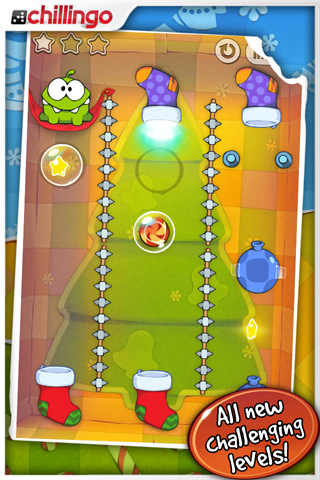
Even if we don’t talk games much, we have our favorite gems from the App Store. Cut the Rope, addictive puzzle game by ZeptoLab, is surely one of them: available both on the iPhone and iPad featuring beautiful and colorful graphics, in CtR you’ll have to literally “cut ropes” to let a tiny frog reach candies. Something like that. Still, it’s addictive, and that should be enough.

ZeptoLab today released a Christmas-themed version of the app, which features new levels and a “new stocking feature”. Most of all, the app is available for free in the App Store and it’s universal. It’s a great deal offered by publisher Chillingo you sure can’t miss, so head over the App Store and download it now.

With all the games released this week (Infinity Blade, anyone?), Cut the Rope is another little masterpiece to add to your weekend game list.

New “antid0te” Jailbreak Hack to Bring ASLR to iOS Devices

While iOS devices are hardened with DEP (Data Execution Prevention) and application sandboxing to aid in preventing malicious code from touching running processes, you find it combination with ASLR (Address Space Layout Randomization) which makes it difficult for attackers to find where processes are located in the first place. ASLR isn’t currently implemented in iOS devices, but a German hacker has developed a new Jailbreaking method which may provide Jailbreakers with some additional peace of mind.

Read more


Dropkick: Simple To-Do List App With Cloud Sync

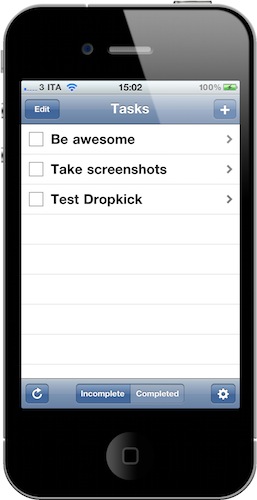
You know we love OmniFocus here at MacStories, and we just can’t get enough of the possibilities offered by OmniGroup’s powerful GTD software. I understand, however, that GTD is not for everyone. Some people are looking forward to having a simple system on their mobile devices and computers, an app to enter tasks in a list and that’s it. Sounds like a solid and affordable plan, right? With only one major problem,though: sync.

People looking for such a simple system would also like to be able to effortlessly sync their tasks in the cloud. As far as I know, there’s no good and simple app that lets you enter tasks on the iPhone, have them backed up online, and find them again in another simple and minimal app on the desktop. If there’s one, please let me know in the comments.

Still, Dropkick is here to solve this problem: it’s a minimal and elegant application that lets you a) enter tasks and b) sync them to all your devices. That’s really it. Read more


Real Racing 2: Coming On December 16th At $9.99, We Can’t Wait

A few minutes ago Firemint announced the full details behind Real Racing 2, the sequel to the popular racing game that came out on the iPhone and iPad earlier this year. The game is coming next Thursday, on December 16th, and it will be available for $9.99 in the App Store.

Real Racing 2 will feature 30 officially licensed cars with a new career mode that will grant you over 10 hours of gameplay, a 16 player online gaming (no other iOS game did this before, I think), 5 game modes and 15 different locations. There will be Game Center integration and you will be able to see vehicle damage in real time (finally), 5 different camera angles and several control modes.

Real Racing 2 basically looks like a huge sequel, and a must-have for iOS users. The online multiplayer sounds fantastic, and the screenshots posted by Firemint are simply delicious.

Check out a trailer below. Read more


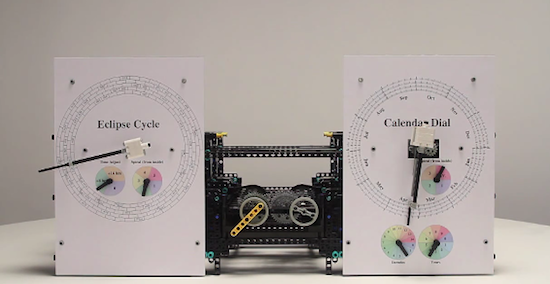
Apple Engineer Re-Builds 2,000 Year Old Computer With Lego

If you’re looking for the perfect way to begin your geek weekend, look no further than the video below. If the screenshot we posted above doesn’t tell you much about what you’re going to see, here’s the gist: an Apple engineer, Andrew Carol, has recreated a 2,000 year old Greek mechanism – widely regarded as the world’s first “computer” – using his 1,500 Lego Technic blocks.

The computer goes by the name of Antikythera Mechanism, and it’s an ancient computer made of mechanical parts Greeks used to calculate “with unprecedented accuracy” astronomical positions and celestial events. Now the Antikythera Mechanism is working again, only in Lego pieces.

If you want the full details on how the mechanism works arithmetically, or you simply want to geek out over the Lego heaven Carol has built, the video is embedded right after the break.

Amazing. [via Engadget] Read more


Google Docs Desktop Editing Comes To The iPad

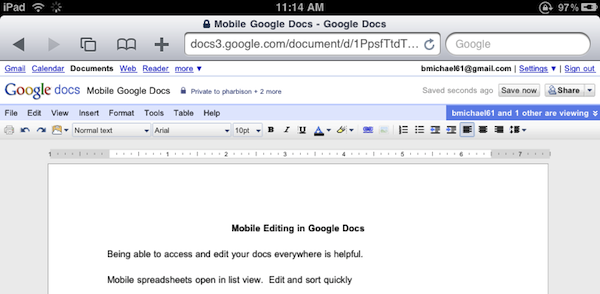
Great news for Google Docs users and iPad owners this evening: Google has announced that they have extended compatibility of the Docs desktop editor to include support for iPad. If you’re running an iPad, you can now switch from the mobile version to the desktop one with just a tap.

The desktop editor is the Google Docs you know and love, allowing you to modify fonts and alignments, paragraphs and font styles. It’s the usual Google Docs, running on a tablet.

As simple as it sounds, Google just made a great move towards ensuring millions of iPad users out there a desktop-class Docs experience without the need of a dedicated mobile client. Google announced a Docs Viewer in June, and released a mobile version for iOS and Android users with editing enabled a few weeks ago.

Once again, Mobile Safari wins.


Helping Developers, For Free

Helping Developers, For Free

Robert Scoble on how he helped the Flipboard developers in the early stages of the app:

Why do I do it for free? Because I love this stuff and want the best possible apps to use myself. Flipboard without Twitter list support would have been totally worthless for me. It isn’t obvious that Twitter list support is important. After all, how many people use Twitter lists. But for Flipboard it was a must have.

I’m passionate about seeing things early and work hard at adding value back to entrepreneurs for that honor.

See, it’s not about the “cool factor” of having access to stuff other people don’t know about. Maybe it’s that, too. I don’t want to call this a “mission” but, really – for some it’s just about helping people build better, innovative products.

Permalink

No In-App Purchases and Game Center In The Mac App Store

Looks like the Mac App Store is going to be quite different from the iOS model we’ve gotten used to in these past two years. Yesterday we broke the news that developers won’t be able to generate promo codes for Mac apps sold though the new Store (even if they’ve gone international for all users), today 9to5mac reports that in-app purchases and Game Center won’t find their way to Jobs’ latest reinvention of the Mac software environment, either.

Mark Gurman notes:

Apple has informed App Store developers that two major iOS app store features will not make their way ‘back to the mac.’

Note: In app purchases are not available for Mac OS X apps.

Note: Game Center is not available for Mac OS X apps.

As we wrote yesterday, Apple is clearly aiming at a simple purchase experience similar to the iOS App Store, but with less features than the mobile counterpart. Perhaps they don’t want Mac users to feel overwhelmed with new functionalities such as in-app purchases? Maybe they didn’t have time to implement them by the 2011 opening?

Still, we think Game Center on the desktop would be great. And terrible for our productivity.


Favorites: My Phone App Replacement

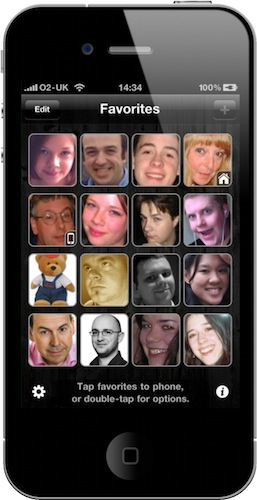
Every time I post screenshots of my iPhone homescreen here on MacStories, I get comments and emails asking me about “that blue icon” next to Captio in my dock. Since I wasn’t able to reply to all those comments and emails and I love to talk about apps that change my workflow, I want to clear the air on this app and write about it.

The app is called “Favorites”, it’s been around for a while in the App Store and it’s developed by Matt Legend Gemmell over at Instinctive Code. It’s a very straightforward app that lets you create shortcuts for your favorite contacts and tap on them to initiate a phone call. Think of it as a homescreen for your contacts. Read more