


I like to hunt down different indie games that fulfill the ever growing desire to feast my eyes on well made, yet simple titles that are available on a variety of platforms so that even our Windows readers can take part in all the fun. But mostly I’m just looking for some casual pixel love for my midnight Mac gaming cravings. Last week I came across Invader Corruption, where a unique name creates an individual gaming experience so that no two games are quite the same. What starts off as a boring and possibly mundane shooter ends up being compelling and totally addictive. Shoot past the break to learn more about this frantic free title.
Invaders Corruption Mutates Invaders With Geometry Wars
Top 5 OmniFocus Applescripts→
Top 5 OmniFocus Applescripts

The OmniFocus Extras forum on the Omnigroup user forum is one of the great sources for ready-to-use Applescripts. All you need to do is move them into the right directory on your machine and occasionally modify some of the scripts parameters to fit your needs.
The following AppleScript are those which are extremely handy and I use on a daily basis. There are many others available on the forum and other places, but many of them didn’t really add much value to my workflow, which is a pretty standard one, or solve problems I never encountered.
The “find project” one is a must-have.
Jailbroken Apple TVs Get VNC Hack
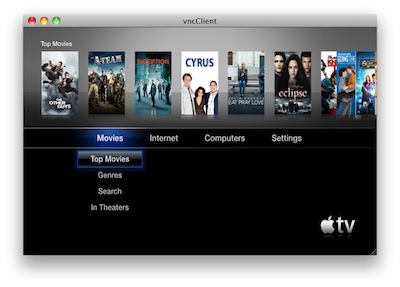
As if Wiimote hacks, third-party browsers and a brand new jailbreak coming before Christmas weren’t enough, jailbroken Apple TV owners can now enable a VNC server on their black boxes with a new hack called Exposed.
VNC access to the Apple TV should, from my understand, allow you to control the device remotely using apps like Screens and iTeleport.
The hack, however, is still in its early stages:
It’s method for getting screen data isn’t great and lacks some effects and animation, but it does work without HDMI plugged in. So if you want to try it out, grab Exposed and place it in the Lowtide Appliances directory. I think it is also important to note that this does require a jailbroken AppleTV 2G running Dustin Howett’s beigelist. Crazy busy with work, but I’m hoping to finish my site redesign by the new year. Peace.
So, jailbreak required and lots of bugs to fix. I’ll give this one a try once it’s more stable. [via 9to5mac]
NoiseES: The Perfect App For A Nintendo Nerd

Released in iTunes a few minutes ago, NoiseES by Shaun Inman might as well be the coolest iPhone app I’ve stumbled upon this week. It’s a retro / pixel / 8-bit style music player that allows you play old Nintendo chiptunes, saved as NSF or NSFe files. Basically, old soundtracks from NES games.
Totally awesome. Read more
#MacStoriesDeals - Friday

Here’s some great deals for today on iOS & Mac apps that are on sale for a limited time, so get ‘em while they’re hot!
SBSwitcher Brings SBSettings To The Multitasking Tray | Cydia Store
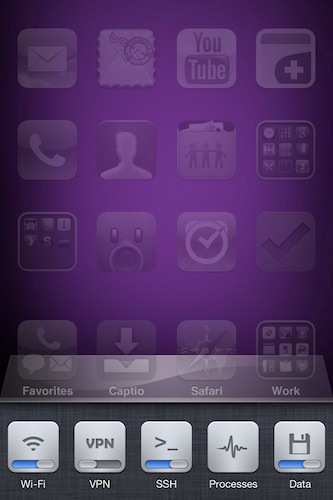
SBSwitcher is a new tweak available in the Cydia Store at $2.99 which brings the SBSettings toggles to the iOS 4 multitasking bar. SBSettings is one of the most popular applications in Cydia, which can be customized to display a series of buttons (indeed, toggles) that can perform a variety of actions otherwise buried deep down into the iPhone’s settings. I’m talking about shortcuts like “activate WiFi”, “turn on Bluetooth” or “open VPN connection”.
SBSwitcher will put these toggles in the multitasking tray, past the iPod widget controls and the volume slider introduced in iOS 4.2. The tweak supports themes for SBSettings and it’s got a bunch of options to set in the Settings app.
SBSwitcher is available at $2.99 in BigBoss’ repository.
‘Whatever Your Resolution’ - A Holiday Wishes Video from Adobe
The Adobe XD design team in San Francisco made a stop-motion film for the holidays. “Wishing You A Happy New Year, Whatever Your Resolution” - what a fun play on words. A few Apple products (among others) were used (product IDs after the break).
Alfred 0.8 Adds Clipboard Snippets, Inline Definitions
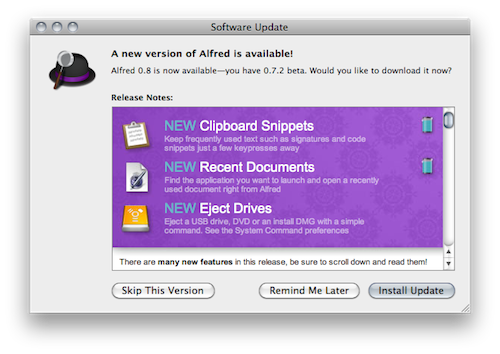
Here at MacStories, we’re big fans of Mac application launcher Alfred. I stopped using Apple’s Spotlight thanks to Alfred, and the app got a lot of better in the past months with clipboard history, improved keyboard navigation and several new features introduced in the paid version of the app, the Powerpack. For instance, I’m a huge fan of the iTunes Mini Player and the file system browser, which allow me to quickly start playing music from iTunes and browse in a Finder alternative view, respectively. Most of all, I like Alfred because it’s lightweight, blazing fast and entirely keyboard-based. Not to mention that the developers are coming out with updated every few weeks or so. I love it.
The latest Alfred update, version 0.8, brings lots of general improvements and bug fixes (check them out below) and a couple of new features that are very welcome in my workflow. Alfred can now save test snippets in its clipboard interface: say you have these recurring lines of text you find yourself typing on a daily bases (email addresses, templates, links), you can save them as snippets in Alfred’s preferences and paste them anywhere with a keyboard command. I type “snip” to open the snippet interface, then “keys” and there my snippet with unicode characters goes into the text field my cursor is on. Takes seconds and it just works.
Other new features include inline dictionary definitions, possibility to open recent documents and eject drives with just a few keystrokes. Great stuff for the keyboard geek. In case you still haven’t tried it, Alfred is available for free here.
Full changelog below. Read more
iPhone 3G Still The Top Camera On Flickr→
iPhone 3G Still The Top Camera On Flickr
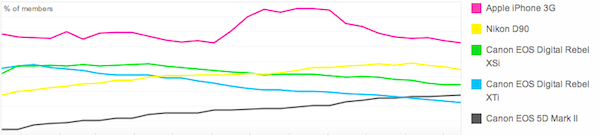
Slightly updated charts from Flickr, which show Apple’s iPhone 3G (released in 2008) is still the most popular camera amongst Flickr users. The iPhone 4 had a rapid increase in the Popular Cameraphones category, with the 3GS stable right below it.
Also, notice the perfect symmetry in the iPhone 4 and 3GS charts.